Month: November 2023

Comparing the 9 Best WordPress Redirect Plugins

Are you looking for the best WordPress redirect plugins?

As your WordPress website grows, you may need to redirect users from one post to another. You may also need to set redirects if you delete a post or page.

In this article, we’ll share our top picks of the best WordPress redirect plugins with their pros and cons.

Comparing the best WordPress redirect plugins

What Are Redirects in WordPress?

Redirects allow you to send users to a different URL than the one they clicked on.

Usually, when you delete a post or page in WordPress or change its URL, then the old URL would start showing a 404 error page.

Search engines wouldn’t be able to find it, and you would miss out on the traffic and SEO rankings you were getting for that page.

Redirects allow you to fix that by sending users to new or similar content on your website. This helps you preserve SEO while offering a better experience for your users.

You may also need redirects if you move a WordPress website to a new domain name.

Why Set up Redirects in WordPress?

Redirects guide visitors from old, broken, or changed articles to new and relevant ones. Following are some of the reasons that make redirects important.

1. Preserving Your SEO Juice

Search engines cannot find a page if it’s deleted or moved to a different URL. Redirects tell them, “Hey, the content is in this new place now!” That helps preserve your WordPress SEO and traffic.

2. Enhancing User Experience:

Imagine clicking a link and landing on a 404 error page. This can be really frustrating for users. Redirects let you prevent this by ensuring that your users can always find what they are looking for.

3. Managing Affiliate Links

Many websites make money online by recommending products to their users. They earn a commission when users buy a product by clicking one of their links. Redirect plugins allow you to use your own short URLs or branded links for these URLs. They also allow you to redirect users to the right product properly.

4. Preserving Social Media Shares:

Have you ever shared a post on social media and later changed its URL? Redirects ensure that when someone clicks the shared link, they land on the updated page, not an error. This maintains your social media presence and prevents potential visitors from bouncing away due to broken links.

Basically, it is like keeping a map updated. It ensures both search engines and visitors can navigate your website effortlessly.

What Are Different Types of Redirects?

There are different types of redirects that you can set up, but they all mean something different for search engines.

Your WordPress website sends an appropriate header code when a page is requested.

This code (usually invisible to human users) lets search engines and browsers know what kind of redirect it is.

The common types of redirects used by WordPress websites are 301 Redirects (Permanent Redirects), 302 Redirects (Temporary Redirects), and 304 Redirects (Cached Not-Modified Redirects).

Luckily, there are excellent WordPress plugins available that make setting all of these up super easy for you.

Now, let’s look at the best redirect plugins for WordPress that you can use.

1. All in One SEO for WordPress
The AIOSEO website

All in One SEO for WordPress is the best WordPress SEO plugin on the market. It allows you to easily set up redirects on your website without losing SEO or breaking your site.

It comes with a powerful Redirection Manager tool, which helps you find 404 errors on your website, track broken links, and quickly set up 301 redirects.

All in One SEO offers the easiest way to set up redirects. Enter the outdated URL in the Source, and next to it, add the new URL under Target.
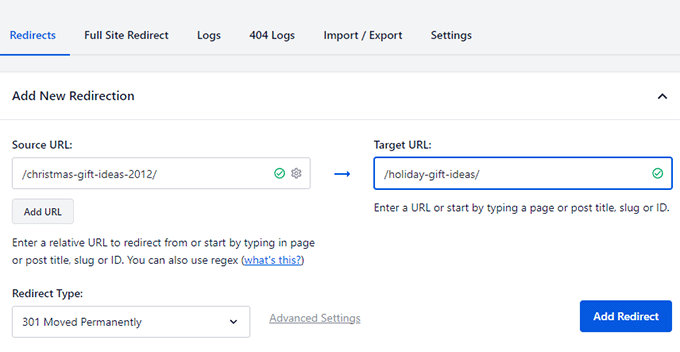
Adding a new redirect in WordPress using All in One SEO

The plugin also allows you to set up full site redirects, which is invaluable when moving your site to a new domain, merging websites, or moving subdomain to the main domain.

All in One SEO enables you to use fast server redirects, track and monitor redirects, and you can even set up automatic redirects.

Using multiple domains to promote your website? All in One SEO’s Site Alias feature allows you to effortlessly redirect users from your Alias domain to the correct URL on your root domain name.

Plus, you get all the benefits of using All in One SEO. It is the most comprehensive WordPress SEO toolkit on the market, allowing you to easily improve your site’s SEO without breaking the bank.

Pricing: Redirection Manager is included in the PRO plan of All in One SEO, which is $174.65/year. This license includes ten sites and access to priority support.

2. SeedProd

SeedProd

SeedProd is the best WordPress page builder on the market, allowing you to create beautiful pages for your WordPress website quickly.

It does not offer many redirection features. However, it does allow you to create beautiful 404 pages for your website.

You see, normally 400 error pages in WordPress are quite plain and not very helpful to the users.

With SeedProd’s drag-and-drop page builder, you can create a custom 404-page design and make it more useful.
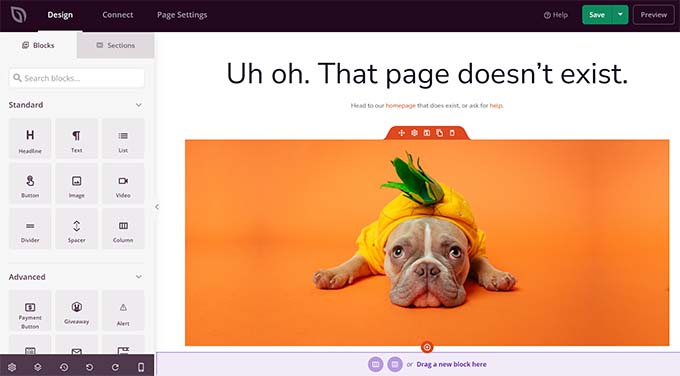
Create 404 page using SeedProd

For instance, you can include your popular articles, promote top-selling products, include a contact form, or ask users to sign up for your newsletter.

Pricing: Starting from $39.50/year. There is also a free version of SeedProd that you can try.

Pretty Links

Pretty Links is one of the best affiliate link manager plugins for WordPress. It allows you to redirect users to the affiliate products and landing pages easily.

Typically, you can add an affiliate link to your WordPress posts and pages like you would normally do. However, what happens when a website changes the URL of a product you are recommending? You’ll have to edit all those pages to replace that URL manually.

Adding an affiliate link like that also passes some of your SEO reputation to the linked website.

Pretty Links helps you solve this by allowing you to redirect users properly. It also allows you to use your own branded links (cloaked links).
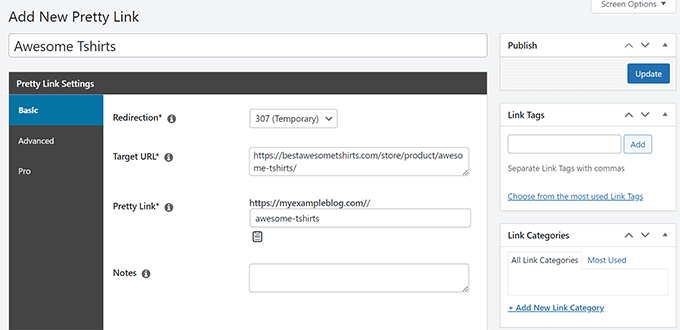
Adding a new link

You can choose the redirection type and sort your links categories and tags.

Use a link more frequently, Pretty Links allows you to set up automatic link insertion for specific keywords.

Pricing: Starting from $99.60 /year.

4. ThirstyAffiliates

ThirstyAffiliates

ThirstyAffiliates is one of the best affiliate marketing tool on the market. It is an affiliate link manager for WordPress websites.

It allows you to cloak your affiliate links using your branded URLs. You can set up proper redirects with the right redirection code for your affiliate links.

[screenshot]

ThirstyAffiliates also allows you to easily manage all your links under one dashboard. You can sort them into categories and tags, and use automatic insertion for your most used links.

The plugin also monitors link health and will track your links for 404 errors. If you add Amazon links to your site, then ThirstyAffiliate also allows you to automatically uncloak those links to comply with the Amazon polices.

Both ThirstyAffiliates and Pretty Links are equally great affiliate plugins with minor differences. To learn more, see our comparison of Pretty Links vs. ThirstyAffiliates.

Pricing: Starting from $99.60 /year.

5. Redirection

Redirection

Redirection is a popular WordPress redirection plugin that allows you to set up redirects for your website easily.

Adding a new redirect in the Redirection plugin is quite simple. You just need to add the Source (old URL) and Target (New URL).
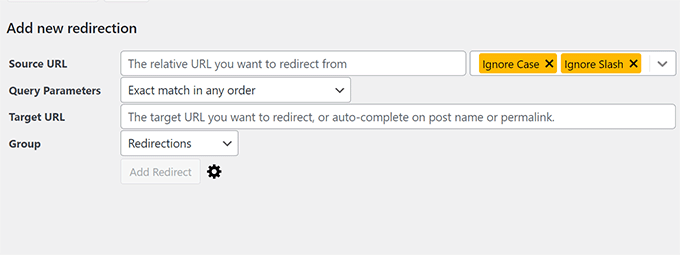
Redirection adding redirect

Optionally, you can choose the redirection type, group different links, and track 404 errors.

It also keeps a log of all links redirected on your website. You can see which links are redirected more often than others.

Redirection can also be used to relocate a site to the new domain name, using domain aliases, and more.

Pricing: Free

6. Simple 301 Redirects
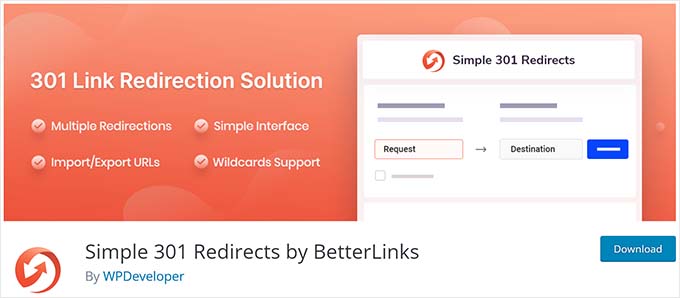
Simple 301 Redirects

As the name suggests, Simple 301 Redirects is an easy-to-use WordPress redirects plugin.

The plugin only allows you to set 301 redirects. It has a much simpler interface where you add the source and target URL.
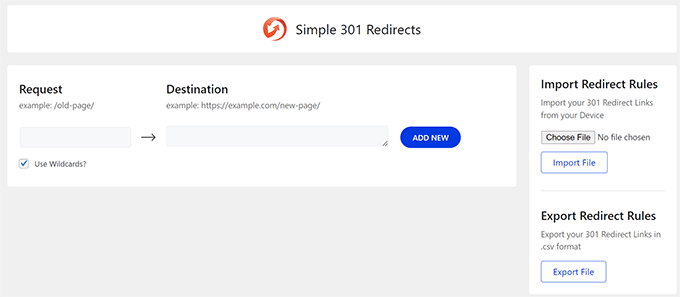
Adding a redirect using Simple 301 Redirects

Optionally, you can use the wild cards to match URLs using Regex. The plugin also allows you to update URLs and import/export redirect rules.

Pricing: Free

7. Rank Math
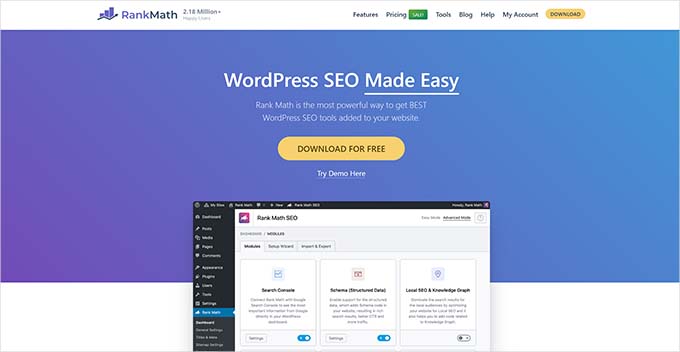
RankMath

Rank Math is a WordPress SEO plugin that comes with a Redirection component.

It allows you to set up redirects on your WordPress website easily. You can choose a redirection code, organize your redirects in categories, and even import/export your redirects.
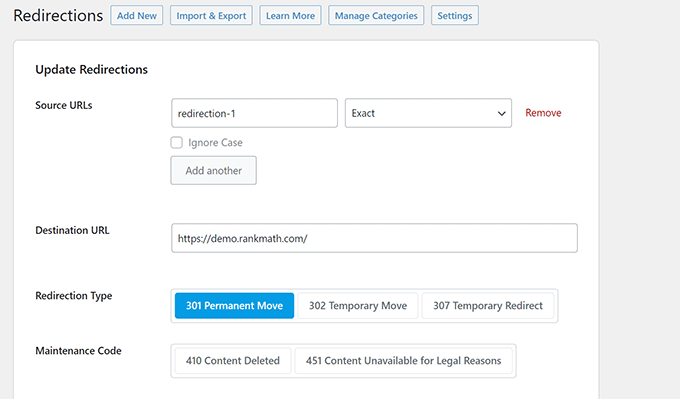
Adding redirects using RankMath

Redirect manager in RankMath also lets you track 404 errors on your WordPress website. However, you will need to add redirects for those errors manually.

The plugin also allows you to schedule redirects and bulk edit them.

Pricing: Starts at 69.00/year

8. 404 to 301

404 to 301

404 to 301 is a simpler redirect plugin for WordPress. It allows you to redirect from 404 error to any page on your WordPress website.

This means that when users click on a broken or outdated link, they will be redirected to a page that you choose instead of the 404 error page.

This approach is not recommended in most cases. As all your users will be redirected to the same page, which may not be what your users were expecting.

However, it could be used as a temporary solution if you are seeing many 404 errors and need time to set up redirects using a different redirect plugin.

Pricing: Free

9. 301 Redirects

301 Redirects

301 Redirects is another simple yet powerful WordPress redirect manager plugin.

The plugin comes with a simple interface to add your redirects. You can easily add your redirects and choose the redirection type.
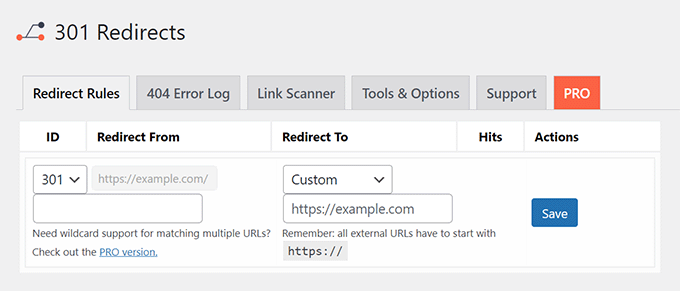
Adding redirect using 301 Redirects

Apart from adding redirects, the plugin also tracks and logs 404 errors on your WordPress website. You can then manually set up redirects for those 404 pages if needed.

Pricing: The base plugin is available for free. Paid plans start at $49/year.

Which is The Best Redirect Plugin for WordPress?

All in One SEO for WordPress is the best redirect plugin for WordPress. The Redirection Manager in All in One SEO is the most comprehensive among all other redirect plugins.

It is super easy to use for beginner-level users and powerful enough for advanced users. Whether you want to set up full site migration or fix broken links, All in One SEO for WordPress makes redirects simple.

It allows you to switch between WordPress rewrites and server-based redirects. The server-based redirects are faster and good for WordPress performance and speed.

We hope this article helped you compare best WordPress redirect plugins. You may also want to see our pick of the best internal linking plugins for WordPress or see the best content optimization tools for WordPress.

If you liked this article, then please subscribe to our YouTube Channel for WordPress video tutorials. You can also find us on Twitter and Facebook.

The post 9 Best WordPress Redirect Plugins (Compared) first appeared on WPBeginner.

WordPress is a powerful content management system that is used by millions of people around the world. It is a great platform for creating websites and blogs, but it can also be used to create redirects. Redirects are useful for directing visitors from one page to another, or for redirecting visitors from an old URL to a new one.

When it comes to WordPress redirects, there are many different plugins available. Each plugin has its own features and benefits, so it is important to compare them in order to find the best one for your needs. In this article, we will take a look at the 9 best WordPress redirect plugins and compare them in terms of features, ease of use, and cost.

The first plugin we will look at is Redirection. This plugin is free and easy to use. It allows you to set up 301 redirects from old URLs to new ones, as well as monitor 404 errors. It also offers advanced features such as the ability to group redirects and track statistics.

The second plugin we will look at is Simple 301 Redirects. This plugin is also free and easy to use. It allows you to set up 301 redirects from old URLs to new ones, as well as monitor 404 errors. It also offers advanced features such as the ability to group redirects and track statistics.

The third plugin we will look at is Safe Redirect Manager. This plugin is free and offers a wide range of features, including the ability to set up 301 redirects from old URLs to new ones, as well as monitor 404 errors. It also offers advanced features such as the ability to group redirects and track statistics.

The fourth plugin we will look at is Quick Page/Post Redirect Plugin. This plugin is free and offers a wide range of features, including the ability to set up 301 redirects from old URLs to new ones, as well as monitor 404 errors. It also offers advanced features such as the ability to group redirects and track statistics.

The fifth plugin we will look at is SEO Redirection Plugin. This plugin is free and offers a wide range of features, including the ability to set up 301 redirects from old URLs to new ones, as well as monitor 404 errors. It also offers advanced features such as the ability to group redirects and track statistics.

The sixth plugin we will look at is WPML Redirect Plugin. This plugin is free and offers a wide range of features, including the ability to set up 301 redirects from old URLs to new ones, as well as monitor 404 errors. It also offers advanced features such as the ability to group redirects and track statistics.

The seventh plugin we will look at is Redirection Manager. This plugin is free and offers a wide range of features, including the ability to set up 301 redirects from old URLs to new ones, as well as monitor 404 errors. It also offers advanced features such as the ability to group redirects and track statistics.

The eighth plugin we will look at is Redirect by BestWebSoft. This plugin is free and offers a wide range of features, including the ability to set up 301 redirects from old URLs to new ones, as well as monitor 404 errors. It also offers advanced features such as the ability to group redirects and track statistics.

The ninth plugin we will look at is Yoast SEO Premium Redirects. This plugin is not free but offers a wide range of features, including the ability to set up 301 redirects from old URLs to new ones, as well as monitor 404 errors. It also offers advanced features such as the ability to group redirects and track statistics.

When it comes to choosing the best WordPress redirect plugin for your website, it is important to consider all of the features offered by each plugin and decide which one best suits your needs. All of the plugins mentioned in this article offer great features and are easy to use, so you should be able to find one that works for you.

Read More

3 Easy Ways to Limit WordPress Pages by Individual Function

Do you wish to limit specific web pages on your web site by user function?

Numerous WordPress companies require to manage which customers can access specific web pages on their internet sites.

In this short article, we will certainly reveal you exactly how to conveniently restrict accessibility to specific WordPress web pages by individual duty.

How to restrict WordPress pages by user role

< img decoding =" async" width=" 680 "elevation=" 385"

src= “https://www.wpbeginner.com/wp-content/uploads/2017/10/restrict-wordpress-pages-by-user-role.png” alt=” How to restrict WordPress pages by user role” class= “wp-image-210342″ title =” Restrict Material by Individual Role” srcset=” https://www.wpbeginner.com/wp-content/uploads/2017/10/restrict-wordpress-pages-by-user-role.png 680w, https://www.wpbeginner.com/wp-content/uploads/2017/10/restrict-wordpress-pages-by-user-role-300×170.png 300w “dimensions =”( max-width: 680px) 100vw, 680px “>< h4 course=" wp-block-heading "id =" aioseo-why-restrict-wordpress-pages-by-user-role" > Why Limit WordPress Pages by Customer Function? When you start a WordPress site, you could intend to limit specific locations and pages

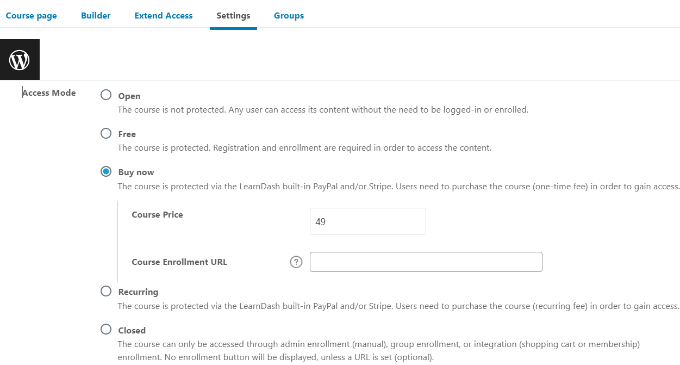
based upon user role. If you have a multi-author site, then you can limit access to details web pages for writers and editors. Limiting web pages based on individual roles is a common use case for membership sites. You can restrict web pages on your website based upon the individual’s subscription level. For instance, just clients can view the video page or the on the internet program web page. By default, WordPress comes with a limited set of tools to limit content on your web site. You can develop exclusive and

password-protected messages, however these features do not enable you to limit accessibility by customer function. Thankfully, there are several WordPress plugins that permit you to do just that. You can choose one of them to limit pages to particular individuals, customer teams, or customer roles. Utilizing these plugins, you can create a subscription site, pay-per-view web sites, or perhaps family members blogs. You can likewise monetize your content by

including paid memberships. That being said, allow’s take a look at exactly how to properly limit WordPress pages by user duty. We will be revealing you various plugins, you can choose the

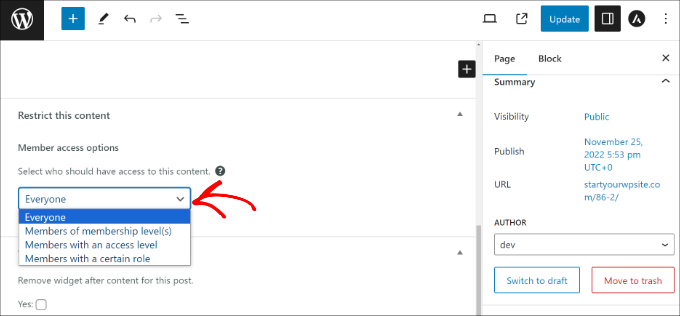
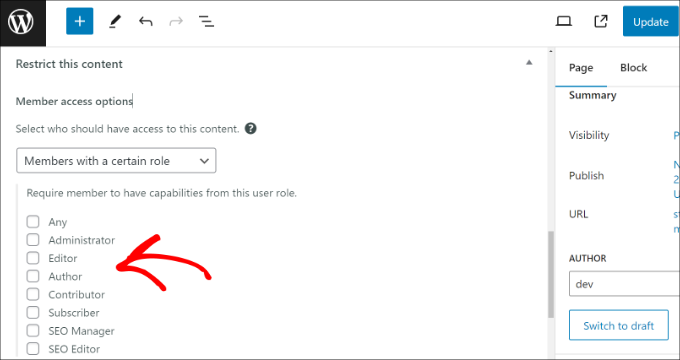
one that best suits your requirements. Restrict WordPress Pages by User Function utilizing MemberPress Limitation Web Page Access by Individual Function utilizing Restrict Web content Pro Block Accessibility to Pages by User Duty making use of LearnDash< h4 course=" wp-block-heading" id=" aioseo-2-restrict-wordpress-pages-by-user-role-using-memberpress" > 1. Limit Pages by Membership making use of MemberPress

MemberPress is just one of the very best WordPress subscription plugins in the marketplace. It allows you to quickly create subscription internet sites with paid memberships. You can establish material constraints and just enable certain user

Discover How You Can Get $553 Worth of Value for Just $7.50!

The Divi Black Friday Sale is going on right now! Get huge savings on Divi, Divi Marketplace bundles and products, Divi Cloud, Divi Teams, Divi VIP, and Divi AI. Plus, all Lifetime members and anyone participating in the sale will receive exclusive Divi website packs and hidden discounts in the Divi Marketplace. And then there’s […]

The post 😍 Spend $7.50 Today And Get $553 In Value? Here’s How! appeared first on Elegant Themes Blog.

Read More

15 Strategies for Making Money on TikTok in 2024

TikTok has remained a vastly popular social media platform since its inception, capitalizing on its early fame as people gravitated toward its light, short-form content. This surge in popularity means TikTok is ripe with revenue opportunities, something that your TikTok marketing strategy should make room for.

From the #TikTokMadeMeBuyIt trend to devoted subcultures like #BookTok, brands are finding creative and authentic ways to position and sell their products or services directly to TikTok audiences. You can too, by making engaging and helpful short videos that speak directly to your audience’s interests.

But where do you begin? In this article, we break down the top 15 strategies for how to make money on TikTok, updated to include changes to the creator fund announced in November 2023.

Table of Contents

  • Join the TikTok Creativity Program/ Creator Fund
  • Run TikTok ads
  • Collect tips or donations
  • Collaborate with a creator
  • Try affiliate marketing
  • Grow and sell TikTok accounts
  • Publish sponsored posts
  • Create a Patreon account
  • Sell your products and merchandise
  • Set up a TikTok shop
  • Offer exclusive content on TikTok
  • Provide virtual gifts
  • Host live events or workshops
  • Offer personalized shoutouts
  • Sell digital products

1. Join the TikTok Creativity Program/ Creator Fund

Since 2020 TikTok has offered its most popular creators a program to monetize content. In November 2023 TikTok announced some changes to how this works, depending on where you are located in the world. TikTok are shutting down the Creator Fund for users in the US, UK, Germany and France and replacing it with the Creativity Program starting December 16th.

TikTok says the new fund will enable creators in these countries to make more money for video uploads over a minute. To join, users must have at least 10,000 followers and 100,000 views in the last 30 days. Earnings will also be based on views and other TikTok engagement metrics.

Are you a creator in Italy and Spain? Users in these countries can still monetize their profiles through the TikTok Creator Fund. Creators need to hit some prerequisites to join the program and begin receiving money from the platform. Creator Fund members earn money based on the number of engagements they get on their content.

2. Run TikTok ads

About 67% of 18-19 year olds and 56% of 20-29 year olds are on TikTok. This makes TikTok marketing a strong advertising choice for brands wanting to market their products to Gen Z. TikTok ads come with simple, powerful tools to help you advertise to millions of users. Ad formats vary by region, but all let you personalize your targeting by age, location, interest and other factors. You can select one or a few formats that work best for your brand.

The most popular types of TikTok ads include:

In-feed video: Appear on the For You Page of TikTok users who meet your targeting parameters.

Brand takeover: This lets your ad expand to the width of the whole screen for a few seconds. Then it becomes an in-feed video ad.

Hashtag challenges: Create appealing challenges that encourage user-generated content. These challenges appear in the Discovery section on TikTok. This option is only available to managed brands that work in collaboration with TikTok sales representatives.

There are several more types of TikTok ads you can experiment with, but note that some are only available to certain types of accounts.

3. Collect tips or donations

TikTok has introduced a tipping feature that allows select creators to earn money from tips and donations. Fans can use this feature to show gratitude to the creators they love.

Video gifts let viewers send creators virtual gifts and coins. Some creators can collect gifts during a live stream. Gifts can be redeemed for Diamonds—TikTok’s digital currency.

When you save up enough Diamonds, you can trade them for real cash.

A screenshot of TikTok's digital currency options.

Creators can also use tipping platforms to earn money. Tipeee, Ko-fi and Buy Me a Coffee can be connected to your TikTok account to function as a tip jar.

4. Collaborate with a creator

The latest Sprout Social Index™ shows that 33% of Gen Z and 28% of Millennials value brand/creator content collaborations. TikTok’s thriving community of content creators makes it an excellent channel for collaborating with influential people with highly engaged communities.

The key is to collaborate with the right creators who can authentically position your brand to their audience, as creator-made branded content has 83% higher engagement rates.

@shopnuuly

Rental Reveal with @Britt 🦋 comment + tell us your fave #nuulyfits #tryon #fypシ #itstuesday

♬ original sound – nuuly rent | nuuly thrift


TikTok’s Creator Marketplace is where you can connect with content creators on the network. In a few steps, you can find influencers and run campaigns with them. Locate creators based on business goals, budget and industry, and find comprehensive performance and audience metrics for data-driven decision-making.

A screenshot of TikTok's Creator Marketplace.

TikTok has some eligibility requirements for the Creator Marketplace, so only select creators can join. This assures marketers that creators they partner with are some of TikTok’s top influencers.

5. Try affiliate marketing

Through affiliate marketing programs, creators and other businesses can promote and sell another company’s products or services for a commission.

To be a successful affiliate marketer, you need to generate sales online. Focus on promoting products that best align with your target audience. Create engaging videos that present affiliate products, showcasing the value and why you recommend purchasing them. Try promoting brands you like and trust, sharing affiliate links or codes to track purchases influenced by your account.

If a follower makes a purchase through the link or code provided, then you will receive a commission from the brand for that sale. TikTok doesn’t allow personal accounts to place clickable links within video descriptions. But you can ask followers to copy and paste links into their browsers, or enter special codes at checkout. Sites like Beacons allow you to create a free webpage containing affiliate links and details for products being promoted. If you have a business account, you can add a link in your bio.

If you’re an in-house marketer, create an affiliate marketing program with clear guidelines and instructions on how to participate. Invite TikTokers who align with your brand values and target audience to participate. Encourage affiliates to promote the products or services that best align with your goals and shared audience. And most importantly, implement a tracking system so you can monitor affiliate performance and commission payments.

6. Grow and sell TikTok accounts

Organically growing a TikTok account could take months. However, you can buy an established account to get an instant boost of followers.

To successfully make money selling TikTok accounts, creators should focus on niche topics that can be sustained by the buyer. This will make it easier for the buyer to continue posting similar content and maintain follower engagement.

Brands considering buying an established account should perform due diligence. An account with a lot of followers but low engagement may not provide the return you’re looking for. Also, ensure the account serves an audience you target and the content aligns with your brand and goals.

Brands can purchase an account with active followers from platforms like 123accs, Accfarm and Fameswap.

A screenshot of account listings on Accfarm

For smaller activations, brands can sponsor posts that live directly on creators’ profiles. Similar to creator collaborations, these campaigns allow brands to pay content creators to promote their products in organic posts. Sponsor single posts or create a series. If it starts trending, you can boost the post to expand its reach even further.

@christinanadinx

#Ad My new favourite primer leaving my skin hydrated and glowy @maccosmetics #MACstudioRadiance #TalkPrimerToMe

♬ Why Are There Boundaries – FKJ


8. Create a Patreon account

A Patreon account lets creators generate revenue from fans through memberships that allow exclusive access to content. Use TikTok to promote membership sign-ups.

@darastarrtucker

#patreon #becomeapatron #patronofthearts #supportcreators #supportcreatorsofcolor #joinmypatreon #creatorsupport @darastarrtucker

♬ original sound – Dara Starr Tucker


Try to keep your subscription costs low to encourage subscribers and consider rewarding new subscribers. For example, giving away merchandise or exclusive content access to your most loyal followers. Add the link to your Patreon page in your videos or add it to your bio to make it easy for followers to subscribe whenever they are ready.

9. Sell your products and merchandise

Merchandise, merchandise, merchandise. This tried-and-true strategy applies to TikTok as well. Turn original artwork, quotes or your brand’s logo into merch and promote it on TikTok. Feature your existing products in tutorials or showcase your product alongside a trend.

@useloom

🕯 New from Loom: Lighten your calendar and brighten your day with Cancelled Meetings by Loom — the first candle designed to help you get back your time. Featuring:✨ 8oz, hand-poured candle✨ “Peace on Earth, Peace at Work,” a free zine✨ The relief of knowing you can cancel a meeting with Loom #loomunlocks

♬ original sound – Loom


Listen to your audience if you are unsure what to sell. Create polls or ask them directly to learn what they might buy.

If you have a personal account, create an ecommerce website to process sales transactions and promote it on your TikTok account. Add the store to your videos, and encourage your followers to check out your products.

If you have a TikTok Business account, you can connect platforms like Shopify, BigCommerce, Square Online and Ecwid store to your account.

10. Set up a TikTok shop

TikTok partnered with Shopify to launch the TikTok Shopping feature. Brands and creators can become official TikTok merchants and sell directly in the app.

A screenshot of the TikTok shopping feature.

By creating a TikTok Shop, you can showcase products on in-feed videos, lives and product showcase tabs. If eligible for this feature, you can signup to become a seller in the TikTok Seller Center, where you can manage inventory, orders, creator partnerships, promotions and more. However, the seller center is only available in select regions.

11. Offer exclusive content on TikTok

TikTok just launched a new monetization feature in June of 2023 called TikTok Series. This new feature is a way to create exclusive content that lives behind a paywall.

Interested creators can apply to get access to this new feature, but there are other criteria they need to meet as well:

  • Creators must be 18+
  • Their account must be at least 30 days old
  • They must have at least 10,000 followers
  • They must have posted 3+ public videos in the last 30 days
  • They must have at least 1,000 views in the last 30 days

Creators who have less than 10,000 followers may still be eligible if they can provide a link to premium content they’ve successfully sold on other platforms.

Your Series can include up to 80 videos total, each up to 20 minutes long. This can be a great way to provide valuable educational content to your audience for a one-time fee. You can set the price for each TikTok Series you create, with payment options ranging from $0.99 to $189.99.

12. Provide virtual gifts

Another monetization feature is virtual gifts on your videos. People who really enjoy your content can send you virtual gifts as a token of their appreciation—which can then be converted into actual money.

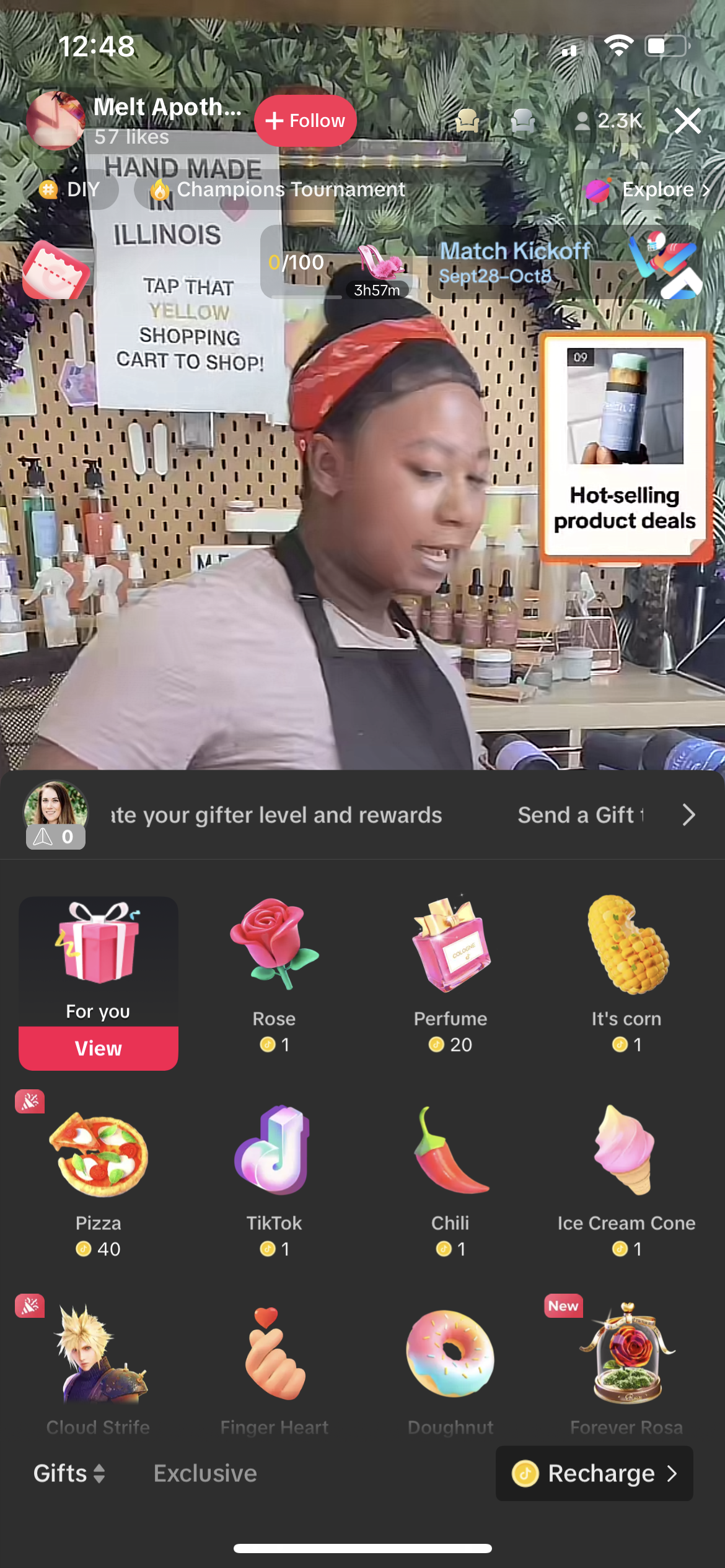
Turn on the gift option to have a small gift box icon appear next to the comment box. Users interested in leaving a gift can tap it to visit this interface:

A screenshot of virtual gifts in TikTok

Coin packages can be bought in the following increments:

  • 20 coins: $0.29
  • 65 coins: $0.99
  • 330 coins: $4.99
  • 660 coins: $9.99
  • 1,321 coins: $19.99
  • 3,303 coins: $49.99
  • 6,607 coins: $99.99
  • 16,500 coins: $249.99

These coins can then be used to buy and send virtual gifts to a user’s favorite creators, with gifts ranging from 5 to 3,000 coins. Turn on virtual gifts to offer this option to your viewers.

13. Host live events or workshops

TikTok Live is another great way to make money. Similar to virtual video gifts, users can also send live gifts. The little gift box icon will appear at the bottom of a live video for users to tap and buy different gifts. The ranges on these are even bigger, with some being just a single coin and others going up to 10s of thousands of coins.

A screenshot of live gifts in TikTok

Several TikTok creators have shared how live streaming can be used to make money. One creator makes between $20-$300 every time they go live and another brought in $34,000 within a single month—just from live streaming.

Make sure your live videos are entertaining and valuable so that users keep wanting to tune in. The more consistent viewers you get, the more likely they are to stick around and send you virtual gifts.

14. Offer personalized shoutouts

If you have a large following, TikTokers who want to grow their accounts may be willing to pay for personalized shoutouts. Pick a price point and sell shoutouts as yet another way to make money. Your price may be a bit of trial and error. If you’re getting no bites, you may want to lower it. But on the other hand, if you’re getting a ton of interest, you might be able to increase your price.

You can then shout these people out during a live video or during a feed video. You might even choose to offer two different price points (with feed videos costing more) so that users can choose where they’d like to be shouted out.

15. Sell digital products

Finally, consider selling digital products. You can create a shop with TikTok and link to your digital products from there, making it easy to make a sale. Promote your products within your videos and include your shop’s URL in your profile so users can easily find it.

Learn more about TikTok for business

These strategies can elevate your TikTok game and put you on a clear path to making money on the app. Learn how to get more TikTok followers so you can increase your earning potential even more.

The post How to make money on TikTok: 15 strategies to use in 2024 appeared first on Sprout Social.

As the world of social media continues to evolve, so too do the opportunities for making money. TikTok is no exception. With its growing user base and innovative features, TikTok offers a variety of ways to monetize your content. Here are 15 strategies for making money on TikTok in 2024.

1. Become an Influencer: With over 800 million active users, TikTok is a great platform for influencers to reach a large audience and monetize their content. You can become an influencer by creating engaging content and building a loyal following.

2. Sell Merchandise: You can use TikTok to promote your own merchandise, such as t-shirts, mugs, and other items. You can also partner with other brands to create and promote their products.

3. Offer Services: You can use TikTok to promote services such as web design, photography, and copywriting. You can also offer virtual services such as tutoring or consulting.

4. Create Sponsored Content: You can work with brands to create sponsored content for their products or services. This can be a great way to make money on TikTok in 2024.

5. Become a Brand Ambassador: You can become a brand ambassador for a company and promote their products or services on your TikTok account. This can be a great way to make money while also helping to spread the word about a brand.

6. Offer Online Courses: You can use TikTok to promote online courses that you create. This can be a great way to monetize your expertise and reach a large audience.

7. Create Affiliate Links: You can create affiliate links for products or services that you recommend on your TikTok account. When someone clicks on the link and makes a purchase, you will receive a commission.

8. Become a Virtual Assistant: You can use TikTok to find clients who need help with tasks such as scheduling appointments, managing social media accounts, or creating content.

9. Sell Digital Products: You can use TikTok to promote digital products such as e-books, music, or artwork. This is a great way to make money while also sharing your creative work with the world.

10. Offer Consulting Services: If you have expertise in a certain area, you can offer consulting services on TikTok. This can be a great way to monetize your knowledge and help others succeed.

11. Become an Affiliate Marketer: You can join affiliate programs and promote products or services on your TikTok account. When someone makes a purchase through your link, you will receive a commission.

12. Create Paid Tutorials: You can create paid tutorials on topics such as makeup, cooking, or coding and offer them on your TikTok account. This is a great way to monetize your skills and help others learn something new.

13. Sell Stock Photos: You can use TikTok to promote stock photos that you have taken and sell them to businesses or individuals who need them for their projects.

14. Become a Voiceover Artist: You can use TikTok to promote your voiceover services and find clients who need help with their projects.

15. Offer Live Streams: You can use TikTok to offer live streams of yourself doing something interesting or entertaining such as playing video games or giving lessons on a particular topic. This is a great way to engage with your audience and make money at the same time.

These are just some of the many strategies for making money on TikTok in 2024. With the right approach and dedication, you can make money on this platform and build a successful career in social media marketing.

Source: sproutsocial.com

Read More