Month: December 2023

Analyzing Instagram Story Metrics: Evaluating the Success of Your Brand’s Content

Honestly, how frequently do you review the analytics for your Instagram Stories?

Tracking interactions with Stories is essential for business accounts.

Companies depend on Stories to remain prominent in their followers’ feeds. Stories are also one of the most popular and highly engaged features on Instagram.

Stories are a treasure trove of marketing information, from the types of content to the messaging and beyond.

That said, it’s easy to overlook siloed Story data among the rest of your Instagram analytics.

We will provide guidance on how to review analytics for your Instagram Story and uncover valuable information.

What are Instagram Story analytics?

Instagram Story analytics represent the measurement of your IG Stories performance.

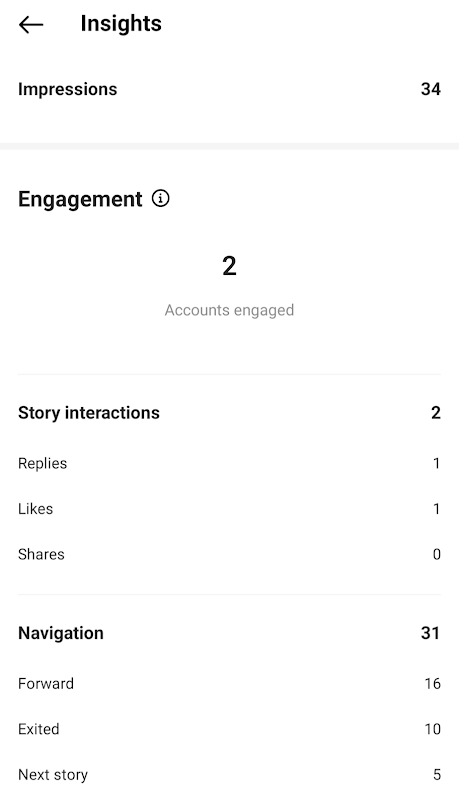
The metrics you can track via Instagram analytics are broken down into three types:

  • Metrics that evaluate engagement, such as likes, shares, and responses.
  • Reach metrics that measure the total impressions and accounts reached by your Stories
  • Navigation metrics that track actions taken by Story viewers (ex: taps back, DMs and more)
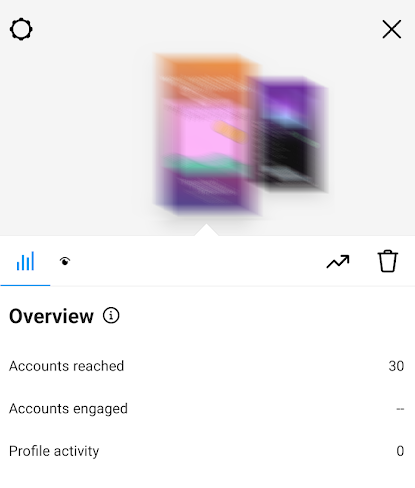
general screenshot of Instagram Story analyticsThe information provided above indicates how effectively you are connecting with your audience. Additionally, the data reveals potential new ways to engage with them.

How to see your Instagram Story analytics

Chances are you already check your real-time analytics when your Stories are live.

Your performance data remains even after your Stories disappear after 24 hours.

If you’re only tracking single Stories as they happen, you’re missing out on bigger trends and insights. The good news? IG now aggregates your Stories data for up to two years.

More good news: there are multiple ways to view your Instagram Story analytics ASAP. This includes Instagram’s native Insights and reporting with tools like Sprout Social.

Note: you need either a business or creator account to access your Stories data.

How to view Instagram Story analytics using Instagram Insights

If you have the correct account type, here is an overview of the steps required.

Step 1. Tap the (☰) menu from your profile to access “Settings and privacy.”
how to check Instagram Stories from your profile

Step 2. Scroll and select “Insights” (found under “For professionals” in a creator account).
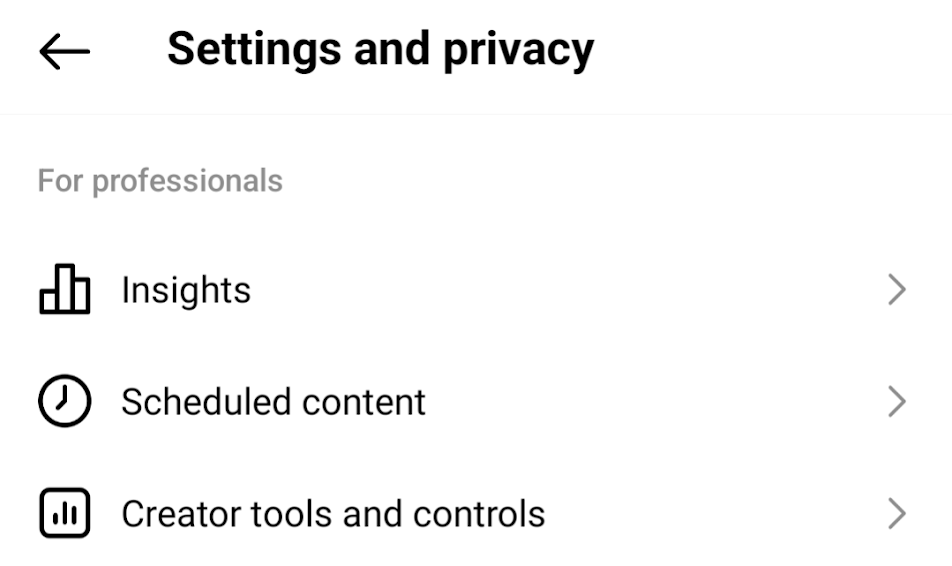
settings and privacy in instagram

Step 3. At the Insights menu, scroll down and select the “Content You Shared” menu. Tap “Stories” when prompted to select a content type.

content you shared for Instagram StoriesStep 4. From here, you can scroll through your most recent Stories (or filter content based on metrics such as reach or impressions).
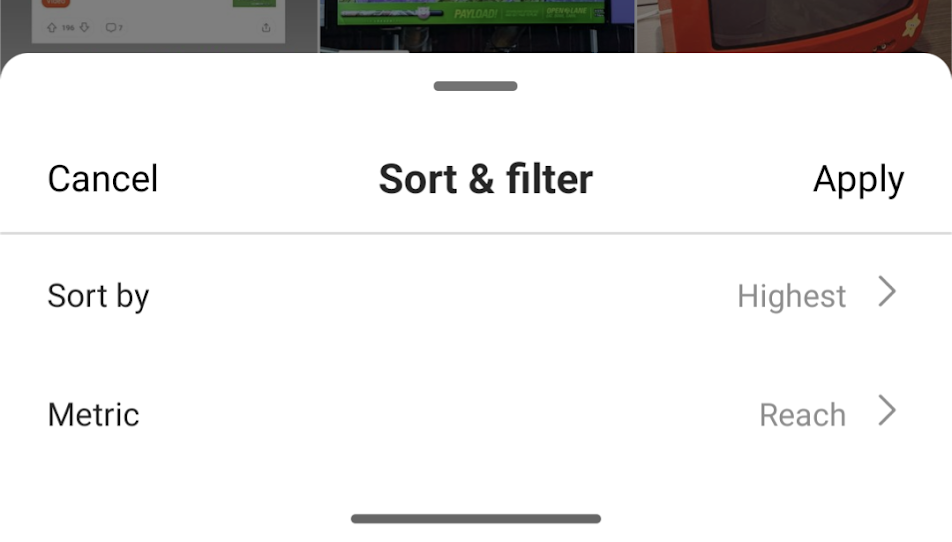
soft and filter your Stories in Instagram insights

Step 5. Tap a specific Story for a detailed breakdown of its analytics and performance data.
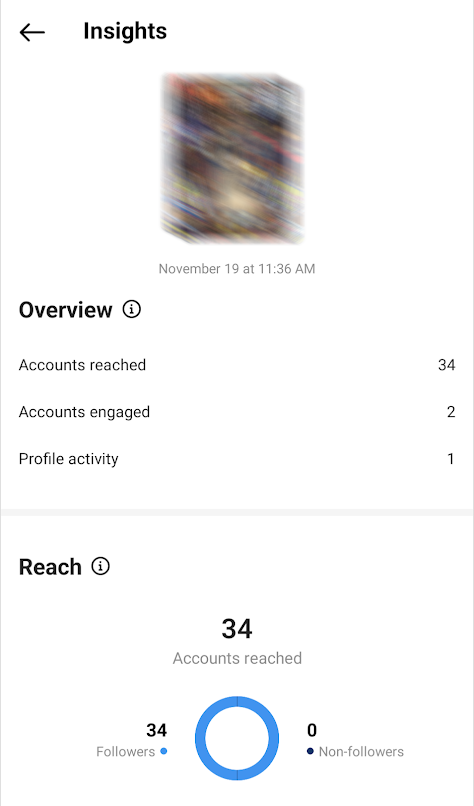
see your Instagram story analytics in InsightsInstagram Story analytics in insights


And you’re good to go!

You have the option to monitor your Instagram Stories analytics through Story Highlights. Just navigate to your highlights and select “Activity” on the Story you wish to analyze. You will have access to most of the same metrics mentioned earlier. Although you cannot view the viewers of your Stories, you can see who has “Liked” them.

How to see your Instagram Story analytics using Sprout Social

Sprout Social’s suite of Instagram analytics tools makes it easy to uncover your Story data. The bonus of using Sprout is the ability to track performance alongside all of your brand’s content.

Here is the method for analyzing your Stories using Sprout’s report for Instagram Business Profiles:

Step 1. Once you’re logged into your Sprout Dashboard, go to “Overview.”
Step 2. Select a business profile or account to analyze using the “Filter” option.
Step 3. Select “Performance Summary.”
Step 4: Choose the option labeled “Stories performance.”
Step 5. Select a date range for your Stories. You’ll then see a breakdown of various reports and performance metrics.
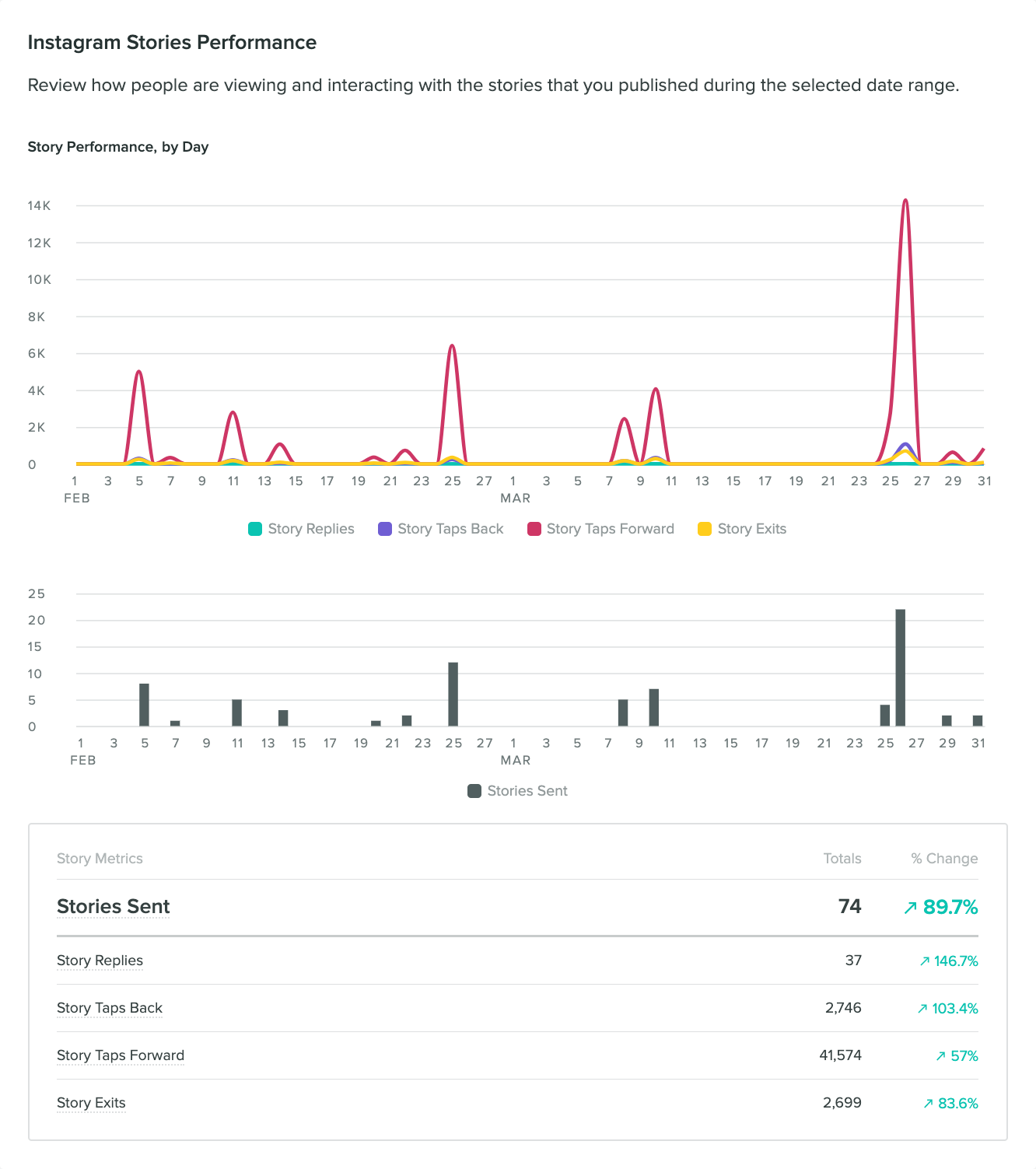
sprout social instagram story analytics

Now, let’s look at the process when using the Post Performance report in Sprout Social. Assuming you’re logged in, here’s all you need to do:

Step 1. Select the Instagram profile(s) you want to view Story analytics for.
Step 2. When prompted to choose between Post Types, select “Story.”
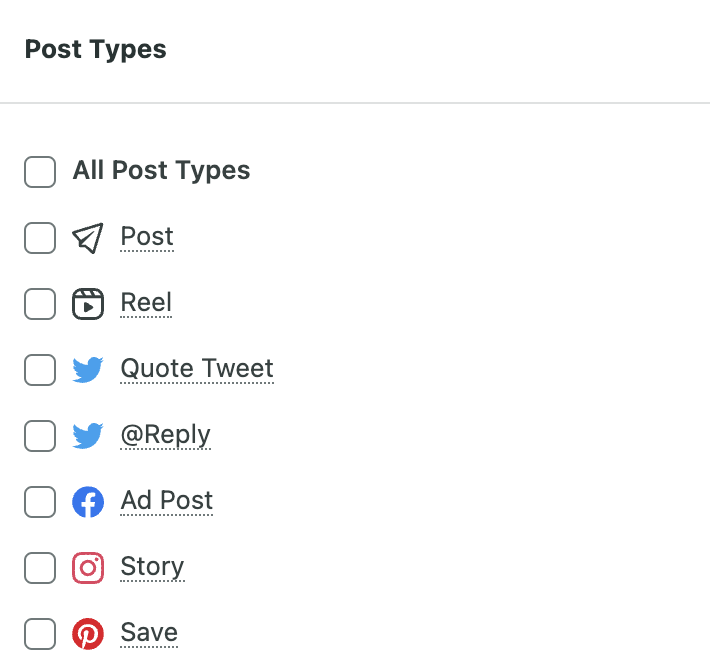
post type Filters for Sprout SocialStep 3. The report will aggregate your Stories. You can use the list view to sort your Stories based on date and/or performance. You can also export your data from here.Easy enough, right?
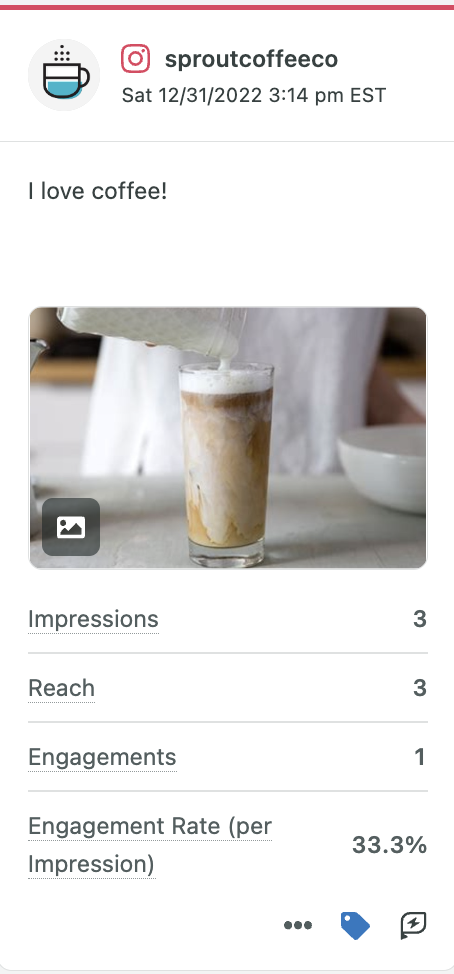
example of sprout social insight analytics

Six important metrics for Instagram Stories that you need to monitor.

Keeping an eye on your Instagram metrics goes hand in hand with growing your account.

Because data can clue you in on what’s working and what’s not when it comes to engagement.

But again, tracking Story metrics can be tricky because they’re kind of siloed on their own.

This indicates the importance of utilizing a platform such as Sprout Social. The platform effortlessly sorts out particular Story metrics and provides comprehensive analyses for them. This allows you to concentrate on your key metrics and eliminates the need to sift through IG Insights.
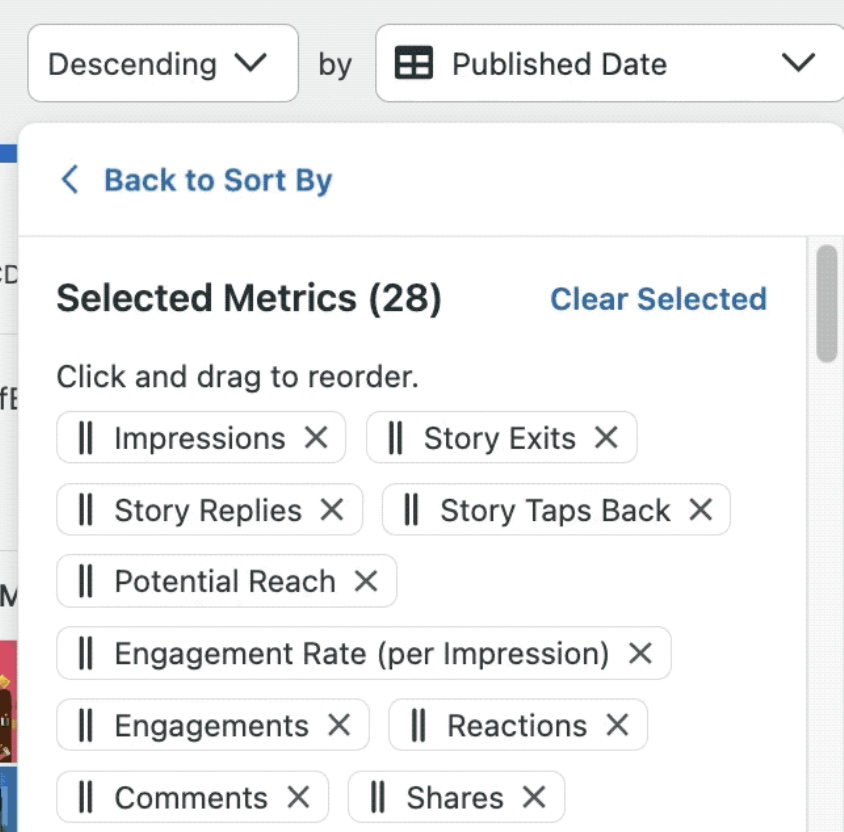
 

sprout social filters for content types including instagram stories

But what metrics should you be tracking when checking your Instagram Story analytics? Sure, interactions and engagements are obviously crucial. They aren’t the only ones, though.

Below are some additional data points to consider that often get swept under the rug.

Story Replies

Story replies are the number of Instagram DMs you received on your Story during its lifetime.

Getting unprompted (positive!) replies from your Stories means you’re nailing your content. More interactions and engagement signal strong relationships and loyalty with your audience.

If you’re lacking in Story Replies, you may want to consider a more direct response to your posts. Not to mention inserting more calls-to-action (but more on that later).

Story Taps Back

Story Taps Back are the number of times people tapped to return to your previous Story.

These are interesting because they offer insight into Stories beyond the post you’re tracking.. For example, taps back can highlight how a previous post in a series of Stories was notable. This doesn’t necessarily mean the post you’re looking at was “bad” or “boring,” though.

This highlights the importance of looking at your Instagram Stories analytics holistically. Context matters, especially when publishing multiple Story posts side-by-side.

Story Taps Forward

The metric “Story Taps Forward” represents the frequency with which viewers tapped on your existing Story to proceed to the subsequent one.

You can think of taps forward as a sort of bounce rate or retention metric. If you post a series of Stories and someone sticks around for all of them, that’s typically a good sign.

On that note, taps forward can also highlight how long your brand’s series of Stories should be. Maybe you retain most viewers with five Stories but see a big drop-off beyond that. If so, you should keep that in mind next time you make a series of posts.

Consider also that taps can also happen out of impatience. You have to read between the lines here since you can’t monitor the amount of time spent on your Stories. Again, context matters.

Story Exits

Story Exits are the number of times people swiped to stop viewing your Story during its lifetime.

Pay close attention to exits, especially when experimenting with new types of Stories. For example, you might see a spike in exits during video Stories or after posting a long series.

If so, take note and keep that in mind for your upcoming content strategy. While Story Exits don’t necessarily mean any given Story was “bad,” they can signal the following:

  • The length of your Story series was excessive (consider that viewing more than 10 slides may discourage users)
  • Your content was repetitive or redundant
  • Your audience wasn’t interested in your Story

Story Impressions

Story Impressions are the number of times your story was displayed to users during its lifetime.

The greater the number of viewers for your Stories, the more beneficial it is! Gaining views from people other than your followers is also a good indication for your Stories. Pay attention to the Stories that receive the most views.

Average Reach Per Story

Average Reach Per Story is the average number of unique users who viewed your story during its lifetime.

Ideally, the average number of people who see your Stories should increase as your account grows. This emphasizes the significance of regularly tracking your Instagram analytics. If you don’t, you won’t be able to tell if your posts are making an impact.

Speaking of, Sprout makes it a cinch to consolidate all of these metrics (and more). Seeing your Stories data alongside the rest of your IG performance offers a holistic understanding of what’s working and what’s not.
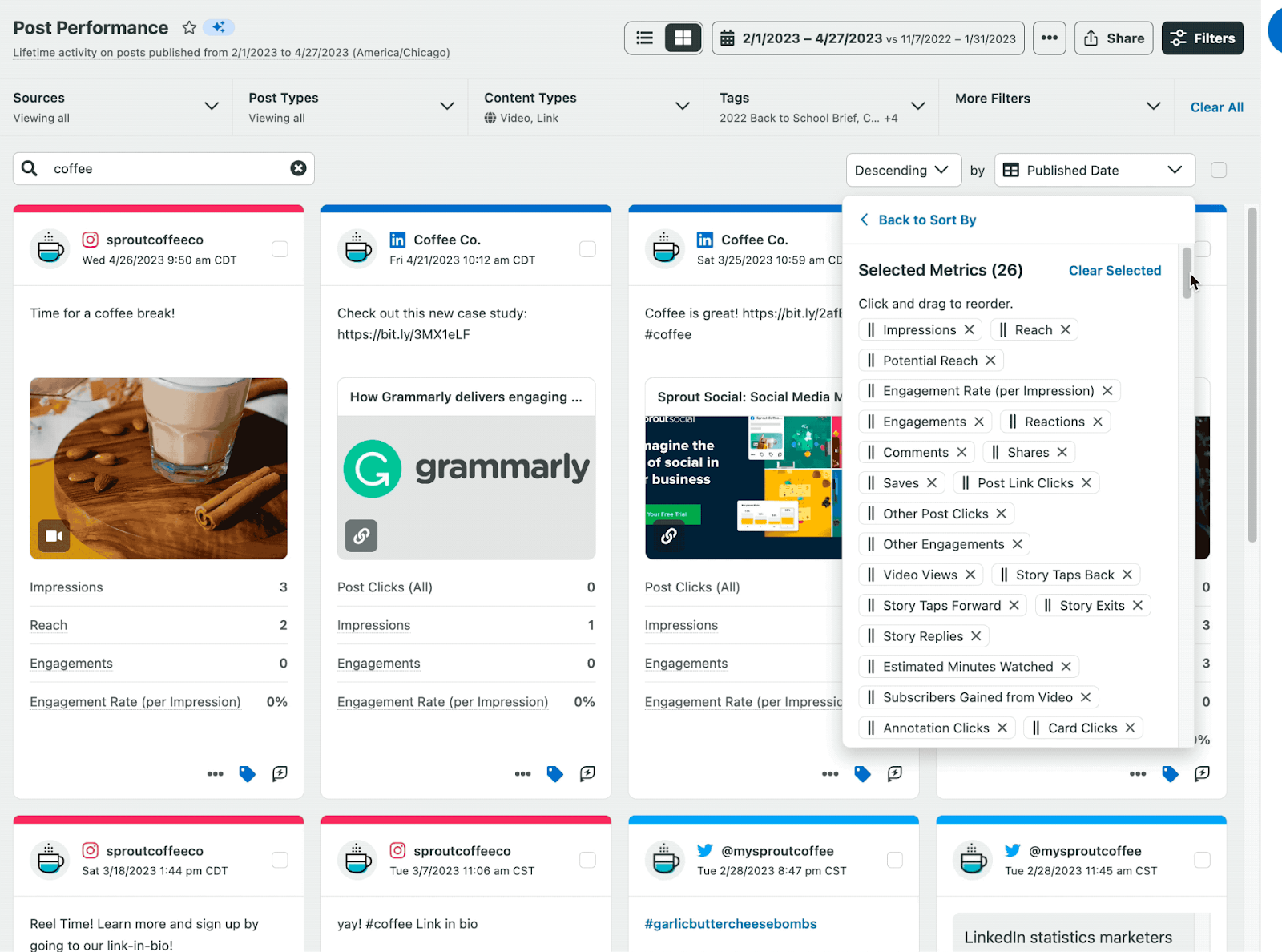
sprout social analytics

Tips for optimizing your strategy using Instagram Story analytics

It’s clear that monitoring your Instagram Story metrics is crucial, but how about making sure those figures are improving?

To wrap things up, let’s dig into how to optimize your Instagram marketing and earn engagement with Stories.

Take advantage of interactive Instagram Story features

Don’t’ sleep on all of the Instagram features built specifically to engage your Story viewers.

Stickers act as an organic method to gain engagement and function as inventive prompts for action. Although stickers are not necessary for every Story, consider how to incorporate interactive components such as:

  • Polls
  • Quizzes
  • Sliders
  • Countdowns
  • Emoji reactions
  • Links

example of Instagram Story interactive features

Stickers can help you come across as engaging with your audience versus talking at them. Not to mention they help inject a sense of personality into your calls-to-action.

example of brand using Instagram stickers in Stories

Feature UGC and tag other accounts in your Stories

Doing anything that pleases the IG algorithm is beneficial. This includes encouraging tags, shares, and engagement with your followers and clients.

Note that many retail brands use Stories as a place to highlight UGC beyond their feeds.

example of brand using UGC in their Instagram stories

This is a low-hanging way to get additional shares and more eyes on your content as creators repost your content. This can be done for organic UGC and content from influencers alike.

As time goes on, you can evaluate which kinds of user-generated content Stories receive the highest levels of engagement. This allows you to enhance your content strategy even more.

Share your Stories at the best times for engagement

We’ll bite: Stories are tricky when it comes to picking best times to post. Unlike Reels or Carousel posts, it’s pretty standard for brands to publish multiple Stories throughout the day.

That said, you can still try to stick to times where Instagram users are typically most engaged.
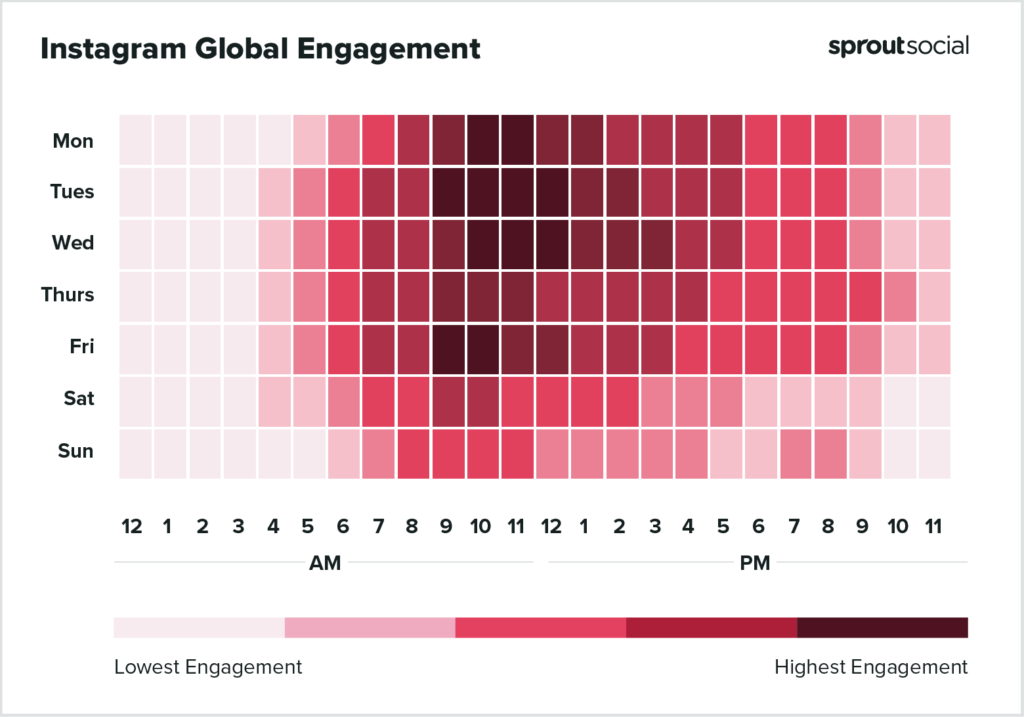
best time to post on Instagram according to Sprout Social

Choosing the optimal time for your brand’s activities relies on several factors. Take into account:

  • A consistent cadence of Stories means you’ll stay visible in your followers’ feeds. Try spreading your Story posts throughout the day versus dumping them all at once.
  • On the flip side, you may find that a rapid-fire cadence works best for your audience. This speaks to the importance of checking your Instagram Story analytics. Don’t assume! 
  • By using Sprout to schedule your Stories, you can achieve your target posting frequency without having to post in the moment.

Many brands will publish a series of three-to-five Stories side-by-side for promotions. This is in addition to consistently republishing their Reels or Carousels to their Stories. Finding a publishing frequency that makes sense for your brand requires some trial-and-error. 

alltrails IG story example

Use Instagram audience insights to guide your content formats

Not to sound like a broken record but every brand’s Instagram target audience is different.

Some audiences prefer videos while others skip them. You might find that your followers love polls and going back-and-forth with you. Maybe you actually find you earn more Stories engagement when you post less.

Regardless, you need to keep a constant pulse on your Instagram analytics to make informed decisions. With a tool like Sprout, you can pick your prioritize metrics across IG and track them with ease.

sprout social analytics

What can you learn from your Instagram Story analytics?

It is essential for brands to monitor their metrics on Instagram due to the platform’s increasing competitiveness.

But Stories require special attention.

The fact that you can publish them so often versus other post types is a gift for marketers. Stories offer a way to consistently learn from your audience and figure out what makes them tick.

Nonetheless, to fully utilize the data, uniformity and context are essential. This is precisely the role Sprout Social plays, providing a central location for monitoring all of your brand’s Instagram analytics.

If you haven’t already, check out Sprout’s Instagram analytics features to see what insights your brand can learn to grow engagement faster.

The post Instagram Story analytics: how to track the right metrics for your brand appeared first on Sprout Social.

Instagram Stories are a great way for brands to engage with their followers and create content that stands out. However, without understanding how to measure the performance of your brand’s content, it can be difficult to know if your efforts are paying off. Fortunately, Instagram Story analytics can provide valuable insights into how your content is performing.

One of the most important metrics to consider when evaluating your Instagram Story analytics is reach. Reach measures the number of unique users who have seen your story. This metric can help you understand how many people are being exposed to your content and if it’s reaching the right audience. Additionally, you can use reach to compare the performance of different stories and determine which ones are resonating with your followers.

Another key metric to consider is engagement. Engagement measures the number of interactions with your story, such as likes, comments, and shares. This metric can help you understand how engaged your followers are with your content and if they’re taking the desired action. Additionally, you can use engagement to compare the performance of different stories and determine which ones are resonating with your followers.

Finally, you should also consider the number of impressions your story receives. Impressions measure the total number of times your story has been viewed. This metric can help you understand how many people have seen your content and if it’s reaching the right audience. Additionally, you can use impressions to compare the performance of different stories and determine which ones are resonating with your followers.

By understanding these key metrics, you can gain valuable insights into how your brand’s content is performing on Instagram Stories. This information can help you make informed decisions about how to optimize your content for maximum engagement and reach. With the right analytics in place, you can ensure that your brand’s content is reaching the right audience and resonating with them in the most effective way possible.

Source: sproutsocial.com

Read More
Three techniques for planning content on Facebook.

It is widely known among social media marketers that achieving organic reach on Facebook is challenging. It requires a substantial strategy of high-quality content and regular posting.

Actually, if you don’t consistently interact with your Facebook followers, you risk losing trust, influence, and brand devotion, in addition to your audience. If the idea of keeping up with a consistent flow of content feels overwhelming, don’t stress – you can schedule Facebook posts using one of three different methods.

Using automation for your Facebook posts will provide a more efficient process, allowing you to concentrate on your overall Facebook marketing plan. Your audience is always active, and your Facebook content should be too.

Reasons to plan ahead for Facebook content posting.

Discover the advantages of planning your content in advance. Learn why scheduling your Facebook posts can be a clever way to boost your productivity.

Consistency

Consistency is key when it comes to social media algorithms. So ensuring your Facebook posts remain consistent is going to be an essential part of your strategy. And scheduling ensures that reliability. If your internet is down or you can’t get to your computer, a scheduled Facebook post will still publish at the right time.

Time management

Time batching is a common time management tactic that is possible when you start scheduling your social media content ahead of time. Set aside a block of time to research and plan your content ideas, a block of time to create your content and a block of time to schedule your content. You’ll find you’re much more productive than if you did each standalone post on its own.

Global reach

By planning your content in advance, you have the flexibility to schedule it for any hour, day or night, allowing you to effectively connect with individuals in various time zones. Rather than sacrificing sleep or setting an early morning alarm to post on Facebook, you can effortlessly engage with a worldwide audience through a pre-scheduled post.

Strategic planning

When you’re scheduling social media posts for a full month (or longer), you can make sure they support the narrative you want to convey. For example, if you’re running a limited-time offer, you could craft and schedule each Facebook post to build a sense of urgency throughout the month.

Improved content quality

If you publish as you go, there are likely to be certain times that you’re not feeling as creative as others, resulting in a poor content strategy. But if you’re time blocking and saving content creation for one of your more inspired moments, you can end up creating much more quality content—consistently.

Audience engagement

By planning and scheduling your content in advance, and maintaining a regular posting schedule, you can improve your audience’s engagement. Facebook’s algorithm will take note of your page’s consistent, high-quality content and will prioritize it in your audience’s feed, leading to an increase in engagement.

Boost productivity

Finally, scheduling content is the perfect social media tip for boosting productivity. Beyond time batching, it can free up your time so that you’re not always having to have your phone or computer ready to publish a new post. Instead of needing to make time each day to publish Facebook content, you can free up your schedule for other important social media management tasks.

Best practices for optimizing scheduled Facebook posts

Here are some methods to ensure that your planned posts reach the appropriate audience and enhance your approach. Remember these five suggestions when scheduling your Facebook content.

Tips for choosing the right scheduling time

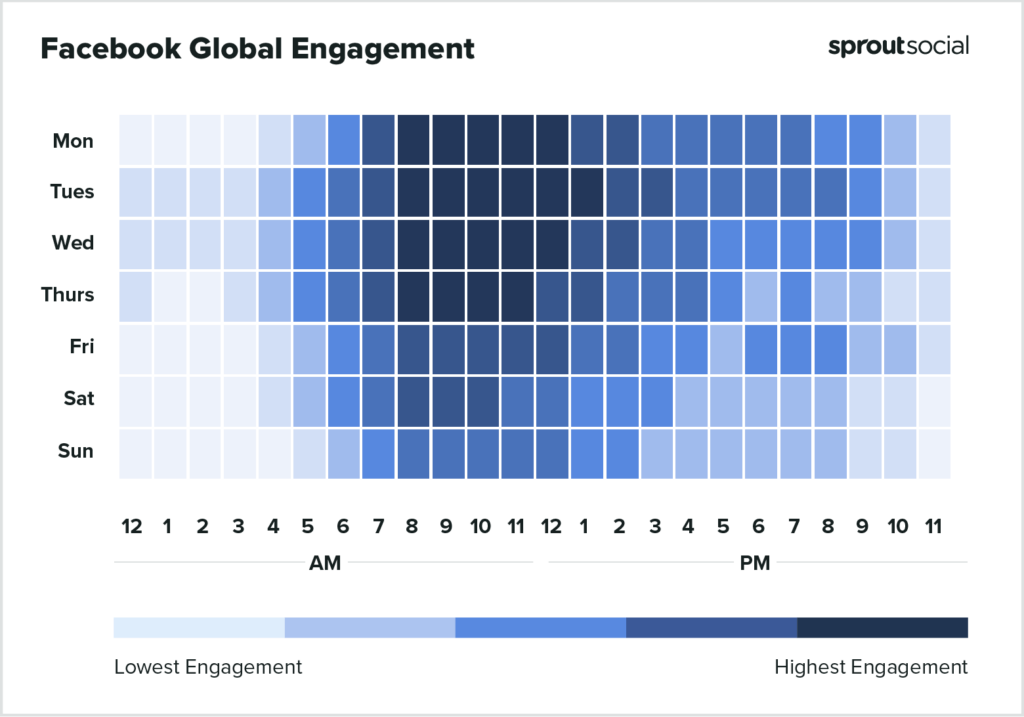
First things first, you need to make sure you’re scheduling your posts for the right time. Ensuring you get your content out when your audience is most active is key in reaching the most people.

Global data states that the best times to post on Facebook are:

  • On Mondays, I am available from 8 in the morning until 1 in the afternoon.
  • Tuesdays from 8 a.m. to 2 p.m.
  • Wednesdays from 8 a.m. to 1 p.m.
  • Thursdays from 8 a.m. to 12 p.m.

However, you should also pay attention to your specific audience. You can check out your Facebook analytics and see when your followers are most likely to be online and schedule your content around those time periods.

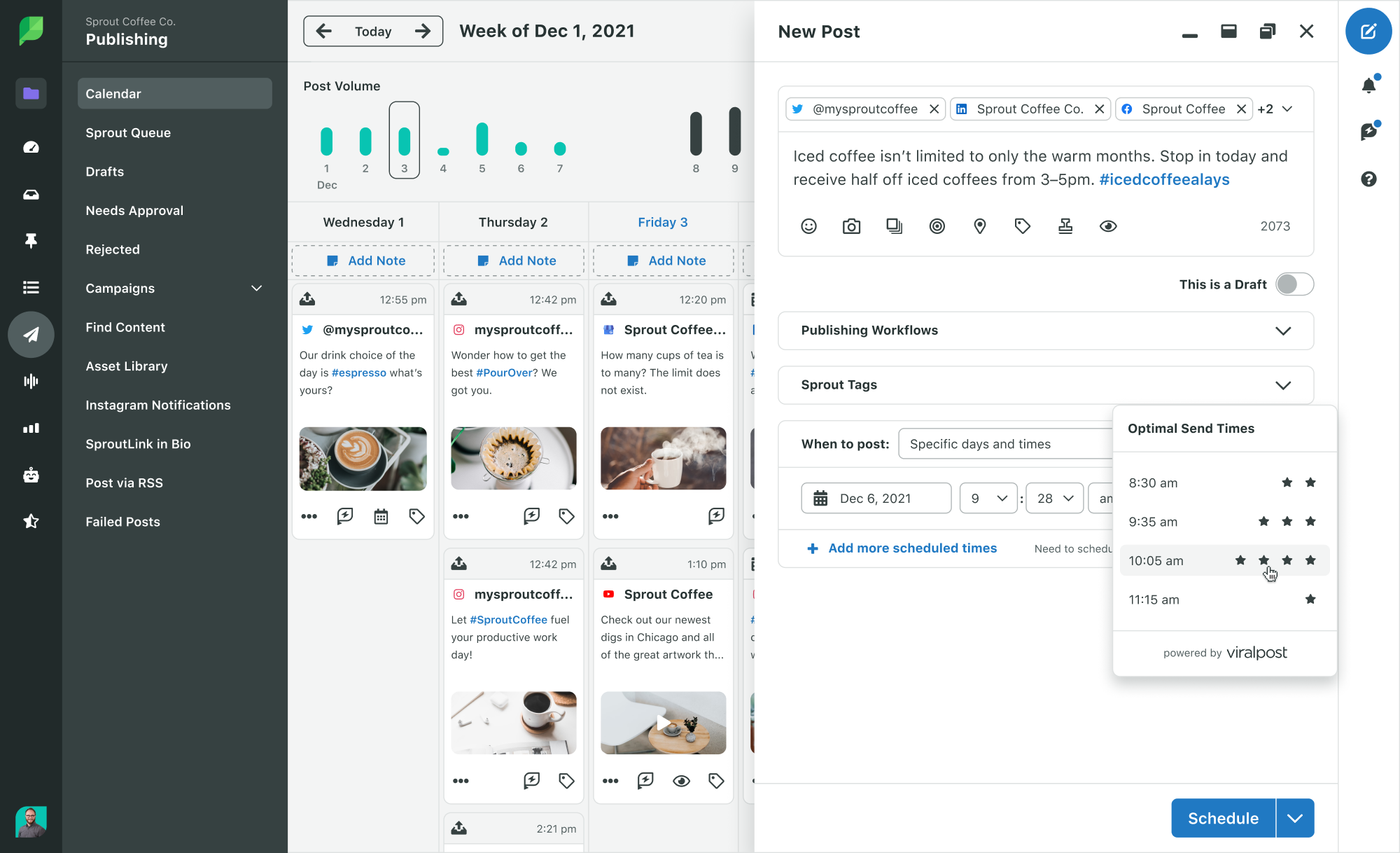
You can also take advantage of Sprout Social’s Optimal Send Times feature that analyzes your audience and selects the best times to schedule your content.

Ensuring that your brand’s image and messaging remain consistent in all planned social media updates.

Next, it’s important to make sure you’re keeping up with your branding throughout all of your scheduled content. If you batch your content creation, this should be a simple enough process.

Maintaining brand consistency includes things like:

  • Maintaining a consistent brand tone across all of your captions.
  • Using the same color scheme and font choices throughout all graphics
  • Sticking with the same filters and effects for all videos
  • Creating graphics using similar templates so everything looks cohesive

If your scheduled content is attracting a larger audience, it’s important to ensure that the content accurately reflects your brand and helps with increasing brand awareness.

Balancing scheduled and live content

Keep in mind that not everything needs to be scheduled ahead of time. Your company might decide to put on a last minute promotion that you want to share on social media, you might have a stroke of inspiration and want to publish something different from what you had scheduled, or you might need to share a last minute company update.

No matter what, remember that you don’t have to strictly adhere to a schedule or completely abandon it. You have the flexibility to make spontaneous adjustments, mix up your content, and post in real-time as inspiration strikes.

If you do, just make sure you’re not publishing a live post around the same time as a scheduled post is going live. Be sure to readjust your schedule to make room for your new content.

Avoiding over-scheduling

Avoid over-planning your content schedule—there is a point where it becomes excessive, and you don’t want to overwhelm your audience with more than 5 posts daily. While some brands may post 4-5 times a day on Facebook, it’s not necessary to follow suit. Overloading your schedule can lead to a shortage of content ideas and can irritate your audience with an abundance of posts from your brand.

Instead, come up with a scheduling plan that makes sense for your business, your content creation load and your audience—and stick with it.

Track analytics and engagement

Ultimately, focus on your Facebook metrics and audience interaction. While worldwide data and your own insights can provide a solid starting point for scheduling, regularly monitoring your analytics can reveal which kinds of content and specific days/times result in the highest engagement for you.

Use this data to inform and adapt your Facebook strategy. This can improve your overall Facebook organic reach, engagement and other important metrics.

How to schedule Facebook posts

You have the option to set up timed posts for your Facebook page through the Meta Business Suite (previously called Creator Studio) or by utilizing a scheduling tool from a different company (such as Sprout Social).

Schedule posts with Meta Business Suite

Step 1: Start by logging into your Facebook account. Head to your Facebook Page, then switch profiles so you’re managing your Page. In the left hand sidebar, click on Meta Business Suite.

A screenshot showing how to access Meta Business Suite from your Facebook Page

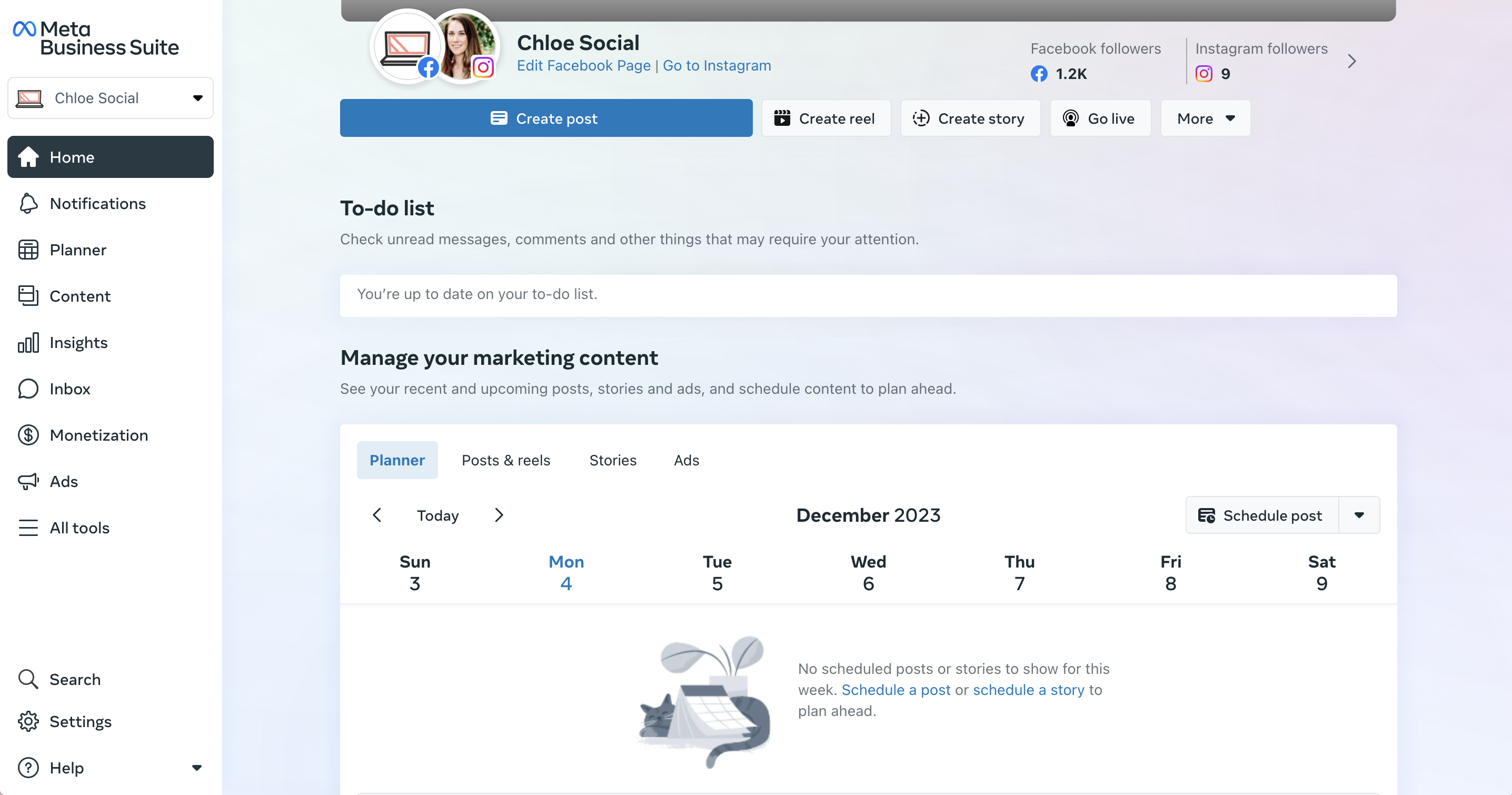
Step 2: Click on the Planner tab in the main dashboard to see your content calendar, then click Schedule post.

A screenshot of the content planner in Meta Business Suite

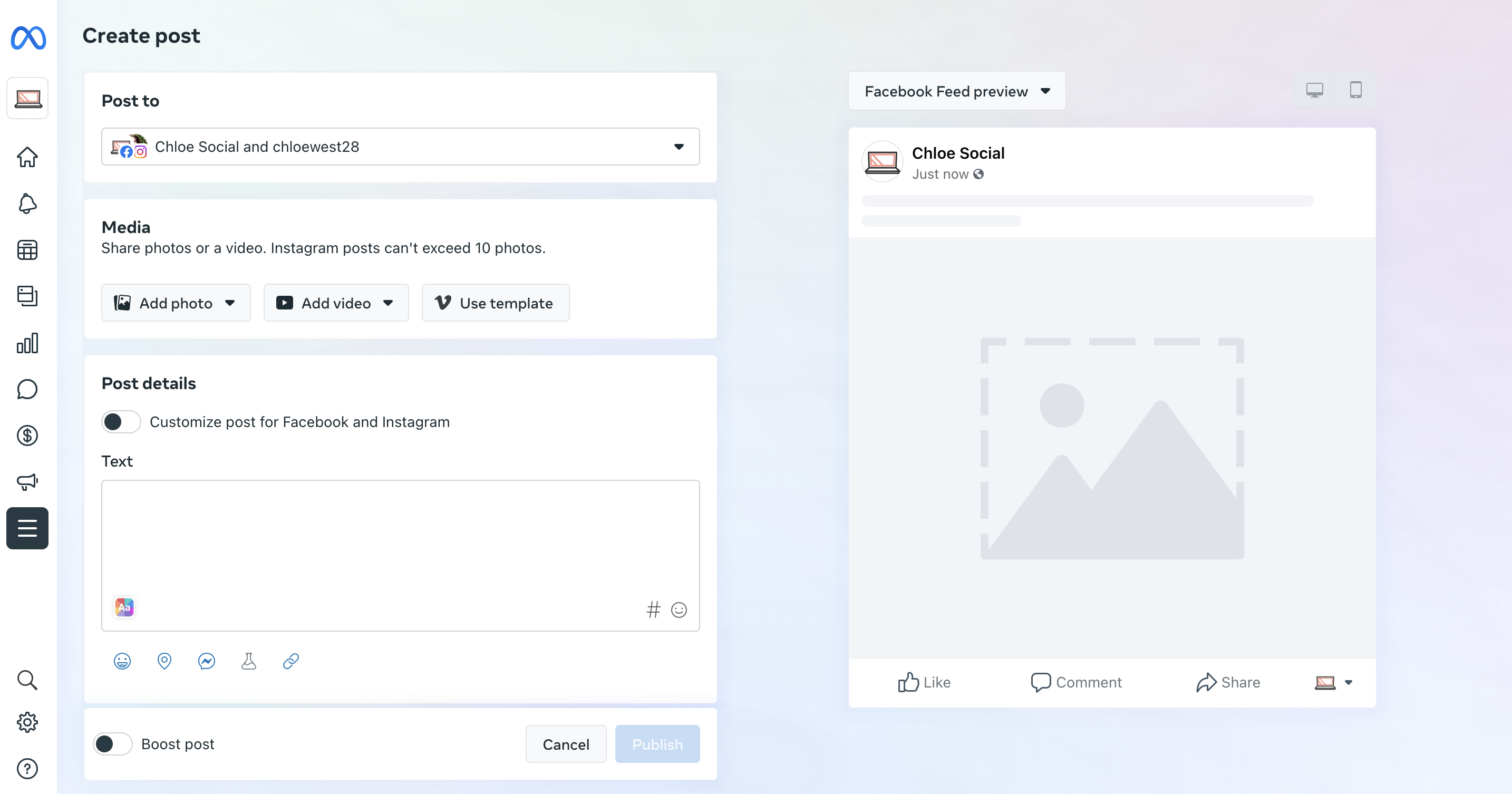
Step 3: Create your post and select which account (either your Facebook or Instagram account, if you have them connected—or both) you want it to publish to. Add your photo or video, input your caption, preview your post, then scroll down to select a date and time to publish your content.

A screenshot showing the post creation screen in Meta Business Suite

That’s it! You now have a scheduled post. Repeat the steps above to schedule additional posts.

How to schedule Facebook posts with Sprout Social

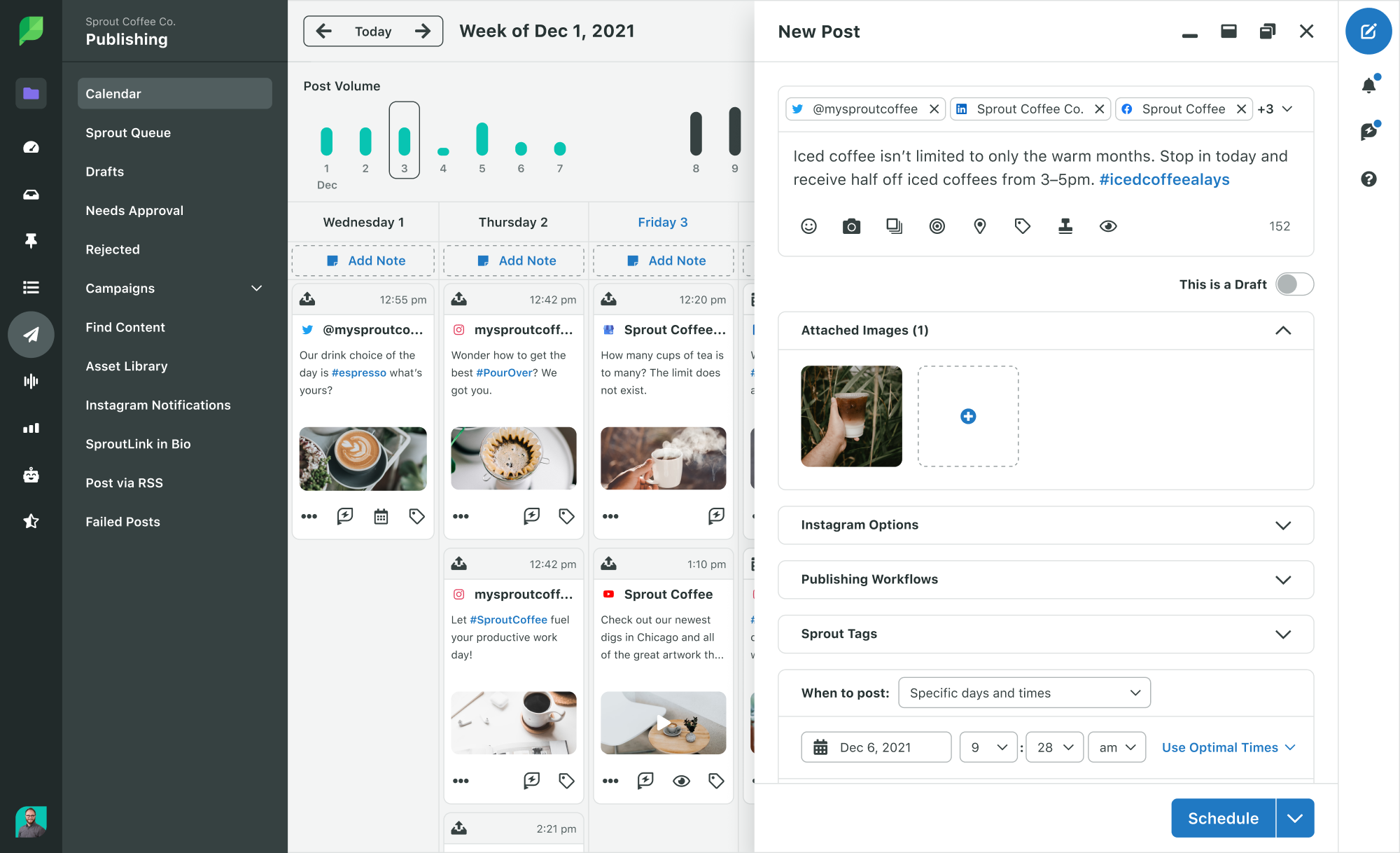
Here’s how to create scheduled Facebook posts with Sprout:

  1. Click the Compose icon to open the Compose window.
  2. Click the Profile Picker to select the Facebook pages for your post.
  3. Create your post.
  4. Choose specific days and times from the “When to post” dropdown menu.
  5. The date and times for your post.
  6. You have the option to add additional scheduled times if desired.
  7. Click Schedule.
A screenshot showcasing how to schedule content in Sprout Social

Schedule Facebook posts with the Sprout Queue

What do you do when you have meaningful Facebook content, but don’t need to publish at any specific date or time? Use the Sprout Queue.

Create a schedule for your Sprout Queue to ensure consistent engagement throughout the day by sharing content such as product advice, links to expert articles, or updates on industry news.

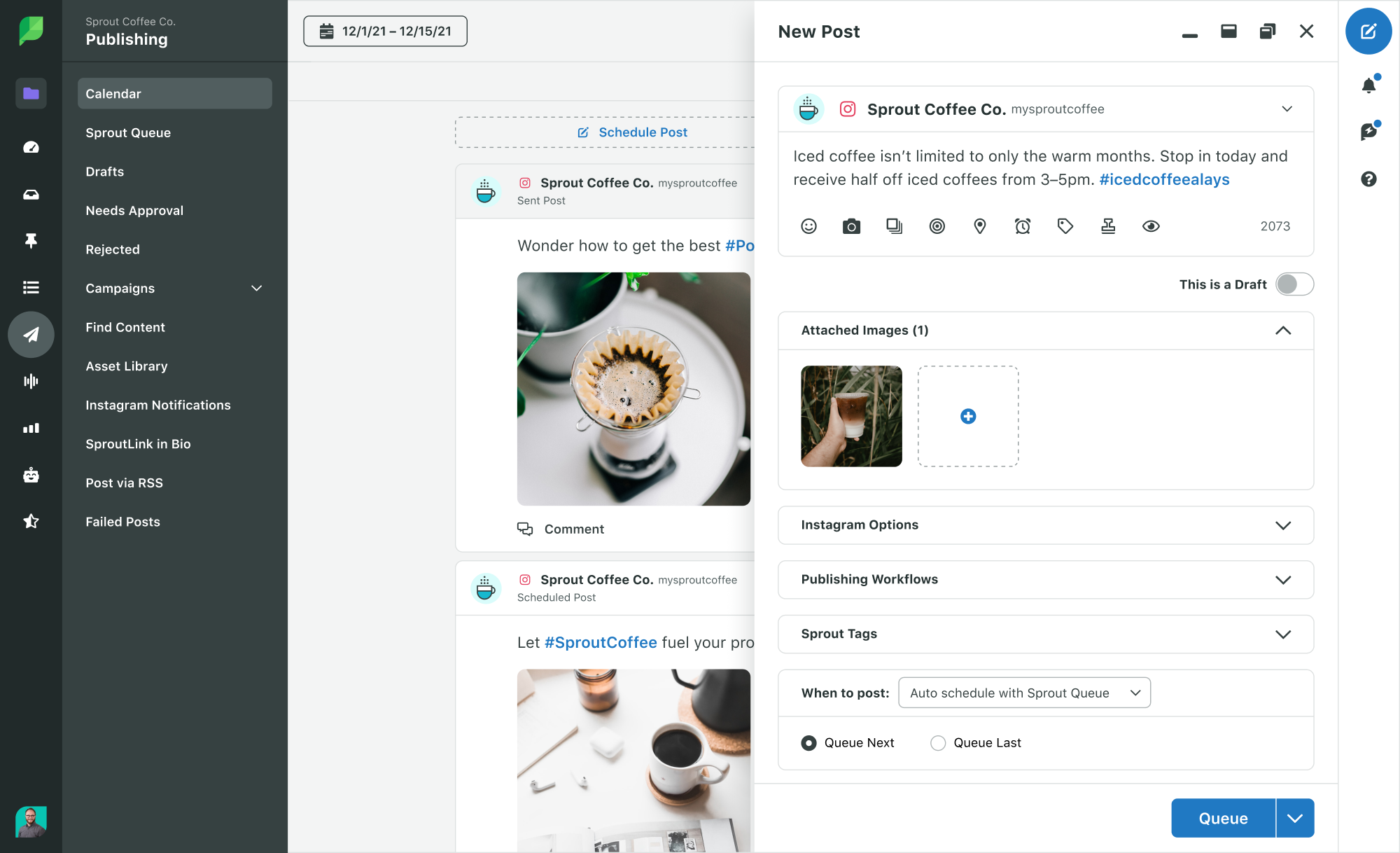
Choose the number of posts per day, your date and times and Sprout will do the rest. To set up your Sprout Queue setup, follow these steps:

  1. Navigate to the Publishing tab.
  2. Click Sprout Queue.
  3. Select “Compose” and begin crafting your message.
  4. Choose Auto-schedule with Sprout Queue from the When to post dropdown.
  5. Select Queue Next at the first possible time slot or Queue Last to move the post to the end of the queue.
  6. Select “Queue” or “Submit for Approval” to set a time for your content to be published.
A screenshot showing how to publish using the Sprout Queue

Configure your queue timeline

Sprout’s suite of social media publishing tools places the content in the Queue Timeline for you to choose a specific time or date. There you can identify your publishing time gaps and plan your content.

This feature allows you to set it up to operate during particular times or dates. This is convenient for social media managers who want to post during the optimal times on Facebook. Choose different posting times for each Facebook Page.

A screenshot showcasing your Sprout Queue

Sprout’s Queue even makes it simple to see your daily post times throughout all your different social media profiles.

Take advantage of ViralPost

ViralPost is a feature in Sprout that allows you to schedule posts for the most effective times. Set up ViralPost in your Sprout Queue to automatically publish your content when it’s most likely to engage your audience (only accessible in Standard Plans and higher).

When you use ViralPost, it analyzes your audience’s usage and engagement patterns to determine the optimal times to publish content on your Facebook page.

A screenshot showcasing how to use ViralPost in Sprout Social

To configure your ViralPost settings, follow these steps:

  1. Go to your Publishing settings.
  2. Click Sprout Queue.
  3. Click Edit for the profile you want to configure ViralPost for. The Configure Queue Settings popup opens.
  4. Select ViralPost for the Scheduling Method.
  5. Choose whether you want to set your schedule by Individual Day or Weekdays/Weekends.
  6. Choose the frequency of your daily posts for each day of the week.
  7. Select the time range for your post.
  8. Click Save.

Add Facebook content to the Sprout Queue

It is recommended to schedule content when it is fresh in your mind. Create a message using the Compose feature, use Sprout’s Chrome Extension to share content found online, or add content to the queue from the RSS Reader. No matter what kind of content you want to post on your Facebook page, our tools will meet your requirements.

Pro Tip: Add content anytime, from anywhere by queueing content from Sprout Social’s web, mobile or browser extension apps.

Share your calendar

Last but not least, once you have your content in order, easily view, share and collaborate on your content calendar. Sprout’s Publishing Calendar gives you insight into your publishing schedule and more.

Here’s a guide on how to display and distribute your calendar in PDF format:

  1. Navigate to the Publishing tab.
  2. Click Calendar.
  3. Choose List, Week or Month.
  4. Choose your desired time frame, accounts, and types of content.
  5. Click Share.
  6. Click Download PDF.
A screenshot of the calendar week view in Sprout Social

Simplify your Facebook post scheduling

Scheduling your Facebook posts makes it simple to manage your content and simplifies the overall Facebook management process.

It enables you to be proactive, connect with your desired audience at optimal moments, and minimize the time and energy spent on manually organizing content.

Want to grow your Facebook page? Sprout Social’s Publishing features make it easy to schedule posts for Facebook. Sign up for a free 30-day trial and get started!

The post How to schedule Facebook posts: 3 Ways appeared first on Sprout Social.

In today’s digital age, it is essential for businesses to have a presence on social media. Facebook is one of the most popular social media platforms, and it is a great way to reach potential customers and build relationships with them. However, it can be difficult to know how to effectively use Facebook to promote your business. One important aspect of using Facebook for business is scheduling posts. Here are three strategies for scheduling posts on Facebook to help you get the most out of your social media presence.

1. Use a Scheduling Tool: Scheduling tools such as Hootsuite or Buffer are great for scheduling posts on Facebook. They allow you to create and schedule posts in advance, so you don’t have to worry about manually posting every day. You can also use these tools to track the performance of your posts, so you can see which ones are getting the most engagement and adjust your strategy accordingly.

2. Post at Optimal Times: Knowing when to post on Facebook is key to getting the most out of your posts. Different studies have shown that the best times to post on Facebook are between 1pm and 4pm on weekdays, and between 12pm and 1pm on weekends. Additionally, you should avoid posting too often, as this can lead to users becoming overwhelmed and tuning out your posts.

3. Vary Your Content: It is important to vary the types of content you post on Facebook. This will help keep your followers engaged and interested in what you have to say. Try posting a mix of text-based posts, images, videos, and links to other content. Additionally, you should try to post content that is relevant to your business and that will be interesting to your followers.

By following these strategies for scheduling posts on Facebook, you can ensure that your posts are reaching the right people at the right times and that they are engaging and interesting. This will help you get the most out of your social media presence and build relationships with potential customers.

Source: sproutsocial.com

Read More
2023 Wondershare Filmora Review: Pricing, Features, and More

If you’re a content creator, finding good video editing software is crucial. Those just starting will likely favor a more user-friendly option, such as Wondershare Filmora. In this post, we’ll dive deeply into this beginner-friendly video editing powerhouse and discuss its features, pros, and cons! Let’s get started. What is Wondershare Filmora Wondershare Filmora is […]

The post Wondershare Filmora Review: Pricing, Features & More (2023) appeared first on Elegant Themes Blog.

Read More