

It is widely known among social media marketers that achieving organic reach on Facebook is challenging. It requires a substantial strategy of high-quality content and regular posting.
Actually, if you don’t consistently interact with your Facebook followers, you risk losing trust, influence, and brand devotion, in addition to your audience. If the idea of keeping up with a consistent flow of content feels overwhelming, don’t stress – you can schedule Facebook posts using one of three different methods.
Using automation for your Facebook posts will provide a more efficient process, allowing you to concentrate on your overall Facebook marketing plan. Your audience is always active, and your Facebook content should be too.
Reasons to plan ahead for Facebook content posting.
Discover the advantages of planning your content in advance. Learn why scheduling your Facebook posts can be a clever way to boost your productivity.
Consistency
Consistency is key when it comes to social media algorithms. So ensuring your Facebook posts remain consistent is going to be an essential part of your strategy. And scheduling ensures that reliability. If your internet is down or you can’t get to your computer, a scheduled Facebook post will still publish at the right time.
Time management
Time batching is a common time management tactic that is possible when you start scheduling your social media content ahead of time. Set aside a block of time to research and plan your content ideas, a block of time to create your content and a block of time to schedule your content. You’ll find you’re much more productive than if you did each standalone post on its own.
Global reach
By planning your content in advance, you have the flexibility to schedule it for any hour, day or night, allowing you to effectively connect with individuals in various time zones. Rather than sacrificing sleep or setting an early morning alarm to post on Facebook, you can effortlessly engage with a worldwide audience through a pre-scheduled post.
Strategic planning
When you’re scheduling social media posts for a full month (or longer), you can make sure they support the narrative you want to convey. For example, if you’re running a limited-time offer, you could craft and schedule each Facebook post to build a sense of urgency throughout the month.
Improved content quality
If you publish as you go, there are likely to be certain times that you’re not feeling as creative as others, resulting in a poor content strategy. But if you’re time blocking and saving content creation for one of your more inspired moments, you can end up creating much more quality content—consistently.
Audience engagement
By planning and scheduling your content in advance, and maintaining a regular posting schedule, you can improve your audience’s engagement. Facebook’s algorithm will take note of your page’s consistent, high-quality content and will prioritize it in your audience’s feed, leading to an increase in engagement.
Boost productivity
Finally, scheduling content is the perfect social media tip for boosting productivity. Beyond time batching, it can free up your time so that you’re not always having to have your phone or computer ready to publish a new post. Instead of needing to make time each day to publish Facebook content, you can free up your schedule for other important social media management tasks.
Best practices for optimizing scheduled Facebook posts
Here are some methods to ensure that your planned posts reach the appropriate audience and enhance your approach. Remember these five suggestions when scheduling your Facebook content.
Tips for choosing the right scheduling time
First things first, you need to make sure you’re scheduling your posts for the right time. Ensuring you get your content out when your audience is most active is key in reaching the most people.
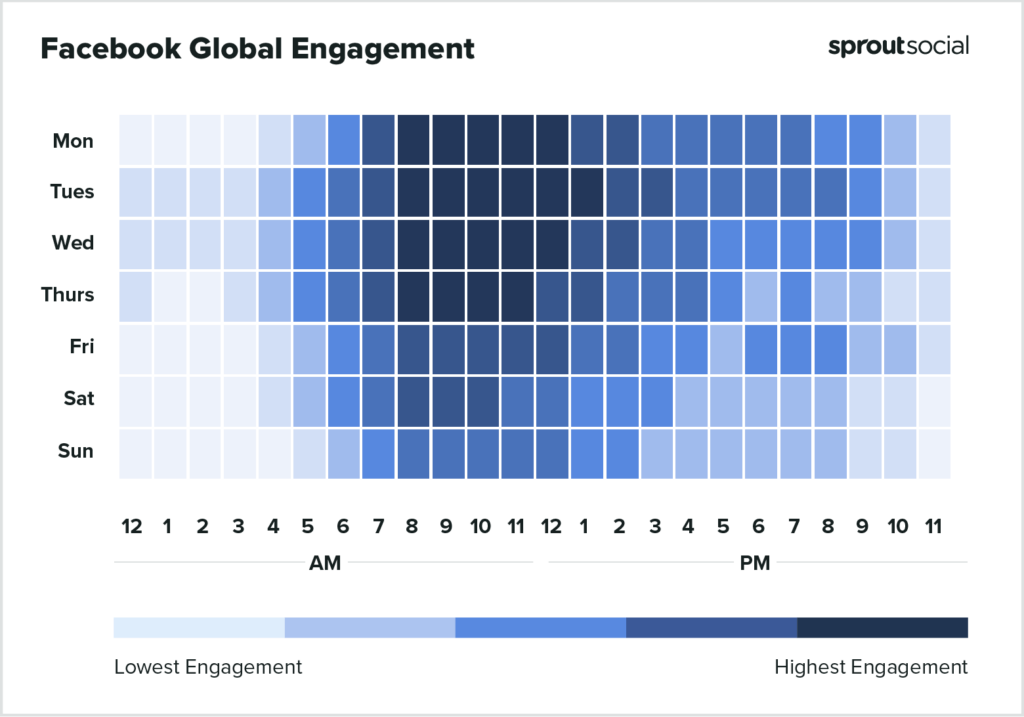
Global data states that the best times to post on Facebook are:
- On Mondays, I am available from 8 in the morning until 1 in the afternoon.
- Tuesdays from 8 a.m. to 2 p.m.
- Wednesdays from 8 a.m. to 1 p.m.
- Thursdays from 8 a.m. to 12 p.m.
However, you should also pay attention to your specific audience. You can check out your Facebook analytics and see when your followers are most likely to be online and schedule your content around those time periods.
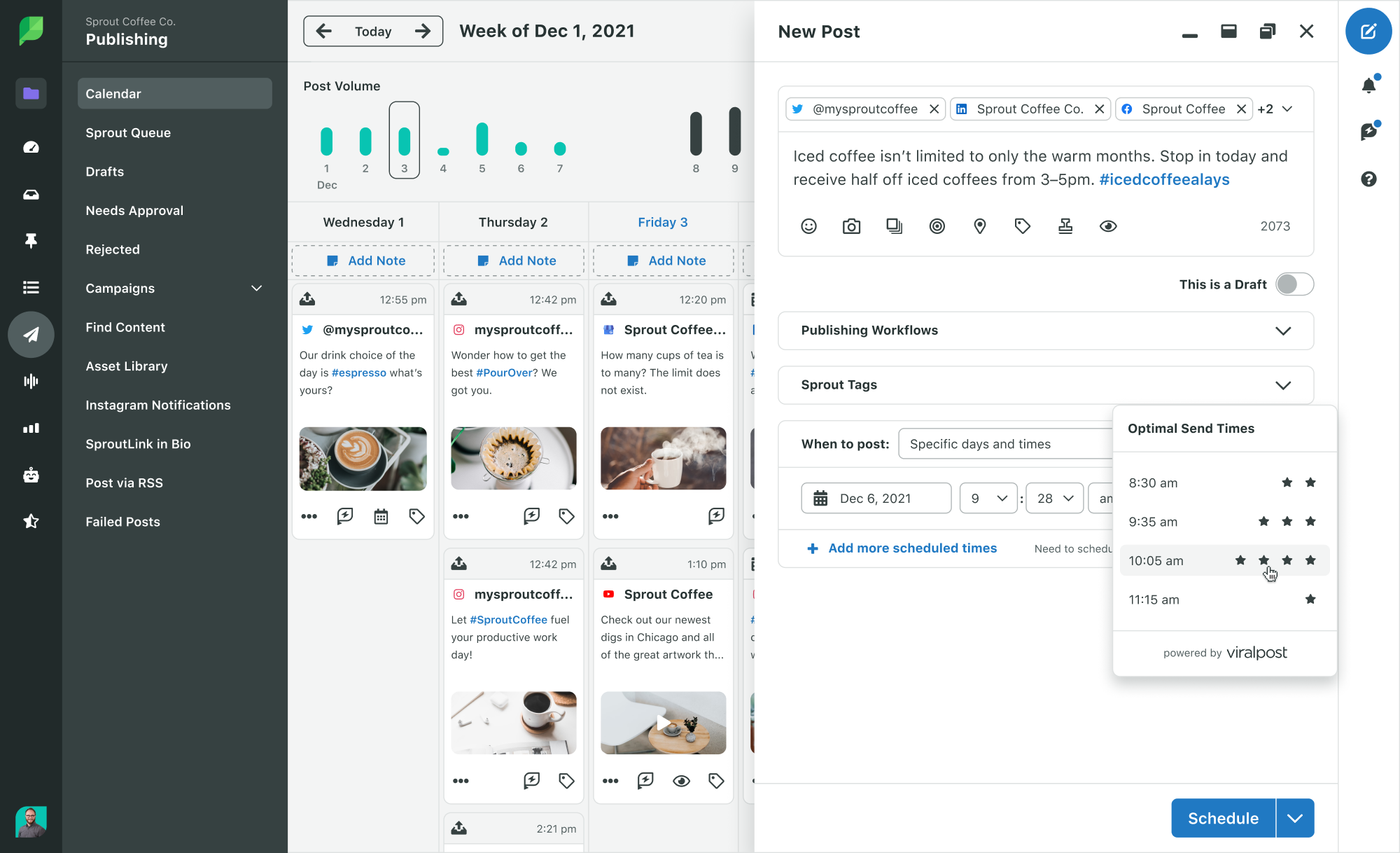
You can also take advantage of Sprout Social’s Optimal Send Times feature that analyzes your audience and selects the best times to schedule your content.
Ensuring that your brand’s image and messaging remain consistent in all planned social media updates.
Next, it’s important to make sure you’re keeping up with your branding throughout all of your scheduled content. If you batch your content creation, this should be a simple enough process.
Maintaining brand consistency includes things like:
- Maintaining a consistent brand tone across all of your captions.
- Using the same color scheme and font choices throughout all graphics
- Sticking with the same filters and effects for all videos
- Creating graphics using similar templates so everything looks cohesive
If your scheduled content is attracting a larger audience, it’s important to ensure that the content accurately reflects your brand and helps with increasing brand awareness.
Balancing scheduled and live content
Keep in mind that not everything needs to be scheduled ahead of time. Your company might decide to put on a last minute promotion that you want to share on social media, you might have a stroke of inspiration and want to publish something different from what you had scheduled, or you might need to share a last minute company update.
No matter what, remember that you don’t have to strictly adhere to a schedule or completely abandon it. You have the flexibility to make spontaneous adjustments, mix up your content, and post in real-time as inspiration strikes.
If you do, just make sure you’re not publishing a live post around the same time as a scheduled post is going live. Be sure to readjust your schedule to make room for your new content.
Avoiding over-scheduling
Avoid over-planning your content schedule—there is a point where it becomes excessive, and you don’t want to overwhelm your audience with more than 5 posts daily. While some brands may post 4-5 times a day on Facebook, it’s not necessary to follow suit. Overloading your schedule can lead to a shortage of content ideas and can irritate your audience with an abundance of posts from your brand.
Instead, come up with a scheduling plan that makes sense for your business, your content creation load and your audience—and stick with it.
Track analytics and engagement
Ultimately, focus on your Facebook metrics and audience interaction. While worldwide data and your own insights can provide a solid starting point for scheduling, regularly monitoring your analytics can reveal which kinds of content and specific days/times result in the highest engagement for you.
Use this data to inform and adapt your Facebook strategy. This can improve your overall Facebook organic reach, engagement and other important metrics.
How to schedule Facebook posts
You have the option to set up timed posts for your Facebook page through the Meta Business Suite (previously called Creator Studio) or by utilizing a scheduling tool from a different company (such as Sprout Social).
Schedule posts with Meta Business Suite
Step 1: Start by logging into your Facebook account. Head to your Facebook Page, then switch profiles so you’re managing your Page. In the left hand sidebar, click on Meta Business Suite.

Step 2: Click on the Planner tab in the main dashboard to see your content calendar, then click Schedule post.
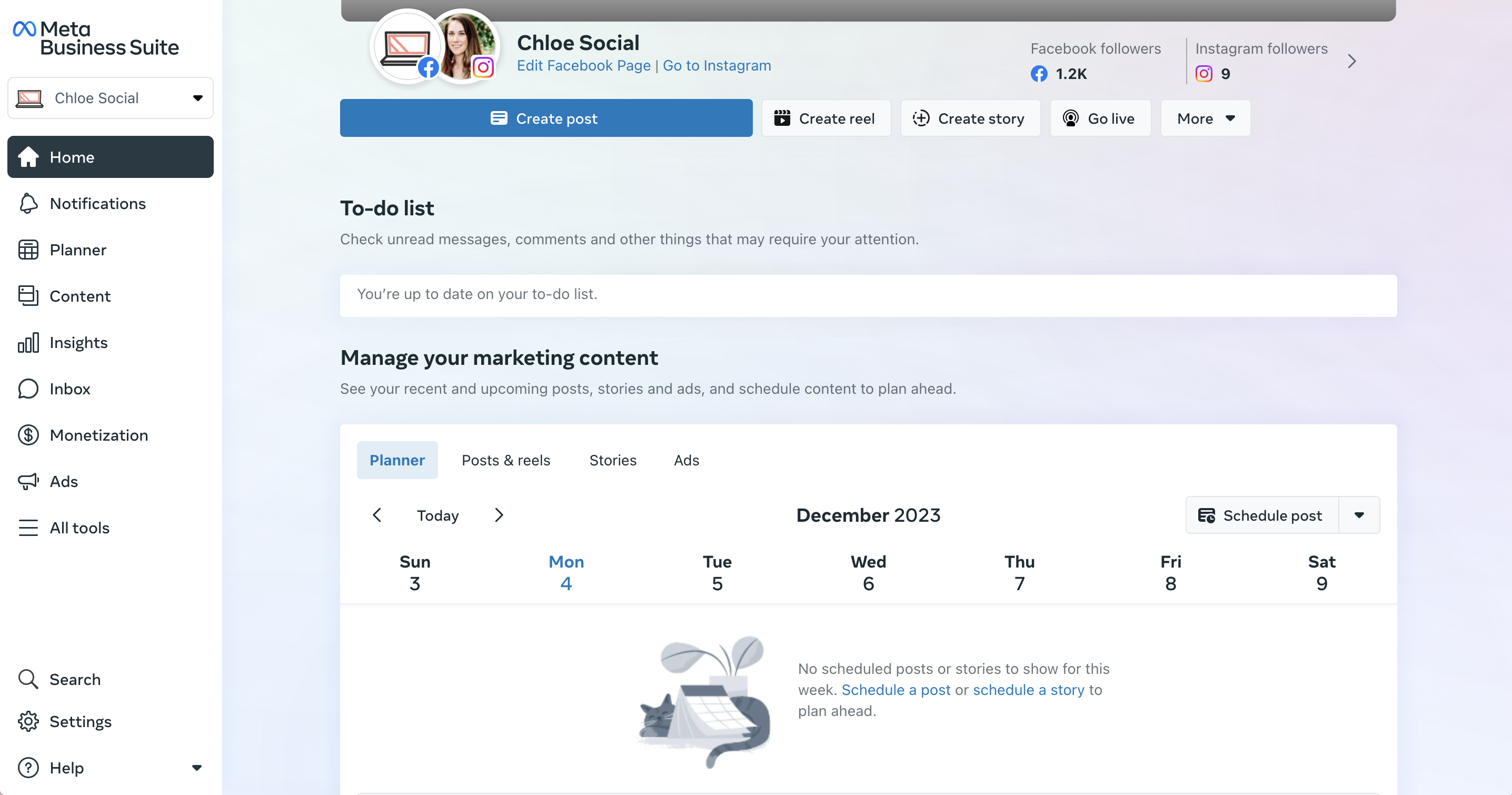
Step 3: Create your post and select which account (either your Facebook or Instagram account, if you have them connected—or both) you want it to publish to. Add your photo or video, input your caption, preview your post, then scroll down to select a date and time to publish your content.
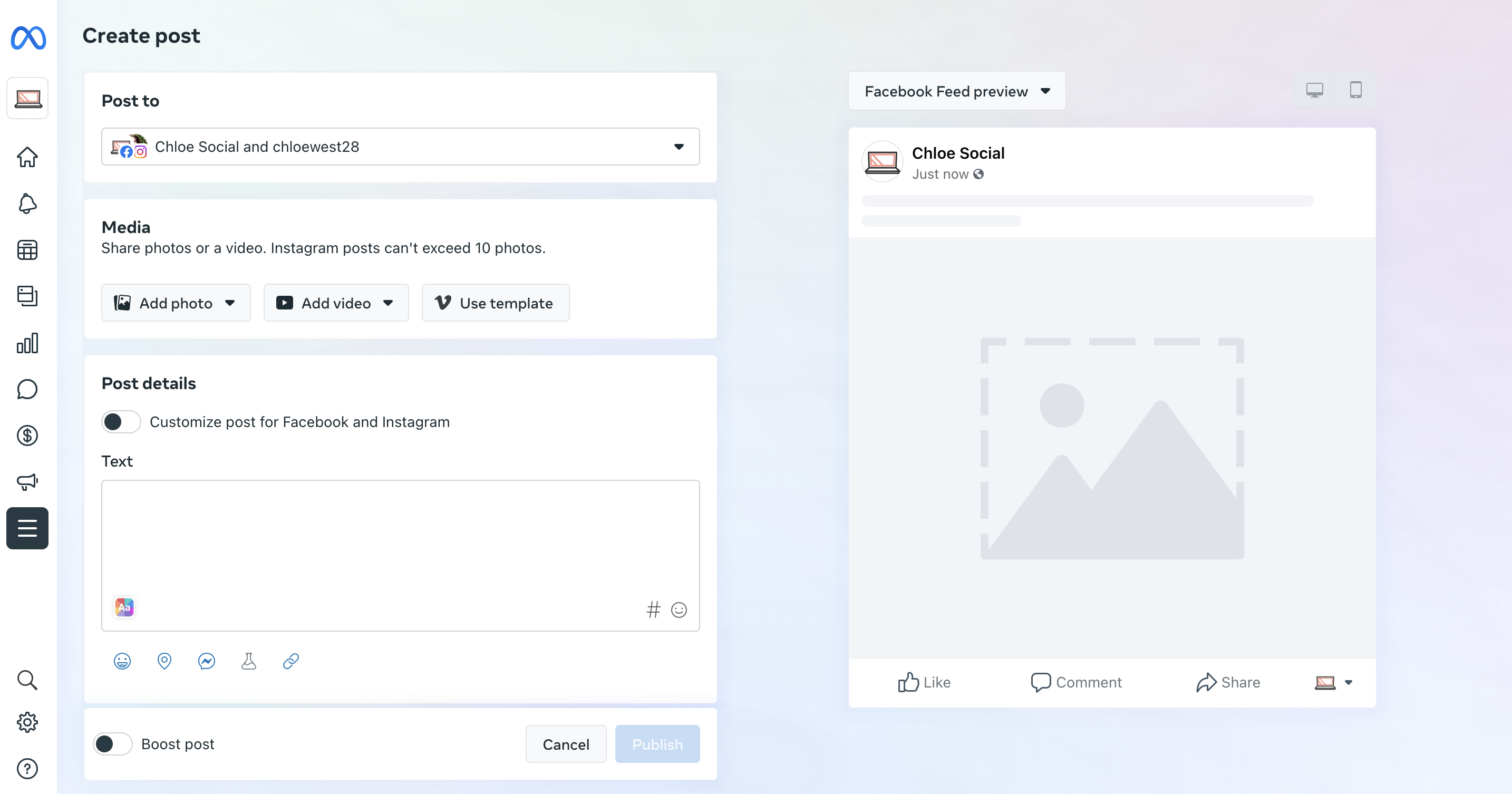
That’s it! You now have a scheduled post. Repeat the steps above to schedule additional posts.
How to schedule Facebook posts with Sprout Social
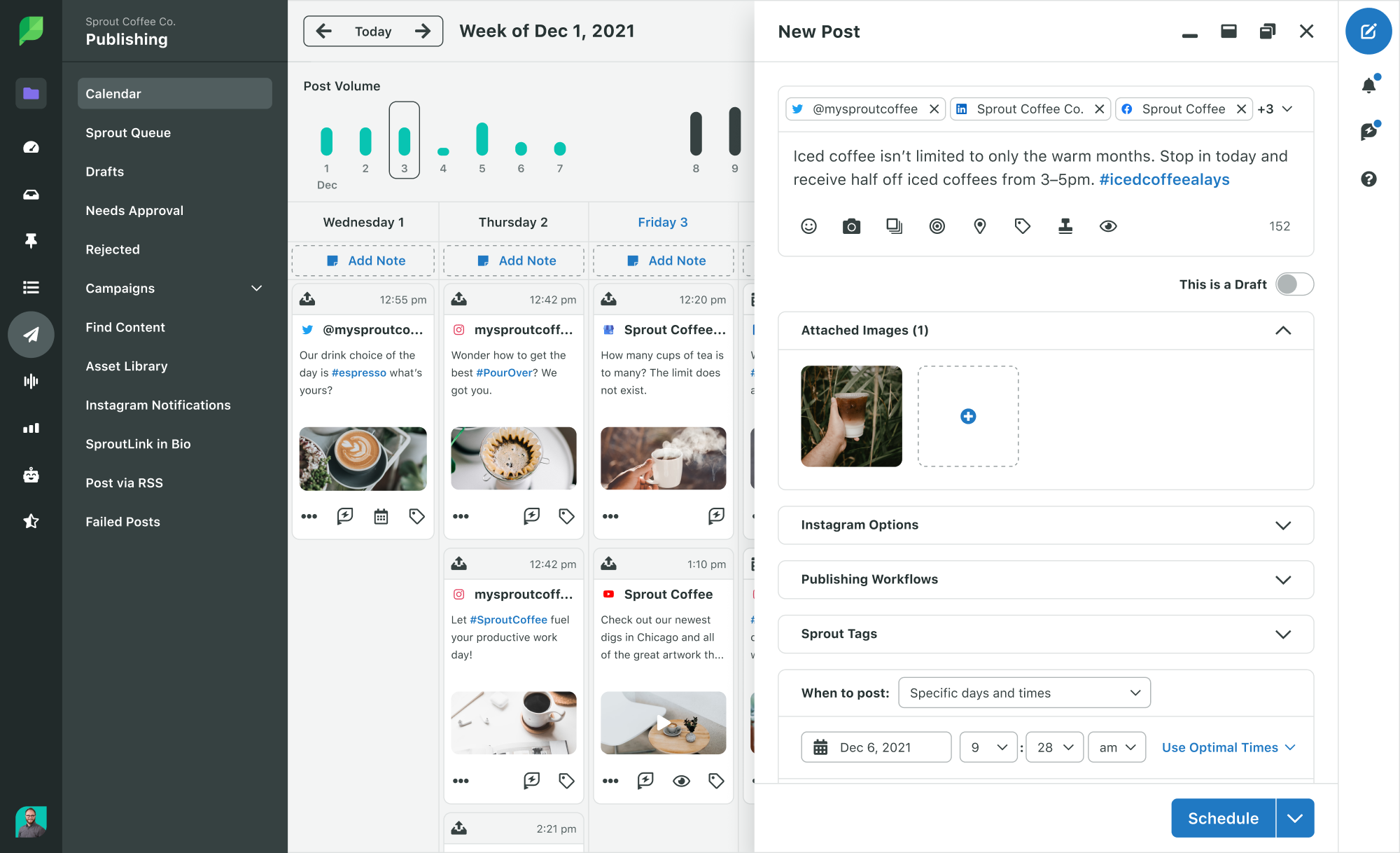
Here’s how to create scheduled Facebook posts with Sprout:
- Click the Compose icon to open the Compose window.
- Click the Profile Picker to select the Facebook pages for your post.
- Create your post.
- Choose specific days and times from the “When to post” dropdown menu.
- The date and times for your post.
- You have the option to add additional scheduled times if desired.
- Click Schedule.
Schedule Facebook posts with the Sprout Queue
What do you do when you have meaningful Facebook content, but don’t need to publish at any specific date or time? Use the Sprout Queue.
Create a schedule for your Sprout Queue to ensure consistent engagement throughout the day by sharing content such as product advice, links to expert articles, or updates on industry news.
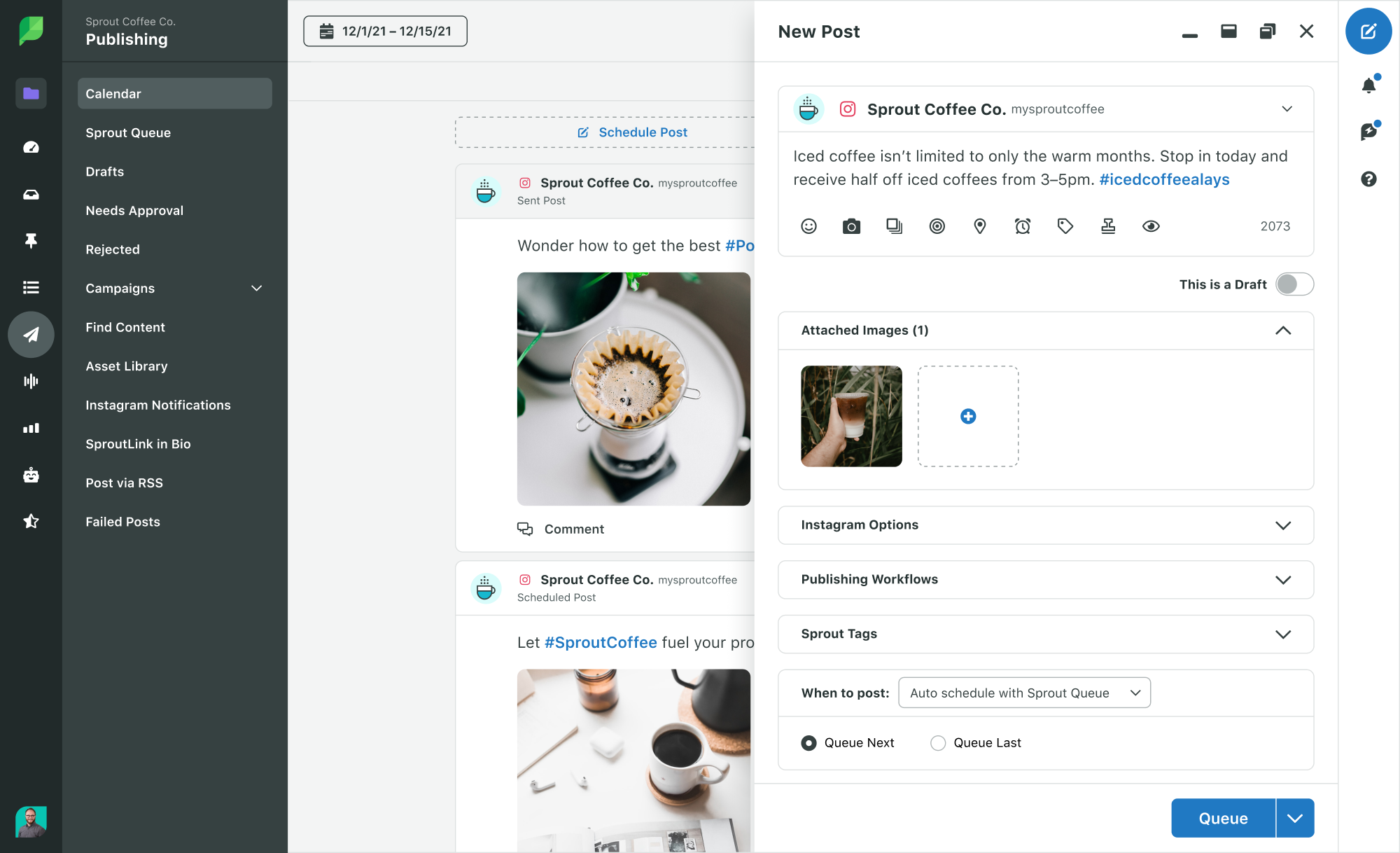
Choose the number of posts per day, your date and times and Sprout will do the rest. To set up your Sprout Queue setup, follow these steps:
- Navigate to the Publishing tab.
- Click Sprout Queue.
- Select “Compose” and begin crafting your message.
- Choose Auto-schedule with Sprout Queue from the When to post dropdown.
- Select Queue Next at the first possible time slot or Queue Last to move the post to the end of the queue.
- Select “Queue” or “Submit for Approval” to set a time for your content to be published.
Configure your queue timeline
Sprout’s suite of social media publishing tools places the content in the Queue Timeline for you to choose a specific time or date. There you can identify your publishing time gaps and plan your content.
This feature allows you to set it up to operate during particular times or dates. This is convenient for social media managers who want to post during the optimal times on Facebook. Choose different posting times for each Facebook Page.
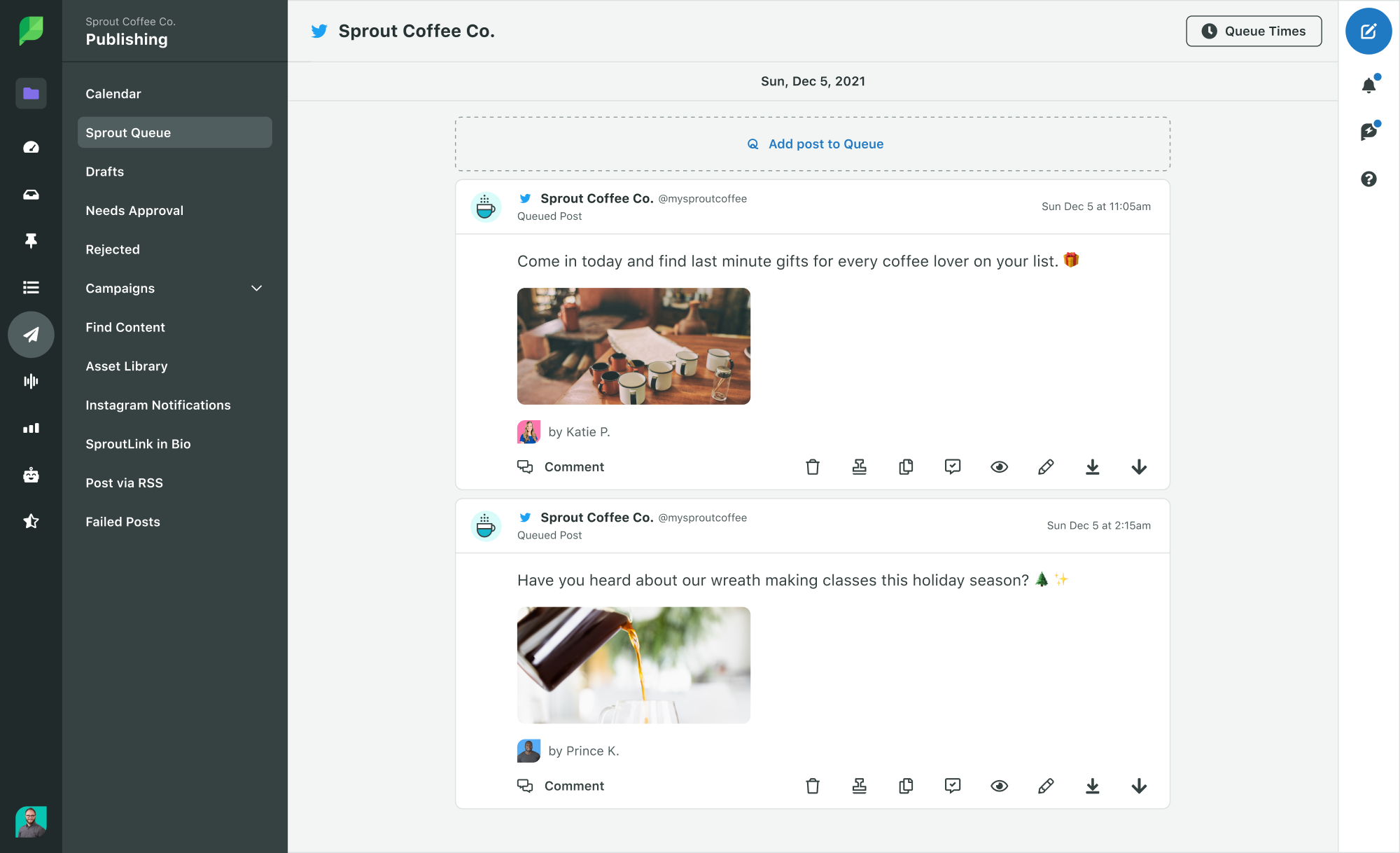
Sprout’s Queue even makes it simple to see your daily post times throughout all your different social media profiles.
Take advantage of ViralPost
ViralPost is a feature in Sprout that allows you to schedule posts for the most effective times. Set up ViralPost in your Sprout Queue to automatically publish your content when it’s most likely to engage your audience (only accessible in Standard Plans and higher).
When you use ViralPost, it analyzes your audience’s usage and engagement patterns to determine the optimal times to publish content on your Facebook page.

To configure your ViralPost settings, follow these steps:
- Go to your Publishing settings.
- Click Sprout Queue.
- Click Edit for the profile you want to configure ViralPost for. The Configure Queue Settings popup opens.
- Select ViralPost for the Scheduling Method.
- Choose whether you want to set your schedule by Individual Day or Weekdays/Weekends.
- Choose the frequency of your daily posts for each day of the week.
- Select the time range for your post.
- Click Save.
Add Facebook content to the Sprout Queue
It is recommended to schedule content when it is fresh in your mind. Create a message using the Compose feature, use Sprout’s Chrome Extension to share content found online, or add content to the queue from the RSS Reader. No matter what kind of content you want to post on your Facebook page, our tools will meet your requirements.
Pro Tip: Add content anytime, from anywhere by queueing content from Sprout Social’s web, mobile or browser extension apps.
Share your calendar
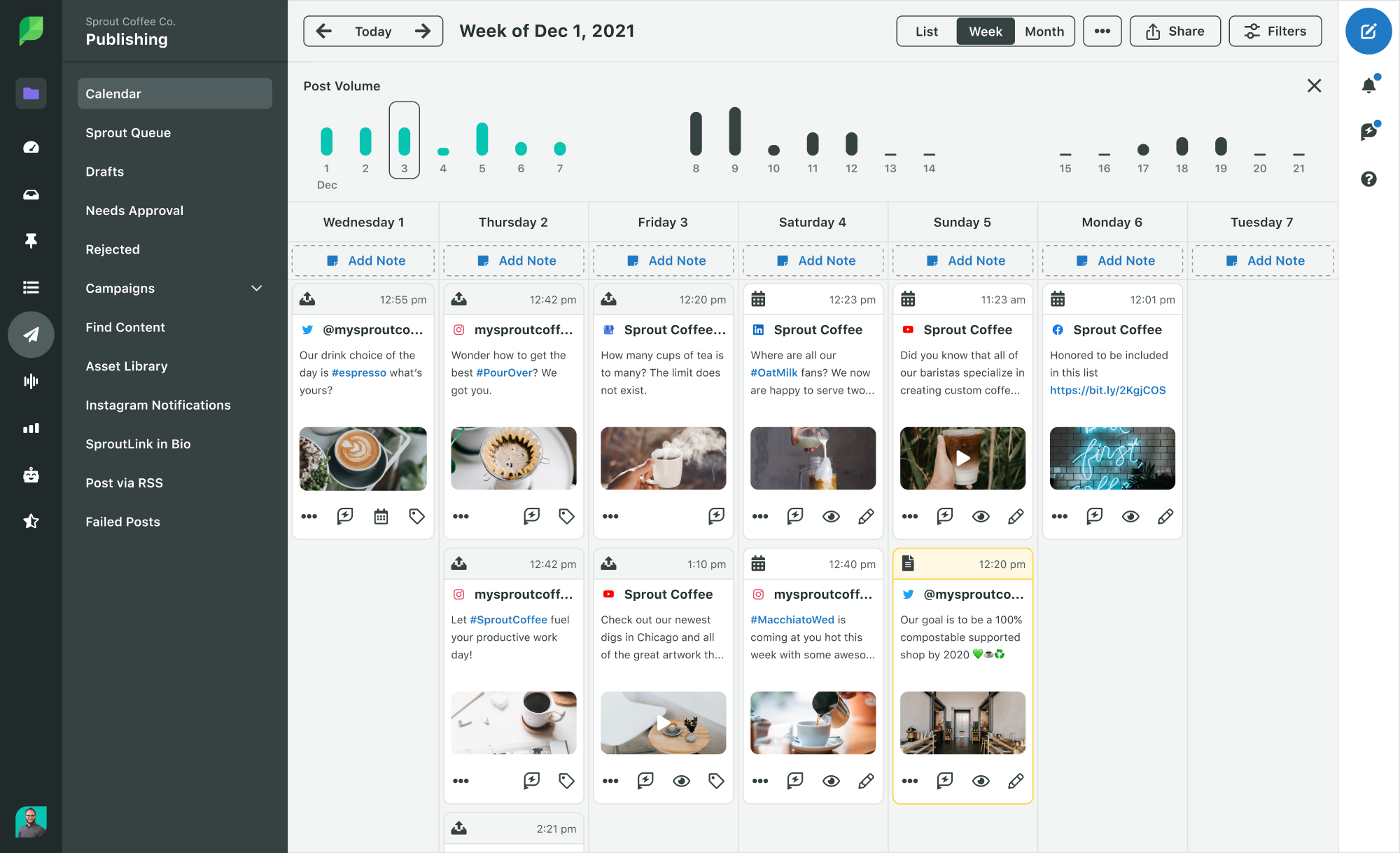
Last but not least, once you have your content in order, easily view, share and collaborate on your content calendar. Sprout’s Publishing Calendar gives you insight into your publishing schedule and more.
Here’s a guide on how to display and distribute your calendar in PDF format:
- Navigate to the Publishing tab.
- Click Calendar.
- Choose List, Week or Month.
- Choose your desired time frame, accounts, and types of content.
- Click Share.
- Click Download PDF.
Simplify your Facebook post scheduling
Scheduling your Facebook posts makes it simple to manage your content and simplifies the overall Facebook management process.
It enables you to be proactive, connect with your desired audience at optimal moments, and minimize the time and energy spent on manually organizing content.
Want to grow your Facebook page? Sprout Social’s Publishing features make it easy to schedule posts for Facebook. Sign up for a free 30-day trial and get started!
The post How to schedule Facebook posts: 3 Ways appeared first on Sprout Social.
In today’s digital age, it is essential for businesses to have a presence on social media. Facebook is one of the most popular social media platforms, and it is a great way to reach potential customers and build relationships with them. However, it can be difficult to know how to effectively use Facebook to promote your business. One important aspect of using Facebook for business is scheduling posts. Here are three strategies for scheduling posts on Facebook to help you get the most out of your social media presence.
1. Use a Scheduling Tool: Scheduling tools such as Hootsuite or Buffer are great for scheduling posts on Facebook. They allow you to create and schedule posts in advance, so you don’t have to worry about manually posting every day. You can also use these tools to track the performance of your posts, so you can see which ones are getting the most engagement and adjust your strategy accordingly.
2. Post at Optimal Times: Knowing when to post on Facebook is key to getting the most out of your posts. Different studies have shown that the best times to post on Facebook are between 1pm and 4pm on weekdays, and between 12pm and 1pm on weekends. Additionally, you should avoid posting too often, as this can lead to users becoming overwhelmed and tuning out your posts.
3. Vary Your Content: It is important to vary the types of content you post on Facebook. This will help keep your followers engaged and interested in what you have to say. Try posting a mix of text-based posts, images, videos, and links to other content. Additionally, you should try to post content that is relevant to your business and that will be interesting to your followers.
By following these strategies for scheduling posts on Facebook, you can ensure that your posts are reaching the right people at the right times and that they are engaging and interesting. This will help you get the most out of your social media presence and build relationships with potential customers.
Source: sproutsocial.com

Recent Comments