

Delivering exceptional customer care requires a delicate balance. Operational efficiency is vital—prompt case resolution, budget management, and maximum team productivity. However, sacrificing customer satisfaction is not an option, as tailored, timely assistance fosters loyalty and encourages retention.
Conventional approaches and disconnected tools can disrupt this equilibrium. Delays, sluggish responses, and customer annoyance result in manual task delegation, fragmented data, and limited insight into team performance.
The ideal social media customer service case management software addresses these issues by improving workflow efficiency and centralizing customer data.
This guide will lead you through the essence of customer service case management, outlining its advantages, key features to consider, and recommending five case management software solutions that can enhance your customer service from a challenge to a competitive edge.
Defining customer service case management:
Customer service case management oversees customer inquiries, challenges, and requests across various channels. It includes:
- Monitoring customer issues
- Directing challenges to the correct department
- Collaborative problem resolution
Envision a customer who tweets about a defective item, sends an email for support, and then makes a call. Effective case management merges these interactions into one case, providing your team with a comprehensive view to resolve the problem quickly.
Customer service case management software automates these tasks, allowing you to track, manage, and address customer interactions from start to finish. This capability enables you to offer rapid, precise customer service.
How does case management differ from CRM?
While Customer Relationship Management (CRM) systems and case management share similarities, they serve distinct purposes in managing customer interactions. CRMs maintain extensive customer information, manage sales pipelines, and oversee marketing initiatives.
On the other hand, case management focuses exclusively on individual customer problems or requests.
While CRMs present a broad overview of customer relationships, case management adopts a detailed, issue-oriented focus. These systems can also connect with case management tools, leveraging CRM data to contextualize each support case.
This collaboration enhances personalized, efficient customer service while preserving an overarching view of customer relationships.
Advantages of utilizing customer service case management tools
Robust case management provides your support team with a 360-degree perspective of each customer’s history, fostering quicker and more personalized problem resolution.
Why is this important? Customers expect fast, consistent assistance across all channels. Case management software ensures you deliver just that—transforming potential frustrations into positive experiences. Here’s how it makes a difference:
Boosts efficiency
Streamline your workflows to simplify support operations. Intelligent routing sends inquiries to the appropriate team members to accelerate responses. This allows your support staff to focus on complex issues while automation takes care of routine tasks.
For instance, Grammarly reported over an 80% reduction in average response time within two years post-implementation of case management software. Automated workflows and smart routing played a key role in this achievement by instantly directing inquiries to the correct agents.
Adopt customer service case management software to automate regular tasks and witness your response times drop as your team manages more challenging issues.
Enhances productivity
A holistic understanding of customer information empowers support teams to manage a greater volume of cases in less time.
The Sprout Social Index™ 2023 indicates that 54% of marketers intend to employ customer self-service tools and resources such as FAQs, forms, and chatbots to enhance social customer care. When integrated with case management systems, these tools eliminate the need for switching between platforms and equip agents with all necessary information right at their fingertips.
Equip your support team with a comprehensive view of customer data and self-service tools to turbocharge their productivity and decision-making capabilities.
Enhances customer service
Case management software allows for consistent, personalized support across all platforms, resulting in higher customer satisfaction.
According to the Index report, 76% of consumers notice and value when companies emphasize customer support.

Social media case management software guarantees that regardless of whether a customer posts, sends an email, or uses carrier pigeons, they receive uniform support.
This ensures omnichannel support capabilities deliver a cohesive, personalized experience that customers recognize and appreciate.
Offers operational insights
Customer service case management software provides essential insights to continuously enhance your customer support processes.
With customizable dashboards and real-time notifications, case management tools can identify support challenges such as delayed response times, misdirected requests, and unresolved tickets. Your support team can then utilize this information to address complaints more swiftly, enhance social media customer service, and allocate resources more effectively.
Supports scalability
Case management software enables your support operations to grow without sacrificing service quality or proportionally increasing team size. As businesses expand, case management software makes it easy to onboard new team members, incorporate additional communication channels, and manage higher case volumes.
Select a case management solution that can adapt alongside your business, ensuring you maintain quality support as your customer base increases.
Key features to seek in customer service case management software
Choosing the appropriate customer service case management software can significantly impact your service delivery. Lacking vital features? Your team’s productivity may diminish, and customer experience could suffer.
Before making a choice, evaluate these essential features to facilitate smooth case management and satisfied customers.
Ticketing system
Envision an air traffic control tower for customer issues—that’s your ticketing system. It serves as the command center of your support operations, ensuring no customer inquiry goes unnoticed.
Ticketing systems offer a structured mechanism for managing customer inquiries across different channels. Each case is assigned a unique ID for precise tracking, while intelligent routing directs cases to the most suited agents based on expertise, workload, and urgency.
Customizable workflows, status updates, service-level agreement (SLA) tracking, and escalation systems prevent cases from being overlooked.
The ticketing system boosts team productivity by providing a clear, organized perspective of all ongoing cases, ultimately leading to quicker response times and heightened customer satisfaction.
Knowledge base
A thorough knowledge base acts as a centralized storage for organizational information, best practices, and resolutions to frequent issues.
It serves as a valuable resource tailored to your brand. Need precise, current information? Your agents can access it in seconds.
With a solid knowledge base, new agents can convert potential lengthy calls into quick solutions. To be effective, ensure your knowledge base is easily searchable and features focused articles, FAQs, troubleshooting guides, and clear product documentation that accelerates social media customer service training. Advanced systems may even leverage AI to propose pertinent articles based on customer queries.
Investing in a well-organized, easily accessible knowledge base empowers your agents, accelerates issue resolution, and ensures consistent, accurate responses across all customer interactions.
Workflows
Streamlined workflow management orchestrates your overall support process, minimizing manual tasks and human errors while empowering agents to focus on high-value activities.
Advanced workflow features offer customizable escalation protocols, SLA tracking, and conditional branching. AI-driven workflows can categorize and prioritize cases, assign them to appropriate agents, and suggest solutions based on historical data.
For instance, when a VIP flags an issue, the system can automatically mark it as high-priority and escalate it to top agents without human intervention.
Choose a case management system capable of flexible workflow management to organize your support operations, enhance team productivity, and consistently deliver outstanding service.
Reporting and analytics
Comprehensive reporting and analytics transform your support team from reactive problem solvers into proactive trouble-spotters, resolving issues before they escalate.
Extensive reporting tools provide customizable dashboards that illustrate KPIs such as average response time, first-contact resolution rate, and customer satisfaction scores.
Advanced analytics can forecast support demand and resource requirements, while thorough evaluations reveal hidden customer needs and challenges.
Utilize these insights to enact targeted enhancements to your support processes, products, or services. With every adjustment informed by analytics, you’re not merely addressing problems—you’re cultivating trust and loyalty.
Five Customer service case management software options
Social media has evolved beyond simple posts and images. In light of customer service trends, it has become a crucial avenue for customers to voice their concerns and request assistance.
As emphasized by Zoila Streich, Co-Founder of Independent Fashion Bloggers and former fashion business owner: 70% of her customers reach out via DMs for support.
A case management system guarantees no customer is overlooked, allowing you to monitor and respond to inquiries promptly and efficiently.
These tools connect with various social media platforms, consolidating all customer interactions—social or otherwise—into one integrated location. No more juggling platforms; just quicker responses and smoother customer experiences.
Here are five top recommendations:
Sprout Social
Sprout Social’s Case Management enhances customer care efficiency and enriches social interactions.
Sprout streamlines manual tasks and rapidly connects cases to the right team members through automated case routing. Custom tags and statuses help organize and prioritize urgent messages for swift responses.

Additionally, Sprout quantifies customer care endeavors. The Case Performance Report evaluates team efficiency, while Customer Feedback Requests gather satisfaction metrics. These features simplify demonstrating customer care’s impact on business outcomes. With Enhance by AI Assist, agents can utilize AI to refine the tone and personalize responses. The Smart Inbox provides four options to ensure every reply feels customized.
Automate standard tasks, prioritize crucial issues, and personalize interactions on a larger scale to enhance efficiency and cultivate stronger customer relationships.
Freshdesk
Freshdesk, part of the Freshworks suite, features cloud-based customer service software designed to deliver tailored support across various channels.
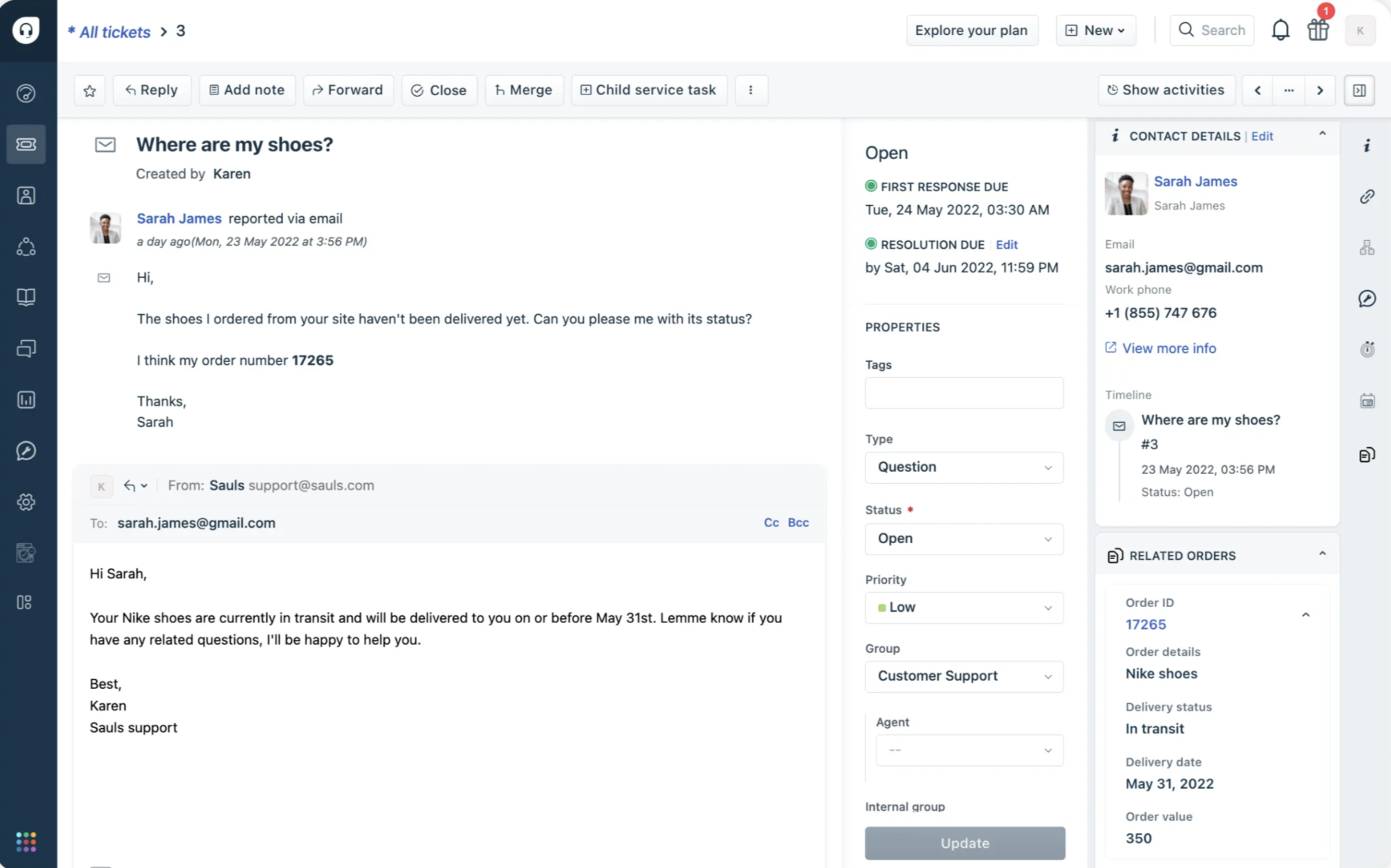
This all-encompassing solution handles customer cases from first contact through to resolution, adapting easily to varied business requirements and structures.
Its collaborative ticketing framework promotes teamwork, while SLA management enables the establishment and tracking of performance metrics, enhancing agent efficiency.
Freshdesk’s Freddy AI automates routine functions while offering intelligent suggestions to agents. This AI customer service feature streamlines workflows and shortens response durations. Furthermore, Custom Objects integration provides operation-specific data at your service interface.
Zoho Desk
Zoho Desk is a cloud-based customer service software facilitating the optimization of support operations and the enhancement of the customer experience. It enables seamless management of customer inquiries from assessment to planning and resolution.
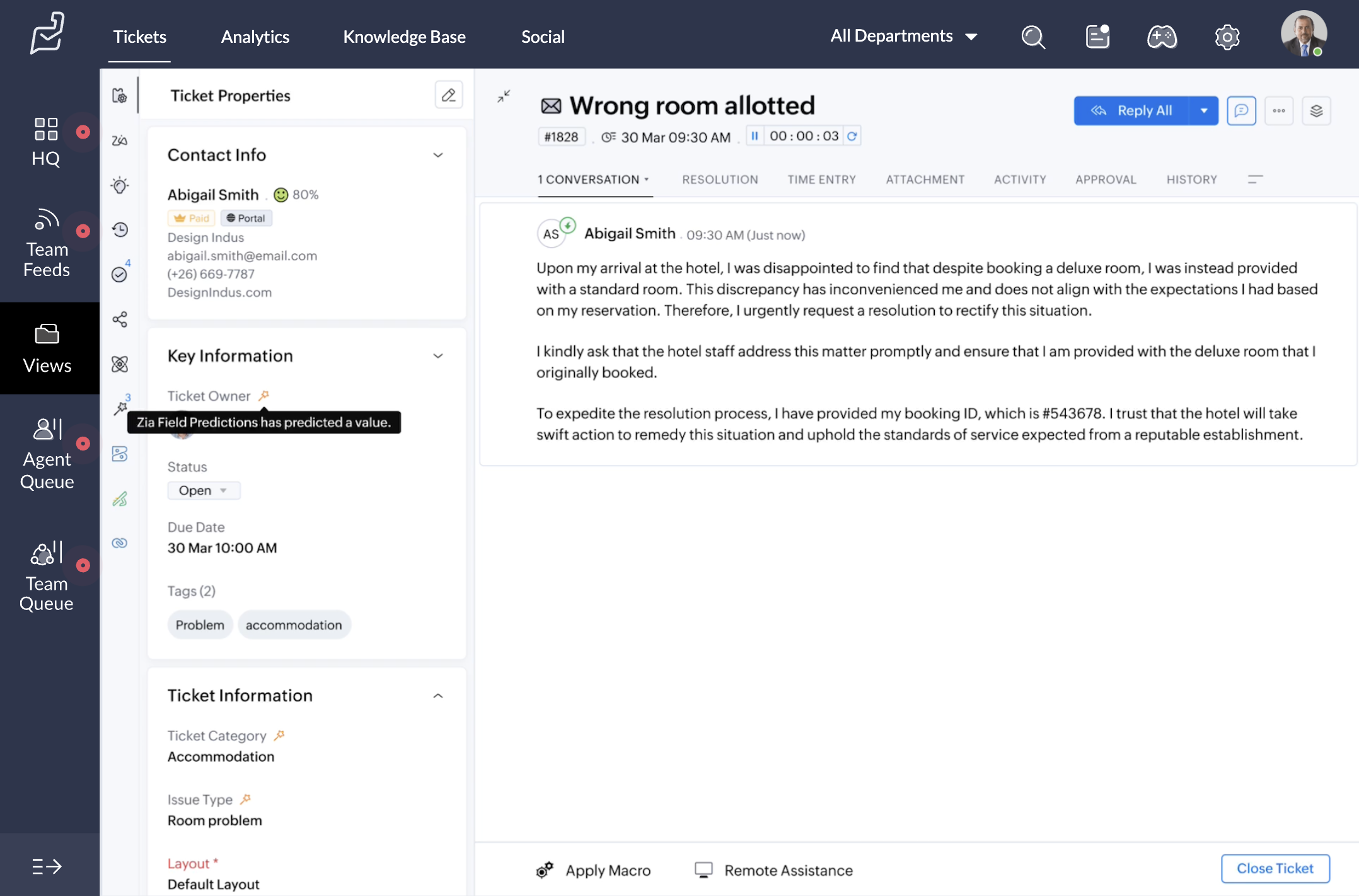
Zoho Desk’s low-code platform allows for quick customization of case management applications tailored to specific business needs.
Key functionalities include process automation, compliance oversight, and time management tools, all designed to enhance operational efficiency. Zoho Desk also integrates seamlessly with existing systems and provides communication tools to create a cohesive support environment.
Zoho Desk strikes a balance between automated workflows and human judgment, empowering organizations to achieve their business objectives while remaining adaptable.
Salesforce Service Cloud
Salesforce Service Cloud‘s case management solution focuses on enhancing both agent productivity and customer satisfaction through knowledge-driven capabilities.
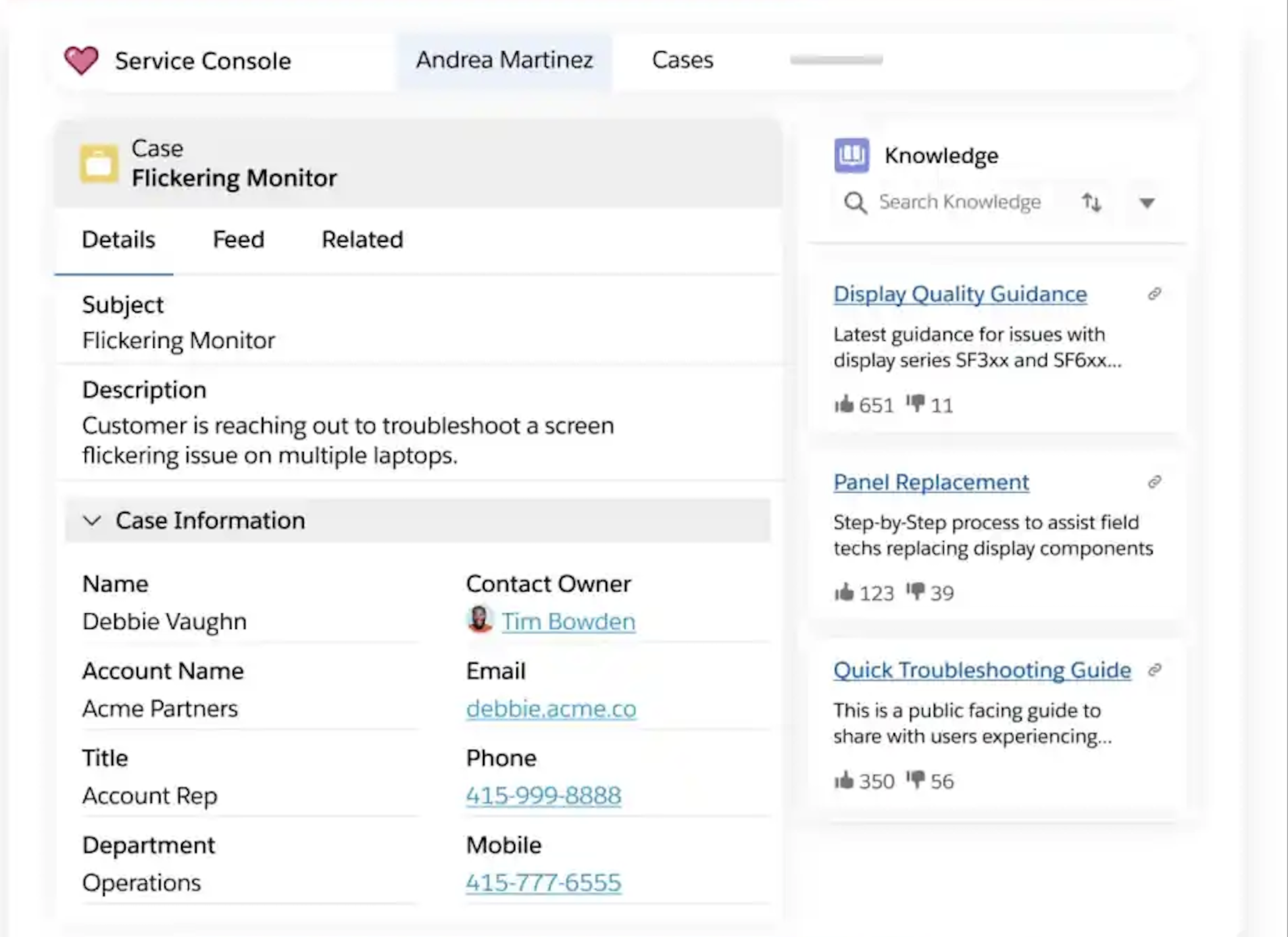
It empowers agents and customers alike to discover answers to common inquiries, accelerating case resolution and promoting self-service. By suggesting relevant articles within the agent console or Help Center, it lessens agent workload and guarantees consistent, accurate responses.
Sprout Social integrates with Salesforce Service Cloud, creating an all-in-one solution for social media engagement and customer relationship management.
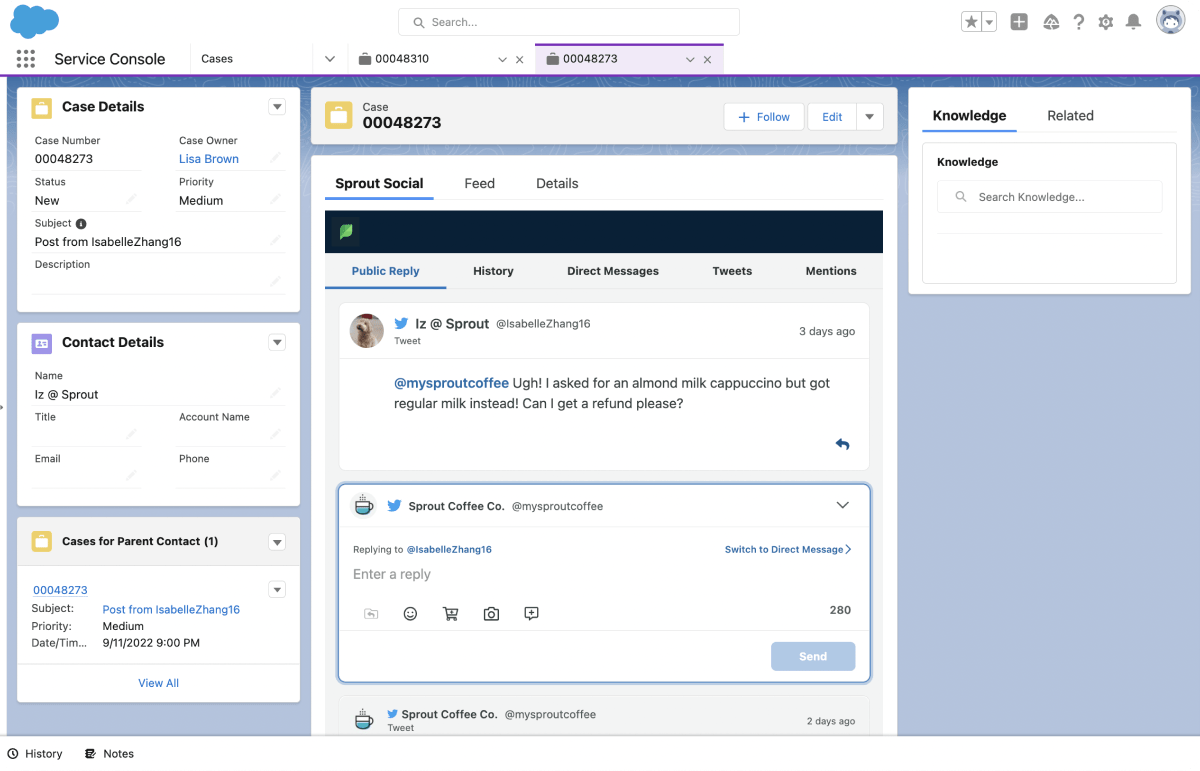
Available on every Sprout plan, this integration allows you to create, manage, and route Salesforce contacts, leads, and cases directly within Sprout, enabling support and sales teams to address social media inquiries efficiently without toggling between platforms.
By merging Salesforce Service Cloud’s robust case management with Sprout Social’s social media expertise, businesses can provide faster and more tailored customer service across various channels.
HubSpot Service Hub
HubSpot Service Hub accelerates customer interactions and support. Integrated with HubSpot’s CRM platform, which includes marketing, sales, operations, and content management tools, it enhances the service journey.
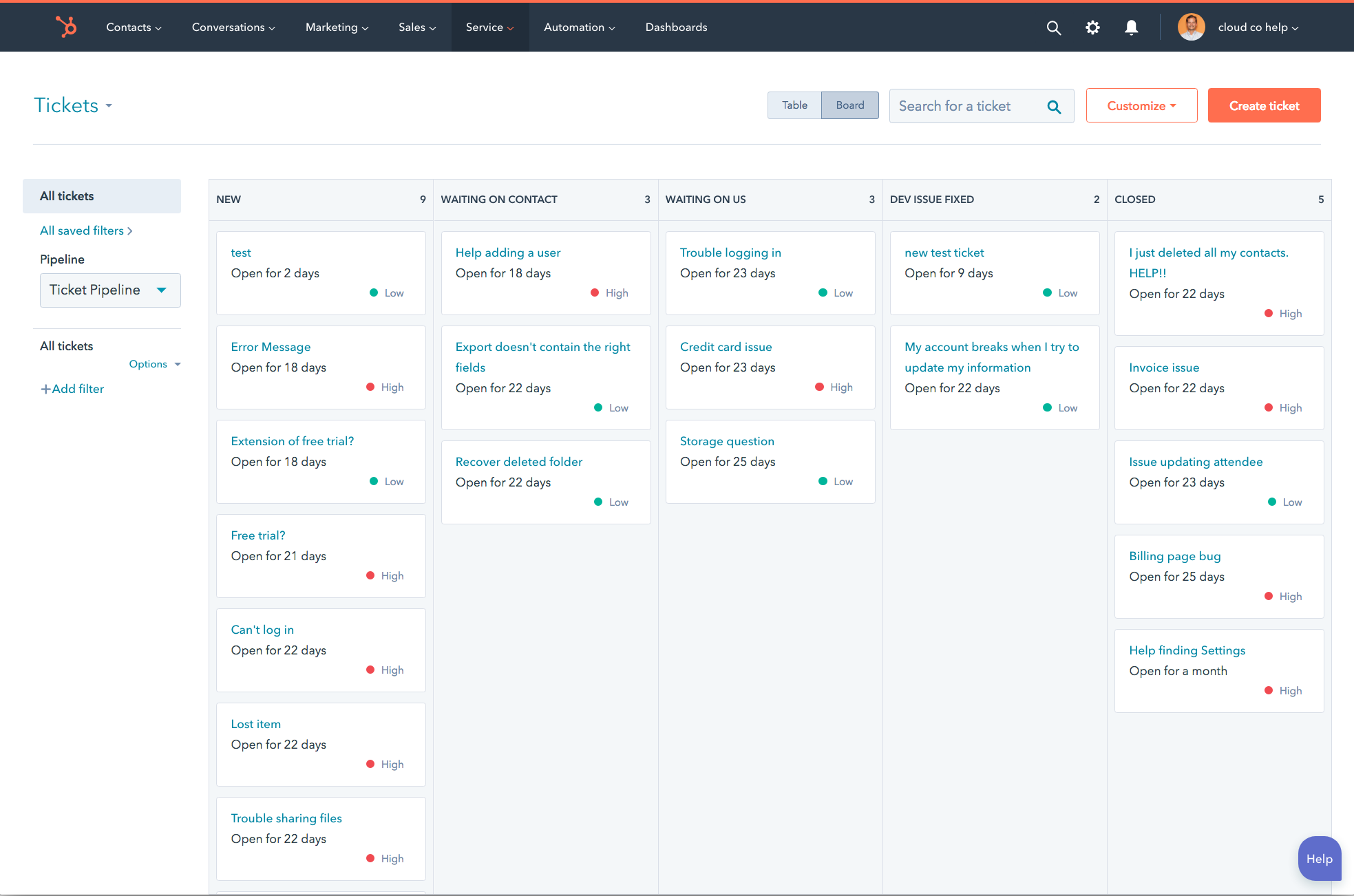
Key capabilities encompass AI-enhanced help desk ticketing, a self-service knowledge base, and omnichannel messaging. It facilitates proactive customer success management through health scores, product usage insights, and feedback collection mechanisms.
HubSpot’s Smart CRM integration provides a complete view of customers while analytics and automation streamline operations with actionable metrics such as customer satisfaction ratings, average response times, and ticket resolution rates. This model enables scalable, personalized support that fosters customer retention and drives repeat purchases.
Begin your journey with customer service case management software
Case management serves as the key to transforming your support function from a cost burden into a growth engine. In selecting software, consider features such as omnichannel support, automation, self-service capabilities, reporting and analytics, and integration potential.
Seeking to enhance case management further? Implement a tiered customer service model aligning support levels with customer value and expectations.
Dive into our detailed guide on customer service tiers, crafted to help establish a scalable, top-tier support strategy that boosts customer retention and enhances revenue.
The post Top customer service case management software in 2024 first appeared on Sprout Social.

Recent Comments