

As web designers and developers, we know that performance is everything. Waiting for a slow page builder to load or render changes can interrupt the creative flow and kill productivity. That’s why one of the main goals of Divi 5 is to revolutionize the speed and performance of the Visual Builder. We’ve taken a deep dive into Divi’s core structure and rebuilt it from the ground up to create a blazing-fast, more responsive builder. 💨
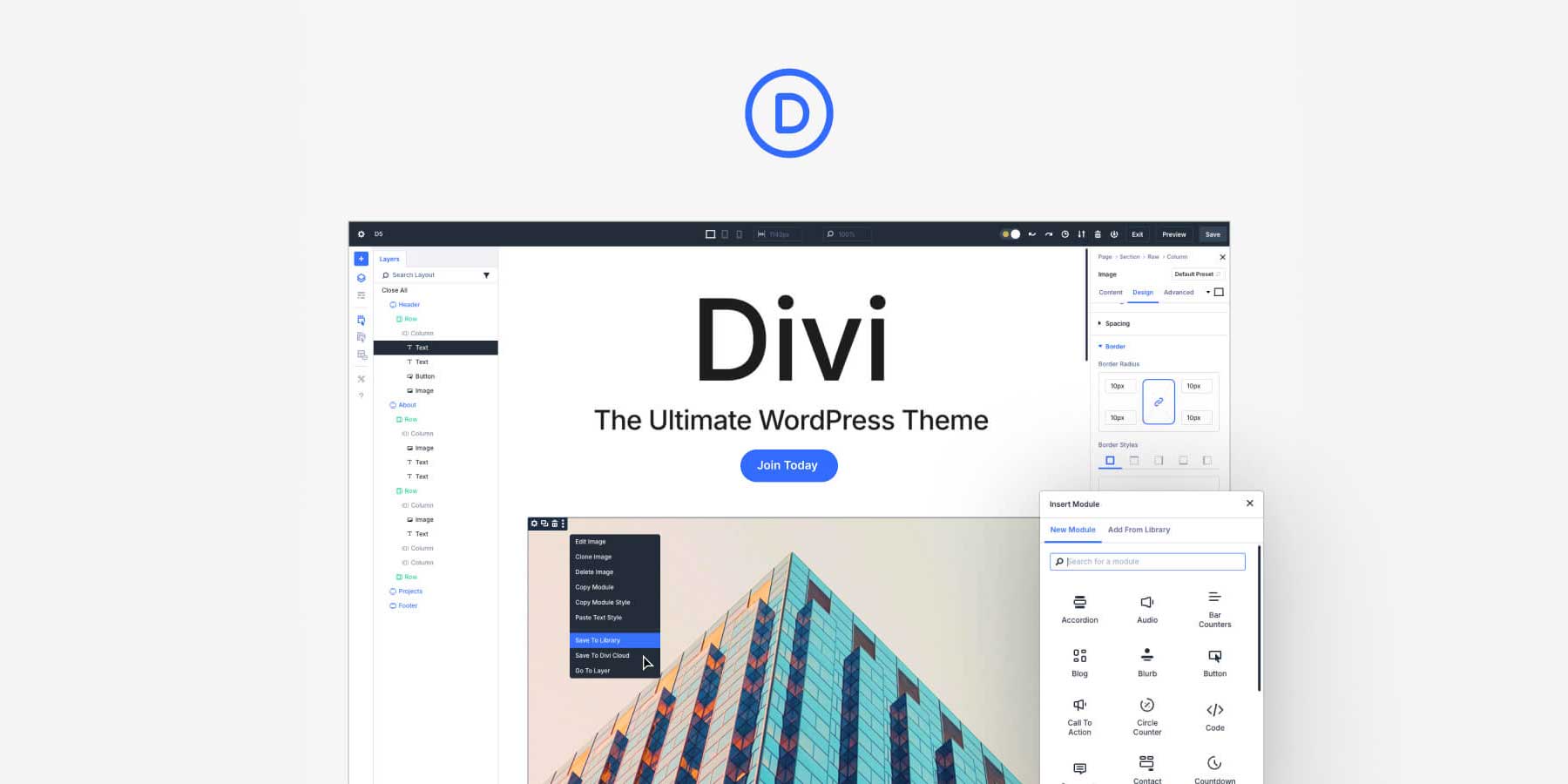
In this post, I’ll walk through the performance improvements within the Visual Builder that make Divi 5 faster than any previous version. Everything about the Divi 5 Visual Builder has been optimized for speed.
Now, let’s explore how this will impact your web design workflow and why you’ll never want to return to slower page builders again.
Rewriting Everything: What Makes Divi 5 Different?
Divi 5 is much more than an incremental update. It’s a complete rewrite of Divi’s core technologies, reimagined with a focus on performance, stability, and scalability. This foundational shift made us rethink how the Visual Builder operates at its core, making it significantly faster and more powerful.
While Divi 4 was already a powerful tool on millions of websites, its architecture was over a decade old. We’ve been improving it and pushing its limits, but it finally came time to build a new foundation.
Technical debt led to slower load times, re-rendering delays, and occasional instability, especially when working with complex layouts. To address this, the Divi 5 team rebuilt the entire framework with a clean slate, optimizing it for performance and future scalability. The results speak for themselves: everything in Divi 5 happens faster, from loading the builder to making edits and previewing changes.
Download The Divi 5 Alpha Try The Divi 5 Demo Report Divi 5 Bug
1. Improved Visual Builder Re-Rendering Speeds
When you work with a tool all day, speed matters. Even the tiniest delay compounds over time. In previous versions of Divi, designers sometimes had to wait a split second for the Visual Builder to respond when adding new elements or adjusting styles. This was especially noticeable when working on long documents (with dozens of sections filled with modules and custom styling).
Notice the style flicker on D4 (left), where the button takes milliseconds to apply the styles from the duplicated section fully. This is on top of being slower than D5 (right) to duplicate the section.
With Divi 5, re-rendering speeds have been dramatically improved, allowing you to work without lag. The Visual Builder responds instantly when you add a new module, switch view modes, or adjust styles. This level of responsiveness makes a huge difference, especially when working on complex designs that require a lot of fine-tuning.
But what exactly has changed to make the builder so much faster?
The Technology Behind Faster Re-Rendering
The only way to achieve this level of improvement was to start from scratch. We took everything we learned over the past decade of Divi development and created a new application using modern technology, eliminating years of technical debt. We spent time auditing different interactions and identifying bottlenecks. We are still doing that, and Divi 5 is getting faster with each update.
Moving away from shortcodes also helped make traversing complex designs more efficient. In tomorrow’s post, we’ll discuss why the shortcode framework had to go and how Divi 5 is doing.
Can you spot the difference in the following comparison video? It highlights another big improvement in Divi 5: improved performance when editing presets! In Divi 5, presets are class-based. With all preset elements sharing the same class, fewer re-renders are needed in the builder, and less CSS is needed on the front end.
2. Faster Loading Times (read: No More Double Reloads)
A significant pain point in older versions of Divi was the double reload when launching the Visual Builder, occurring when third-party modules and plugins mistakenly injected dynamic data into the Visual Builder’s cache. This mistake was so pervasive that the double reload became a common pain point.
Divi 5 “fixes” this issue by being so fast out of the box that it doesn’t need caching! Since we aren’t caching anything, there’s no opportunity for the cache to become invalidated, and you’ll never experience the double reload again.
Loading times have been improved across the board. Check out how fast Divi 5 loads when compared to Divi 4. It loaded so fast in my test that you don’t even get a chance to see our fancy new preloader animation. 😂
This improvement is especially noticeable for designers working on larger projects. Previously, opening a large project in the Visual Builder could take several seconds to load fully.
3. We Removed All Interface Animations
One of the most notable changes in Divi 5’s new interface (beyond its modern redesign) is the removal of all animations.
In previous versions, animations provided visual feedback when interacting with the builder (e.g., adding new modules or switching view modes). While these animations added a certain level of playfulness, they also introduced slight delays in the design process, especially on slower systems.
Divi 5’s design philosophy is different. The interface is there to serve you, nothing more. It’s minimal. It doesn’t get in your way. It doesn’t compete with your design. It doesn’t care about looking cool. Its UI/UX is rooted in speed and efficiency.
Do you notice all those subtle animations (fade-ins-outs, slide-ins-outs, and similar) that Divi 4 uses? Those unnecessarily make the UI feel slower and less responsive. In Divi 5, we’ve taken a speed-over-style approach. We’ve removed these animations to quicken the builder and make it more responsive. The focus is now entirely on functionality, ensuring that every action you take in the builder happens as quickly as possible.
Where Does Divi 5 Go From Here?
The Public Alpha is officially launched. First, we’d love to thank you for your patience as we worked diligently over these last months to get Divi 5’s Public Alpha out the door. It was no small task—and our work is just beginning.
As Nick discussed on Thursday, we’ll spend about a month fixing known bugs in our backlog and many bugs you, the community, are finding right now. Divi 5’s Public Alpha is very much an Alpha, but we are working tirelessly to get it to a production-ready state. You can help by giving Divi 5 a spin on your local and staging sites, finding all the bugs you can, and reporting them to our support team. We’ll triage each bug finding and work on the most pressing ones as they come up.
Download The Divi 5 Alpha Report Divi 5 Bug
If you do not have a staging or local site to test with, you can still get your feet wet with the Demo version of Divi 5. This is a great way to get used to the new builder redesign and layout. It’s quite the change, but one that was very much needed.
The Future of Divi Is Fast
Divi 5 represents a significant leap forward in terms of speed and performance. Divi is now more powerful and responsive with blazing-fast re-rendering, quicker load times, and a redesigned builder that prioritizes utility over style. Whether you’re a solo web designer or part of a larger development team, these improvements will make your workflow faster, smoother, and more efficient.
If you’ve been using Divi 4, you will be blown away by how fast Divi 5 feels. The best part? This is just the beginning. As we optimize and expand the Divi 5 framework, the builder will only get faster and more powerful. The future of web design with Divi is blazing fast—and we’re just getting started.
In the coming days, we’ll talk about what it means that Divi 5 is stepping away from shortcodes, taking a deep dive into the site migration system, and a developer-related vantage. Don’t forget to follow and subscribe to catch these updates and more.
The post Speed Comparison: Exploring The Blazing-Fast Divi 5 Visual Builder appeared first on Elegant Themes Blog.
# Analyzing Speed Performance: A Comprehensive Review of the Divi 5 Visual Builder
In the ever-evolving landscape of web development, speed and performance are paramount. Users expect websites to load quickly, and search engines reward those that do. Among the myriad of tools available for building websites, Elegant Themes’ Divi has emerged as a popular choice, particularly with the release of Divi 5 and its Visual Builder. This article delves into the speed performance of Divi 5, exploring its features, optimizations, and overall impact on website loading times.
## What is Divi 5?
Divi 5 is the latest iteration of the Divi theme and page builder, designed to empower users to create visually stunning websites without needing extensive coding knowledge. With its drag-and-drop interface, a vast library of pre-made layouts, and extensive customization options, Divi 5 caters to both beginners and seasoned developers. The Visual Builder allows real-time editing, enabling users to see changes as they make them, which enhances the overall user experience.
## Key Features of Divi 5
1. **Enhanced Performance**: Divi 5 introduces several performance enhancements aimed at reducing loading times and improving overall site speed.
2. **Global Styles**: The new global styles feature allows users to set design preferences that apply across the entire site, reducing the need for repetitive styling and thus optimizing performance.
3. **Dynamic Content**: Divi 5 supports dynamic content, enabling users to create more interactive and engaging websites without compromising speed.
4. **Improved Code Structure**: The underlying code has been optimized for better performance, ensuring that websites built with Divi 5 load faster and run more efficiently.
5. **Built-in Caching**: Divi 5 includes built-in caching options, which help to speed up page loading times by storing frequently accessed data.
## Speed Performance Analysis
### 1. Loading Times
One of the most critical factors in assessing the speed performance of any website builder is its loading time. Websites built with Divi 5 have shown significant improvements in loading speeds compared to previous versions. On average, sites built with Divi 5 load in under three seconds, which is crucial for user retention and SEO rankings.
### 2. Page Size and Requests
Divi 5 has been designed to minimize the size of web pages and the number of HTTP requests. By optimizing images, scripts, and stylesheets, Divi 5 ensures that pages are lightweight. This reduction in page size and requests translates to faster loading times, making it easier for users to access content quickly.
### 3. Mobile Performance
With mobile usage on the rise, ensuring that websites perform well on mobile devices is essential. Divi 5 has been optimized for mobile performance, with responsive design features that adapt layouts for smaller screens. This optimization not only improves user experience but also contributes to faster loading times on mobile devices.
### 4. Compatibility with Caching Plugins
Divi 5 works seamlessly with popular caching plugins like WP Rocket and W3 Total Cache. These plugins further enhance the speed performance of websites by caching static files and reducing server load. Users can leverage these tools alongside Divi 5 to achieve optimal performance.
### 5. Impact on SEO
Search engines like Google prioritize fast-loading websites in their rankings. By utilizing Divi 5’s performance enhancements, users can improve their SEO standings. Faster loading times lead to lower bounce rates and higher user engagement, both of which are favorable for SEO.
## Best Practices for Optimizing Speed with Divi 5
To maximize the speed performance of websites built with Divi 5, consider the following best practices:
1. **Optimize Images**: Use compressed images and appropriate formats (like WebP) to reduce file sizes without sacrificing quality.
2. **Minimize Plugins**: Limit the number of plugins used on your site to reduce bloat and potential conflicts that can slow down performance.
3. **Leverage Lazy Loading**: Implement lazy loading for images and videos to ensure that only the content visible to the user loads initially, improving perceived loading times.
4. **Utilize CDN**: A Content Delivery Network (CDN) can distribute your website’s content across multiple servers globally, reducing loading times for users regardless of their location.
5. **Regularly Update**: Keep Divi and all plugins updated to benefit from the latest performance improvements and security patches.
## Conclusion
Divi 5’s Visual Builder represents a significant advancement in web design technology, particularly in terms of speed performance. With its enhanced features, optimized code structure, and compatibility with caching solutions, Divi 5 allows users to create visually appealing websites that load quickly and efficiently. By following best practices and leveraging the tools available within Divi 5, web developers can ensure that their sites not only look great but also perform exceptionally well, ultimately leading to improved user satisfaction and SEO success

Recent Comments