

Google’s year-old spam limit and Apple’s iOS are causing significant problems for email marketing.
SMB or enterprise, CPG or B2B — brands of all sizes and verticals are still struggling to get under Gmail’s spam thresholds. It’s not for lack of trying, either. Apple’s iOS 15 and iOS 18 updates have complicated the email picture, making analytical insights and subsequent solutions difficult to pinpoint.
Here are the problems we’re seeing and what brands can do to improve deliverability and avoid spam folders.
What we’re seeing in email campaigns
Over the last year, I’ve seen some common (and damaging) trends among brands who engage our agency to improve their email performance.
- They have seen their engagement rates (open and click rates, especially) drop considerably. Their emails only show up in the inboxes of people already engaging with the brand. For most subscribers, the emails are getting flagged as spam.
- For many of these brands, this is the first time they have encountered this issue.
- For brands with a recent history of combatting spam labels, normal mitigation practices have either been unsuccessful or only effective in the short term.
Dig deeper: 3 keys for better email engagement in Gmail
What’s going on? The impact of iOS updates on email performance
Can a four-year-old “update” tank performance? The answer is yes — if the update is iOS 15 (and Mail Privacy Protection, or MPP).
Because iOS 15 thoroughly messed up the accuracy of open rates, Apple Mail users who opted into MPP were generally tracked as opening every email sent by brands they subscribed to. That meant brands got wildly inflated data on their loyal subscribers, many of whom had barely engaged. The upshot: brands segmenting by email open rates were setting those segments up to underperform — all the way to spam folders.
If that wasn’t enough, Apple introduced iOS 18 in September 2024 — and changes in the 18.2 version took a significant whack out of engagement rates. These changes include:
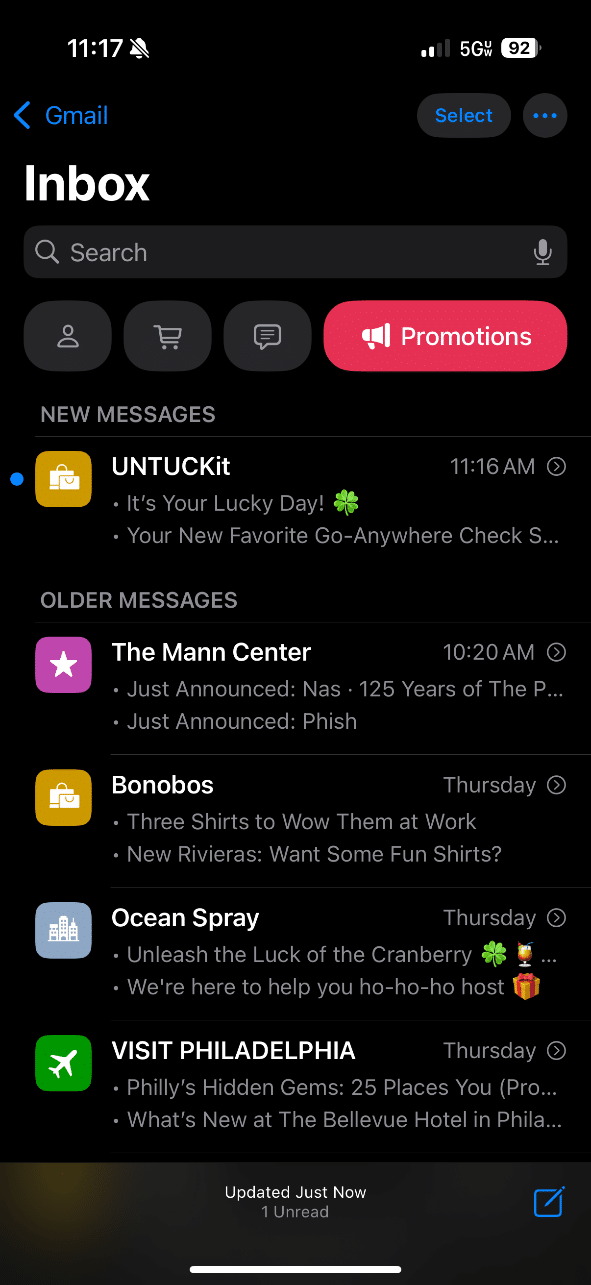
- The introduction of tabs to the inbox experience—Primary, Transactions, Updates, and Promotions—had a massive impact on email performance. Brands in our client portfolio saw almost all of their messages (aside from truly transactional ones) filtered into the Promotions tab.
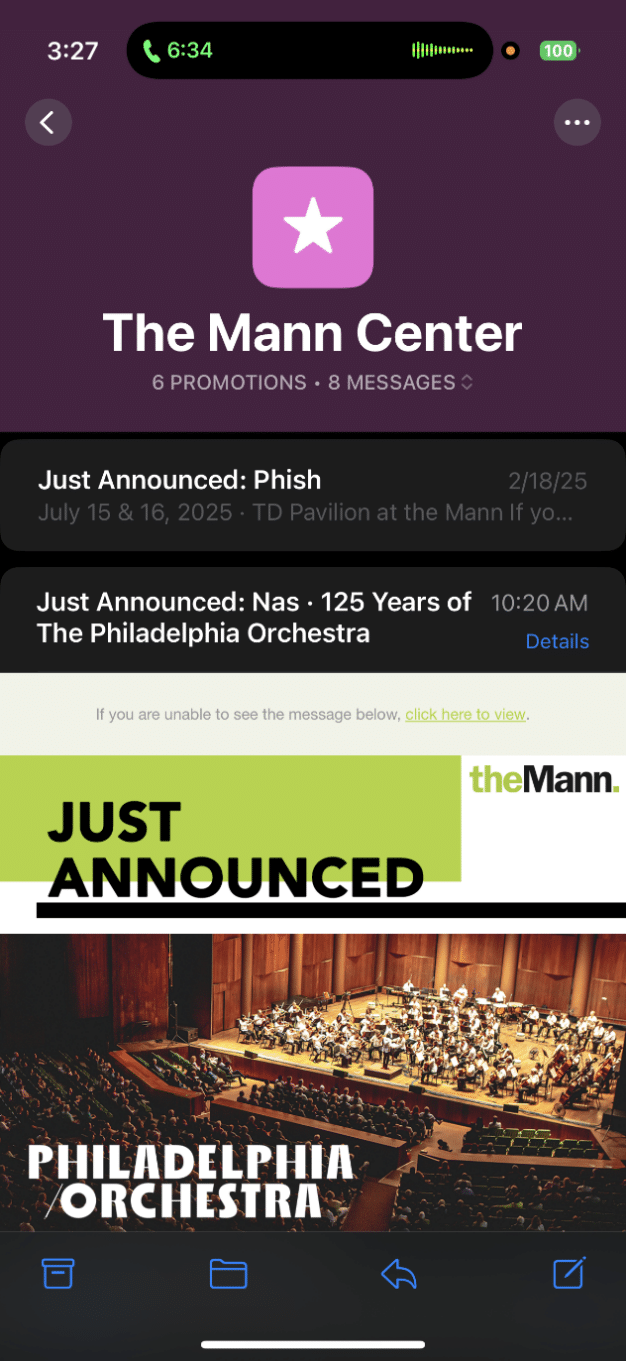
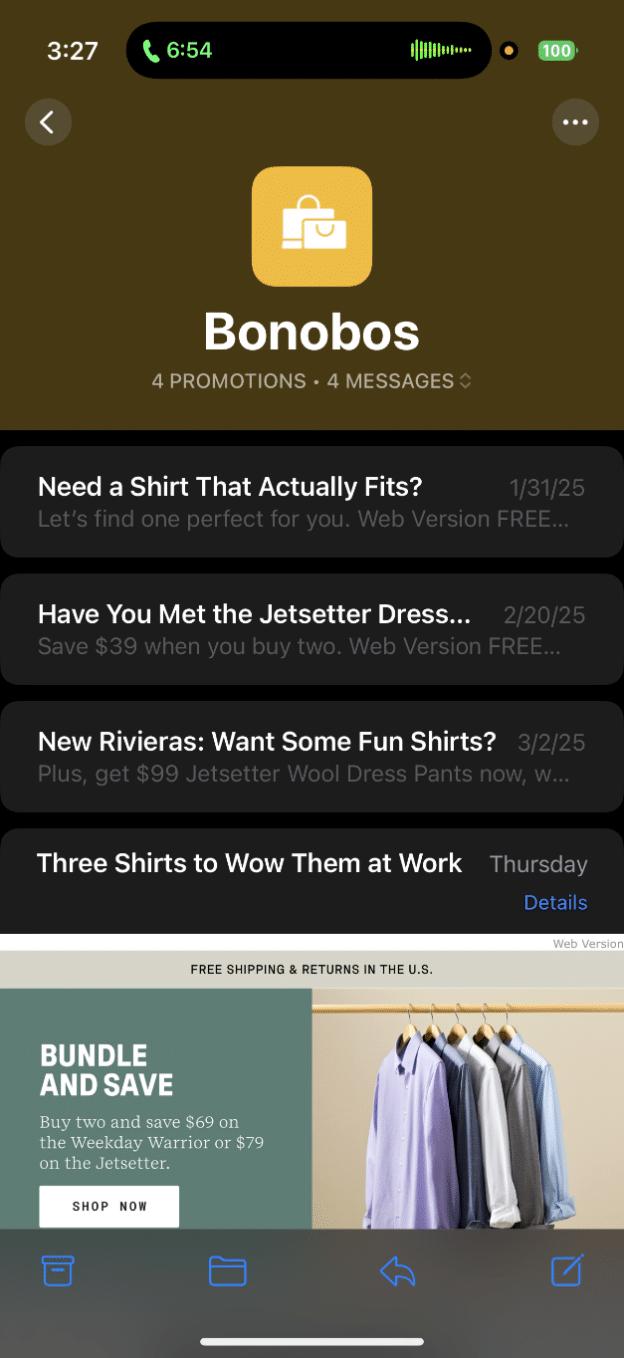
- Grouping emails from the same sender together, forcing users to deal with previous emails when opening the most recent one, as in the screenshots below:
- Including subject lines of the same recent emails (and removing preview text altogether) in the Promotions tab.
- Replacing preview text with an Apple Intelligence summary in the “All Mail” tab.
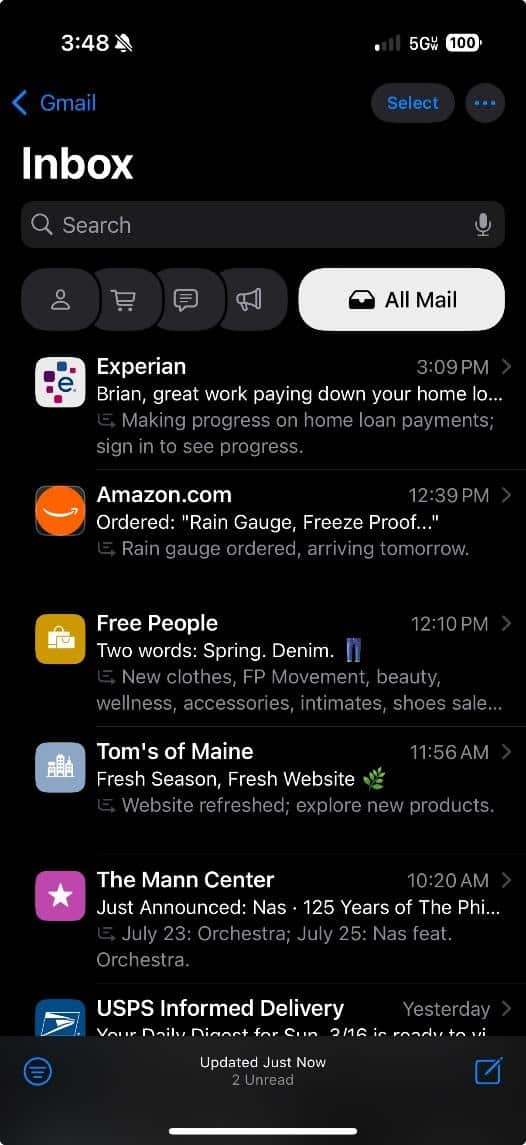
The net impact of all this:
- More barriers to seeing the emails (since users must now navigate to the Promotions tab).
- Increased steps to viewing a specific email.
We know engagement has suffered even without the ability to accurately measure open rate, as discussed above.
Making matters worse, we expect the current adoption rate of iOS 18.2 and 18.3 (a combined 46.1%, according to Statcounter) to rise.
Dig deeper: Subscriber acquisition best practices following Gmail’s spam update
Where can brands go from here?
- Re-examine your segmentation strategy: Email opens over a long period is a faulty metric; brands must get more creative with audience rules to identify top engagers.
- Be far more restrictive with your audiences: The smaller and more precise the audiences brands send campaigns to, the lower the spam rate. Start small, get reliable data and results and expand gradually from there.
- Lean heavily into engagement-friendly techniques: Personalization, automated journeys, promo codes in subject lines, etc.
- Make sure you’re using live text in your emails: Don’t use static text in images, as the AI features Apple introduced in iOS 18.2 won’t read your content well otherwise.
- Review your content calendar periodically: Make sure you’re not stacking up a bunch of emails in the same inboxes in close succession.
Doing these should go a long way toward lowering your spam rate — but you’ll also want to stay on top of news and trends to update your approach as we go.
In closing
Email deliverability is more of an art than a science. Ensure your team maintains an open dialogue about strategies to stay out of the spam folder, and test initiatives that have proven effective for similar brands. Finally, stay tuned for more recommendations as best practices continue to evolve.
Dig deeper: Why bad business decisions can hurt email deliverability
The post Apple and Gmail make it harder for email campaigns to get to the inbox appeared first on MarTech.
**Apple and Gmail Implement Stricter Email Filtering, Impacting Email Campaign Deliverability**
In an ongoing effort to enhance user experience and security, tech giants Apple and Google (via Gmail) have recently implemented stricter email filtering policies. These changes are designed to combat spam, phishing, and other malicious email practices, but they are also having a significant impact on email marketers and businesses that rely on email campaigns for customer engagement and lead generation.
### What’s Changing?
Both Apple and Gmail have updated their email filtering algorithms and policies to better identify unwanted or potentially harmful emails. These updates include:
1. **Enhanced Spam Detection Algorithms**: Using advanced machine learning and AI, Gmail and Apple Mail are now better at identifying patterns associated with spam or unsolicited emails. This includes analyzing sender reputation, email content, engagement history, and authentication protocols.
2. **Stricter Authentication Requirements**: Both platforms are now enforcing stronger adherence to email authentication standards such as SPF (Sender Policy Framework), DKIM (DomainKeys Identified Mail), and DMARC (Domain-based Message Authentication, Reporting & Conformance). Emails that fail these checks are more likely to be flagged or rejected.
3. **User Engagement Metrics**: Email providers are increasingly using user behavior—such as open rates, click-through rates, and how often users mark emails as spam—to determine whether future emails from a sender should be delivered to the inbox or filtered out.
4. **Apple’s Mail Privacy Protection**: Introduced with iOS 15, Apple’s Mail Privacy Protection feature masks user activity, such as whether an email was opened. This makes it harder for marketers to gauge engagement and optimize their campaigns accordingly.
### Impact on Email Campaign Deliverability
These changes have led to a noticeable decline in email deliverability for many businesses. Key impacts include:
– **Lower Inbox Placement Rates**: Emails that would previously land in the primary inbox are now more frequently being routed to the spam or promotions folders.
– **Increased Bounce Rates**: Emails that fail authentication checks or are sent from low-reputation IP addresses may be outright rejected by Gmail or Apple Mail servers.
– **Reduced Campaign Performance Visibility**: With Apple’s privacy features obscuring open rates, marketers are finding it more difficult to measure campaign success and adjust strategies in real time.
– **Greater Need for List Hygiene**: Maintaining a clean and engaged email list is more critical than ever. Inactive or unengaged recipients can negatively affect sender reputation, further reducing deliverability.
### Best Practices for Adapting to the New Landscape
To maintain high deliverability and campaign effectiveness, marketers should consider the following best practices:
1. **Authenticate Your Emails**: Ensure your emails are properly authenticated using SPF, DKIM, and DMARC. This not only improves deliverability but also builds trust with email providers.
2. **Focus on Engagement**: Send relevant, high-quality content that encourages recipients to open, read, and interact with your emails. Segment your list to target users more effectively.
3. **Maintain List Hygiene**: Regularly clean your email list by removing inactive subscribers and invalid addresses. Use confirmed opt-in methods to ensure recipients genuinely want your emails.
4. **Monitor Deliverability Metrics**: Use tools to track bounce rates, spam complaints, and inbox placement. This data can help you identify and address deliverability issues early.
5. **Adapt to Privacy Changes**: With open rates becoming less reliable, shift your focus to other engagement metrics such as click-through rates and conversions.
### Looking Ahead
As Apple and Gmail continue to prioritize user security and experience, marketers must evolve their strategies to stay compliant and effective. While these changes present challenges, they also offer an opportunity to build more meaningful, permission-based relationships with subscribers. By focusing on quality, relevance, and transparency, businesses can not only maintain deliverability but also improve the overall impact of their email marketing efforts.
In the ever-changing digital landscape, adaptability is key—and those who embrace these changes will be best positioned for long-term success.

Recent Comments