

Recently, I shared an example of a work email on LinkedIn, sparking a flood of opinions on whether images belong in B2B emails. It turns out, the question of “to image or not to image” is a surprisingly divisive topic in B2B.
Here’s the email in question for reference. While the names have been hidden to protect privacy, the situation still reflects a poor experience for everyone involved.
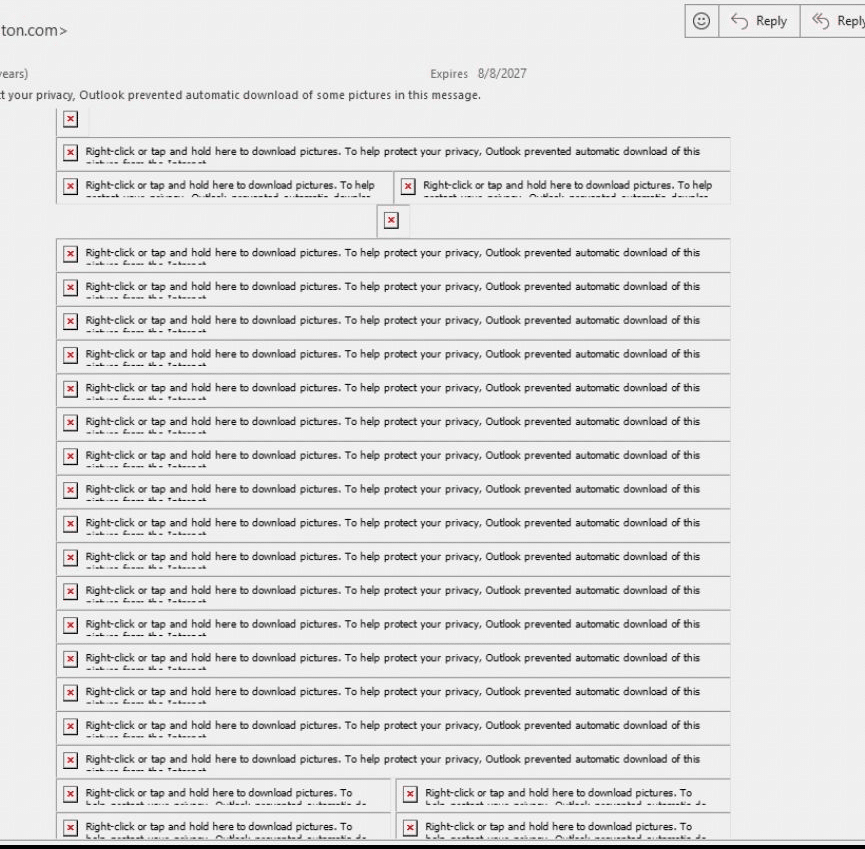
I would love to make a B2B email that renders like a beautiful flysheet, but Outlook isn’t a member of the Creative Suite. Beautiful designs that stack and interact aren’t your friend in an Outlook inbox. Even if you can code your way through most style rendering issues, you’re still faced with the fact that many businesses automatically suppress the download of images in email.
Why bother adding images at all, my B2B email friends? Because a picture is still worth a thousand words. If you’re struggling with the balance of text versus image-based B2B emails, let’s arm you with some talking points.
Less is more, but not never
Before you make any major changes, check your inbox reports. If your marketing automation platform reports on inbox placement, this is your go-to report for making decisions about email design. Here’s an example of what you might see.
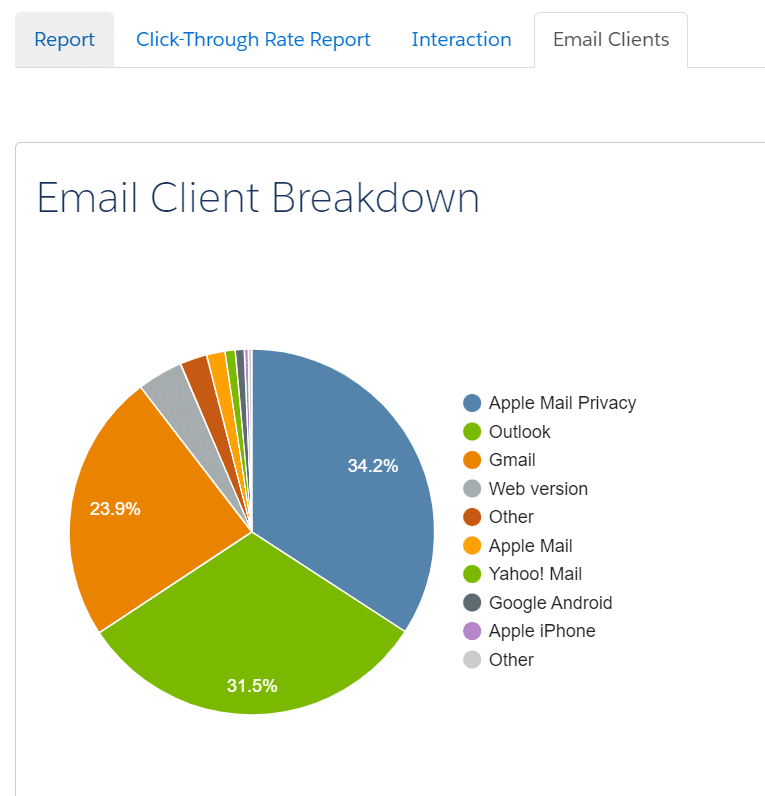
If a large percentage of your audience uses Outlook, keeping your designs simple and less table-heavy is best. Keep in mind that Outlook often turns off images by default, so avoid overly complex designs. While it’s tempting to prioritize design, optimizing for Outlook compatibility is key to ensuring your B2B emails perform effectively in the inbox.
While we’re at it, make yourself a reminder to check on your email fallback fonts and avoid those rounded corners — but that’s a conversation for another article.
Get inspired by other B2B designs
You can be simple and not boring. Really Good Emails is a great place to get inspired by newsletter formats, nurture emails and so much more that’s working well in B2B. Check out their curated list of B2B email designs.
Dig deeper: How to produce brand-approved email designs on time and on budget
Align your email design with your audience’s expectations
If your only image is a stock header or a basic thumbnail, it’s likely not worth downloading. Instead, consider your audience and tailor your design to their expectations.
Give recipients a reason to download images — such as sharing valuable information in a graphic. Add a preface that helps recipients anticipate the image’s content to encourage this. For example, include a dynamic, personalized image with a note like, “We’ve provided your specific results in a quick visual…” followed by the custom graphic.
Customize images based on the recipient
Are you adding any new value to your header images? You could consider creating dynamic header images that trigger off a person’s industry, region or area of interest. Recommended supporting content could also be dynamic. For instance, rather than showcasing one upcoming webinar, why not showcase the one the recipient is most likely to attend based on their buyer profile?
Use alt text strategically
Alt text is essential for accessibility, but it can also be a tool to encourage image downloads. You might make it humorous (if it suits your brand), intriguing or simply descriptive. Rather than just describing the image, consider using alt text to convey the image’s purpose or add a creative touch that invites curiosity.
Deploy hidden images to detect security bots
You can also use images in unconventional ways — like creating captures for security bots. Adding a 1 px by 1 px image into your background with a dedicated link can tell you which recipients have a security bot that might pre-click all email links and lower the engagement score by clicking the link.
Optimize image dimensions for email clients
Use images that fit the space allowed, ideally keeping the width at or below 680 px. Oversized images can disrupt the layout, especially in Outlook, which often ignores specified dimensions and displays images at their full size. For instance, uploading a 1200 px header into a 600 px slot could result in a 1200 px display, causing recipients to scroll horizontally to view the entire email.
Avoid text in images
Avoid placing text directly within images — especially if many of your recipients use Outlook. Text embedded in images can appear blurry, become too small to read on mobile or remain hidden if images aren’t downloaded. While the image may look perfect in your browser’s preview, remember that most recipients won’t have the same large display experience.
Dig deeper: Stop insulting your audience with this email behavior
Test, test and test again
Have an email rendering tool? Use it! Email rendering tools are the best way to see how your new design will look across countless email inboxes — and it’s a lot more user-friendly than sending your email to a dozen of your coworkers.
The post When and how to use images in B2B emails appeared first on MarTech.
# Best Practices for Effectively Using Images in B2B Emails: Timing and Techniques
In the world of B2B marketing, email remains one of the most powerful tools for nurturing leads, engaging prospects, and maintaining relationships with clients. However, the effectiveness of B2B emails is not just about the words you use but also how you present your message visually. Images, when used correctly, can enhance the impact of your emails, making them more engaging and memorable. But when used poorly, they can detract from your message or even lead to deliverability issues.
This article explores the best practices for effectively using images in B2B emails, with a focus on timing and techniques that can help you maximize engagement and conversion rates.
## 1. **Understand the Role of Images in B2B Emails**
Before diving into the specifics, it’s important to understand the role that images play in B2B emails. Unlike B2C emails, where flashy visuals and emotional appeal often drive engagement, B2B emails typically focus on delivering value, building trust, and providing information. Therefore, the images you use should support these goals rather than distract from them.
### Key Roles of Images in B2B Emails:
– **Enhance Understanding**: Visuals such as infographics, charts, and product images can help explain complex ideas more effectively than text alone.
– **Build Brand Identity**: Consistent use of brand colors, logos, and design elements in your images can reinforce your brand’s identity and professionalism.
– **Guide the Reader’s Attention**: Images can be used to direct attention to key parts of your email, such as a call-to-action (CTA) button or an important piece of information.
– **Create Emotional Connection**: While B2B buyers are more rational than B2C buyers, they are still human. Images that evoke trust, confidence, or excitement can help create an emotional connection with your audience.
## 2. **Timing: When to Use Images in B2B Emails**
The timing of when to use images in your emails depends on the type of email you’re sending and the stage of the buyer’s journey your recipient is in. Here are some key considerations:
### A. **Awareness Stage Emails**
In the awareness stage, your goal is to introduce your brand and offer value without overwhelming the recipient. At this stage, images should be used sparingly and strategically. A clean, professional design with a few well-placed visuals can help make your email more inviting without distracting from the core message.
**Best Practices:**
– Use a simple header image that reflects your brand.
– Include a relevant image or infographic that visually represents the problem you’re solving.
– Avoid overly promotional images at this stage.
### B. **Consideration Stage Emails**
At this stage, your prospects are evaluating different solutions. This is where images can play a more significant role in illustrating the benefits of your product or service. Visuals such as product screenshots, comparison charts, and customer testimonials can be highly effective.
**Best Practices:**
– Use product images or screenshots to showcase your solution.
– Incorporate comparison charts or infographics that highlight key differentiators.
– Include images of customer testimonials or case studies to build trust.
### C. **Decision Stage Emails**
In the decision stage, your goal is to close the deal. Here, images should be used to reinforce the final push toward conversion. However, it’s important not to overload the email with visuals, as the focus should remain on the CTA.
**Best Practices:**
– Use a clear, compelling image near the CTA to draw attention.
– Include a testimonial or success story image to reinforce credibility.
– Avoid cluttering the email with too many visuals that could distract from the conversion goal.
## 3. **Techniques for Using Images Effectively in B2B Emails**
Now that we’ve covered when to use images, let’s dive into how to use them effectively. Here are some key techniques to ensure your images enhance your emails rather than detract from them.
### A. **Optimize Image Size for Faster Load Times**
One of the biggest mistakes marketers make is using large, high-resolution images that slow down email load times. In B2B, where many recipients may be opening emails on corporate networks with strict firewalls, slow-loading emails can lead to higher bounce rates and lower engagement.
**Best Practices:**
– Compress images to reduce file size without sacrificing quality.
– Use image formats like JPEG or PNG, which balance quality and file size.
– Aim for a total email size (including images) of less than 100KB to ensure fast load times.
### B. **Use Alt Text for Accessibility and Deliverability**
Many email clients, especially in corporate environments, block images by default. This means that if your email relies too heavily on images, recipients may miss important information. To mitigate this, always include descriptive alt text for your images.
**Best Practices:**
– Write

Recent Comments