

(We’ve updated the guide with a new section on warming up IP addresses.)
Deliverability may not be the most interesting part of email marketing, but it is the most important. It doesn’t matter how good your creatives or offers are if they never get to the email inbox.
Getting to the inbox is getting tougher. Earlier this year, Google and Yahoo started enforcing new requirements for bulk email senders. Fortunately, the requirements help reputable email marketers by making best practices mandatory.
Here is your guide to why the requirements were put in place, the impact and cost of deliverability problems and how to ensure your email always goes through.
Table of contents
- Why are email deliverability rules getting tougher?
- What are the new requirements for bulk email senders?
- The cost of email deliverability failure
- Email deliverability success rates are increasing
- Consumers hate email deliverability failures, too
- Email deliverability best practices
- Should I warm up my IP address?
Why are email deliverability rules getting tougher?
“Google, Yahoo and many other mailbox providers are getting more and more frustrated having to deal with spam,” Al Iverson, industry research and community engagement lead at Valimail, told MarTech. “So you have requirements that are tightening up, meant to make it harder to send unwanted and unsolicited emails.”
How big is the spam problem?
“The latest figure I saw was something like 347,000,000,000 emails sent a day,” Cynthia Price, SVP of Marketing at Litmus, told Martech. “And over half of those, depending on which metrics you look at, are estimated to be spam.” That’s 173,000,000,000 spam emails a day.
“The internet service providers, the Googles and the Yahoos and the Microsofts of the world are really, really trying to do everything they can to hold down the fort and protect our inboxes from mayhem,” said Price.
What are the new requirements for bulk email senders?
The new requirements codify the very well-tested best practices of email marketing.
“Best practices are now transitioning to literally written-up requirements that mailbox providers like Gmail and Yahoo post on their website and say, ‘These are the things you have to do now,’” said Iverson, who is also the longtime publisher of The Spam Resource newsletter.
For the most part, the requirements focus on three areas: authentication of outgoing emails, reported spam rates and the ability to easily unsubscribe from email lists.
Authentication
Bulk email senders — generally those sending emails to at least 5,000 addresses a day — must use the following::
- Sender Policy Framework (SPF) helps prevent domain spoofing by allowing senders to identify the email servers that are allowed to send emails from their domain.
- DomainKeys Identified Mail (DKIM) adds a digital signature to outgoing email, which verifies the message was sent by an authorized sender and wasn’t tampered with along the way.
- Domain-based Message Authentication, Reporting and Conformance (DMARC) helps domain owners specify which actions to take when an email fails authentication. It also enables reporting on email authentication results.
Dig deeper: Gmail spam updates are here: What now?
Spam rates
Google says bulk senders must keep their reported spam rate (i.e., the percentage of outgoing messages reported as spam by recipients) in Google Postmaster Tools below 0.1% and “avoid ever reaching 0.3% or higher.”
Yahoo says the spam rate must be below 0.3%.
Unsubscribe
Yahoo and Google require organizations to make it easy for people to unsubscribe.
This means:
- Use of functioning list-unsubscribe header, which supports one-click unsubscribe for marketing and subscribed messages.
- Have a clearly visible unsubscribe link in the email body.
- Process unsubscribe requests within two days.
“No more trying to hide the unsubscribe link or sending people to a landing page that has a phone number on it,” said Price. “I see lots of that still happening and that’s just got to stop. People need to be able to remove themselves from your list because if you force them to stay on it, all you are doing is frustrating them further and encouraging them to mark you as spam every single time.”
The cost of email deliverability failure
According to Mailtrap, the cost of undelivered emails for U.S. businesses is:
- $164+ million daily.
- $1.1+ billion weekly.
- $4.9+ billion monthly.
- $59.5+ billion yearly.
Deliverability problems cost more than $15,000 for every million emails sent, according to a report by Validity.
“A lot of people don’t understand they have deliverability problems until it’s too late,” said Price. “And, much like a credit score, it takes time to build it back up and to be recognized as a safe sender.”
Email deliverability success rates are increasing
- Over the past three years, the average deliverability rate improved from 94.26% in 2020 to 96.43% in 2023.
- The average bounce rate was 1.98%.
- Over the past four years, the ecommerce industry has seen the biggest improvement in deliverability rates (10.28% rise) and a drop in bounce rates (0.7%).
- The overall average unsubscribe rate decreased 26.32% over the past 4 years.
- The overall spam rate went down by 44.4% in 2023 compared to 2020.
Source: Selzy Email Marketing Performance by Industry, 2024 Benchmarks
Dig deeper: New rules for bulk email senders from Google, Yahoo: What you need to know
Consumers hate email deliverability failures, too
Businesses are not the only ones upset when an email doesn’t go through. Consumers want emails when the content interests them. They are unhappy if they don’t get them.
According to a report from Mailgun:
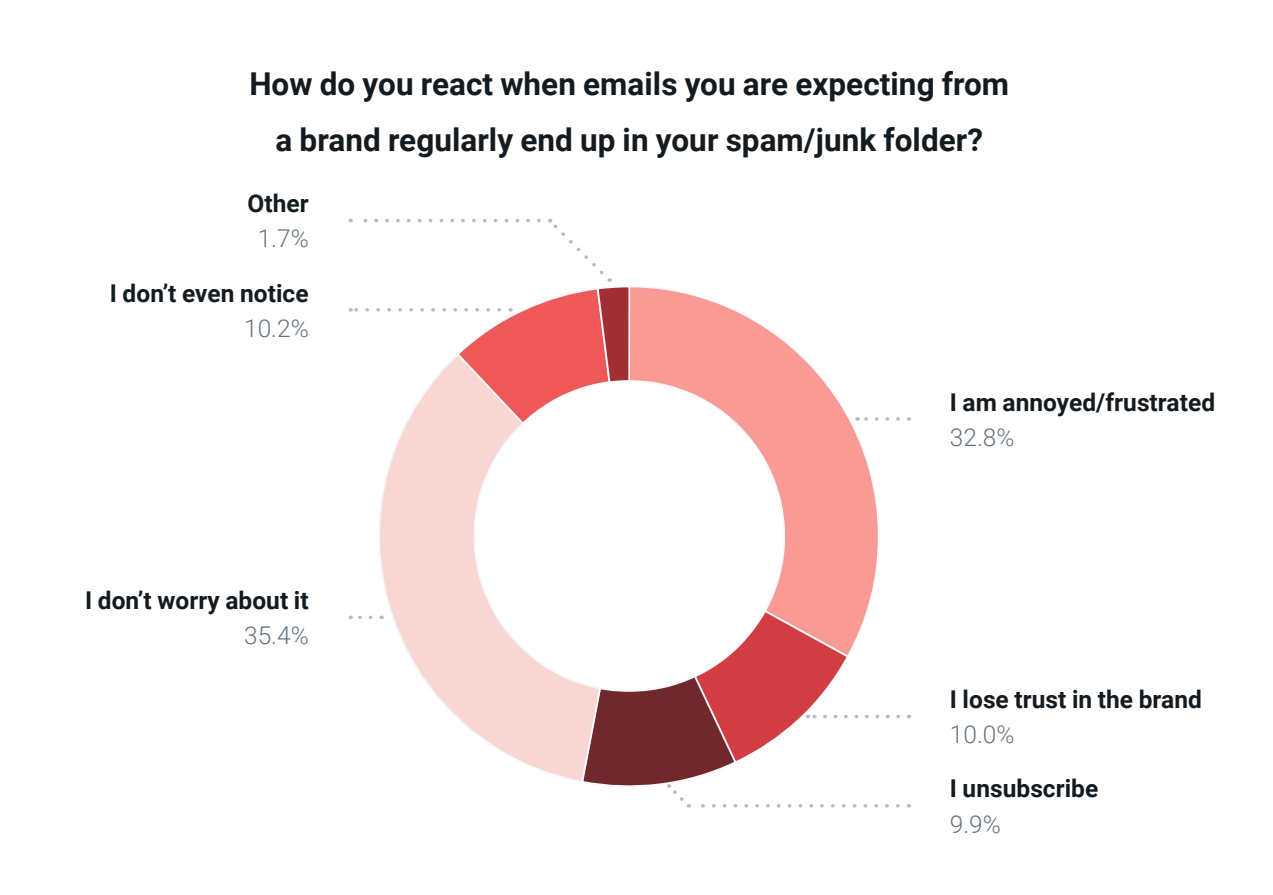
- When emails from a brand regularly land in spam, 52.7% of consumers say they would either feel frustrated, lose trust, or unsubscribe as a result.
- Over 70% of consumers check their spam folders to see if important emails are missing, and almost 33% find it annoying when they find emails from brands in their spam folders.
Email deliverability best practices
Tighter regulations are also clearer regulations. Yahoo and Google are making the requirements very clear to everyone.
“The good news is they are really trying to be transparent about what their algorithms are, how they measure bad practices and what they look for,” said Price. “It’s important to stay up to speed on what those are. What are you supposed to be doing?”
These best practices can be summed up as, “DO NOT SPAM.” Send relevant content to people who’ve said they want to hear from you.
Monitor your inbox placement rate. This tells you if your email program is working and when messages are blocked by mailbox providers.
Keep your email lists clean. Be sure there are no spam traps, unknown users and inactive subscribers. Use a double opt-in process to reduce inactive and spam addresses on your list. Use a contact verification solution on your existing list and be sure new addresses are verified as they are added.
Send regularly and consistently. Spammers send email in different volumes and not at set times. Be sure your email volleys are similar in size and sent at regular intervals. “Implement a preference center so subscribers can say, ‘Actually, I only want one email a month from you, or I want every email you’re ever going to send,’” said Price. “You’ll have both types in your audience, but treating them all the same is really where people get into trouble.”
Monitor sender reputation. Sender reputation is the combination of IP reputation — the trustworthiness an IP has based on its sending history, and domain reputation — the trustworthiness of an email-sending domain based on engagement, spam complaints, bounce rates and more. It is one of the main factors mailbox providers use to determine whether messages should go to the inbox, the spam folder, or be blocked entirely. A Sender Score is a numerical representation of your sender reputation, you can check it for free at SenderScore.org.
Use BIMI to boost trustworthiness. Brand Indicators for Message Identification (BIMI) place a brand logo on your emails, This proves your emails are from a verified, trustworthy sender and are OK to open.
“There are a couple of simple things that should be top of mind, but the most basic of which is just to make sure that the content you’re sending is relevant and valuable to the audience,” said Price. “And that’s the hardest thing to solve for, but that’s what’s going to actually keep people from thinking of you as spam and from marking you as spam.”
Should I warm up my IP address?
Warming up an IP address involves gradually increasing the number of emails sent from a dedicated IP address over four to six weeks. Is it important for deliverability? Absolutely.
“If you have a dedicated IP, 100% you need to be warming it up,” said Price. “One of the biggest signals for the ISPs when they’re looking at email behavior that’s coming into their systems is somebody sending from a fresh IP with a lot of volume.”
Establishing a safe sender history with ISPs is essential. Doing large mailings without that history is a giant red flag for providers because that’s how most fraudulent emails — phishing, spam, malware, etc. — are sent.
“Feed a little wanted mail at first, growing that volume over time,” said Iverson. “You’re spoon-feeding the baby. You let the baby digest it and understand that it’s not going to hurt them, not going to hurt their users.”
The post Email deliverability: What you need to know appeared first on MarTech.
# Essential Insights on Email Deliverability: Key Factors You Should Understand
In today’s digital landscape, email remains one of the most effective channels for communication and marketing. However, the success of your email campaigns hinges on one critical factor: deliverability. Email deliverability refers to the ability of your emails to successfully reach your recipients’ inboxes. Poor deliverability can lead to your emails being marked as spam or, worse, not being delivered at all. To ensure your emails reach their intended audience, it’s essential to understand the key factors that influence email deliverability.
## 1. **Sender Reputation**
Your sender reputation is one of the most crucial factors affecting email deliverability. Internet Service Providers (ISPs) use your sender reputation to determine whether your emails should be delivered to the inbox, sent to the spam folder, or blocked entirely. Several factors contribute to your sender reputation:
– **Bounce Rate:** A high bounce rate indicates that many of your emails are being sent to invalid addresses. This can harm your sender reputation. Regularly clean your email list to remove invalid or inactive addresses.
– **Spam Complaints:** If recipients frequently mark your emails as spam, your sender reputation will suffer. Ensure that your emails are relevant and that you have explicit permission to contact your recipients.
– **Engagement Metrics:** ISPs monitor how recipients interact with your emails. High open rates, click-through rates, and low unsubscribe rates indicate that your emails are well-received, which can improve your sender reputation.
## 2. **Email Authentication**
Email authentication is a process that verifies the legitimacy of your emails, helping to protect against phishing and spoofing attacks. Proper authentication is essential for improving deliverability. The three main authentication protocols are:
– **SPF (Sender Policy Framework):** SPF allows domain owners to specify which IP addresses are authorized to send emails on their behalf. This helps prevent spammers from sending emails that appear to come from your domain.
– **DKIM (DomainKeys Identified Mail):** DKIM adds a digital signature to your emails, which allows the recipient’s server to verify that the email was indeed sent by the domain owner and that it hasn’t been altered in transit.
– **DMARC (Domain-based Message Authentication, Reporting & Conformance):** DMARC builds on SPF and DKIM by providing instructions to receiving servers on how to handle emails that fail authentication. It also provides reporting, so you can monitor and improve your email authentication practices.
## 3. **Content Quality**
The content of your emails plays a significant role in deliverability. ISPs use content filters to detect spammy or malicious content. To ensure your emails pass these filters, consider the following:
– **Avoid Spam Trigger Words:** Words and phrases like “free,” “guaranteed,” “urgent,” and “act now” can trigger spam filters. Use these terms sparingly and in context.
– **Balance Text and Images:** Emails that contain too many images or too little text can be flagged as spam. Aim for a balanced ratio of text to images.
– **Personalization:** Personalized emails are more likely to engage recipients and avoid spam filters. Use the recipient’s name and tailor the content to their preferences or past interactions.
– **Clear Unsubscribe Option:** Always include a clear and easy-to-find unsubscribe link in your emails. This is not only a legal requirement but also helps reduce spam complaints.
## 4. **List Management**
Effective list management is essential for maintaining good deliverability. Here are some best practices:
– **Double Opt-In:** Use a double opt-in process to ensure that recipients genuinely want to receive your emails. This involves sending a confirmation email after someone subscribes, requiring them to click a link to confirm their subscription.
– **Segment Your List:** Segmenting your email list allows you to send more targeted and relevant content to different groups of recipients. This can lead to higher engagement rates and lower unsubscribe rates.
– **Regularly Clean Your List:** Remove inactive subscribers and invalid email addresses from your list. Sending emails to inactive or non-existent addresses can harm your sender reputation.
## 5. **Sending Practices**
Your sending practices can also impact deliverability. Consider the following:
– **Consistent Sending Schedule:** Sending emails at consistent intervals helps ISPs recognize your sending patterns and can improve deliverability. Avoid sending large volumes of emails all at once, as this can trigger spam filters.
– **Warm-Up Your IP Address:** If you’re using a new IP address to send emails, start by sending small volumes of emails and gradually increase the volume over time. This process, known as IP warming, helps establish a positive sender reputation.
– **Monitor Blacklists:** Regularly check if your domain or IP address is listed on any email blacklists. If you find yourself on a blacklist, take immediate steps to resolve the issue and improve your practices.
## 6. **Compliance with Regulations**
Compliance with email regulations is

Recent Comments