
Divi empowers you to build the best websites possible, and now, Divi Quick Sites takes website creation to a whole new level. This revolutionary tool lets anyone, regardless of skill level, generate a complete website in under two minutes! Divi Quick Sites provides everything you need to launch your dream website instantly. You can choose a pre-made Starter Site that’s been professionally designed, or Divi AI to generate an entire new design.
Each Starter Site comes pre-loaded with all essential web pages, stunning Theme Builder templates, customizable global styles and presets, and a ready-made navigation menu. But that’s not all! Divi Quick Sites are completely customizable with Divi’s drag-and-drop page builder.
Let’s dive deeper into the Divi AI Starter Sites and discover what’s included!
What is a Divi Starter Site?
Our revolutionary new product, Divi Starter Sites, automatically generates an entire Divi website in under two minutes. Our design team professionally designs each Divi Starter Site, which builds a fully functional website. This website includes all core web pages, global styles, and dynamic Theme Builder templates. You can fully customize all of these elements with Divi’s Visual Builder.
In addition to core pages and templates, every Divi Starter Site sports a user-friendly menu that guides your guests effortlessly through your website. Divi Starter Sites are also ecommerce ready. If you need an online store, tick a checkbox, and Divi will install WooCommerce and all related templates to support it.
Each template and core page created uses Divi’s global preset functionality, so all Divi Modules will have their own styles that can be applied to any page you create in the future. Lastly, all images used in Divi Starter Sites are royalty-free and suitable for commercial use. A Divi Starter Site is the perfect solution for building quick, effective websites while improving your workflow.
Discover What’s Included in the AI Starter Site for Divi
Every Divi Starter Site has everything you need to create a complete website in minutes, from core pages to Theme Builder templates to global presets. Let’s take a closer look at what’s included with the AI Starter Site for Divi, so you’ll understand its phenomenal value.
Core Website Pages
Divi offers the AI Starter Site to showcase your business. It includes core web pages to showcase your services, contact information, and a brief company history. Here’s a closer look at what’s included.

Theme Builder Templates
Divi’s Theme Builder is a powerful tool that allows you to go beyond editing individual pages and control the overall layout of various sections of your website, including the header, footer, posts, and products. Theme Builder templates ensure that your site has a consistent look and feel. By using Theme Builder templates, you can create a cohesive and user-friendly website that reflects your realty business’s brand identity and keeps visitors returning for more.

Starter Sites Are WooCommerce Ready
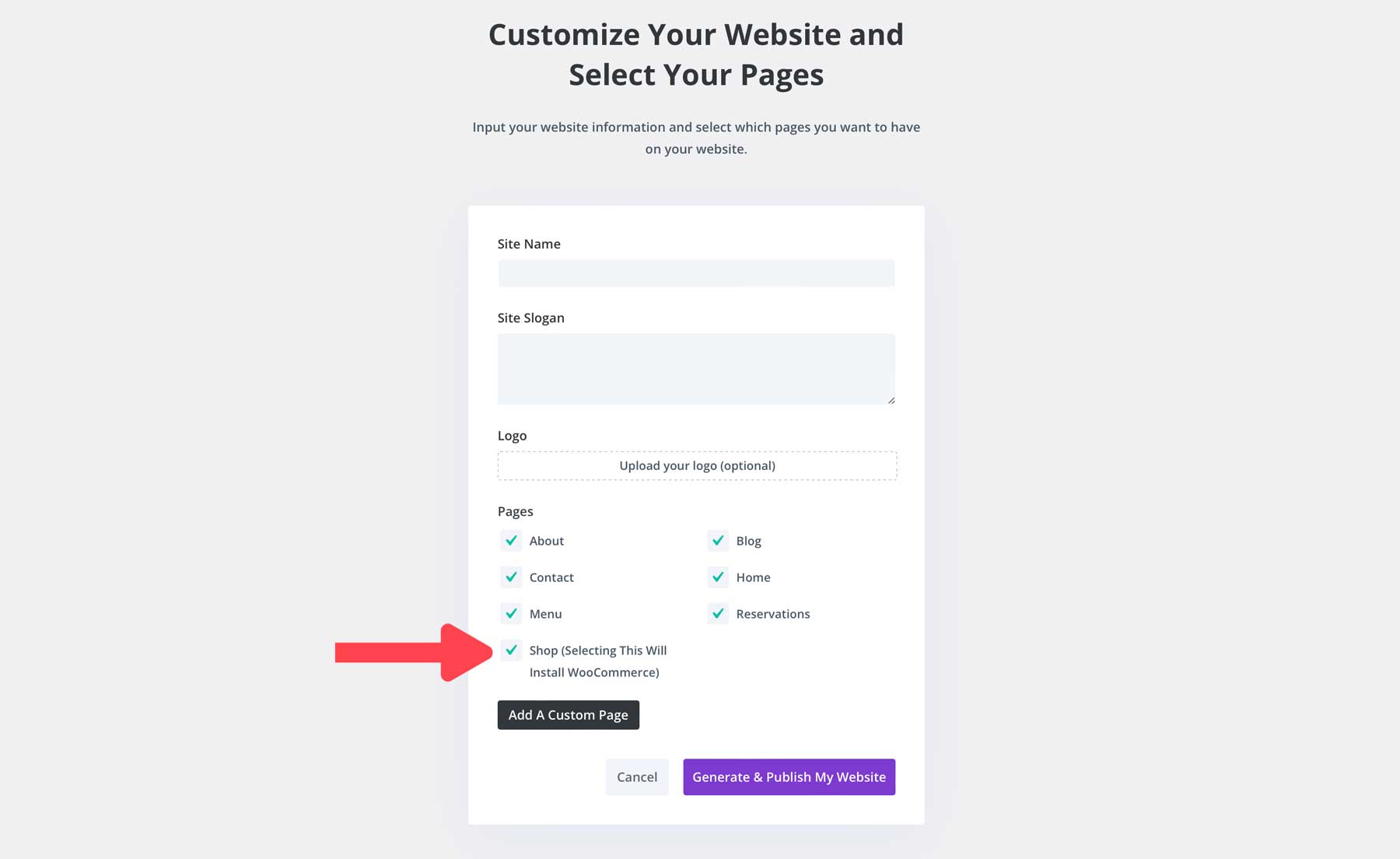
Divi Starter Sites go beyond stunning design and efficiency – they’re built with ecommerce in mind! With just a few clicks, you can have a fully functional online store up and running in minutes. Divi automatically installs and configures WooCommerce, eliminating the need for manual setup and saving you valuable time and effort. Simply tick a check box during the generation process, and Divi will install a beautiful shop page along with product, cart, and checkout templates.
Divi Starter Sites takes advantage of Divi’s powerful ecommerce integration, boasting a library of 20+ WooCommerce modules, allowing you to craft a unique and user-friendly online ordering experience. From product grids and countdown timers to eye-catching CTAs, Divi empowers you to create a store that converts.
With Divi Starter Sites and WooCommerce, you can feature mouthwatering dishes, offer convenient online ordering, promote special offers and bundles, and accept online payments easily and safely.
Global Presets, Fonts, and Colors
Every Divi Starter Site comes with global colors, fonts, and presets, making it easy to swap styles to match your branding. This essential makes any module within these layouts reusable. That way, anytime you add a new button, headline, or other Divi module to a new page or section on an existing page, the design will remain consistent. Global colors are located within any module’s settings in the Design tab.

Regarding fonts, if you open any module with text, you’ll notice that each text area within the starter site uses a default header and body text. When your site is being generated, Divi controls the site’s settings through the WordPress Customizer. That way, if you’d like to choose different fonts, they’ll be applied across the website, rather than needing to be changed at the module level.

Finally, the global presets included in every Divi Starter Site allow you to keep design elements consistent across your website, should you create new sections or pages. Every module’s presets are located underneath the header section within a module. Click the dropdown menu to reveal the presets associated with a module.

A dialog box will appear revealing a list of presets.

To edit a preset, click the pencil icon next to the preset’s name, make any design changes you wish, and save the preset to apply it to all instances of it across your website. We’ll go more in-depth on this a bit later in the post.

How to Launch a Starter Site in the Divi Dashboard
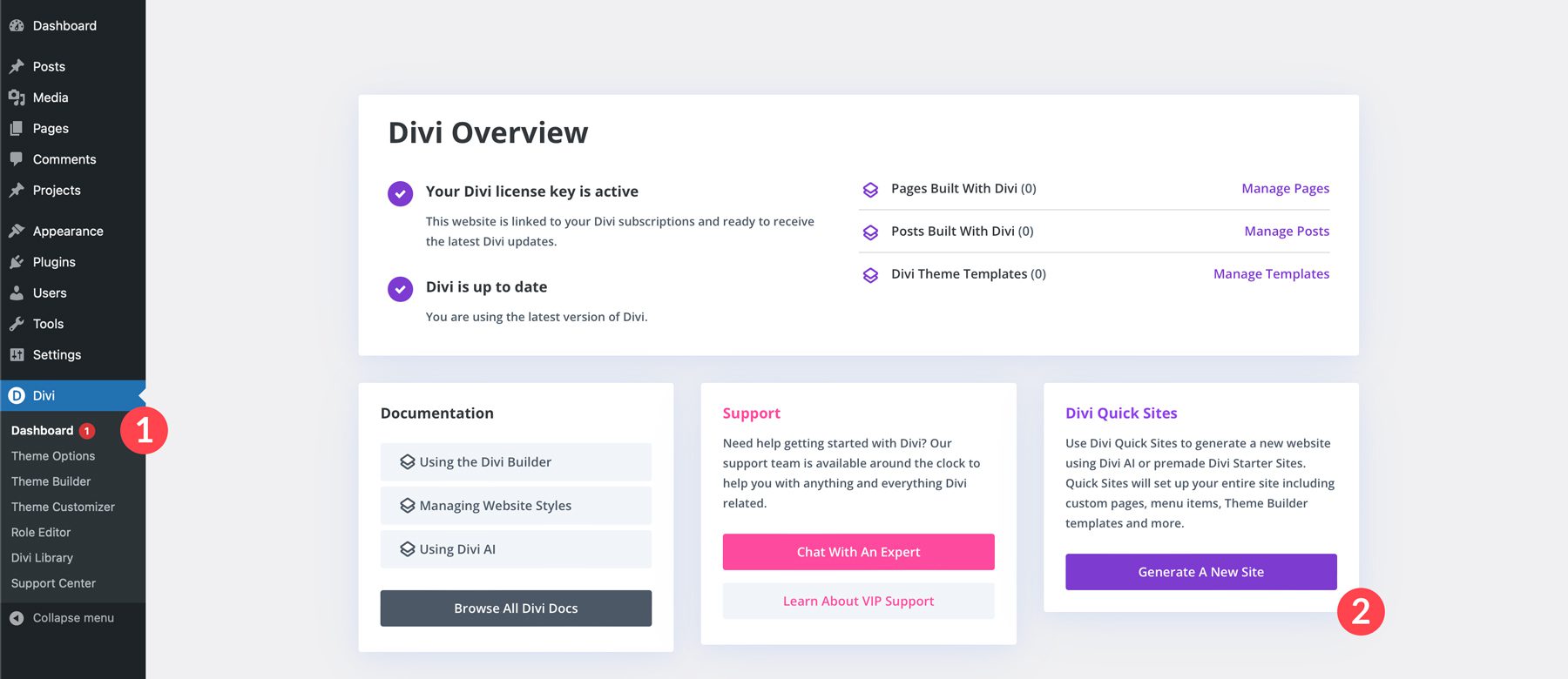
In the latest version of the Divi Theme, there’s a new menu item called Dashboard in Divi’s settings. Under Divi Quick Sites, select the Generate A New Site button to get started.
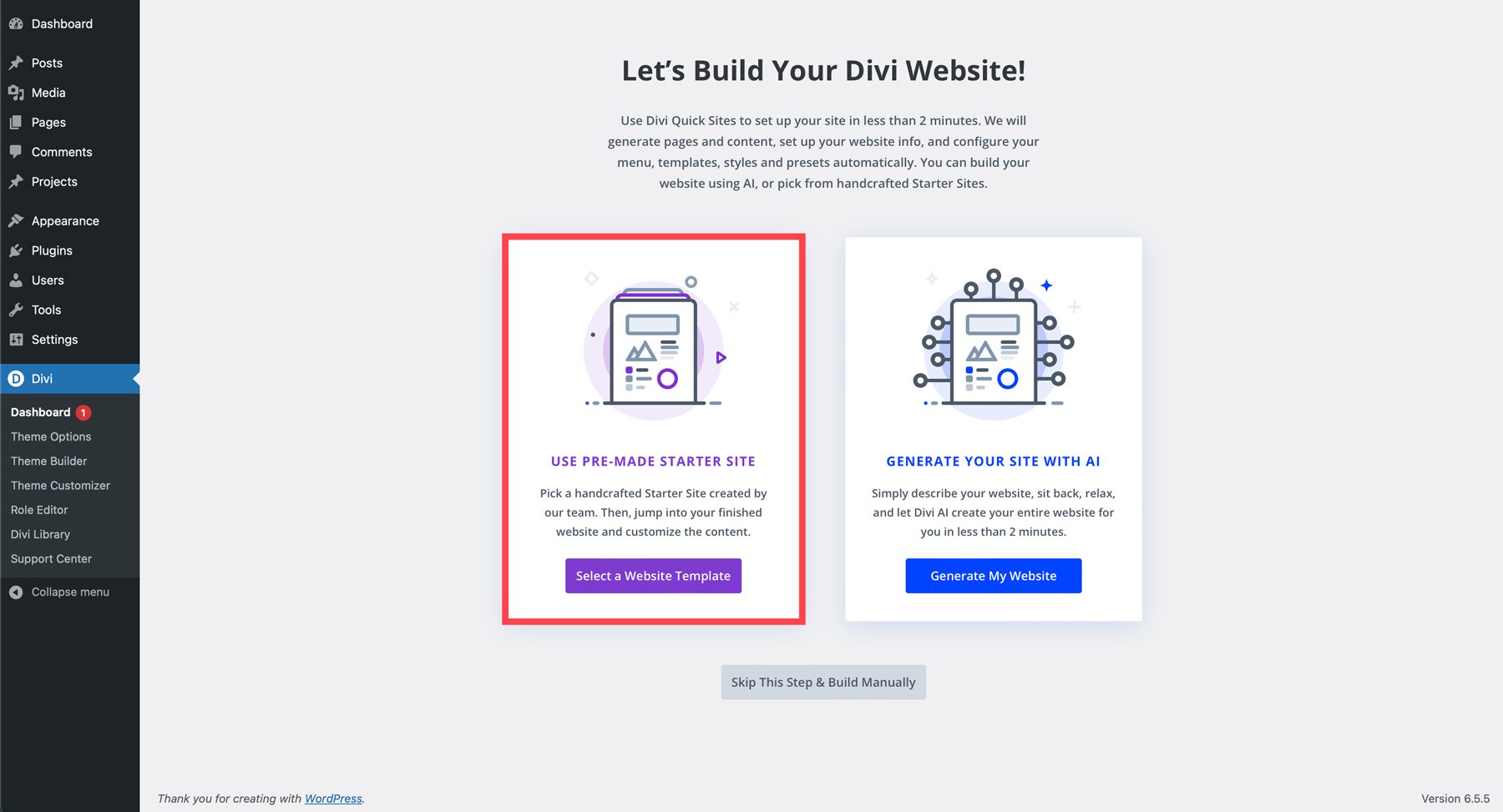
When the screen refreshes, you’ll have two options to build your Divi website: starting with a website template or generating a site with AI. Choose Select a Website Template.
Next, select the template you want to install on your Divi website.

You can preview the Starter Site or install it by clicking the Start With AI button.

A dialog box will appear, allowing you to enter a site name, slogan, logo, and pages. You can add additional pages by clicking the Add a Custom Page button. When your settings are in place, click the Generate & Publish My Website button.
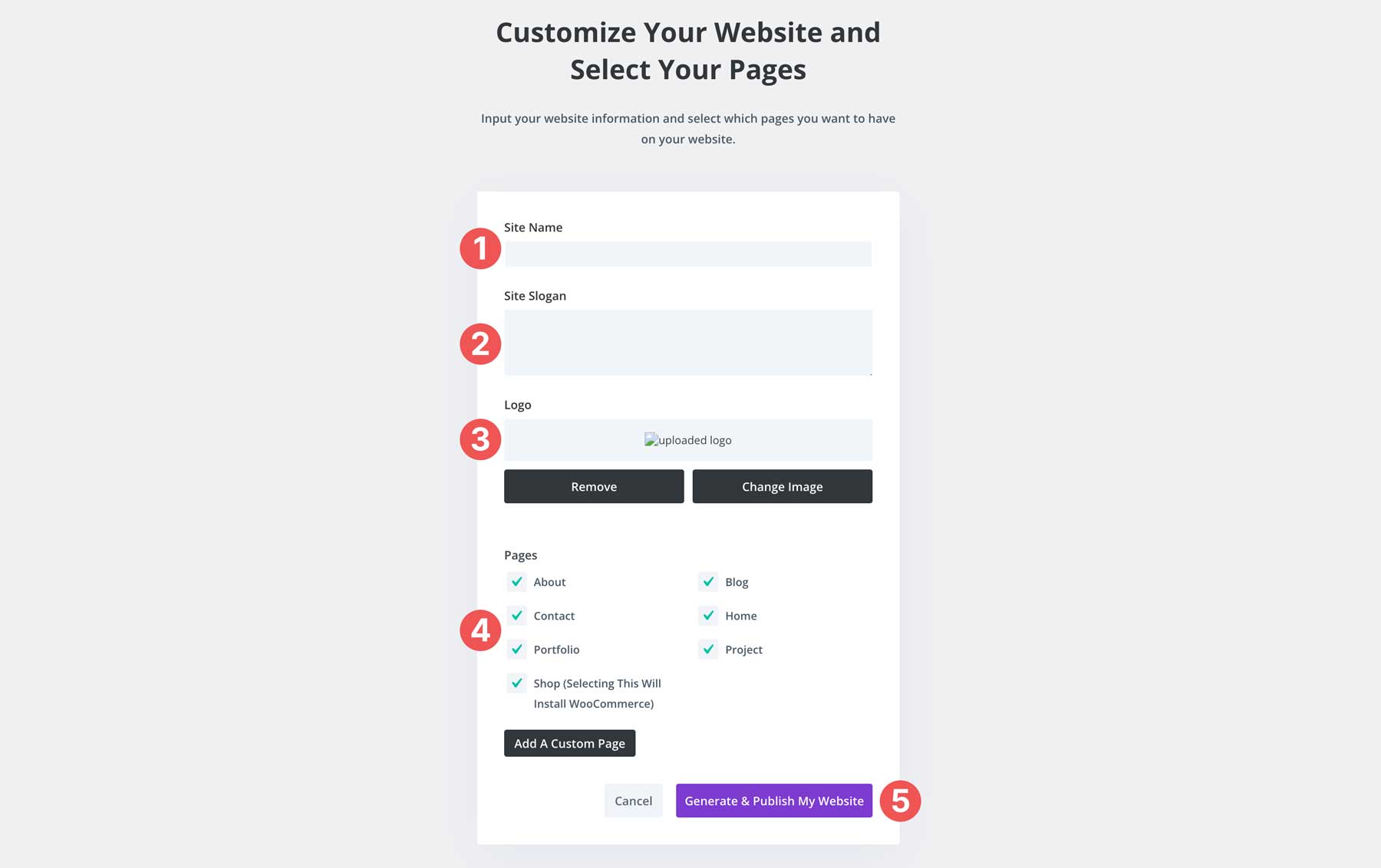
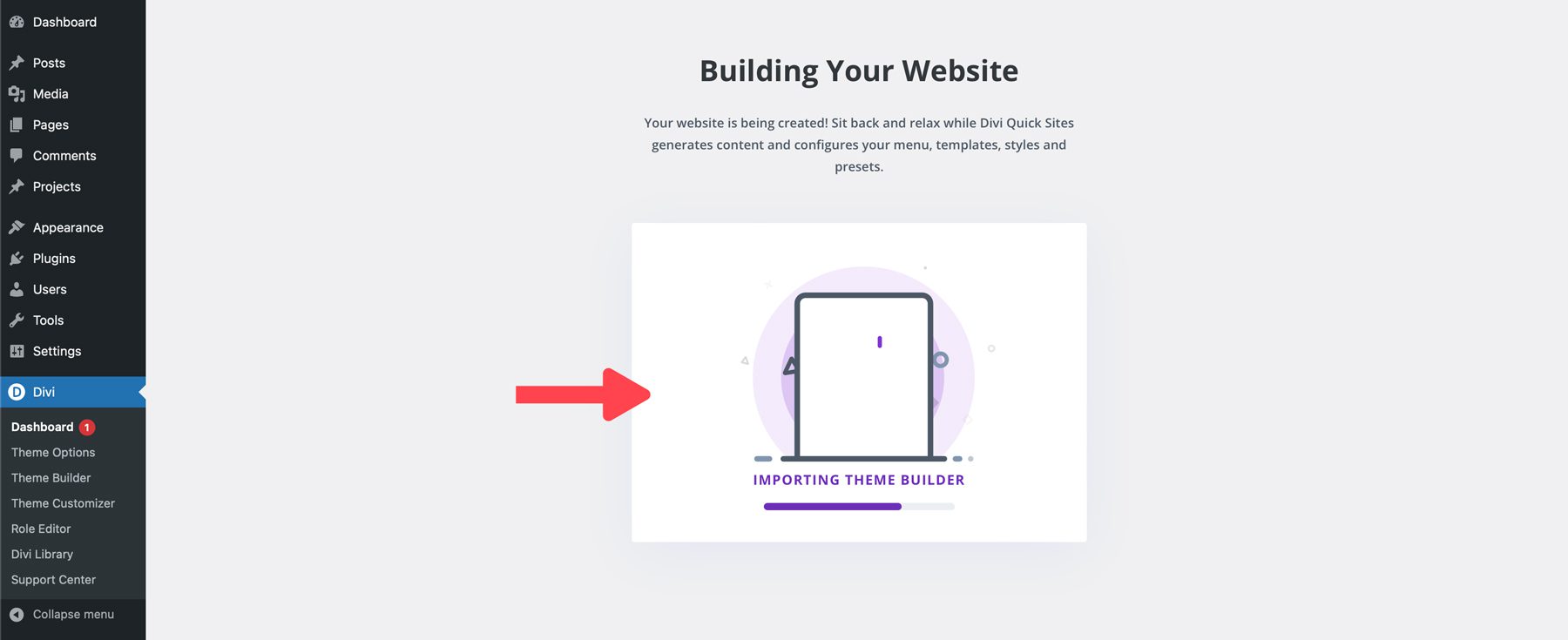
Divi will create your website’s page, add all appropriate template files for posts, archives, and search results, and configure your menu, styles, and presets.
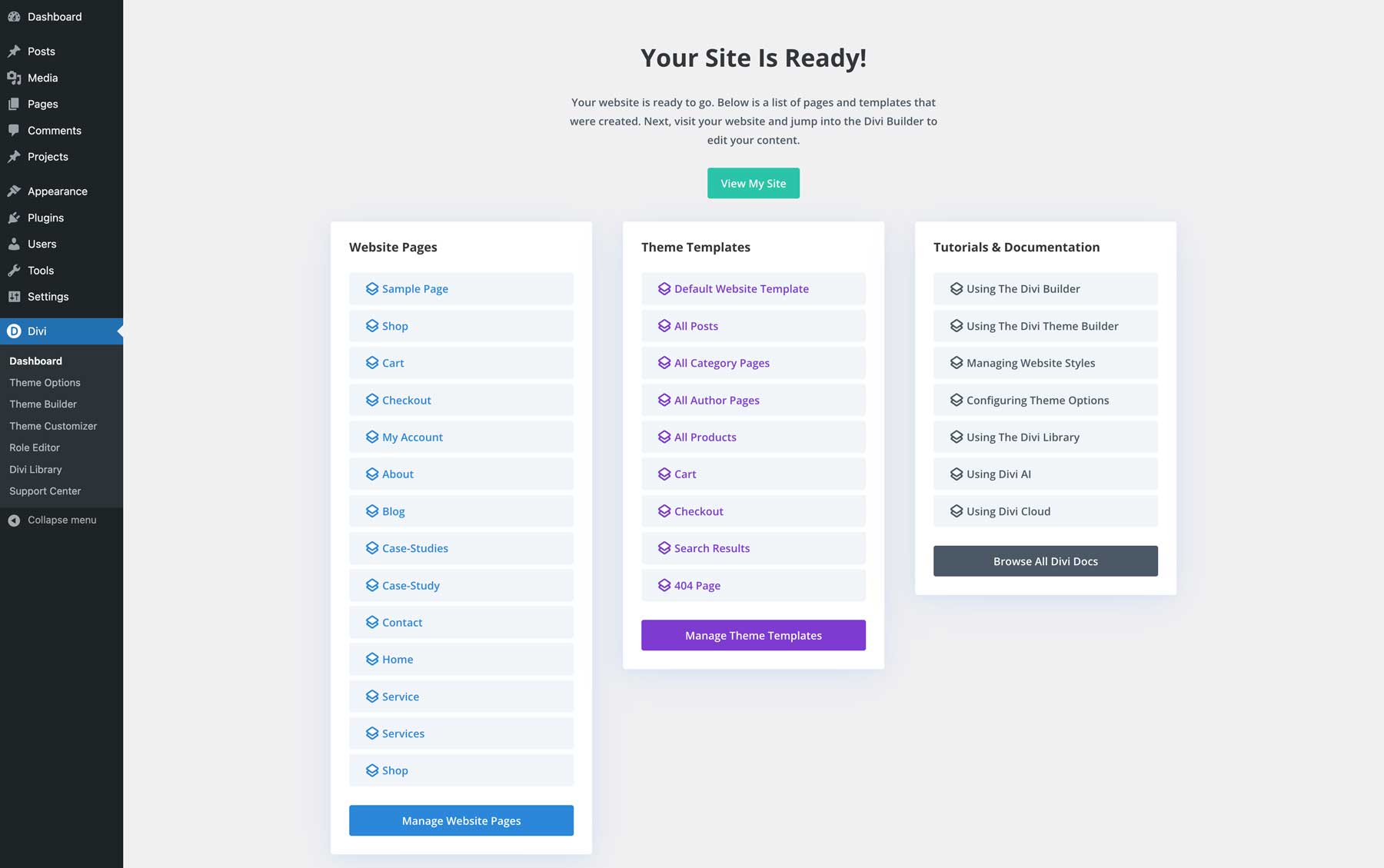
Once your site is created, you can view it, manage its pages and templates, and access helpful tutorials and documentation to prepare for success with Divi.
Fully Customizable: How to Modify Your Starter Site
Divi’s Starter Sites are a fantastic way to jumpstart your Divi website. But what if you want to put your own unique spin on things? Divi’s global presets, and Theme Builder templates allow you to customize your Divi Starter Site exactly how you envision it.
Editing Divi Starter Site Theme Builder Templates
Every Divi Starter Site comes with Theme Builder templates that control the overall layout of specific parts of your website, like headers, footers, and blog posts. Once your site is created, you can view its associated templates by navigating to Divi > Theme Builder.
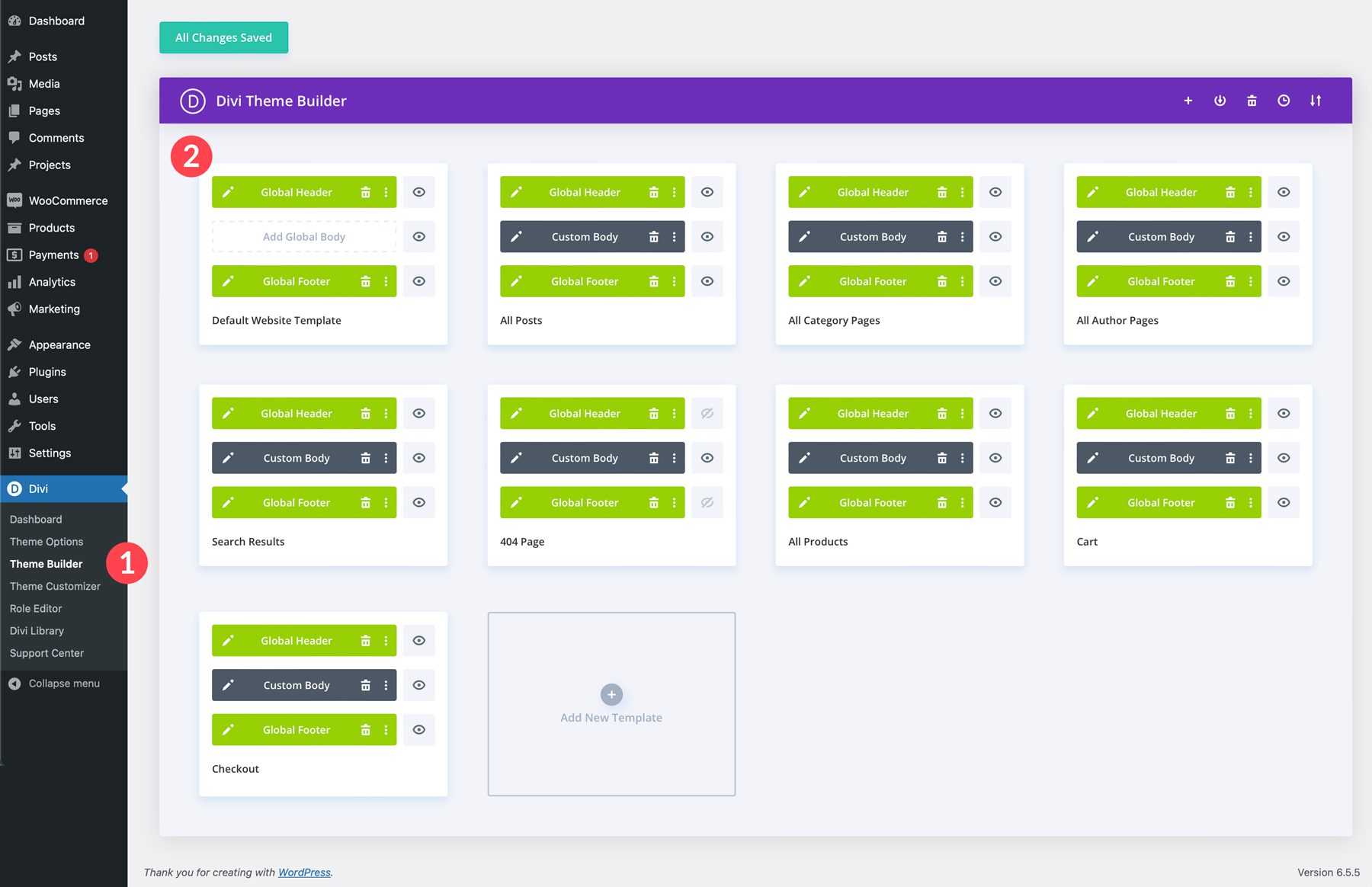
Any Starter Site’s templates can be edited by clicking the pencil icon to the left of any template’s global header, custom body, or global footer section. Changes will be reflected regardless of the template you edit when editing the header or footer. Click the pencil icon for Default Website Template to demonstrate.
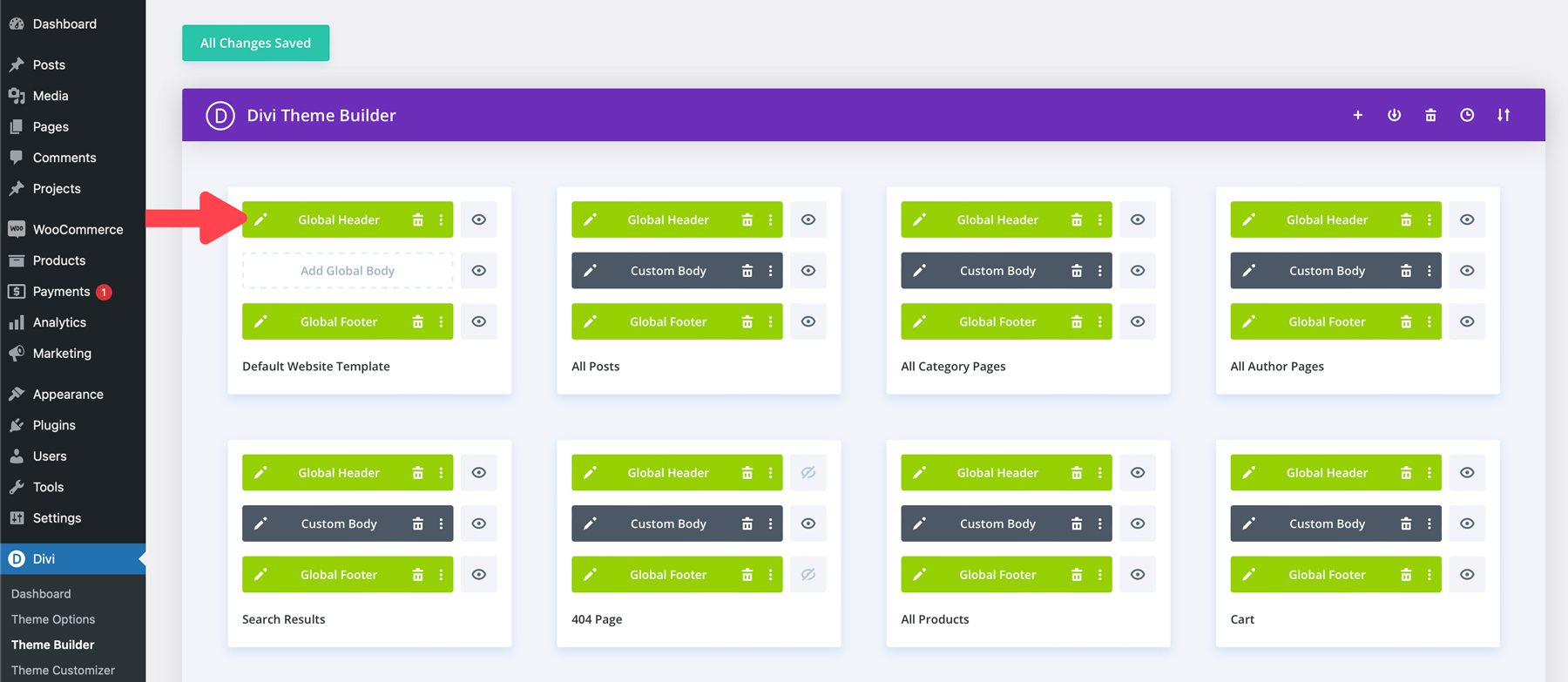
When the template opens, you can edit the header’s background color, add a logo, or adjust fonts and colors in the menu settings using the Visual Builder. Add, remove, and style Divi modules like on a web page.

Here’s the beauty of using templates. Any changes you make to the Header (or any other Theme Builder template) are automatically updated across your entire website, wherever that template is used.
Divi Global Presets
Divi global presets are reusable styles for any Divi module. Imagine them like little style templates you can apply to buttons, text modules, blurbs, or any other module. When you create a global preset for a specific module, such as a button, you can apply it as the default button or create a new preset to apply to any button on your website. That way, when you make a global preset for your standard button style, text style, or any other module you use frequently, you can apply it whenever and wherever you need it.
Divi Starter Sites come with presets for every module used in its pages and templates, so there’s no need to create new ones. However, there may be situations where you want to edit the existing presets to match your brand’s styling. Thankfully, Divi makes that a breeze.
Edit An Existing Preset
We’ll edit the home page on the new starter site to edit a global preset. Click Enable Visual Builder from the front end.

Hover over the button module on the page and click the grey + icon to edit it.

As mentioned previously, all Starter Sites for Divi have their own presets. For example, we’ll edit one of the Starter Site’s current button presets. To do so, click the dropdown arrow next to the preset area under the module’s header.

Next, locate the preset for the module, in this case, AI White. Hover over the preset to reveal the preset’s menu. Click the pencil icon to edit the preset.

When editing Divi presets, the module’s header will turn purple to grey, indicating that design changes are occurring.

Make any design changes you’d like and save the module by clicking the green check button.

A dialog box will appear at the bottom asking if you’re sure you’d like to make changes to the preset. Select Yes to save the changes.

The module’s header will turn purple again. Click the green save button a final time to save the preset.

Customizing Global Fonts and Colors
Divi makes customizing your Starter Site’s global fonts and colors easy through the WordPress Customizer. You can make changes globally and watch as they magically apply to your entire website. To access the WordPress Customizer, select Theme Customizer from the dropdown menu on the front end.

There are four key areas to focus on in the WordPress Customizer. First is the typography. You can easily change your heading and body fonts, font size, and more by navigating to General Settings > Typography.

Under General > Layout Settings, you can adjust the site width and add primary and secondary colors.

Your customization options extend beyond fonts and site colors. With a few clicks, you can also adjust your website’s buttons.

As you can see, Divi Starter Sites makes it easy to adjust fonts, colors, and other website settings globally.
Jumpstart Your Divi Website with a Starter Site
Gone are the days of starting at a blank page and being overwhelmed by where to start. With Divi Starter Sites, you can create your new website in minutes, not weeks or months. With stunning web page layouts, seamless WooCommerce integration, and the ability to make global style changes in a few clicks, Divi Starter Sites provides everything you need to create a beautiful and functional website that showcases your brand beautifully.
Purchase a Divi subscription today and explore the power of Divi Quick Sites!
The post New Starter Site for AI (Quick Install) appeared first on Elegant Themes Blog.
# Introducing the Quick Install Guide for the New AI Starter Site
In today’s fast-paced digital landscape, businesses and developers are increasingly turning to artificial intelligence (AI) to enhance their operations, improve customer experiences, and drive innovation. However, the complexity of setting up AI-driven platforms can often be a barrier to entry. To address this challenge, we are excited to introduce the Quick Install Guide for the New AI Starter Site, designed to streamline the process and empower users to harness the power of AI with ease.
## What is the AI Starter Site?
The AI Starter Site is a comprehensive platform that provides users with the tools and resources needed to kickstart their AI projects. Whether you are a seasoned developer or a newcomer to the field, this site offers a user-friendly interface, pre-built templates, and a wealth of educational materials. The goal is to simplify the integration of AI technologies into existing workflows and applications, making it accessible to everyone.
## Key Features of the AI Starter Site
1. **User-Friendly Interface**: The AI Starter Site is designed with simplicity in mind. Its intuitive layout allows users to navigate through various features without the need for extensive technical knowledge.
2. **Pre-Built Templates**: To expedite the development process, the site offers a variety of pre-built templates tailored for different industries and use cases. These templates can be customized to fit specific needs, saving users valuable time and effort.
3. **Comprehensive Documentation**: The Quick Install Guide is part of a larger documentation suite that provides step-by-step instructions, best practices, and troubleshooting tips. This ensures that users have the support they need at every stage of their AI journey.
4. **Community Support**: Users can connect with a vibrant community of developers, data scientists, and AI enthusiasts. This collaborative environment fosters knowledge sharing and provides opportunities for networking and mentorship.
5. **Integration Capabilities**: The AI Starter Site is designed to integrate seamlessly with popular programming languages, frameworks, and cloud services, allowing users to leverage existing tools and infrastructure.
## The Quick Install Guide: A Step-by-Step Overview
The Quick Install Guide is a crucial resource for users looking to set up their AI Starter Site quickly and efficiently. Here’s a brief overview of the installation process:
### Step 1: System Requirements
Before diving into the installation, ensure that your system meets the necessary requirements. This includes compatible operating systems, hardware specifications, and software dependencies. The Quick Install Guide provides a detailed list to help you prepare.
### Step 2: Downloading the Installer
Visit the AI Starter Site and navigate to the download section. Here, you will find the installer package tailored for your operating system. Download the appropriate version and save it to your local machine.
### Step 3: Running the Installer
Once the download is complete, locate the installer file and run it. Follow the on-screen prompts to initiate the installation process. The installer will guide you through the necessary steps, including selecting installation directories and configuring initial settings.
### Step 4: Configuration
After installation, you will need to configure the AI Starter Site to suit your specific needs. This includes setting up user accounts, defining project parameters, and integrating any required APIs or data sources. The Quick Install Guide offers detailed instructions for each configuration option.
### Step 5: Testing the Installation
Once configuration is complete, it’s essential to test the installation to ensure everything is functioning correctly. The Quick Install Guide includes a series of test scenarios and troubleshooting tips to help you identify and resolve any issues.
### Step 6: Getting Started with Your First Project
With the installation complete and tested, you’re ready to embark on your AI journey. The AI Starter Site provides a variety of resources, including tutorials, sample projects, and community forums, to help you get started on your first AI project.
## Conclusion
The introduction of the Quick Install Guide for the New AI Starter Site marks a significant step towards making AI technology more accessible to a broader audience. By simplifying the installation process and providing comprehensive resources, we aim to empower users to explore the vast potential of AI. Whether you are looking to automate processes, analyze data, or enhance user experiences, the AI Starter Site is your gateway to innovation. Embrace the future of technology and get started today!

Recent Comments