


This is a warning to all business professionals. If you’re an agency in the world of data collection (analytics, marketing, etc.), this might be a “shame on you” moment.
Data is the lifeblood of all organizations. Without it, how can executives, business owners and managers make day-to-day and long-term decisions? Yet, for many organizations, the question of who owns their data rarely arises — until problems emerge.
I thought this issue had been resolved long ago, but with several new clients, it has resurfaced as a top priority. Each case was slightly different, but they all boiled down to the client not owning or controlling 100% of their analytical or marketing data.
In all instances, the client’s old agencies claimed things like, “We use proprietary code, so we can’t share it,” or “It’s all under our account and can’t be transferred.” In most cases, the agencies are holding the client’s data hostage in hopes of retaining them. This was a common practice 25-30 years ago in the early days of digital marketing, but I thought it had faded away. I was wrong. Here are some recent examples.
Analytics data
A client hired an agency to implement, configure and maintain their site’s analytics. Eventually, the client became dissatisfied and wanted to switch agencies. As the new agency, I said, “No problem — just grant us admin rights and remove the old agency’s access.” That’s when they discovered they only had view access to the data. When they asked the previous agency for admin-level access, they were told no, because the data was “owned by the agency” and was set up by the agency for their own use.
In another case, the client had property admin access, allowing it to make configuration changes, but no rights to manage users.
In one of these cases, the client eventually gained full admin control, including user management and severed ties with the old agency. In the other case, the old agency refused to transfer access, and the only solution was to export the historical data to a data warehouse and then rebuild the analytics account from scratch.
Dig deeper: Data plus analytics is the route to the truth
Tag Manager access
Having been burned before, this client made sure they were the primary admin when their Google Analytics property was created.
However, when the old agency disappeared (presumably closed), no one had access to the Google Tag Manager account. In another instance, the client had no idea who had set up their Tag Manager account and, as a result, was locked out.
In both cases, the only solution was to reverse-engineer what was being tracked and reported in Google Analytics, replicate it into a new GTM container and then delete the old GTM container from the site’s code. This was no small task, and what should have been a 30-60-minute job turned into a few days’ work.
Data visualization
This isn’t the first time I’ve seen this, and every time, I need to take a deep breath, shake my head and then calm the client down. The client had paid an agency to create data visualization reports for two different web properties.
They had expected some recurring charges, but after two years, they realized those small fees had snowballed into thousands of dollars annually. At this point, they decided they wanted full ownership of the reports.
The agency, however, informed them that:
- The reports contained proprietary code and couldn’t be shared.
- The data visualization reports were the agency’s property, per their agreement.
Naturally, the client was upset, having paid a significant amount upfront for developing reports, assuming any custom coding was part of the original fee.
I explained that the agency likely used APIs to connect with its analytics, which can incur monthly fees. The charges didn’t justify the cost, even with a reasonable markup fee.
The client took screenshots of the reports and canceled the contract. Then, the reports were recreated from the screenshots while ensuring ownership of the new account and its data.
Dig deeper: Data visualization: How to transform analytics data into actionable insights
Marketing data
In digital advertising, many organizations focus on setting up and monitoring campaigns, often outsourcing the entire process. But what happens if you switch agencies or decide to bring campaign management in-house?
Knowing which ads failed is valuable to avoid repeating costly mistakes. This information plus all the historical data (ads generating, ad impressions, clicks, conversions) belongs to the organization running the campaigns (the agency), not the client.
In digital advertising, agencies may have a legitimate reason for not transferring accounts, as most run campaigns under a master account instead of setting up individual accounts for each client. This problem can be avoided by insisting upfront that you own the ad account(s) and simply grant the agency access to it.
Dig deeper: Data analytics: Your stack’s past and limitations
How can this be avoided?
Carefully review all contracts and terms of service to ensure they explicitly state that the work and any data generated are owned by your organization (the client). Ensure a generic in-house email account is given full administrative access to any tools (i.e., Adobe Analytics, Google Analytics, Looker Studio, Tableau, Google Ads).
Record this email in your documentation, including the password. Have your IT team set it so that all received emails can be forwarded to multiple people.
Why? What happens if the person who set this up leaves the company along with the login details? How do you reset passwords when the required validation information leaves the company?
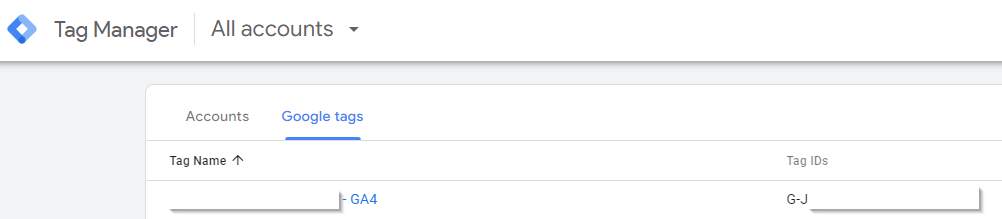
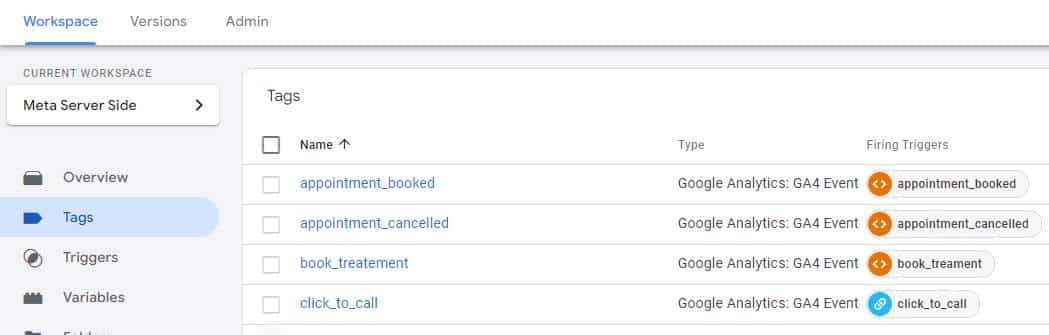
When an agency tells you they’ve granted you access to your Google Tag Manager account, verify it. If your GTM container is listed only under “Google Tags” and not under “Accounts,” you do not have full access.
You should have access to the workspace and see something like this:
These same rules apply to any data warehouse where an agency might store your data. It’s your data, and any contract should ensure ownership stays with your organization, not the agency.
Taking these extra steps today will save you time in the future and prevent headaches, financial losses and project delays down the line.
The post Who really owns your data Protecting your business from agency lock-in appeared first on MarTech.
# Understanding Data Ownership: Safeguarding Your Business from Agency Lock-In
In today’s data-driven world, businesses rely heavily on digital marketing agencies, cloud platforms, and third-party service providers to manage and analyze their data. While these partnerships can be highly beneficial, they also come with potential risks, especially when it comes to data ownership and control. One of the most significant risks is “agency lock-in,” where businesses find themselves dependent on a particular service provider, making it difficult to switch vendors or regain control of their data. Understanding data ownership is crucial for safeguarding your business from this scenario and ensuring long-term flexibility and independence.
## What is Data Ownership?
Data ownership refers to the legal rights and control over data that is collected, stored, and processed by a business or its partners. It encompasses the ability to access, modify, share, and delete data, as well as the responsibility for ensuring its security and compliance with regulations. In the context of working with third-party agencies or service providers, data ownership determines who has ultimate control over the data and how it can be used.
### Key Aspects of Data Ownership:
1. **Access Rights**: Who can access the data and under what conditions?
2. **Control**: Who has the authority to make decisions about how the data is used or shared?
3. **Portability**: Can the data be easily transferred to another platform or service provider?
4. **Security**: Who is responsible for ensuring the data is protected from breaches or misuse?
5. **Compliance**: Who is accountable for ensuring the data meets regulatory standards (e.g., GDPR, CCPA)?
## The Risk of Agency Lock-In
Agency lock-in occurs when a business becomes overly reliant on a particular agency or service provider for managing its data, making it difficult or costly to switch to another provider. This can happen for several reasons:
– **Proprietary Systems**: Some agencies use proprietary tools or platforms that are not compatible with other systems, making it challenging to transfer data elsewhere.
– **Limited Data Access**: Agencies may restrict access to certain data, preventing businesses from fully controlling or exporting their own information.
– **Contractual Restrictions**: Service agreements may include clauses that limit a business’s ability to retrieve or transfer data, or impose hefty fees for doing so.
– **Complex Integrations**: Over time, businesses may integrate deeply with an agency’s systems, making it technically difficult to migrate data to another platform without significant effort and cost.
### Consequences of Agency Lock-In:
– **Loss of Control**: Without full ownership of your data, you may be unable to make critical business decisions or pivot to new strategies.
– **Increased Costs**: If you are locked into a contract or system, switching providers may involve significant financial penalties or require costly data migration efforts.
– **Security Risks**: If your data is stored on a third-party platform without adequate oversight, you may be exposed to security vulnerabilities or compliance risks.
– **Limited Innovation**: Being tied to a single provider may limit your ability to adopt new technologies or explore alternative solutions that could benefit your business.
## How to Safeguard Your Business from Agency Lock-In
To protect your business from agency lock-in and ensure you retain full control over your data, it’s essential to take proactive steps when entering into partnerships with agencies or service providers. Here are some best practices to consider:
### 1. **Establish Clear Data Ownership Terms in Contracts**
Before signing any agreement with an agency or service provider, ensure that the contract clearly outlines data ownership terms. This should include:
– **Who owns the data**: Specify that your business retains full ownership of all data generated or collected through the partnership.
– **Access rights**: Ensure that you have unrestricted access to your data at all times, including the ability to export it in a usable format.
– **Portability**: Include provisions that allow for the seamless transfer of data to another provider if needed, without incurring excessive fees or delays.
– **Data retention**: Define how long the agency can retain your data after the contract ends and ensure that they are required to delete it upon your request.
### 2. **Use Open Standards and Interoperable Systems**
Whenever possible, choose agencies and platforms that use open standards and interoperable systems. This will make it easier to transfer your data to another provider if necessary. Avoid proprietary systems that lock your data into a specific platform or format, as this can make migration more difficult and expensive.
### 3. **Maintain a Backup of Your Data**
Even if you trust your agency or service provider, it’s essential to maintain your own backup of all critical data. This ensures that you have access to your data in case of a dispute, service interruption, or security breach. Regularly download and store copies of your data in a secure location that is independent of the agency’s systems.
### 4. **Negotiate Exit Clauses**
When

Recent Comments