

Many assume LinkedIn Ads is an easy-to-use platform: just set your budget, pick your audience, and let the leads roll in.
But small mistakes can add up quickly, costing your organization thousands with little to show.
This article breaks down five of the most common LinkedIn Ads mistakes – from targeting missteps to overlooked settings – and how to fix them.
1. Using age as a targeting criterion
You probably don’t remember this, but when you created your LinkedIn profile, you were never asked for your age or birth year.
That means LinkedIn has no direct way of knowing how old you are (which, honestly, I don’t mind).
Instead, it makes an educated guess based on factors like your graduation year.
But we all know that educational paths vary – especially for those who studied overseas or come from countries with different high school durations.
Use years of experience as an alternative.
How long someone has been in their role is a better indicator of their decision-making power within a company and helps you determine the right depth for your messaging.
2. Enabling LinkedIn audience expansion without adjustments
You use LinkedIn primarily for its unmatched targeting capabilities, so why allow the platform to expand your audience to anyone who meets just one of your targeting criteria
Instead, try predictive audiences.
I’ve seen lower CPCs while maintaining high ICP fits (over 90%) – precisely the expansion you want for prospecting.
LinkedIn builds these high-value audiences using:
- Lead gen forms.
- Contact or company lists.
- Conversions (e.g., Insight Tag, CAPI, website actions).
- Retargeting.
Essentially, it leverages high-quality data to deliver high-quality results.
Dig deeper: Marketing on LinkedIn: What you need to know
3. Turning on the LinkedIn Audience Network without optimization
Running ads outside LinkedIn while leveraging its targeting capabilities sounds like a no-brainer.
The problem?
Many advertisers fail to add a block list or select only a few brand-safe websites on which their ads should appear.
If you have a team running ads on the Google Display Network or a programmatic team, they likely have a list of negative placements to help you get started.
No one wants their ads to appear next to content that clashes with their brand or values.
I’m not a big fan of the LinkedIn Audience Network (LAN). I’ve seen better results on other platforms.
The appeal is that enabling it is as simple as checking a box, but you need to follow up to ensure your ads appear in the right places.
Did you know that, in some instances, LinkedIn estimates whether a signal belongs to a member who fits your targeting criteria—such as when a user isn’t logged in or browsing a third-party site or mobile app?
This means you could target someone completely different than intended for your ABM flow.
Dig deeper: 6 B2B paid media platforms where you can advertise effectively
4. Failing to set up website actions
Many teams have limited development resources, but LinkedIn makes it easy to track website actions with the LinkedIn Insight Tag.
This is likely the only thing you’ll need to ask your developer for, and it’s pretty simple to install.
Once the tag is in place, LinkedIn will automatically populate website actions for tracking, such as button clicks and page visits.
Unlike other platforms, you don’t need to install additional code or pixels.
You can access this by logging into Campaign Manager, clicking on Data in the left panel, and selecting Website Actions.
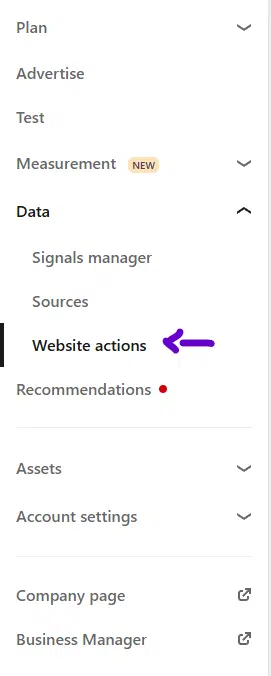
These website actions allow you to create:
Conversions: This is great for key form fills and tracking micro-conversions, like clicks on “Contact Us” buttons that don’t lead to form submissions.
Remarketing: Using website actions, you can create top-to-bottom funnel journeys. For example, remarket to those who clicked on your product or pricing pages or exclude those who visited the “Login,” “Customer Portal,” or “Tech Support” pages.
If you haven’t already, check out the website actions section. It offers a lot of power with minimal effort.
5. Relying on only one ad format
If your ad budget is tight, investing in videos, carousels, or other high-production formats may not be an option.
However, creating a document and thought leader ads with LinkedIn makes those excuses less valid.
A document ad is essentially a carousel ad for non-marketers. The two most common mistakes people make with this format are:
- Using any random PDF from their website: Most PDFs are designed for desktop viewing or printing, but since most LinkedIn users browse on mobile, they’ll have to zoom in and out, leading to a poor experience.
- Gating the content too early: This requires testing. Gating the content on the second page – where you’re just showing the index – won’t work. To demonstrate your brand’s value, you need to reveal more upfront.
On the other hand, thought leader ads allow anyone – employee, client, or vendor – to write or record themselves discussing an engaging topic.
These ads feel more personal and can capture attention in a way that doesn’t seem like an ad. A clear call to action is critical for success here.
Make the most of your LinkedIn Ads by addressing these mistakes
By avoiding these common LinkedIn Ads mistakes, you can optimize your campaigns, improve targeting accuracy, and achieve better results without overspending.
LinkedIn offers powerful tools, but only if you take the time to understand how they work and apply them strategically.
So, next time you set up a campaign, review these tips to ensure your account reaches its full potential.
After all, the devil is in the details, and on LinkedIn, those details can make all the difference.
The post 5 common LinkedIn Ads mistakes and how to fix them appeared first on MarTech.
# 5 Common LinkedIn Ads Mistakes and Effective Ways to Fix Them
LinkedIn Ads can be a powerful tool for businesses looking to reach professionals, generate leads, and drive conversions. However, many advertisers make common mistakes that can lead to wasted budgets and poor campaign performance. To help you get the most out of your LinkedIn Ads, we’ll explore five common mistakes and provide effective solutions to fix them.
## 1. **Targeting Too Broad or Too Narrow an Audience**
### **The Mistake:**
One of the most common mistakes advertisers make is setting their audience targeting too broad or too narrow. A broad audience may result in irrelevant clicks, while a narrow audience may limit reach and increase costs.
### **How to Fix It:**
– Use LinkedIn’s audience segmentation tools to refine your targeting.
– Start with a well-defined audience based on job titles, industries, company size, and skills.
– Use LinkedIn’s **Matched Audiences** to retarget website visitors or upload a list of high-value prospects.
– Test different audience sizes and adjust based on performance data.
## 2. **Ignoring Ad Creative and Messaging**
### **The Mistake:**
Many advertisers focus too much on targeting and forget about the importance of compelling ad creative and messaging. Poorly designed ads with weak copy fail to capture attention and drive engagement.
### **How to Fix It:**
– Use high-quality images, videos, or carousel ads that align with your brand.
– Write clear, concise, and action-driven ad copy that speaks directly to your audience’s pain points.
– A/B test different headlines, descriptions, and visuals to determine what resonates best.
– Ensure your call-to-action (CTA) is strong and encourages users to take the next step.
## 3. **Not Optimizing for Mobile Users**
### **The Mistake:**
With a significant portion of LinkedIn users accessing the platform via mobile devices, failing to optimize ads for mobile can result in poor engagement and conversions.
### **How to Fix It:**
– Use mobile-friendly ad formats such as **Sponsored Content** and **Message Ads**.
– Keep ad copy concise and easy to read on smaller screens.
– Ensure landing pages are mobile-optimized for fast loading and seamless navigation.
– Test your ads on different devices to ensure they display correctly.
## 4. **Setting the Wrong Bidding Strategy**
### **The Mistake:**
Choosing the wrong bidding strategy can lead to overspending or underperformance. Many advertisers either bid too low and miss out on impressions or bid too high and exhaust their budget too quickly.
### **How to Fix It:**
– Start with **automated bidding** to let LinkedIn optimize for the best results.
– If using manual bidding, monitor performance and adjust bids based on cost-per-click (CPC) or cost-per-impression (CPM) trends.
– Test different bid strategies such as **Maximum Delivery** (for reach) or **Target Cost** (for cost control).
– Regularly review campaign performance and adjust bids accordingly.
## 5. **Neglecting Performance Tracking and Optimization**
### **The Mistake:**
Many advertisers set up LinkedIn Ads and forget to track performance, leading to missed opportunities for optimization. Without proper analysis, it’s difficult to know what’s working and what needs improvement.
### **How to Fix It:**
– Use **LinkedIn Campaign Manager** to monitor key metrics such as click-through rate (CTR), conversion rate, and cost per lead.
– Set up **LinkedIn Insight Tag** to track website conversions and retarget visitors.
– Regularly analyze ad performance and make data-driven adjustments.
– Pause underperforming ads and allocate the budget to high-performing ones.
## **Final Thoughts**
LinkedIn Ads can be a highly effective platform for B2B marketing, but avoiding common mistakes is key to success. By refining your audience targeting, improving ad creatives, optimizing for mobile, choosing the right bidding strategy, and continuously tracking performance, you can maximize your LinkedIn Ads ROI.
Are you currently running LinkedIn Ads? What challenges have you faced? Share your experiences in the comments! 🚀

Recent Comments