


One of the most powerful things about generative AI is how quickly you can turn ideas into reality. After watching a video from my friend Shawn Kanungo, I was inspired to create a series of interactive marketing calculators designed to help marketers quickly calculate common campaign metrics. Think Bankrate mortgage calculators, but for marketers.
Keep reading to learn how I used a combination of spreadsheets and generative AI to create fully functioning calculators. In this article, I’ll walk you through creating a Lead Gen Calculator for SaaS marketers.
Before we jump in, it’s worth noting that my background is in graphic design and marketing strategy. I’m not a coder.
Creating the base marketing calculators
I started by building the calculators in a spreadsheet, just to make sure the math worked as a good ol’ sanity check. Once the calculators were working, I pasted one into ChatGPT-4.0 mini to build the baseline code. It’s worth noting that I quite literally pasted in the rows and columns. Yea… really.
That’s when the real fun started.
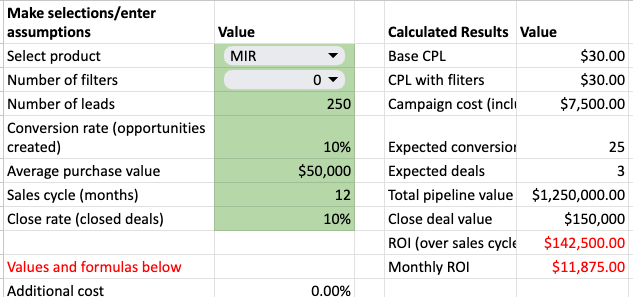
Here’s the part of the spreadsheet for the lead gen calculator that I built to make sure the math worked correctly and to get the formulas:
Dig deeper: How to use ChatGPT to simulate martech tools and marketing strategy
How to talk to developers who aren’t human
It’s worth saying that this exercise was not a single, simple prompt like, “Create a calculator.” I really had to lean into coaxing ChatGPT to get what I wanted. I ran into more than a few dead ends, token limits and lots of confusion. And yes, I could have done this in Claude, which apparently is better at this sort of thing, but here we are.
Here’s one example: I had to learn to give the AI enough context and information to get what I wanted. When ChatGPT wasn’t giving me what I wanted, I found myself chatting back with replies like this:
The point of this exercise is to create a simple PLG calculator designed for marketers to get a sense of how to scale up their marketing efforts. Let’s start again fresh and think through the marketing elements and not worry about monthly churn rates or getting deep into retention since this is about marketing and driving trials.
I found chatting with the AI in this manner both progressed the quality of the responses I was getting and forced me to clarify my thinking, precisely as I would with a human developer.
The AI provided solid feedback, and thus began and continued my dance, back and forth on requirements and coding, with each version giving me a few steps forward before retreating again and again.
At one point, the math stopped mathing, and so, using my spreadsheet as a reference, I was able to get the AI back on track:
Explain to me how if the churn rate is 100% why doesn’t this go to 0?
The AI understood and fixed the math problem, though I’m unsure exactly why it made the mistake in the first place. Oh, silly LLM.
It’s important to remember that chatbots have token limits, which is effectively how much the chatbot can remember about your given conversation. An oversimplification: You can tell when you hit token limits when you feel that the bot is no longer listening to you or can’t recall things from earlier in your chat.
For me, the way around this was to start a fresh chat to reset the token limits. I’d paste the latest working code and ask the bot for additional changes and code checks.
Through rapid iteration, testing and tons of trial and error, the calculator worked perfectly.
Faster, better, smarter LLM models improve the code base
As I was finalizing and preparing landing pages for each calculator, OpenAI released the 01-preview model, which gave me an idea. In a new chat window, I prompted:
Good morning! I had a different model create this code for a lead generation calculator. I’d like you to perform the following tasks: 1. review the code and improve it. 2. suggest any enhancements that would make it easier to use, or more useful for marketers to do each step separately, pausing between steps and giving me your responses and asking if it is ok to proceed.
The new model suggested improvements such as better error handling, code cleanup, verifying logic and design tweaks. It is an instant upgrade.
What’s exciting here isn’t just the calculators — it’s the potential for mass customization, personalization and integration across other tools. We’re just scratching the surface of what’s possible.
For example, ChatGPT suggested adding scenario options, multilingual support, allowing users to export data directly from popular CRM systems like Salesforce or HubSpot, an integrated feedback mechanism and my favorite: dynamic charting with chart.js or Google Charts. I’ll leave those ideas in the backlog for now, so I can at least get the initial versions live for you to play with!
All in all, over about two weeks, this project took me somewhere between five and six hours total. That includes creating the initial spreadsheets, messing with prompts trying different configurations and ultimately taking the time to create the final versions.
3-2-1… let’s calculate!
This exercise pushed me to figure out how to create working code and to think through different use cases that marketers might find useful. Internal testing helped me bring additional context and resources to each landing page and, finally, the confidence to launch!
Here are the four initial calculators we created and links:
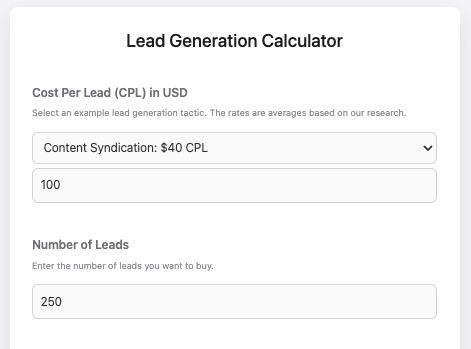
The Lead Gen Calculator is designed to help SaaS marketers simulate the ROI of lead generation campaigns by calculating costs, conversions and potential revenue. By entering variables like the number of leads, conversion rates and sales metrics, you’ll get instant feedback. Try different combinations to simulate the effectiveness of a given marketing tactic.
The CPM Calculator helps you maximize your ad budgets by estimating impressions, clicks and cost per click based on budget, channel and click-through rate (CTR). It’s a quick, essential simulator for planning and optimizing ad campaigns to ensure you get the most out of every dollar spent.
The PLG Calculator is a strategic simulator for you to estimate the impact of your product-led growth (PLG) initiatives. By entering key metrics like users, conversion rates and churn rate, this calculator will provide you with user growth projections, revenue and overall business impact.
The Return on Ad Spend (ROAS) Calculator helps you quickly evaluate the effectiveness of your ad campaigns by calculating the ratio of revenue generated to the amount spent on advertising. With default values pre-set, this tool allows you to effortlessly adjust inputs and instantly see the results, making it easier to optimize your marketing efforts.
The post How to build interactive applications with generative AI appeared first on MarTech.
# A Step-by-Step Guide to Developing Interactive Applications Using Generative AI
Generative AI has rapidly emerged as a transformative technology, enabling developers to create interactive applications that can generate text, images, music, and even code. From chatbots that mimic human conversation to AI-powered design tools that generate artwork, the possibilities are endless. In this guide, we will walk through the step-by-step process of developing interactive applications using generative AI.
## Table of Contents
1. **Understanding Generative AI**
2. **Choosing the Right Generative AI Model**
3. **Setting Up Your Development Environment**
4. **Defining the Application’s Purpose and Scope**
5. **Training or Fine-Tuning the AI Model**
6. **Building the User Interface (UI)**
7. **Integrating the AI Model with the Application**
8. **Testing and Iterating**
9. **Deploying the Application**
10. **Monitoring and Improving the Application**
—
### 1. Understanding Generative AI
Generative AI refers to algorithms that can create new content based on the data they have been trained on. Unlike traditional AI, which is often used for classification or prediction tasks, generative AI can produce new outputs that resemble the data it has seen. Some common types of generative AI include:
– **Text generation** (e.g., GPT-4, BERT)
– **Image generation** (e.g., DALL·E, Stable Diffusion)
– **Music generation** (e.g., OpenAI’s MuseNet)
– **Code generation** (e.g., GitHub Copilot)
Generative AI models are typically built using deep learning techniques, particularly neural networks such as transformers and GANs (Generative Adversarial Networks). These models can be trained on vast amounts of data to learn patterns and generate new content that is coherent and contextually relevant.
—
### 2. Choosing the Right Generative AI Model
The first step in developing an interactive application is selecting the appropriate generative AI model based on the type of content you want to generate. Here are some popular models for different tasks:
– **Text Generation**: OpenAI’s GPT-4, Google’s BERT, or Hugging Face’s T5.
– **Image Generation**: OpenAI’s DALL·E, MidJourney, or Stable Diffusion.
– **Music Generation**: OpenAI’s MuseNet or Jukedeck.
– **Code Generation**: GitHub Copilot or OpenAI’s Codex.
Consider the following factors when choosing a model:
– **Accuracy and quality** of the generated content.
– **Pre-trained vs. custom models**: Pre-trained models like GPT-4 are ready to use, while custom models may require additional training.
– **API availability**: Some models are accessible via APIs (e.g., OpenAI API), making integration easier.
– **Hardware requirements**: Some models may require powerful GPUs for training or inference.
—
### 3. Setting Up Your Development Environment
Once you’ve chosen a model, the next step is to set up your development environment. Here’s what you’ll need:
– **Programming Language**: Python is the most commonly used language for AI development due to its extensive libraries (e.g., TensorFlow, PyTorch, Hugging Face Transformers).
– **AI Libraries**: Install the necessary libraries depending on the model you’re using. For example:
– `transformers` for text generation models.
– `torch` for PyTorch-based models.
– `tensorflow` for TensorFlow-based models.
– **API Access**: If you’re using a cloud-based model like GPT-4, you’ll need to sign up for API access and obtain an API key.
– **Development Tools**: Use tools like Jupyter Notebooks for experimentation and testing, and a code editor like VSCode for building the application.
Example setup for using Hugging Face’s GPT-4 model:
“`bash
pip install transformers
pip install torch
“`
—
### 4. Defining the Application’s Purpose and Scope
Before diving into coding, it’s essential to clearly define the purpose and scope of your interactive application. Ask yourself the following questions:
– **What problem does the application solve?**
– **What type of content will the AI generate?**
– **How will users interact with the AI?**
– **What are the key features of the application?**
For example, if you’re building an AI-powered chatbot, the purpose might be to assist users with customer service inquiries. The scope could include generating human-like responses, handling multiple languages, and integrating with a live chat interface.
—
### 5. Training or Fine-Tuning the AI Model
If you’re using a pre-trained model, you may want to fine-tune it to better suit your application’s needs. Fine-tuning involves training the model on a specific dataset that is relevant


Recent Comments