
Marketing with chatbots can enhance the effectiveness of your customer care approach by boosting engagement and minimizing obstacles throughout the customer care experience, spanning from acquisition through to retention. Rather than having your team spend time addressing every incoming customer inquiry, social media chatbots can take over numerous functions, like replying to common questions or collecting customer insights. This kind of automation can drastically reduce time pressures and cut down on customer service expenses, enabling you to concentrate on refining your strategy.
This guide will educate you on how social media chatbot marketing can assist you in crafting seamless customer experiences, enhancing engagement across social platforms, and strengthening brand loyalty.
Defining Chatbots
Designed to automatically respond to received messages, chatbots may either be rule-based or operate with artificial intelligence (AI).
Rule-based chatbots follow predetermined responses consistently or vary their replies based on specific keywords. In contrast, AI chatbots leverage machine learning (ML) and natural language processing (NLP) to comprehend the intent behind incoming messages and adjust their responses accordingly.
Chatbots typically function within SMS messaging, chat windows on websites, and social media messaging services—such as Messenger, X (previously known as Twitter), WhatsApp, and Instagram Direct—to engage and reply to users.
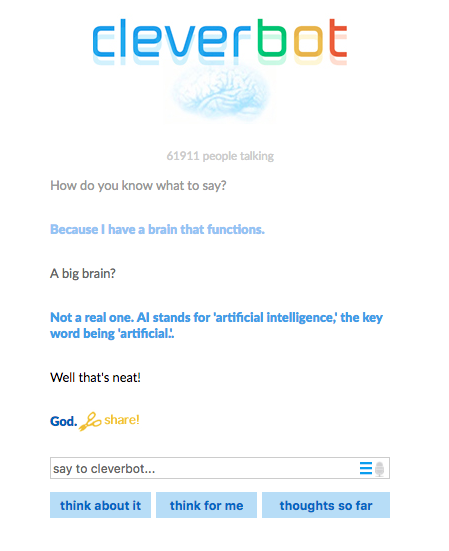
Some chatbots are designed for entertainment, like Cleverbot, which responds in a manner akin to natural human conversation.
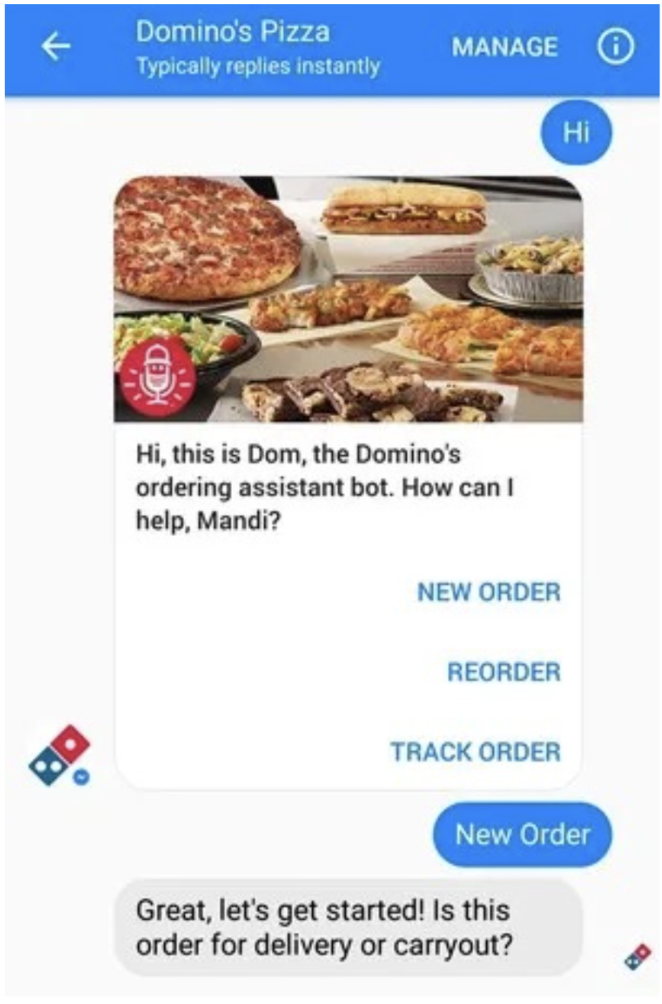
Others serve customer care and marketing functions for specific brands, like Domino’s Pizza chatbot, Dom, which enables users to place pizza orders, track them, and receive menu recommendations via platforms like Facebook Messenger or the Domino’s app. Chatbots like Dom demonstrate how brands can provide enhanced convenience and elevate the customer experience.
Chatbots are increasingly vital for meeting customer expectations. Data from Facebook indicates that:
- 63% of individuals prefer messaging over calling or emailing customer service.
- 66% of consumers are more inclined to shop with brands they can contact via messaging.
- 74% of people feel more connected to a brand when they can directly message it.
Given that customers generally prefer to message companies directly, chatbot marketing serves to address customer inquiries more efficiently while catering to your customers at their convenience.
Chatbots versus Conversational AI
Your chatbot marketing approach across social media can be tailored to be as simple or elaborate as desired, depending on your industry, customer demographics, and budget.
Basic rule-based chatbots adhere to a set itinerary based on user interactions. These bots follow a defined script that utilizes a basic decision-making framework designed for designated interactions.
Conversational AI chatbots are built to grasp the context and purpose behind a user’s input to fulfill more intricate tasks. NLP algorithms embedded in these chatbots identify keywords and subjects through a semantic analysis of the text. Such AI algorithms facilitate conversations using natural language, seamlessly directing users to different functions or specialized teams when necessary to resolve issues.
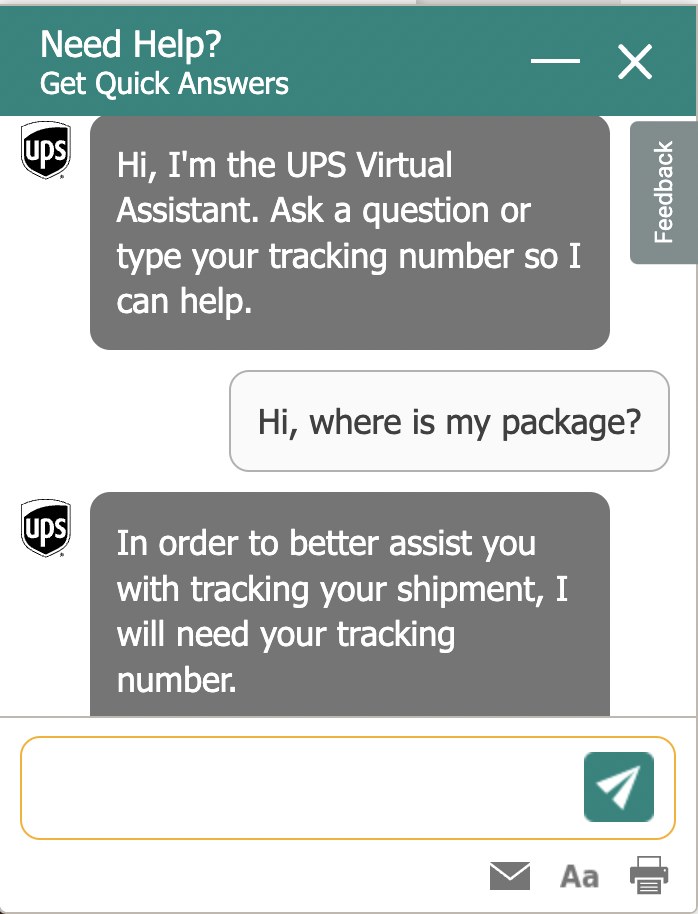
If your aim is merely to simplify aspects of customer engagement, such as assisting users in navigating your website or shopping process, a rule-based chatbot would be effective. Conversely, for tackling complicated customer queries, like postal and delivery inquiries across regions, a virtual assistant would be more suitable.
Below is an instance of how UPS employs a virtual assistant to accelerate customer service by addressing complex inquiries.
Understanding Chatbot Marketing
Chatbot marketing, or bot marketing, makes use of automated messaging to specifically engage customers during marketing and sales processes. This includes guiding them through product discovery, helping with purchase decisions, offering personalized suggestions, providing instant answers to inquiries about promotions, and simplifying processes like signing up for free trials or downloading marketing content.
For instance, Bank of America’s AI assistant, Erica, has revolutionized customer engagement. By April 2024, Erica facilitated over 2 billion interactions, assisting 42 million clients in managing accounts, monitoring spending, and paying bills. Notably, 98% of users received replies in under 44 seconds, highlighting Erica’s capability in providing quick and customized financial help. This showcases how chatbot marketing can boost customer satisfaction and enhance operational efficiency.
Chatbots provide immediate responses to customer inquiries, ensuring you have 24/7 customer service. The data they gather can be harnessed to understand customer challenges and evolving trends, enabling a more tailored customer experience.
Chatbot marketing also facilitates closer interactions between brands and users by:
- Delivering quick information about discounts or services.
- Addressing complaints or issues.
- Offering comprehensive answers to inquiries.
- Connecting the appropriate support team for specific concerns.
Marketing chatbots often use prompts for customers to select from, clarifying their intent and encouraging them toward informed decisions. Integrating keywords helps chatbots execute these specified tasks based on customer messages, enhancing their proactivity and efficiency.
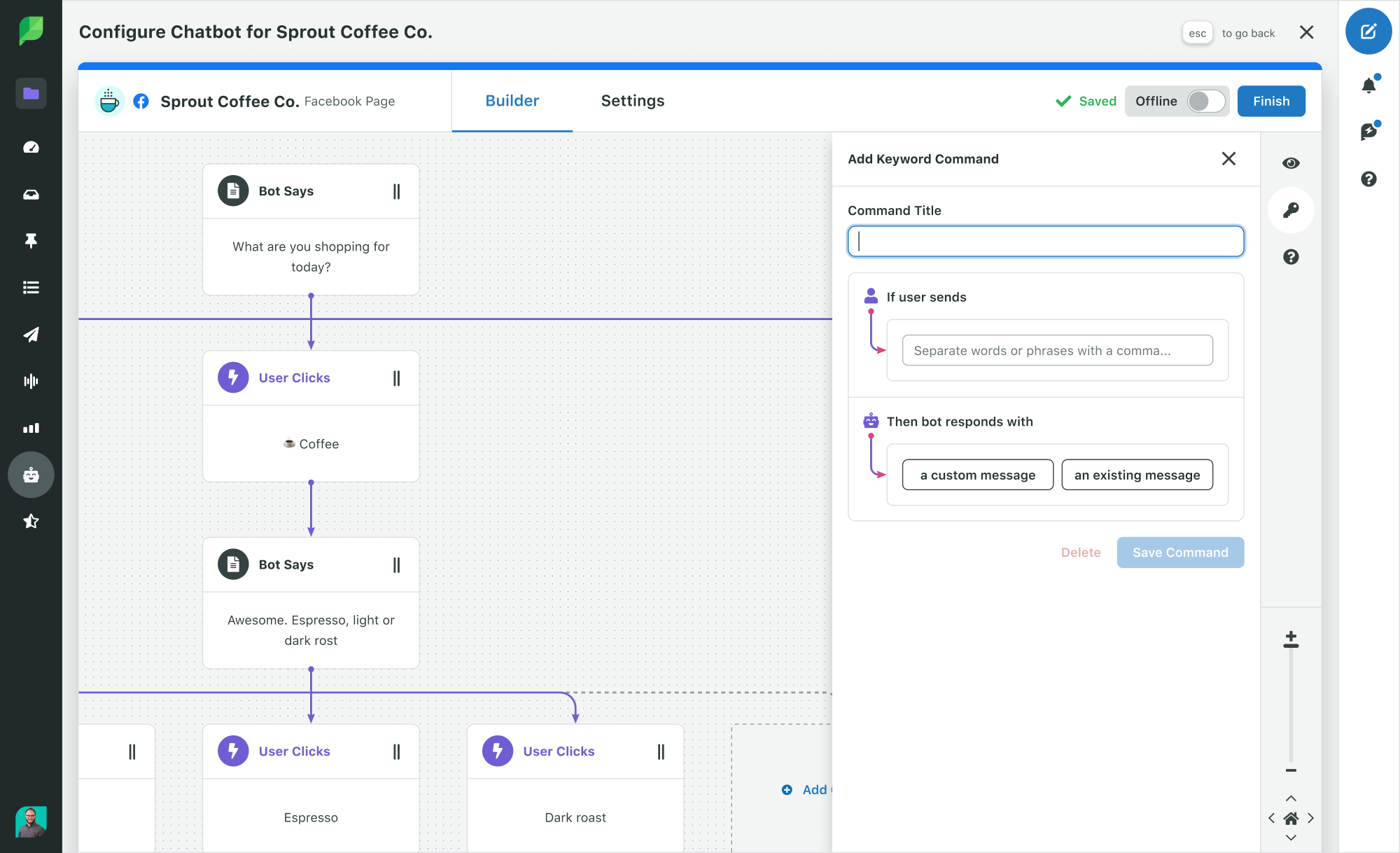
Creating a marketing chatbot for social media involves several considerations, but it shouldn’t be overly complex. Explore our article on customer service chatbots for a detailed guide on how to effortlessly create an effective chatbot.
The Advantages of Social Media Chatbot Marketing
Beyond aiding in scaling, streamlining, and automating customer care, chatbot marketing can significantly influence your business in key areas, including:
1. Time and Cost Savings
The Sprout Social Index™ reveals that almost three-quarters of consumers expect a response within a day or sooner. Furthermore, those same consumers agree that if a brand fails to reply to their queries on social media, they will turn to a competitor the next time. Automating responses to standard inquiries that don’t necessitate human involvement saves time for both your team and customers, minimizing the risk of overlooking essential customer interactions.
With rule-based, AI-equipped, or hybrid chatbots—combining rule-following and AI algorithms—you can automate numerous customer and prospect engagements, ensuring prompt responses.
Moreover, utilizing chatbot marketing in your customer support operations enables you to provide customers with information beyond standard business hours.
2. Lead Generation and Revenue Enhancement
Chatbots can collect essential information to provide effective support, especially when integrated into your website. For instance, if a chatbot inquires why a user is visiting your page, this automated engagement can assist customers in finding what they are looking for and guide them toward converting.
Additionally, chatbot marketing can boost sales by proactively sending notifications about offers and discounts, hastening the purchasing process.
By discerning intent from exchanges with customers and qualified leads, chatbots can automatically channel customers in the right direction, whether that means obtaining support or connecting with the sales team.
3. Navigating Users to Optimal Outcomes
Customers don’t always know how to locate the information they seek, particularly new customers. By posing a series of qualifying questions, you can direct users to the most suitable resources for their needs. This may include support outside of sales, such as tracking deliveries and processing refunds.
Common inquiries chatbots may pose include:
- What are you searching for?
- What is your location?
- Did you leave an item in your cart?
- Would you like personalized assistance?
- What is your order ID?
For an airline, the multitude of interactions, from departures and arrivals to potential seating upgrades and various ticket purchasing avenues, creates nearly endless combinations for customer interactions. Personalizing chatbot queries and facilitating seamless interactions make the often tedious process of trip planning and travel significantly simpler for both users and the business, thereby increasing customer satisfaction.
4. Gaining Insights on Customers
Chatbots can also proactively gather valuable insights through intelligent social listening. Data from chatbot conversations can be analyzed to enhance customer experience, refine product descriptions, and inform development and personalization efforts.
Utilizing machine learning-driven text analysis and sentiment analysis of chatbot data allows for deeper insight into customer demographics, web clickstreams, and prior purchasing behaviors to create highly customized offerings. This provides a competitive edge, permitting you to identify market gaps and better address customer requirements.
5. Engaging Users
Chatbots can hold and maintain user attention through interactive and personalized experiences. Providing engaging features not only adds value but also cultivates stronger connections with customers.
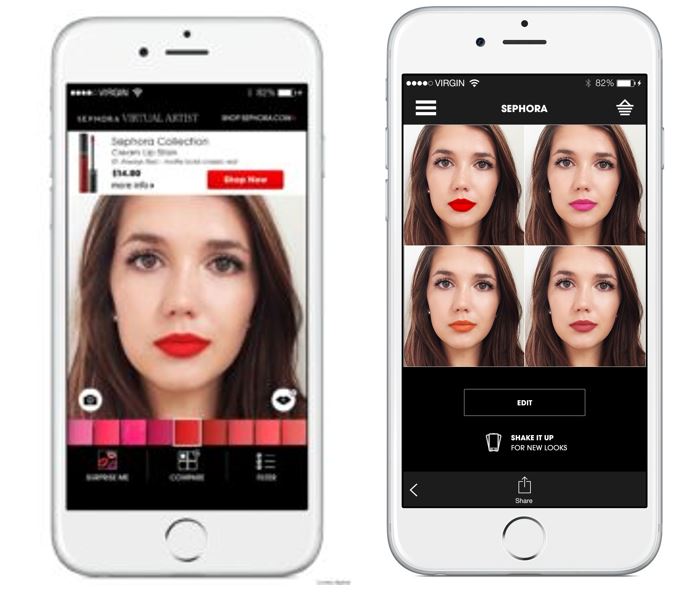
Sephora’s Virtual Artist captures user interest with augmented reality, enabling them to virtually try on makeup and receive customized product suggestions. This entertaining, interactive experience aids customers in making confident purchasing decisions while enhancing overall engagement and rendering shopping more immersive and enjoyable.
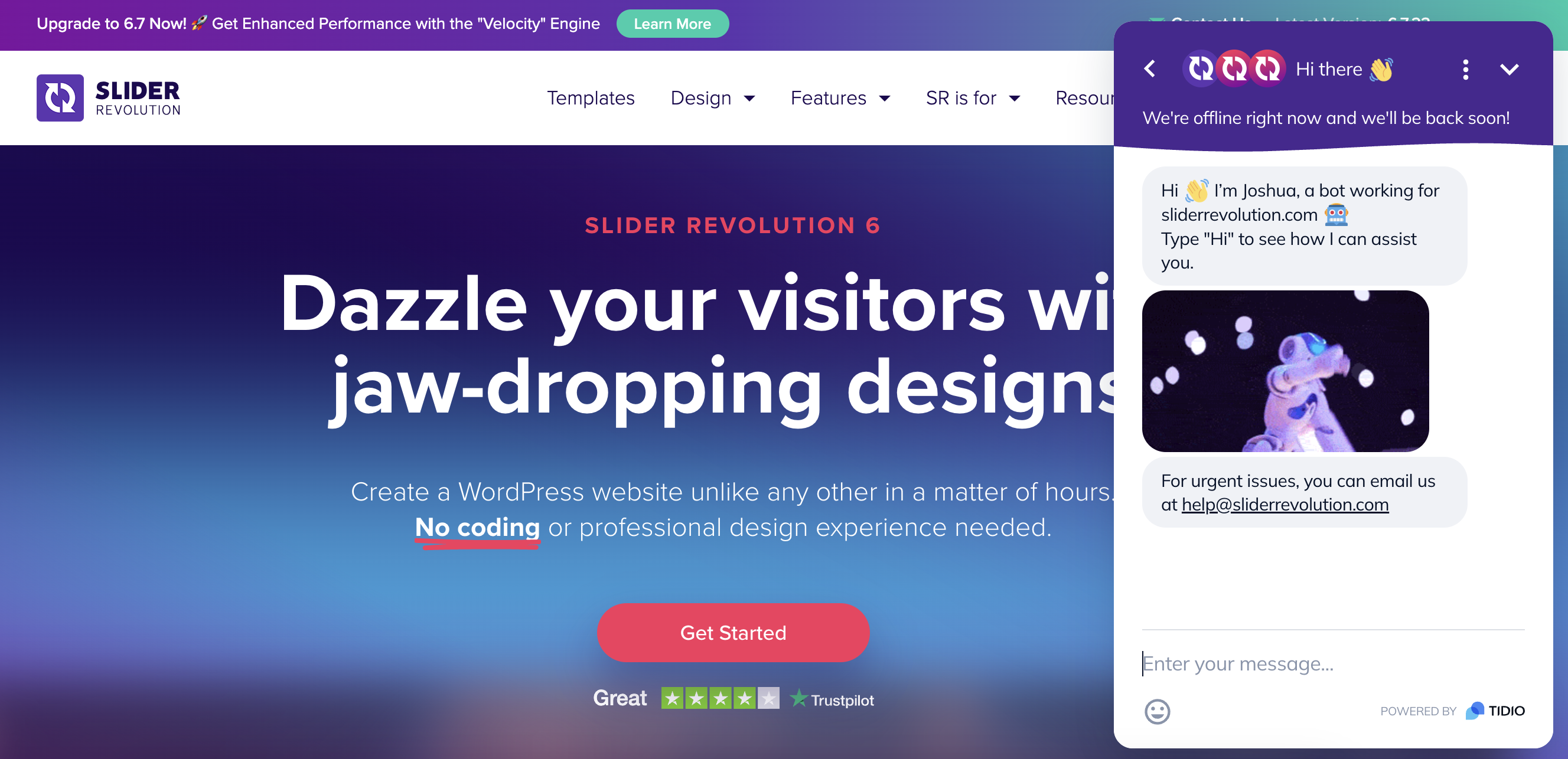
Slider Revolution’s chatbot greets users with a friendly message and an entertaining GIF, prompting them to type “Hi” to begin. Though a GDPR acknowledgment is necessary, the bot allows users to ask questions and features feedback options to rate their experience. This approach fosters interaction and gathers insights to improve bot functionality.
These seamless user experiences contribute to brand recall for exceptional customer service.
6. Enhancing Customer Retention
Chatbots encourage customer retention by delivering immediate and personalized support that keeps users engaged. They offer real-time responses to inquiries, send proactive follow-ups, and provide tailored product suggestions based on individual preferences.
Beyond merely addressing issues, chatbots cultivate trust by making customers feel acknowledged and appreciated. Sustaining regular communication and providing value at every touchpoint allows chatbots to offer a streamlined experience that fosters repeat business.
This approach effectively fortifies customer relationships and nurtures sustainable growth by fostering long-term loyalty.
7. Promoting Cross-Selling and Upselling
Chatbots assess customer conduct, purchase history, and preferences to uncover opportunities for cross-selling and upselling. By utilizing this data, they can propose complementary items or premium upgrades during interactions, thereby enriching the shopping experience while increasing revenue.
For instance, a chatbot on an e-commerce site might suggest matching accessories for an outfit or an upgraded version of an item recently viewed.
Such timely and personalized suggestions add value for the customer and enhance the average order value for the business. Delivering these tips in real-time ensures seamless integration into the user journey, driving conversions without interrupting the experience.
Structuring a Chatbot Marketing Strategy
Establishing a successful chatbot marketing strategy for social media requires a thoughtful plan. Begin by clearly defining your target audience, understanding their engagement with your brand, and determining the metrics you will employ to measure success. These elements are crucial in shaping your chatbot’s user experience and crafting effective conversational workflows.
Here’s a step-by-step roadmap to initiate your process:
Set Clear Chatbot Marketing Objectives
The first, most essential step in creating chatbots for marketing is to solidly define your objectives. Be precise about what you aim to achieve—whether it’s gaining new customers, raising brand visibility, collecting product inputs, streamlining customer service, or addressing additional needs.
For example, if your social media team is inundated with messages on specific platforms, deploying chatbots there could alleviate the pressure. Likewise, if your website is grappling with low conversion rates, a chatbot might direct visitors toward completing their purchases.
Regardless of your goal, having a clear understanding of what you aspire to accomplish will help shape the chatbot’s user experience. This clarity ensures a quicker and more successful implementation.
Select a Chatbot Provider
Using a chatbot platform is typically more cost-efficient and effective than creating an in-house solution. These platforms offer the required software and infrastructure, while you retain control over crafting and customizing your chatbot’s functionality.
When choosing a provider, consider:
- Ease of setup and the learning curve
- Customization capabilities for your brand
- Integration with your existing tools (CRM, social media, website)
- Analytics and performance tracking options
- Pricing and scalability choices
- Available AI features (natural language processing, intent recognition)
- Quality of customer support
- Security and data protection protocols
Select the Appropriate Social Platform for Your Chatbot
For instance, an existing customer on X might contact you with service inquiries, while a first-time shopper on Instagram might be exploring your offerings. The nature of interactions will vary depending on where your chatbot is deployed, whether it’s on:
- Your website
- Meta Messenger
- X Direct Message
- Instagram Direct
Keep in mind that the demographics of social networks play a vital role in platform selection. For example, Gen Z and Millennials constitute a significant portion of Instagram users, making it an ideal choice for brands targeting younger audiences. Aligning your chatbot strategy with platform demographics ensures more relevant and effective interactions.
Establish a Chatbot Content Strategy
Once you’ve chosen a platform, the next step is to ascertain the content users will engage with during chatbot interactions. Start by tackling frequently asked questions (FAQs) and developing conversation pathways that lead users to answers without needing team involvement.
Utilize insights from internal teams to discover further content opportunities:
- Customer service: Your customer service teams likely have extensive interactions with your customers. Inquire about the trends they observe in common questions.
- Sales: Sales teams also engage in crucial discussions with prospects. Identify the factors preventing users from converting to customers.
- Marketing: Your marketing experts may have insights into why individuals reach out to you through social channels. These questions are vital for your chatbots.
- Quora/Reddit: These sites are resources where users seek answers on various topics, including product issues and purchase inquiries. Monitor these platforms to uncover any discussions about your brand. If trends in questions arise, consider incorporating them into your chatbot.
Finally, assess your existing content to spot materials related to customer needs before generating new assets. This guarantees that your chatbot can deliver meaningful interactions from the outset.
Define Your Chatbot’s Tone and Personality
Creating a distinct brand voice and personality for your chatbot helps humanize interactions, reinforces brand identity, and improves the user experience. Start by assigning a name to your bot to indicate it’s a chatbot while fostering a welcoming atmosphere. Collaborate with your copywriting team to ensure consistent tone and alignment with your branding.
Initiate interactions with an engaging welcome message that reflects the chatbot’s personality. Use captivating language to set a positive tone, clarify that it is a bot, and provide a pathway for users to connect with a real person when necessary. Sustain the dialogue by posing pertinent questions that guide users toward their objectives, ensuring a memorable and effective experience.
Chart Your Customer Journey
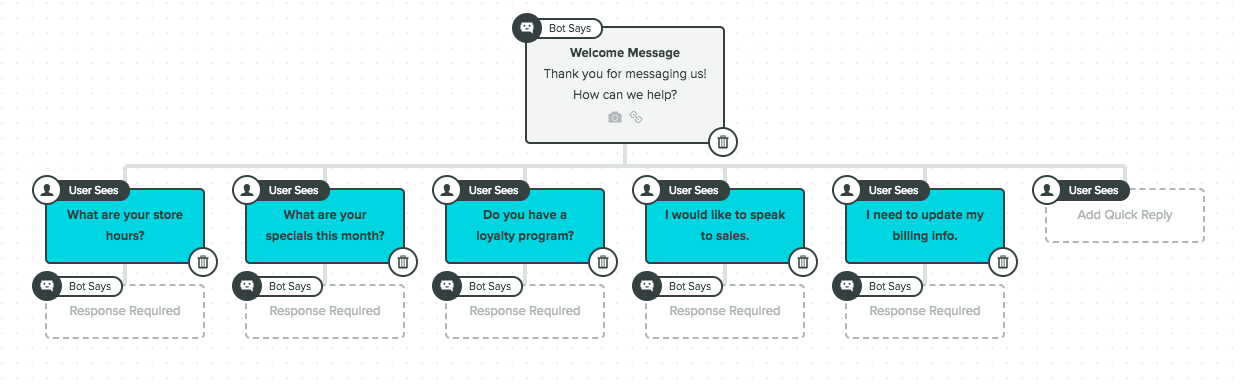
Once you pose the initial questions, begin charting out potential conversation pathways. You can use a tool like Sprout Social’s Bot Builder or start mapping in Google Drawings.
This example examines a fictional restaurant that needs to convey details about its hours, specials, and loyalty programs. Include all the questions users may want to pose to you.
Generate Effective Responses
For every question you’ve raised, determine the optimal responses users can select from. Curate multiple responses for each inquiry to enhance the likelihood of meeting user needs.
- Anticipate requirements: Identify common queries and supply precise, concise answers.
- Offer options: Present multiple response choices to address diverse needs.
- Simplify language: Use approachable, easy-to-understand language that aligns with your brand tone.
- Guide subsequent steps: Provide follow-ups to direct users to resources or human support when necessary.
Well-structured responses will promote engaging conversations and better fulfill user expectations.
Incorporate Visual Elements
Add greater appeal to messages by integrating emojis, images, or animated GIFs into the chatbot conversation. Visuals infuse more personality into your messages and aid in reinforcing your communication, increasing conversion rates within conversations.
Facilitate Checkout for Customers
Ensure your chatbot makes moving to the next steps a breeze. Whether directing customers to a product in their shopping cart or encouraging them to share their experiences on social media, clear calls to action streamline the process.
Thoughtful guidance during interactions elevates the user experience and assures customers can effortlessly find what they need. Clear CTAs convert casual exchanges into significant outcomes.
Test Your Chatbot
Chatbot conversations can quickly transform into complex interaction flows, so testing each pathway is fundamental. Validate that all discussions are smooth, intuitive, and effectively meet customer needs. Most chatbot platforms provide live preview functionalities, enabling you to test and refine dialogue flows prior to launch. Consistent testing ensures your chatbot delivers a seamless and satisfying user experience.
Launch and Monitor Your Performance
After completing all preparatory steps, it’s time to activate your chatbot. Once live, closely oversee user engagement to identify any points where customers might encounter difficulties or desist from their journeys. Quickly addressing these gaps ensures a streamlined experience.
Remember, your chatbot launch is merely the beginning. The information gathered from user interactions is a treasure trove of insights. Utilize it to enhance your chatbot’s functionality, improve user experience, and refine your overall marketing strategy.
Seek Feedback
User input is crucial for ongoing enhancement. Encourage customers to provide feedback on their experiences through surveys following interactions or feedback prompts built into the chatbot. Assess their replies to uncover areas for making the bot more intuitive, engaging, or effective.
Look for recurring themes in user feedback, such as frequent issues or requests for new features, and utilize these insights for iterative updates. Collaborate with your customer service and marketing teams to ensure the chatbot aligns with both user demands and business objectives.
Consistently updating your chatbot based on feedback helps it stay relevant, boosts user satisfaction, and strengthens its functionality as a valuable tool in your marketing approach.
Inspiring Chatbot Marketing Examples
As you advance with your plans, it’s vital to remain focused on your objectives and craft a distinct customer experience. Understand your audience and evaluate the communication channels when integrating chatbots into your strategy. This will guide you in prioritizing which chatbots to employ and the messaging service to choose.
Here are some instances of brands harnessing chatbots in both B2B and B2C contexts.
Personalized Financial Assistance
Erica, an AI-driven virtual assistant from Bank of America, provides tailored financial advice and assistance. Accessible within the bank’s mobile app, Erica aids users in managing transactions, keeping tabs on expenditure, setting savings goals, and receiving timely updates regarding their accounts. By 2023, Erica had processed over 330 million customer requests, averaging 56 million interactions monthly.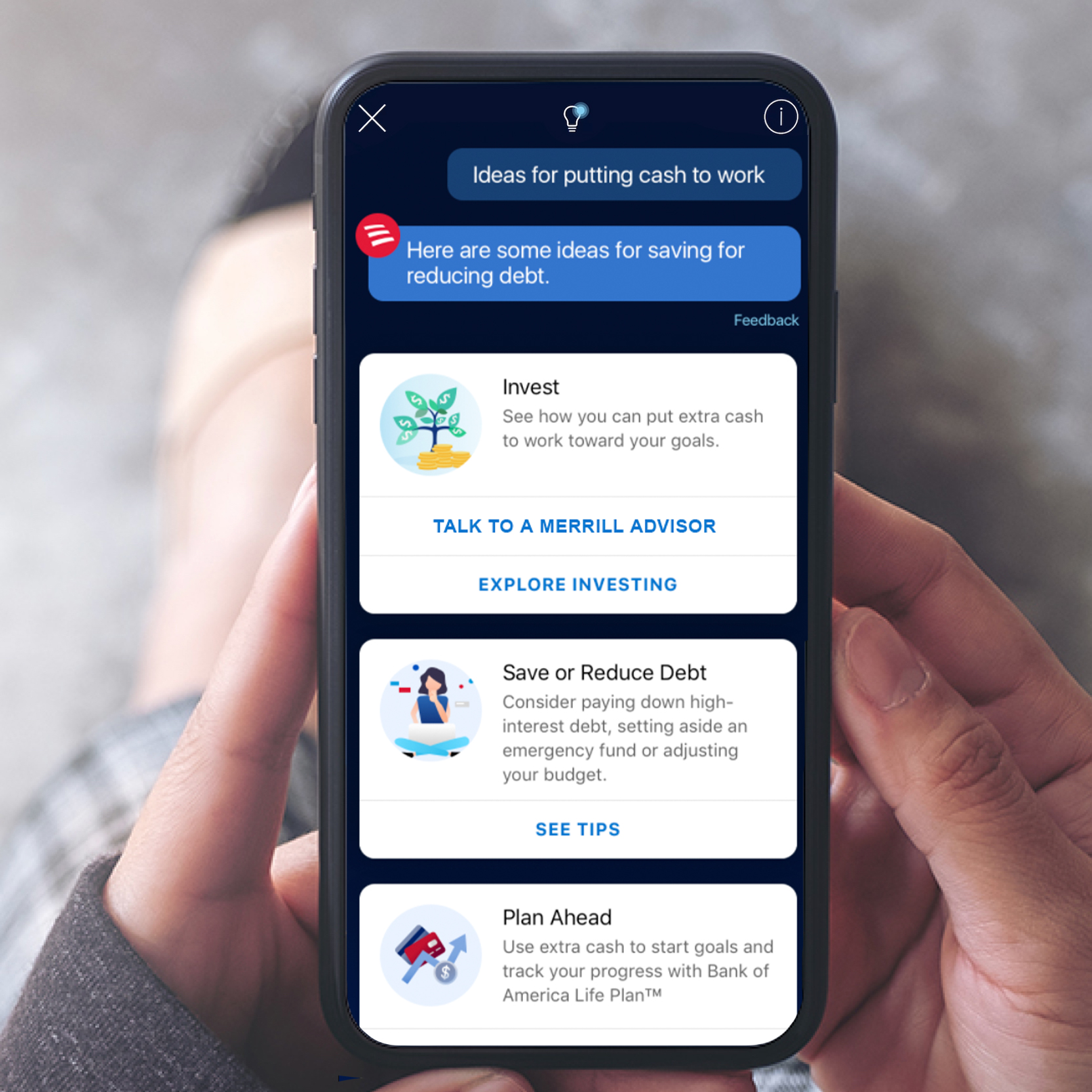
Erica transcends basic customer support by offering proactive insights and personalized recommendations. Its seamless integration into the mobile app guarantees a user-friendly experience, while its advanced AI capabilities render financial management more accessible and efficient. This serves as a prime example of how AI can elevate customer interaction and satisfaction in finance.
Gift Selection Assistance
Lego’s Gift Bot is a customer-friendly Facebook Messenger chatbot designed to simplify the gift selection process. It engages customers by posing personalized questions about the recipient’s age, interests, and preferences. Based on responses, it provides tailored product recommendations to easily help shoppers find the ideal gift.

Lego’s Gift Bot merges convenience with personalization. By guiding users with targeted questions and providing curated suggestions, it creates a relaxed and enjoyable shopping experience. This chatbot not only enhances customer satisfaction but also drives sales, demonstrating how brands can effectively leverage AI to add value to the shopping experience.
Step-by-Step Support
GoDaddy Guides is a chatbot that assists users in building and managing their online presence. Whether customers are creating a website, establishing a domain, or troubleshooting technical issues, the chatbot offers step-by-step guidance tailored to their individual requirements. It also transitions users to a human representative when more in-depth assistance is necessary.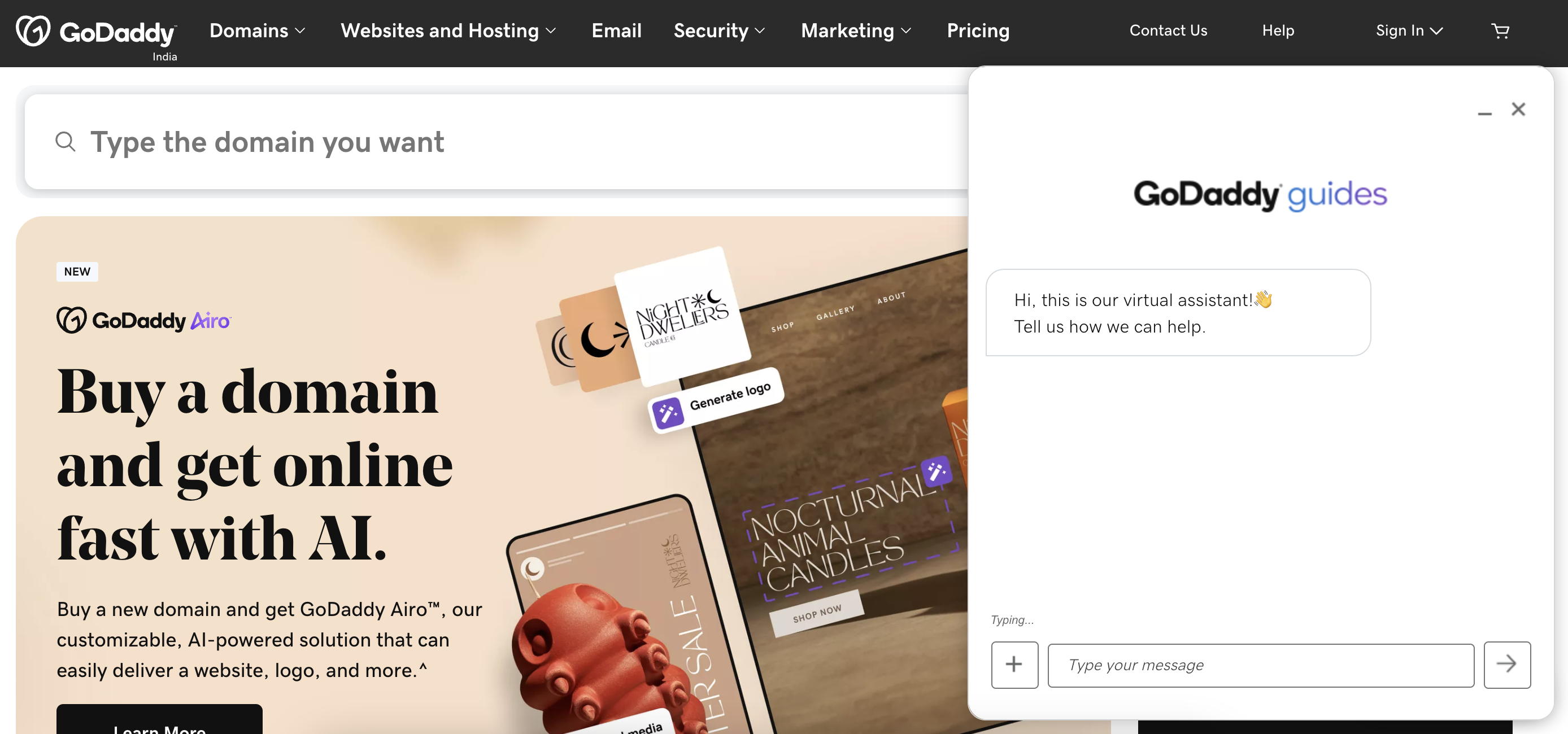
GoDaddy Guides distinguishes itself through its customer-centric approach, integrating automation with personalized support. The chatbot simplifies intricate tasks, allowing users to easily meet their goals. Its ability to balance automated support with human assistance ensures users feel supported throughout their experience, enhancing both satisfaction and loyalty.
Setting Up Social Media Chatbots Using Sprout Social
Social media chatbots can optimize interactions, boost customer engagement, and automate repetitive tasks. Sprout Social’s Bot Builder features a user-friendly interface for creating and managing chatbots across platforms like X and Facebook.
Watch the video below to learn how to create a chatbot in Sprout.
Step 1: Access the Bot Builder
Commence by logging into your Sprout Social account and selecting Bots from the menu. (Don’t have a Sprout account? Use your business email to start a free trial.)
Ensure you possess the needed permissions to create or modify chatbots:
- Users with Full Publishing access can create, edit, activate, or delete a chatbot for a given X or Facebook profile.
- Users with Read Only, Needs Approval, or Can Reply privileges can view existing chatbots but lack the ability to create or alter them.
Step 2: Chatbot Home Screen
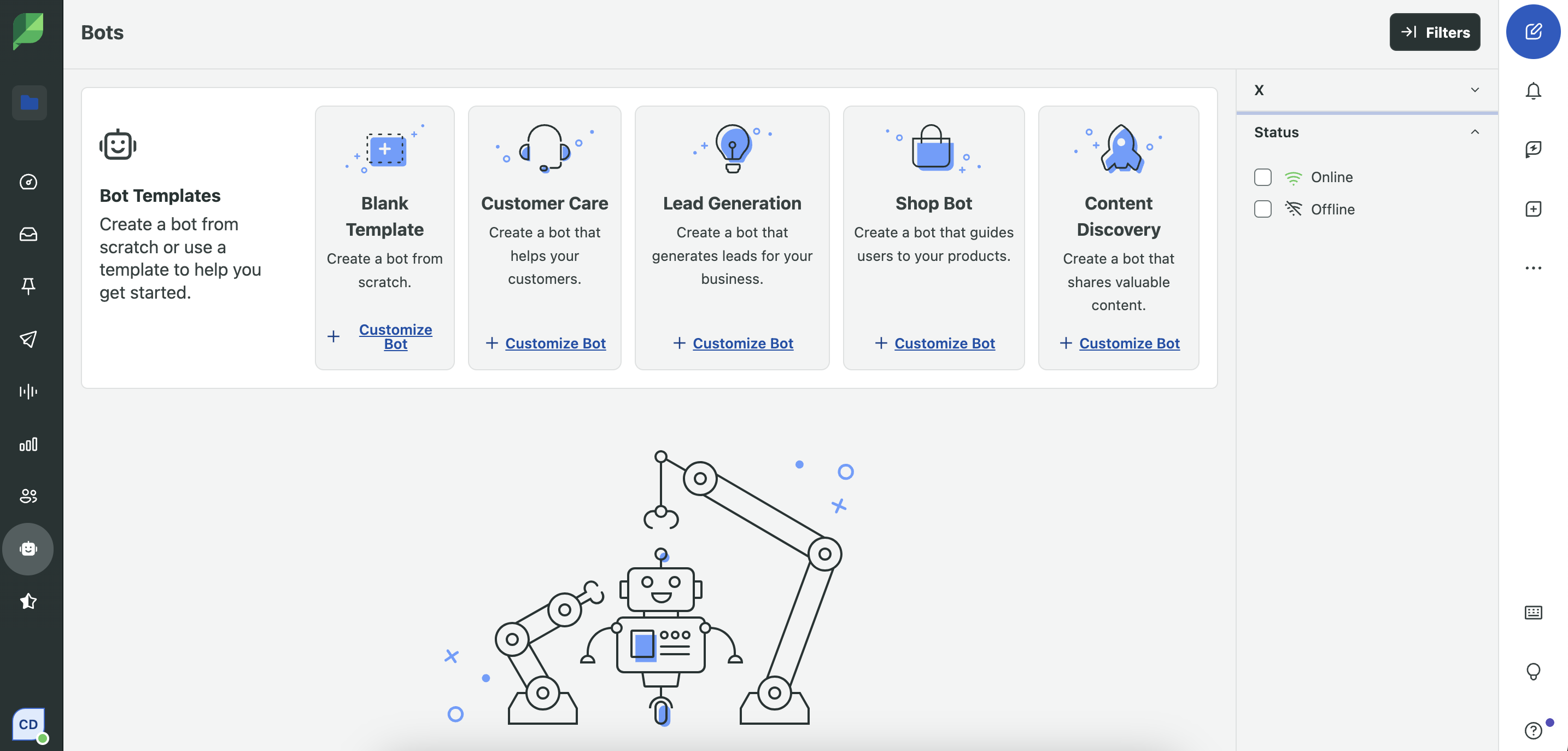
The Chatbots home screen displays all your chatbots. From this point, you can:
- Create a new chatbot by selecting a Blank Template or any of the pre-set templates.
- View, edit, or test a chatbot by clicking its respective tile.
- Use the menu on the bottom right of a chatbot tile to edit, duplicate, delete, or share a preview.
Note: You can create as many chatbots as you like, but each profile can only have one active chatbot at any given time.
Step 3: Associate the Chatbot with a Profile
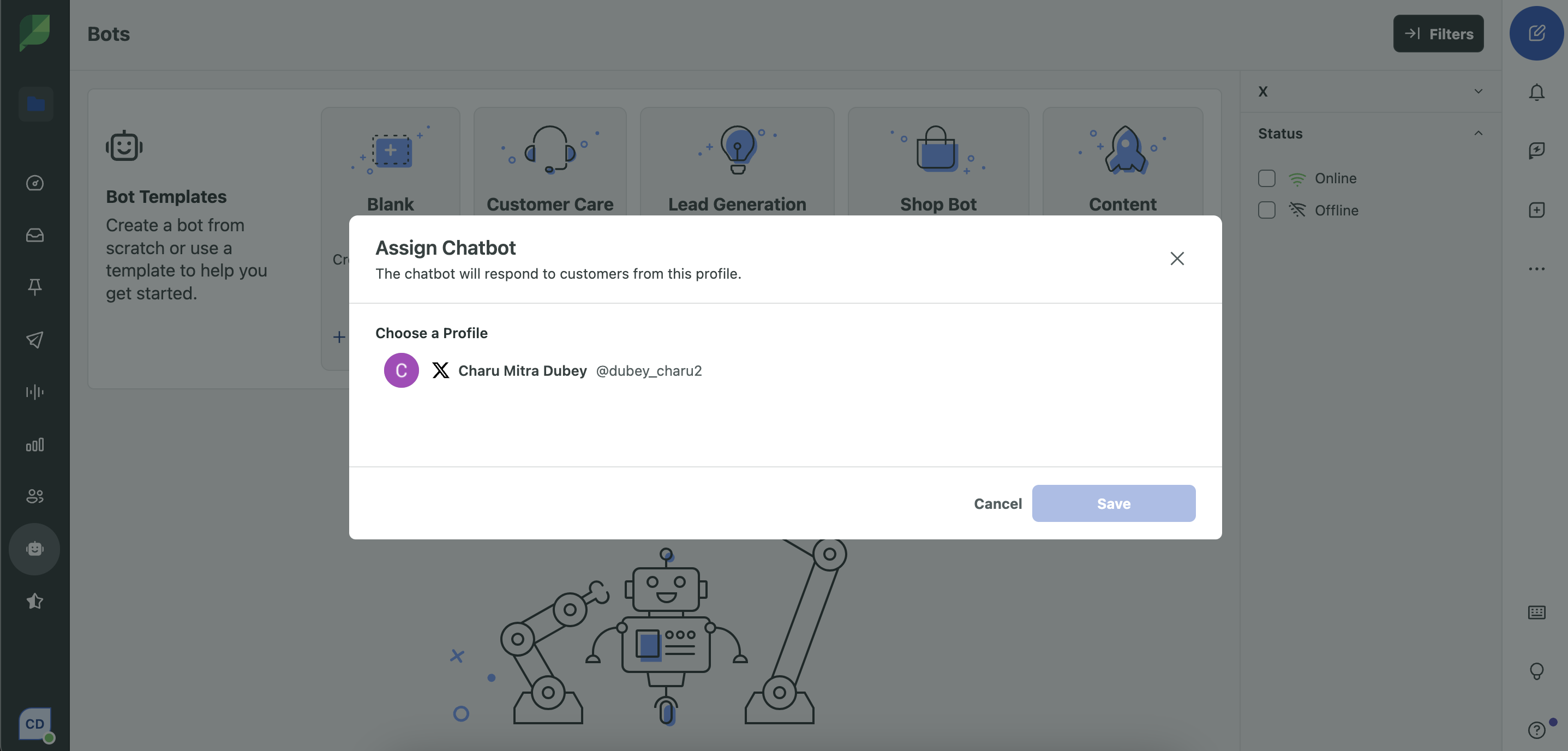
Begin by selecting the social media profile that you want to assign the chatbot to. This could be a Facebook or X account.
- Activate Allow DMs to ensure users can initiate conversations with your chatbot.
- Review and accept the terms and conditions to proceed.
Step 4: Customize Your Chatbot
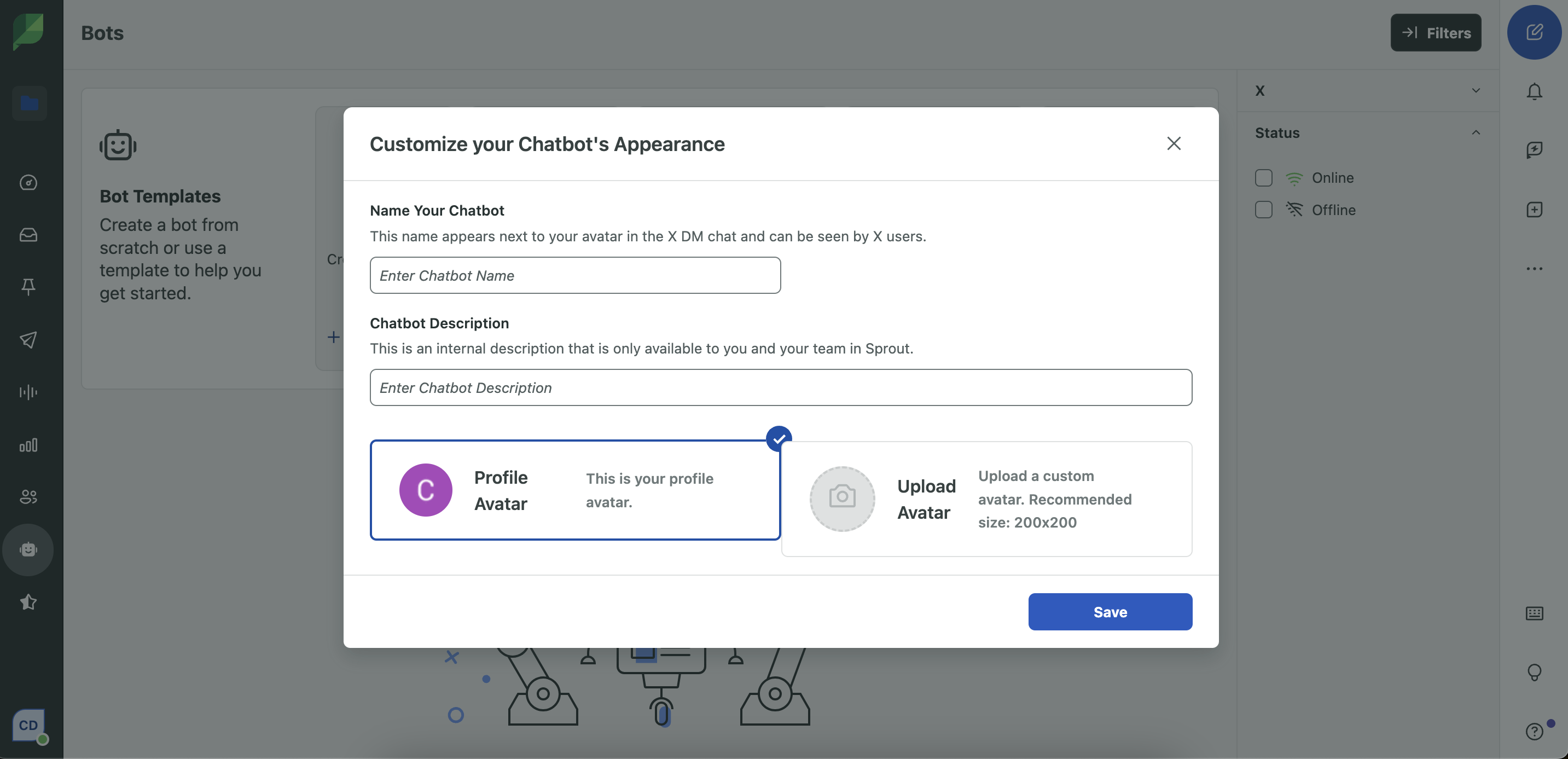
Establish a unique identity for your chatbot that aligns with your branding:
- Name and Description: Assign a distinct name and an internal description for organizing your bots. These details won’t be visible to users but are crucial for managing multiple chatbots.
- Avatar: Upload an image or utilize your account’s profile picture to enhance the bot’s visual identity. A personalized avatar helps build trust and familiarity with your audience.
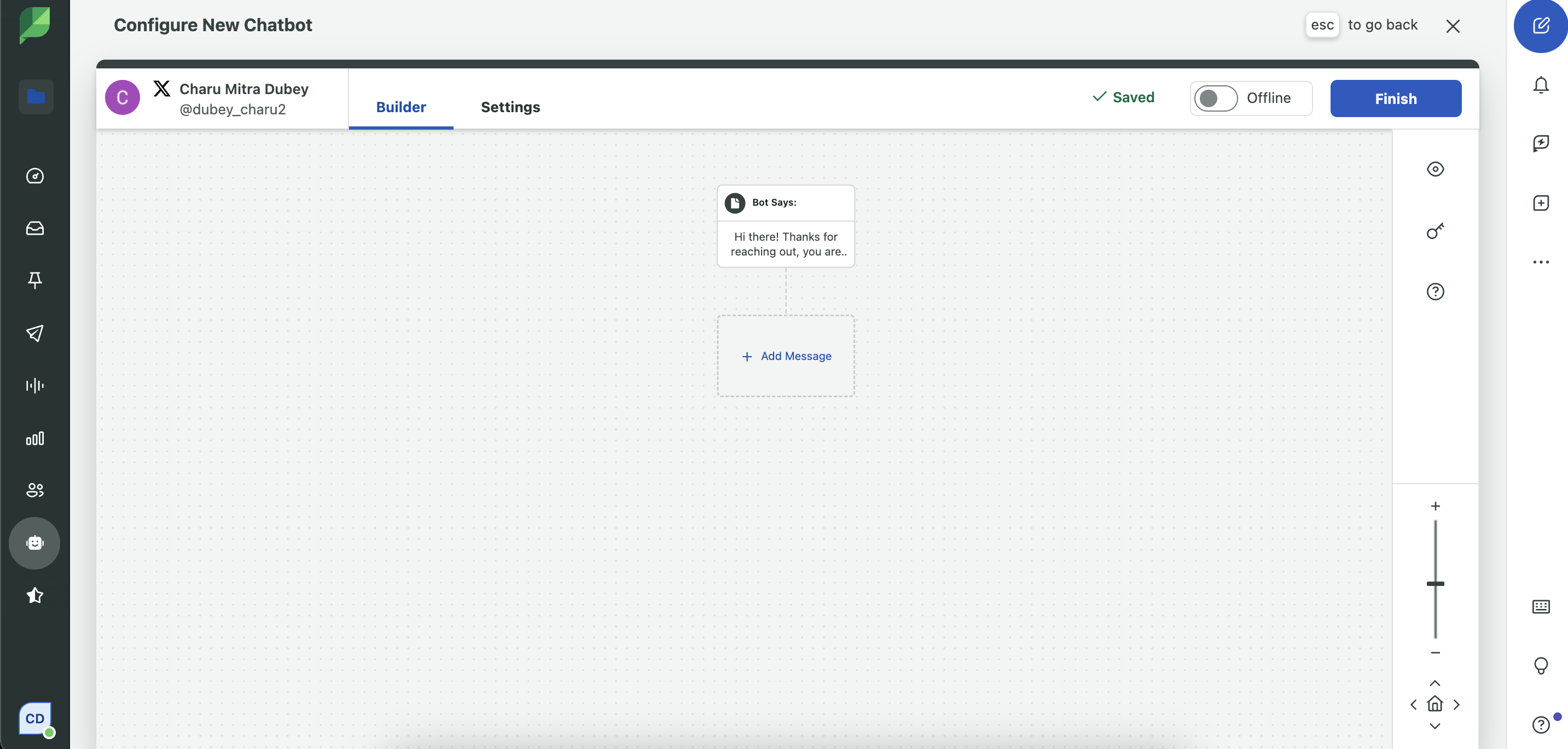
Step 5: Develop Comprehensive Conversation Paths
Create a conversation tree for each question your chatbot will ask and every response it can give. While some chats may wrap up quickly, others may necessitate multiple layers of dialogue.
- Plan for Depth: Anticipate how interactions might develop and craft responses that completely address user needs.
- Acknowledge When to Escalate: If a dialogue becomes overly complex, guide the user to a live representative to ensure their issues are adequately addressed.
- Prioritize User Fulfillment: Ensure every conversation route is thorough, logical, and constructive in order to keep users engaged and satisfied.
Step 6: Integrate Keyword Commands (Optional)
Establish keyword prompts to make your chatbot more responsive to user-initiated queries.
- Example: If a user types “shipping info,” the bot could respond with: “Our regular delivery time is 3–5 business days. Please let me know if you need more specifics.”
Step 7: Preview and Test
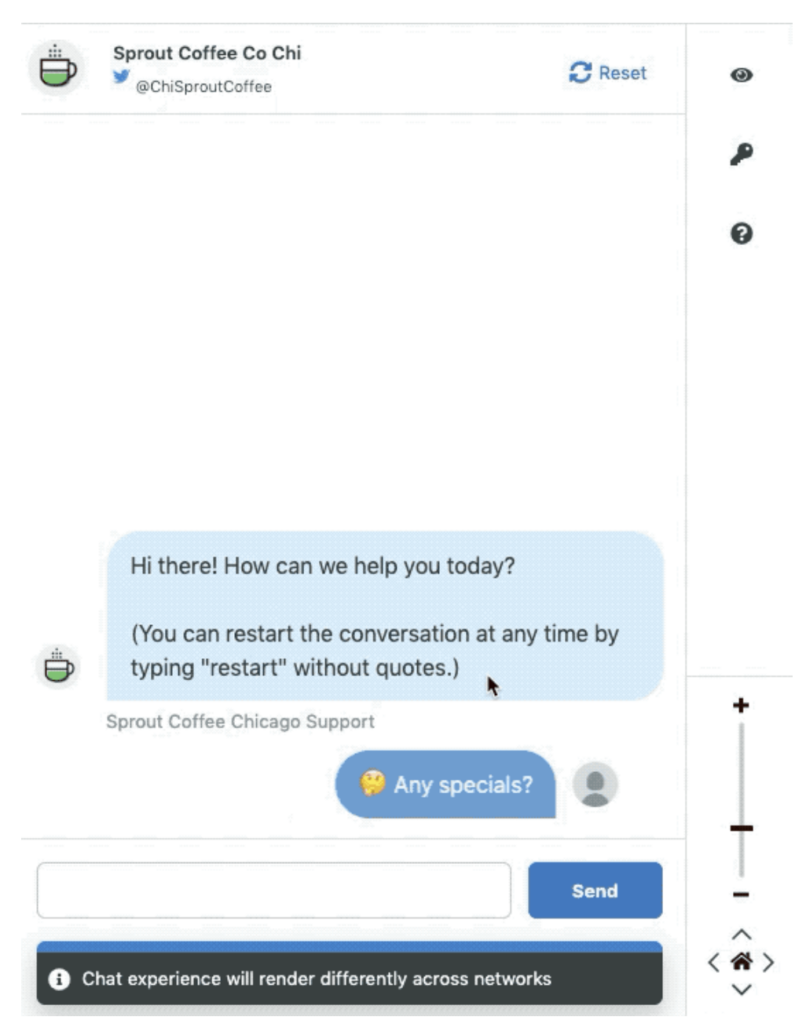
Prior to going live, utilize the Live Previewer to simulate interactions and confirm that the conversation flows as desired.
- Experiment with various user inputs, quick replies, and keyword triggers.
- Refine responses to remove any ambiguities or mistakes.
Pro Tip: Check the chatbot’s performance on both mobile and desktop to ensure a consistent user experience across devices.
Setting Up X/Twitter Chatbots in Sprout
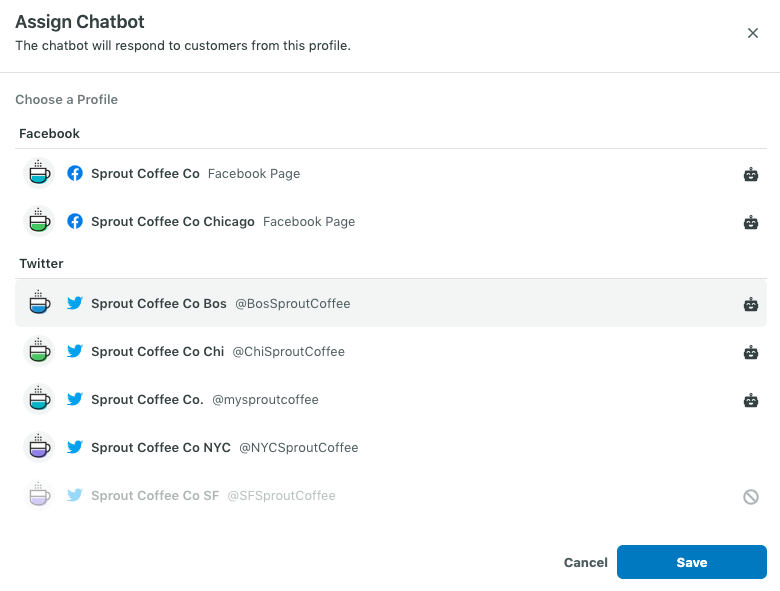
Step 1: Assign a Chatbot
Choose the X profile to which you’d like to assign the bot. A bot icon next to a profile indicates that a chatbot is already linked.
Step 2: Personalize Your Chatbot’s Appearance
- Choose your X account’s profile avatar or upload a distinct avatar for your bot.
- Provide a name and internal description to identify the chatbot. This description isn’t visible to users.

Step 3: Configure the Conversation
Sprout Social’s Bot Builder supports three conversational elements within X Direct Messages:
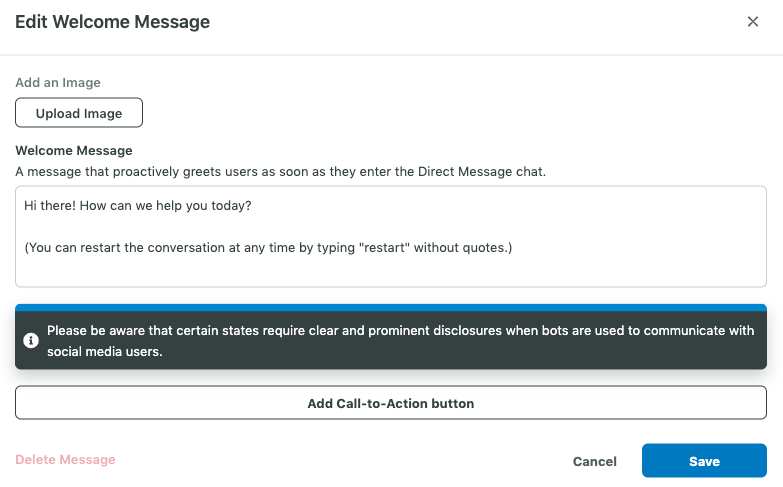
- Welcome messages: Engage users proactively and set expectations.
- Example: “Hi there! How can we assist you?”
- Quick replies: Provide clickable options that guide users.
- Example options: “My order was incorrect,” “I’m experiencing a technical problem,” or “I need to speak with a customer service representative.”
- Tip: Include a “Something else” option for any unlisted requests.
-
- Auto-responses: Automatically reply based on the selected Quick Reply.
- Example: “Sorry to hear that! Please provide your order number or email, and we’ll resolve this as soon as possible.”
- Strategically plan landing pages: Implement CTAs within your bot to direct users to high-value pages such as product information, FAQs, or personalized suggestions. This method can facilitate substantial conversions at scale without manual sales involvement. A well-thought-out CTA strategy improves user experience and ensures swift access to essential information.
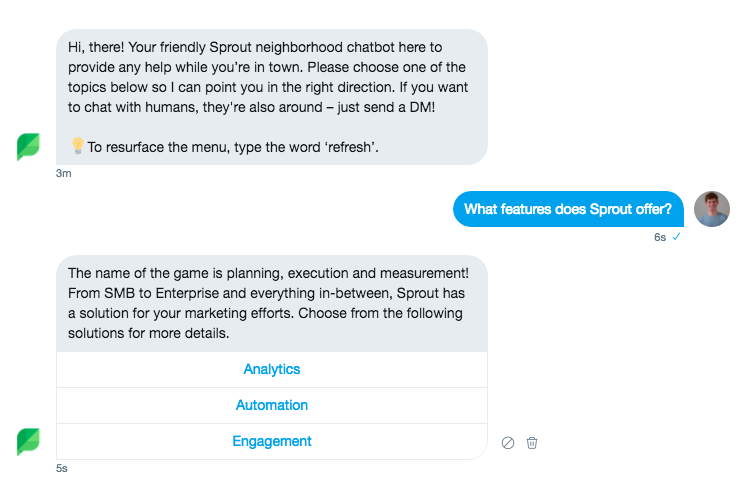
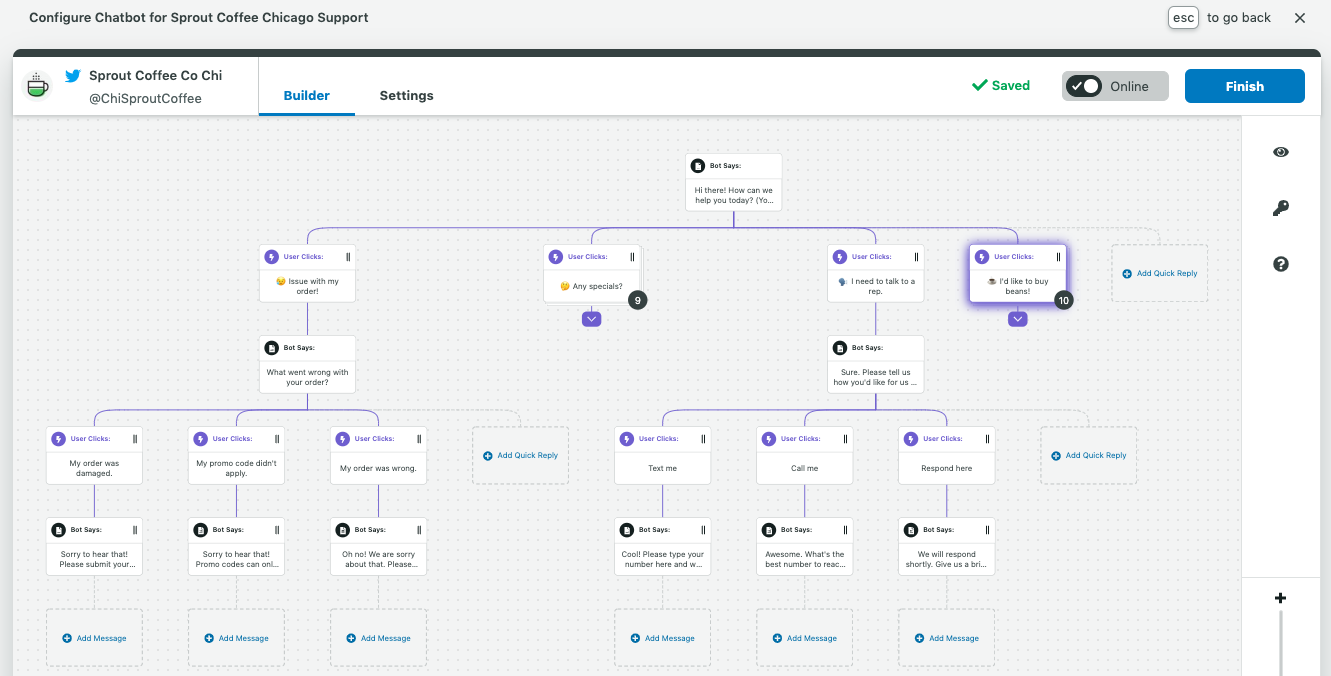
Utilize the drag-and-drop interface in the Bot Builder to organize conversation flows and assess them in the Live Previewer.
Preview and Finalize Your Bot
During the design phase, use the preview feature on the right side of your Bot Builder dashboard to visualize how your chatbot will function during interactions.
For further assistance, the Chatbot Guide (accessible via the Resource button in the right panel) provides valuable insights, including chatbot components and suggestions for crafting effective conversational flows.
Once satisfied with your chatbot experience, click “Finish” to save your work and return to the main Bots screen.
Pro Tip: Click the “Reset” button available in the Chat Preview’s upper-right corner. Users can use this to restart the conversation as they wish.
Setting Up Facebook Chatbots in Sprout
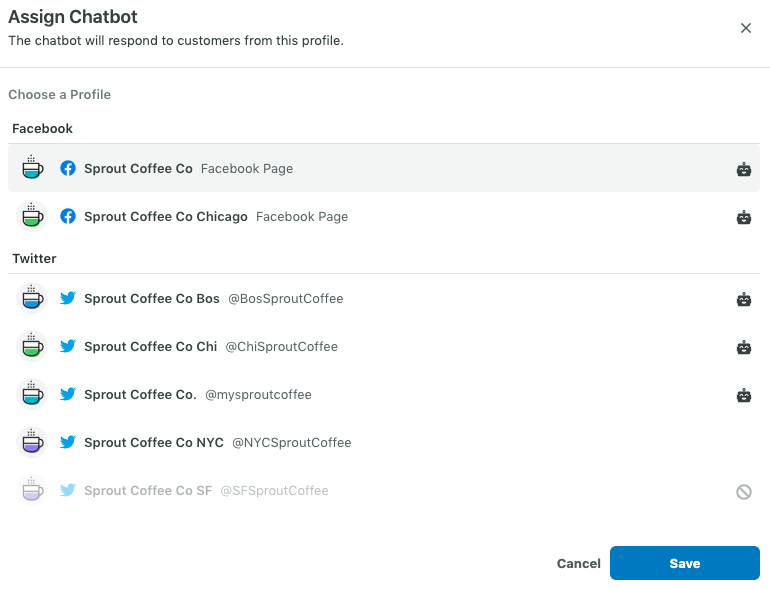
Step 1: Assign a Chatbot to Your Profile
Start by selecting the Facebook profile where you want to assign the chatbot. If a chatbot is already associated with a profile, a bot icon will appear on the right side of that profile.
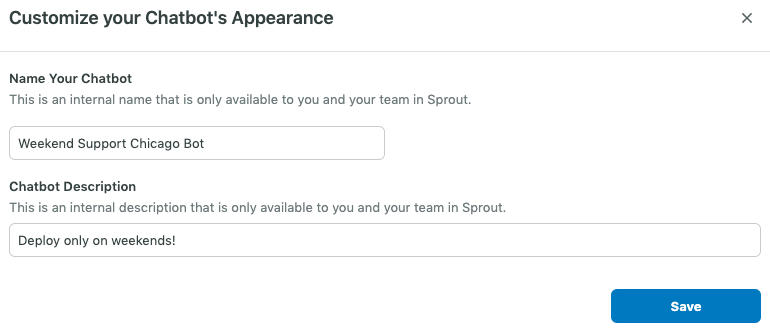
Step 2: Personalize Your Chatbot’s Information
Assign a name and an internal description to your chatbot. This information is solely for your reference and won’t be visible to users on Facebook.
Step 3: Configure the Conversational Flow
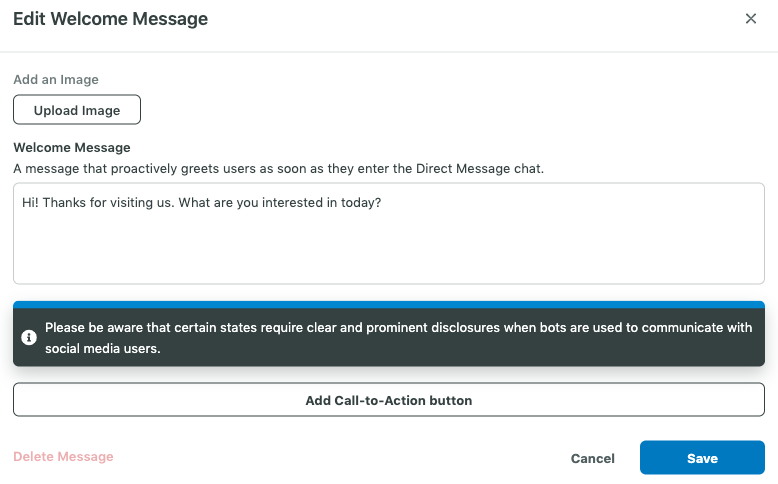
Sprout’s Bot Builder allows you to create and manage engaging conversational components in the Facebook Private Message channel. This includes Welcome messages, Quick Replies, and more, using text, images, or carousel cards.
Important Note: If a user has previously interacted with your Facebook page on Messenger, the “Get Started” button will not be visible. To restore it, users must delete the previous conversation.
- Welcome messages: These greet users as they enter your Private Message channel (i.e., Hi there! How can we assist you today?), aiding in setting expectations and guiding next steps.
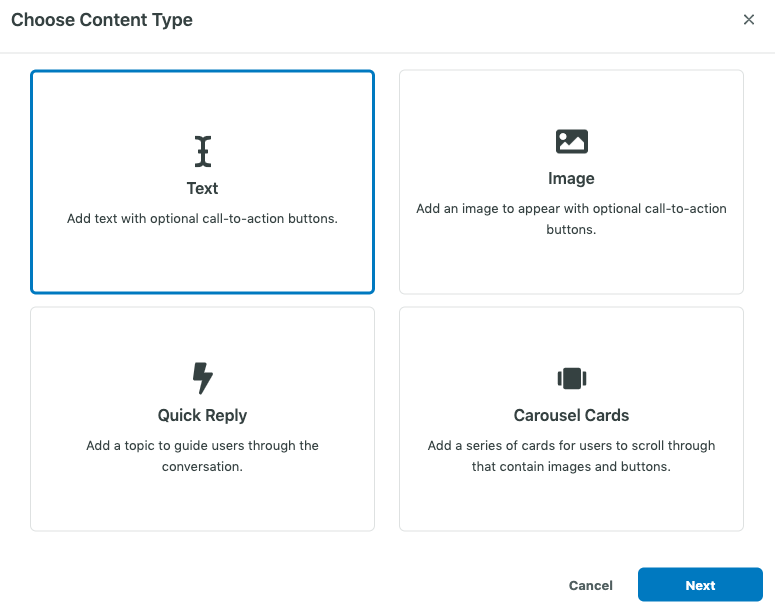
Select Content Types: The Content Type modal allows you to pick from Text Messages, Image Messages, Quick Replies, or Carousel Cards for your chatbot responses.
- Quick replies: These interactive buttons help guide users by providing specific choices. You must include at least two Quick Replies but can add up to six, easily rearranging them in the conversation map.
Examples of Quick Replies:- “My order was incorrect”
- “I’m experiencing a technical issue”
- “I want to talk to a representative”
Pro Tip: Incorporate a “Something else” or “Other” option to cover questions not included in your predefined responses.
- Responses to quick replies: Establish text or image responses for each Quick Reply option. For example: If a user selects “My order was incorrect,” the chatbot might reply: “We apologize for that! Kindly provide your order number or email, and we’ll resolve this promptly.”
- Carousel cards: These horizontal cards can feature up to 10 slides, each including an image, title, subtitle, and button. They serve as excellent tools for showcasing products or directing users to other web pages.
Preview and Finalize Your Chatbot
Utilize the Live Preview to assess and refine your chatbot’s conversational flow.
For further help, the Chatbot Guide (accessible through the Resource button in the right panel) offers insights into chatbot structure and best practices for creating effective bots.
Once satisfied with your setup, click Finish to save your chatbot and return to the main Bots screen.
A Superior Experience is Just One Chatbot Away
Chatbot marketing has emerged as a robust tool that enhances customer experiences, streamlines business operations, and stimulates growth. As technology progresses and customer expectations rise, we can anticipate chatbots evolving to become even more sophisticated. By leveraging advanced AI capabilities to:
- Hyper-personalization: Expect chatbots to utilize AI and machine learning to create truly tailored experiences, predicting customer needs and delivering highly personalized recommendations.
- Multi-modal interactions: An increase in chatbots integrating voice, text, and visuals to craft more immersive and engaging conversations is on the horizon.
- Proactive engagement: Moving beyond reactive support, chatbots will proactively interact with users, providing relevant information, tailored offers, and timely assistance.
- Integration with the metaverse: As the metaverse develops, chatbots will play an integral role in navigation and interaction within these virtual spaces.
- Focus on ethical considerations: With the growing sophistication of AI, ethical issues around data privacy, bias, and transparency will become paramount in the development and implementation of chatbots.
By adopting these trends and continuously refining your chatbot strategies, your brand can unlock the full potential of this technology to foster stronger customer relationships, drive revenue growth, and maintain a competitive edge in an ever-evolving market.
Try Sprout Social’s free 30-day trial to discover how chatbots can revolutionize your social strategy.
The post The complete guide to chatbots for marketing appeared first on Sprout Social.

Recent Comments