

I’m here to give you a sneak peek at a feature coming soon to Divi 5. With Divi 5’s foundation complete, we’re now focused on aggressive feature development, with new features in the works as part of the Divi 5 feature swap.
Every time we finish a feature, we start working on a new one, and every time we start working on a new feature, I’m going to tell you all about it!
Earlier this week, we released Option Group Presets, and the team involved is already working on their next project: Divi Design Variables.
It’s a bold step in a new direction for Divi and an essential part of Divi 5’s design system, which we are building to satisfy the needs of advanced web designers.
Get all the details in this video. 👇
What Are Design Variables?
Thanks to Divi’s global color system, you should already be familiar with the concept of design variables. Global colors are a type of design variable. They are data saved in your database, in this case, colors, that can be used throughout your website.
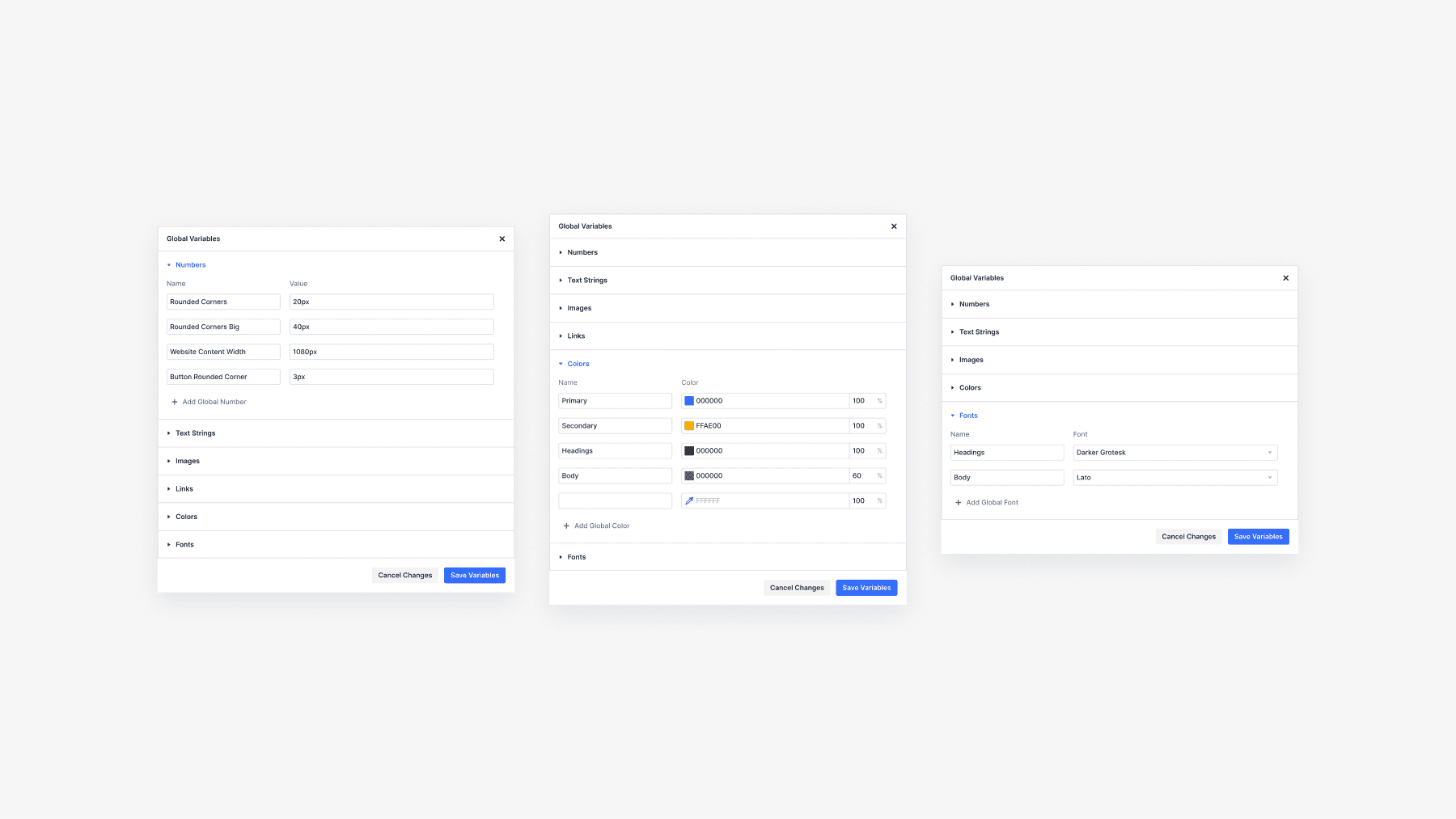
With the introduction of Divi Design Variables, you won’t be limited to global colors; you can define global anything! You can define variables for colors, units, strings, fonts, and images. These variables can be plugged into module settings and presets.
When you change a variable, it gets updated across your entire website. That makes designing with variables very efficient.
Furthermore, all of Divi’s input fields in the settings panel will be updated to support variables and dynamic content!
Designing Websites With Variables
How will design variables be used? In so many ways! For example, let’s consider number variables.
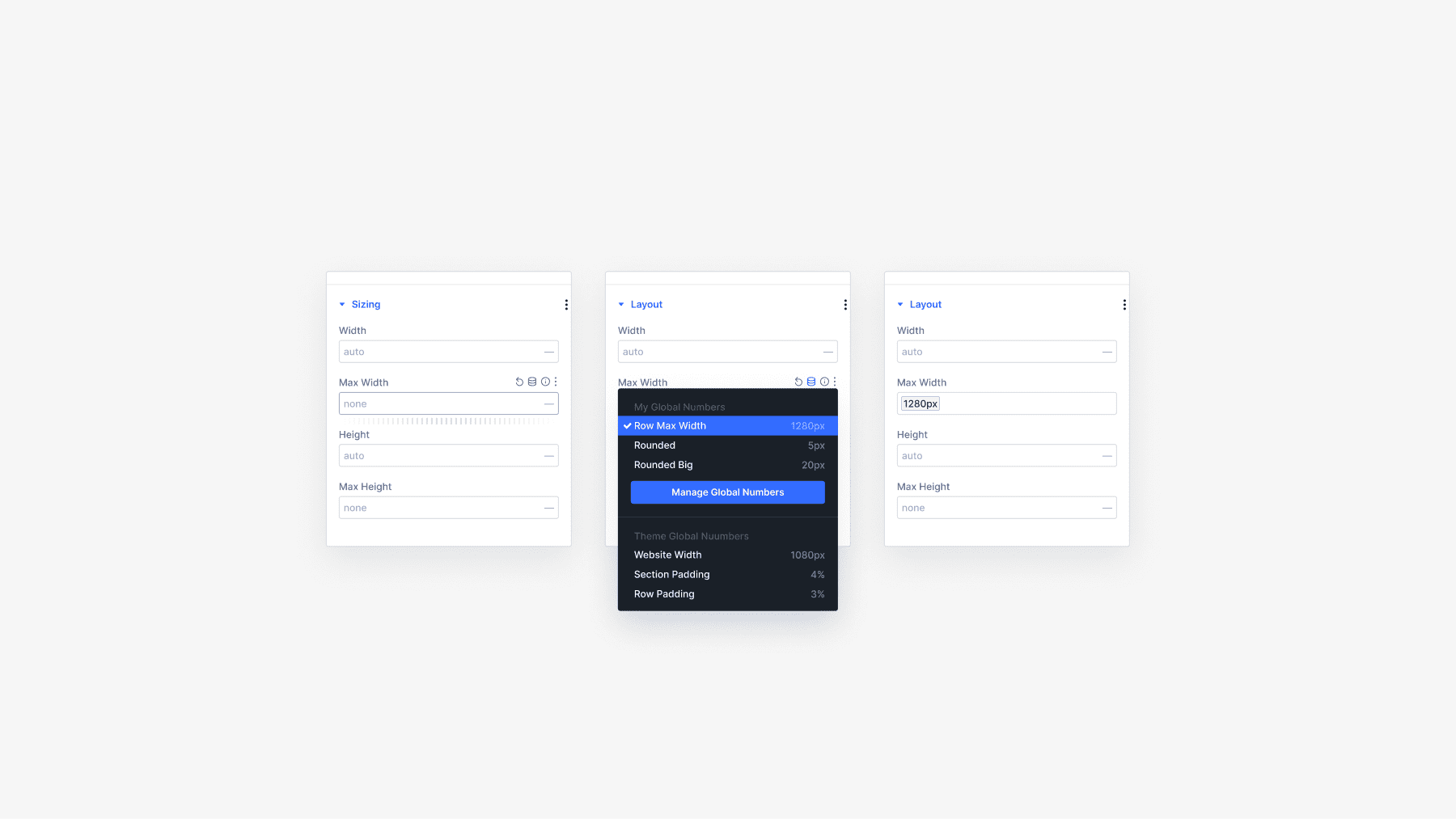
You can create a balanced sizing system for your website using a few number variables within your default presets. Define variables for your large, medium, and small font sizes and plug those variables into your presets and modules. If you ever want to change the size of your fonts, you only have to edit the variables!
Are you using the same border-radius value on dozens of elements? Turn that into a number variable, and then you can easily change your website’s border radius.
The same thing goes for fonts. Define and assign font variables to your title and body text presets or within static modules. If you ever want to switch things up and change your website’s fonts, you only need to update the variables, not your collection or presets, and certainly not a disparate set of modules on various pages.
You can also define variables for things like content strings and images. For example, you may have a company phone number, email, or address referenced throughout your website. If you turn that into a content variable, updating your company’s contact information is easy; digging through hundreds of pages is unnecessary.
The Divi Design System Is Evolving
The design system we’re building for Divi 5 is a beautiful thing. Preset-based design and variable management will usher in a new era of web design for Divi users, and you won’t have to wait long. Option presets were released a few weeks ago, and Variable Management isn’t far behind.
Let us know your thoughts in the comments or if you have any questions. Will the Divi Design Variables change how you build websites? I want to hear what you think!
Have You Tried Option Group Presets?
In case you missed it, check out my video from a few days ago announcing the release of Option Grou Presets.
Option Group Presets ushers in the era of preset-based design for Divi 5. You can create option presets for things like backgrounds, borders, and text and use those presets with any element, just like applying CSS classes to multiple HTML elements.
Get all the details in this video. 👇
Many More Features Coming Soon
Let us know your thoughts in the comments or if you have any questions. Before you go, I have a favor to ask. We are on a mission to leapfrog the competition in 2025 with dozens of new features, and we want you to know about all of them.
That’s why you must subscribe to our YouTube channel, as it’s the primary way we spread the word (in addition to the Divi newsletter). Over 50% of our viewers keep returning to watch these updates but aren’t subscribers. If that’s you, consider clicking the subscribe button and following along as Divi makes its comeback.
All it takes is one little click. 😁
We will fill this year with feature announcements and sneak peeks you don’t want to miss. Stay tuned, and I’ll see you for another sneak peek, which I promise is right around the corner.
The post Divi 5 Sneak Peek! Divi Design Variables appeared first on Elegant Themes Blog.
# An Overview of Divi 5: Introducing Design Variables
In the ever-evolving landscape of web design, tools that empower users to create visually stunning and functional websites are paramount. One such tool that has consistently stood out is Divi, a popular WordPress theme and page builder developed by Elegant Themes. With the release of Divi 5, the platform has taken a significant leap forward by introducing a feature called Design Variables. This article will provide an overview of Divi 5 and delve into the implications and benefits of Design Variables for web designers and developers.
## What is Divi?
Divi is a versatile WordPress theme that allows users to build websites using a visual drag-and-drop interface. It is known for its flexibility, extensive customization options, and a vast library of pre-designed templates. Divi caters to a wide range of users, from beginners who may have no coding experience to seasoned developers looking for a robust framework to build upon.
## The Evolution of Divi
Since its inception, Divi has undergone numerous updates and enhancements, consistently adding features that improve user experience and expand design capabilities. The introduction of Divi 5 marks a significant milestone in this evolution, particularly with the integration of Design Variables.
## What are Design Variables?
Design Variables are a new feature in Divi 5 that allows users to create and manage global design settings across their websites. This feature enables designers to define key design elements—such as colors, fonts, spacing, and more—once and apply them universally throughout their site. This not only streamlines the design process but also ensures consistency across all pages and elements.
### Key Features of Design Variables
1. **Global Control**: Design Variables provide a centralized location to manage design settings. Changes made to a Design Variable automatically propagate to all instances where that variable is used, saving time and reducing the risk of inconsistencies.
2. **Customizable Settings**: Users can create custom variables tailored to their specific design needs. This flexibility allows for a high degree of personalization while maintaining the efficiency of global settings.
3. **Responsive Design**: Design Variables can be adjusted for different screen sizes, ensuring that websites look great on desktops, tablets, and mobile devices. This feature is crucial in today’s mobile-first world.
4. **Enhanced Collaboration**: For teams working on larger projects, Design Variables facilitate better collaboration. Designers can establish a design system that team members can adhere to, ensuring a cohesive look and feel across the project.
5. **Easy Updates**: When it comes time to refresh a website’s design, updating a Design Variable is all it takes to implement changes site-wide. This makes maintaining and updating websites significantly easier.
## Benefits of Using Design Variables
### 1. Consistency
One of the primary advantages of Design Variables is the consistency they bring to web design. By using a set of predefined variables, designers can ensure that colors, fonts, and other design elements remain uniform across all pages. This consistency enhances the overall user experience and strengthens brand identity.
### 2. Efficiency
Designing a website can be a time-consuming process, especially when changes need to be made across multiple pages. Design Variables streamline this process by allowing designers to make global changes quickly. This efficiency not only saves time but also reduces the likelihood of errors.
### 3. Flexibility
While Design Variables promote consistency, they also allow for flexibility. Designers can create multiple sets of variables for different projects or sections of a website, enabling them to adapt their designs without starting from scratch.
### 4. Improved Workflow
For teams and agencies, Design Variables can significantly improve workflow. With a shared set of design variables, team members can work more collaboratively, ensuring that everyone is on the same page regarding design standards.
## Conclusion
Divi 5 and its introduction of Design Variables represent a significant advancement in the world of web design. By offering a powerful tool for managing global design settings, Divi 5 empowers users to create cohesive, efficient, and visually appealing websites with ease. As web design continues to evolve, features like Design Variables will undoubtedly play a crucial role in shaping the future of website creation, making it more accessible and streamlined for designers of all skill levels. Whether you are a seasoned professional or a beginner, Divi 5 provides the tools you need to bring your creative vision to life.

Recent Comments