
Divi has long been considered one of the most powerful and versatile WordPress themes. With the introduction of Divi 5, we’re shaking things up. In previous versions of Divi, shortcodes – small snippets of code – acted as a placeholder for Divi’s design modules, allowing the Visual Builder to generate complex layouts and styles through backend commands.
With the release of Divi 5, shortcodes are gone, and we’ve completely rewritten the framework from the ground up. In this post, we’ll explore how Divi’s new framework, built similarly to Gutenberg blocks, is more efficient and powerful than ever.
Learn more about the Divi 5 Public Alpha and how to download it. 👇
What Are Shortcodes?
Shortcodes were designed to make it easier for users to add complex content and functionality to their websites without requiring long-form code. For instance, instead of manually coding an entire form or image gallery in HTML and CSS, users can insert a shortcode like [ gallery ], and WordPress will automatically generate the necessary elements when the page is rendered.
The idea behind shortcodes was to make WordPress more user-friendly. These short snippets could run custom functions and render custom elements, which could be re-used throughout your website easily.
How Divi Used Shortcodes In The Past
Divi used WordPress’s native shortcode system to organize its builder elements, with each shortcode acting like a single building block in a larger design.
For example, when a user adds a button in the Visual Builder, behind the scenes, Divi inserts a shortcode for that button that defines all of its properties, like color, size, border-radius, etc. This makes it possible for people to build incredible layouts, but behind the scenes, Divi stacks shortcodes to define and render each element.
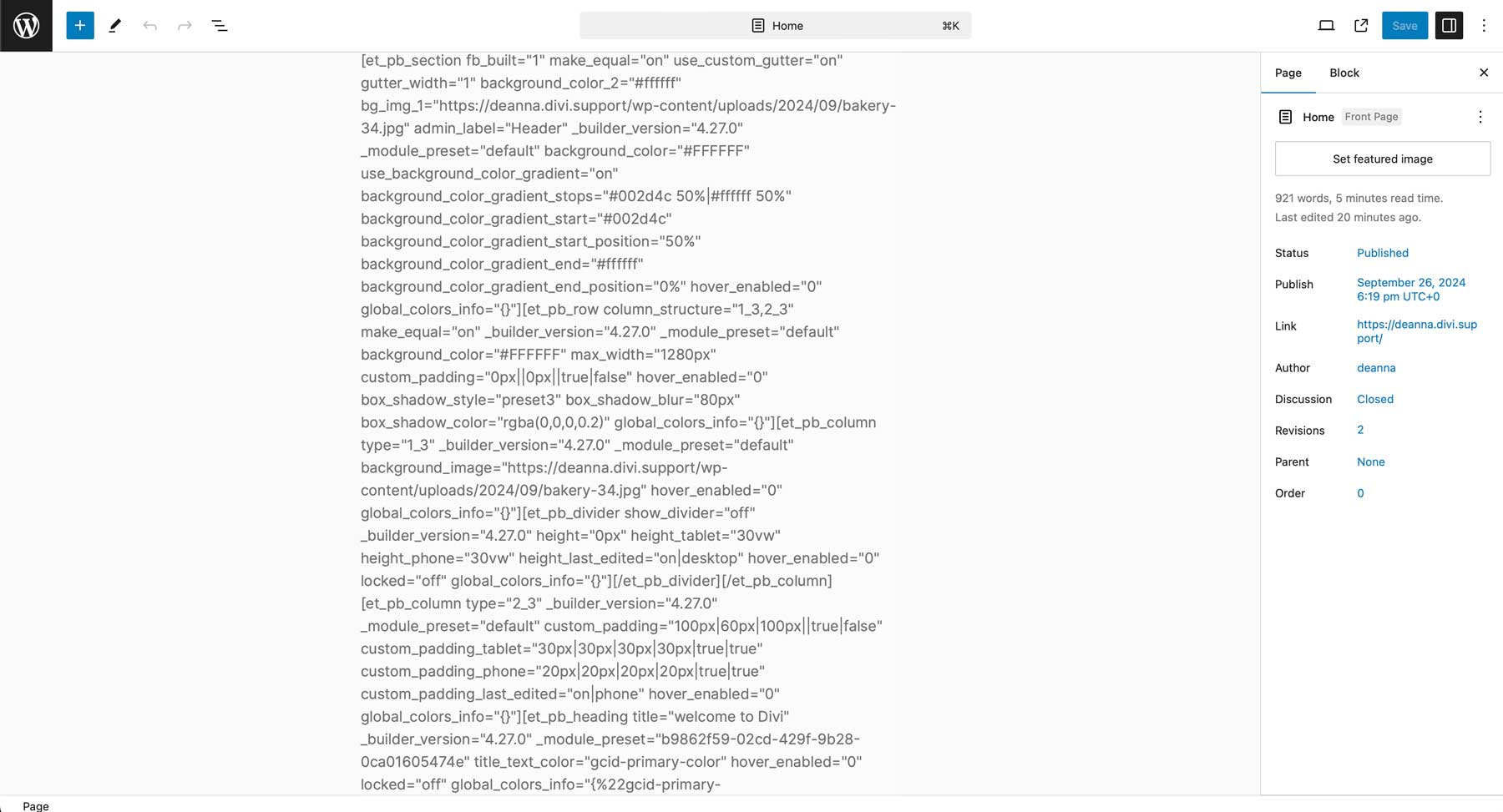
If you have ever disabled Divi and visited a page you built with the Divi Builder, you would have seen these shortcodes below.
Why We Moved Away From Shortcodes In Divi 5
WordPress is moving away from shortcodes in favor of blocks. For that reason alone, Divi must abandon its reliance on shortcodes, which will inevitably be deprecated. Divi 4 lives in the past, while Divi 5 is built for the future. But there are more reasons to move, which will benefit Divi users greatly.
Improved Performance
The first reason is performance. Parsing a page built with shortcodes is less efficient because it doesn’t have a proper hierarchy. It simply takes longer for Divi to take a massive string of shortcode content and understand it. Furthermore, the speed at which WordPress renders shortcode content leaves something to be desired. Divi 4 is pushing this system to its limits.
Improved Versatility
The second reason is versatility. Shortcodes weren’t envisioned as part of a complex, nested design system. Divi 4 had to jump through hoops to avoid problems when nesting modules within columns within rows within sections, and adding more nestability, such as columns within columns, opens up a whole new can of worms. Divi 5 solves this problem with its new storage format, allowing infinitely nested elements.
Improved Stability
The third reason is stability. As an API, shorcodes have limitations. The way brackets and attributes store complex data means that one rogue character could crash the whole system. Divi 5 will have fewer bugs because fewer things can go wrong.
Improved Cross-Compatibility
The fourth reason is cross-compatibility. Divi 5’s new storage format mimics WordPress’s native blocks, making it easier for Divi and Gutenberg to talk to each other.
This was a huge change. We had to start over! But it’s incredibly important for the long-term viability of Divi.
The Shift To A Block-Based Visual Builder System
Recognizing the need for a more modern approach, Divi 5 has moved away from shortcodes in favor of a block-based approach aligned with WordPress’s future. Instead of relying on shortcodes, Divi 5 mimics WordPress’s block-based architecture. Removing shortcodes in Divi 5 is part of a larger push to make Divi faster, more flexible, and easier to use. By eliminating the old framework, Divi 5 delivers significant performance improvements.
In terms of flexibility, Divi 5 allows for more dynamic and scalable site-building capabilities. This modern new framework can easily be expanded and integrated with more complex features, which is impossible with Divi 4’s shortcode-based framework.
What’s The Impact On Existing Divi Websites?
The most pressing question for many long-time Divi users is what will happen to their existing websites built with Divi 4. Fortunately, we planned for this. While Divi 5 does eliminate shortcodes in new site builds, existing websites will not be affected.
Divi 5 comes with a migrator that will convert all of your Divi 5 shortcodes to Divi 5 blocks. It’s as easy as clicking a button!
Divi 5 was also designed with backward compatibility, ensuring that your website continues functioning normally, even before migration. If Divi 5 detects legacy shortcodes, it will run in backward compatibility mode until that content is properly migrated or your third-party modules have been updated to support Divi 5.
Divi 5: Faster, Cleaner, & More Flexible
Removing Divi 4’s shortcode-based framework is a significant step forward.
Want to experience the difference yourself? Now is the perfect time to test the Divi 5 Alpha and familiarize yourself with its biggest changes. Help us find bugs and make the final version of Divi 5 even better.
Remember only to test the Divi 5 Alpha locally or on a staging site. You will likely encounter many bugs at this stage, especially during migration. If you don’t want to participate in the bug-testing phase, jump in later.
The post Divi 5 Waves Goodbye To Shortcodes. Here’s Why It Matters appeared first on Elegant Themes Blog.
# Divi 5 Eliminates Shortcodes: Key Implications for Users
The release of Divi 5 has sparked significant interest and discussion within the WordPress community. As one of the most popular WordPress themes and page builders, Divi has continually evolved to meet the needs of its users. One of the most notable changes in this latest version is the elimination of shortcodes. This article explores the implications of this significant shift for users, developers, and the broader WordPress ecosystem.
## Understanding Shortcodes in Divi
Shortcodes have been a staple of WordPress for years, allowing users to insert dynamic content and complex layouts into posts and pages with simple, bracketed commands. In Divi, shortcodes were used extensively to create various elements, such as buttons, galleries, and custom layouts. While they provided a level of convenience, shortcodes also came with their own set of challenges, including:
1. **Complexity for Beginners**: New users often found shortcodes confusing, especially when troubleshooting issues or trying to understand how different elements interacted.
2. **Dependency on the Divi Builder**: If users switched themes or deactivated the Divi Builder, the shortcodes would often render as plain text, leading to broken layouts and loss of functionality.
3. **Limited Flexibility**: Shortcodes could be limiting in terms of design and customization, as they often required users to adhere to predefined structures.
## The Shift to a Shortcode-Free Experience
With the introduction of Divi 5, Elegant Themes has opted to eliminate shortcodes altogether. Instead, the new version focuses on a more intuitive, block-based editing experience that enhances user control and flexibility. Here are some key implications of this transition:
### 1. Enhanced User Experience
By removing shortcodes, Divi 5 aims to simplify the user experience. The new block-based system allows users to drag and drop elements directly onto the page without needing to remember or input shortcodes. This change is particularly beneficial for beginners who may feel overwhelmed by the technical aspects of WordPress.
### 2. Improved Performance and Speed
Shortcodes can sometimes lead to performance issues, as they require additional processing to render content. By eliminating them, Divi 5 can streamline the rendering process, potentially leading to faster load times and improved overall performance. This is crucial for SEO and user retention, as site speed is a significant factor in both search rankings and user satisfaction.
### 3. Greater Design Flexibility
The new block-based approach allows for more creative freedom in design. Users can customize layouts and styles without being constrained by shortcode limitations. This flexibility can lead to more unique and visually appealing websites, as users can experiment with various design elements without worrying about how they will be rendered in shortcode format.
### 4. Better Compatibility with Other Themes and Plugins
One of the primary drawbacks of shortcodes was their theme-specific nature. When users switched themes or deactivated the Divi Builder, their content often broke. With the elimination of shortcodes, users can expect better compatibility with other themes and plugins, making it easier to switch or integrate additional functionality without losing their content.
### 5. Streamlined Maintenance and Updates
Shortcodes can complicate maintenance and updates, as users must ensure that all shortcode-dependent elements are functioning correctly after updates. By moving away from shortcodes, Divi 5 simplifies the maintenance process, allowing users to focus on content and design rather than troubleshooting shortcode-related issues.
## Conclusion
The elimination of shortcodes in Divi 5 represents a significant shift in how users will interact with the theme and page builder. By focusing on a more intuitive, block-based editing experience, Divi 5 aims to enhance usability, improve performance, and provide greater design flexibility. While the transition may require some adjustment for long-time users accustomed to shortcodes, the long-term benefits are likely to outweigh the initial learning curve.
As the WordPress ecosystem continues to evolve, Divi 5’s move away from shortcodes may set a precedent for other themes and builders, encouraging a more user-friendly approach to website design and development. For users, this means a more seamless, enjoyable experience as they create and manage their online presence.

Recent Comments