

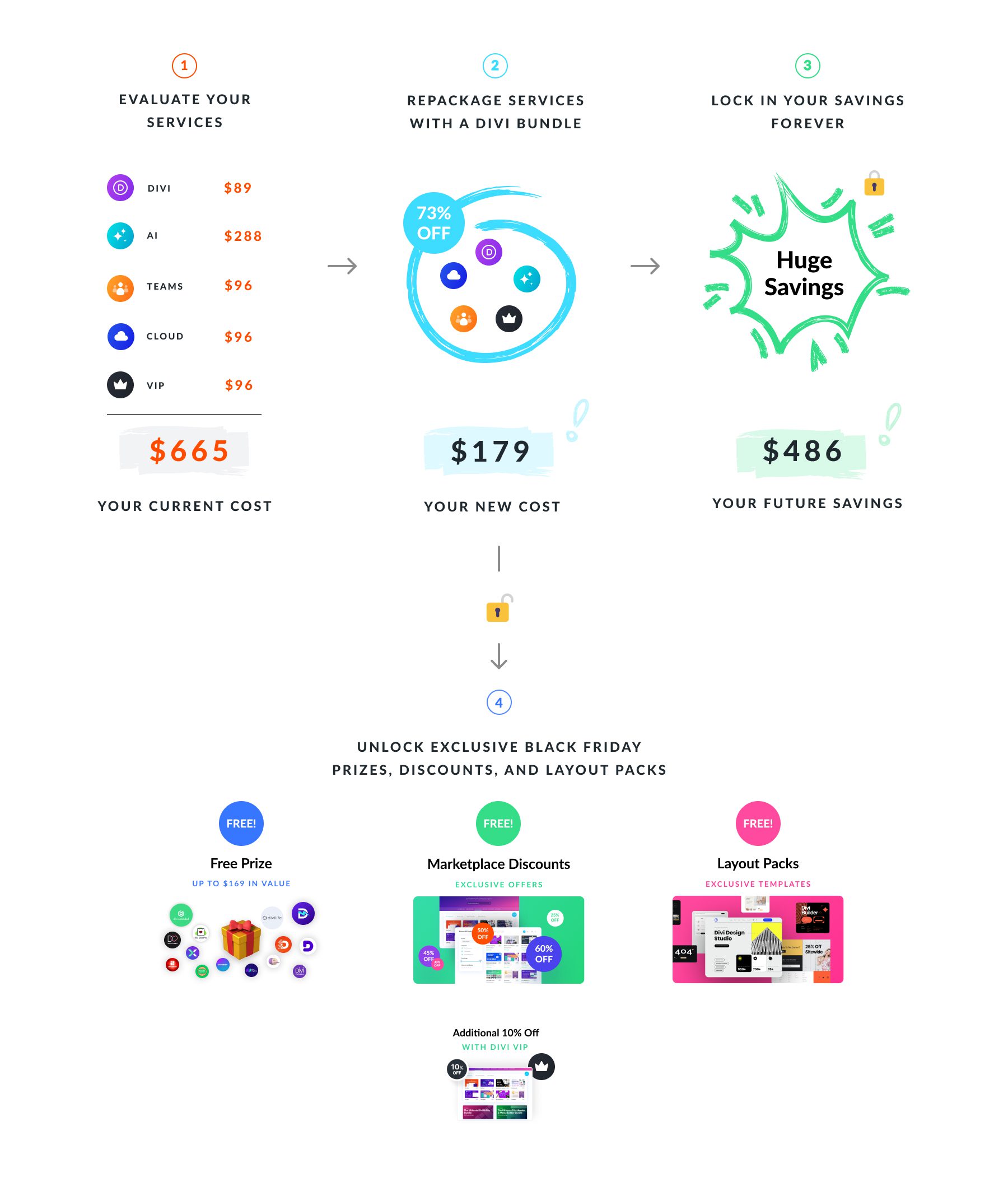
The Divi Cyber Monday Sale is our biggest sales event of the year. For a limited time, you can lock in up to 73% savings when upgrading to Divi Pro — all with just two clicks. Thanks to our Cyber Monday bundle discount, you’ll likely reduce your subscription cost while accessing more features! It’s a win-win.
Upgrading to Divi Pro during Cyber Monday isn’t just about saving money; it’s about unlocking the full power of Divi. Divi Pro gives you everything you need to build better, faster, and more innovative websites, from AI features to collaboration tools and priority support.
Why Should You Upgrade To Divi Pro (& Lock In 73% Off For Life)?
Subscribe To Our Youtube Channel
By acting now, you’re saving money and unlocking the whole Divi experience. This upgrade gives you access to Divi’s entire ecosystem of tools and world-class support — all bundled into a single, cost-effective package.
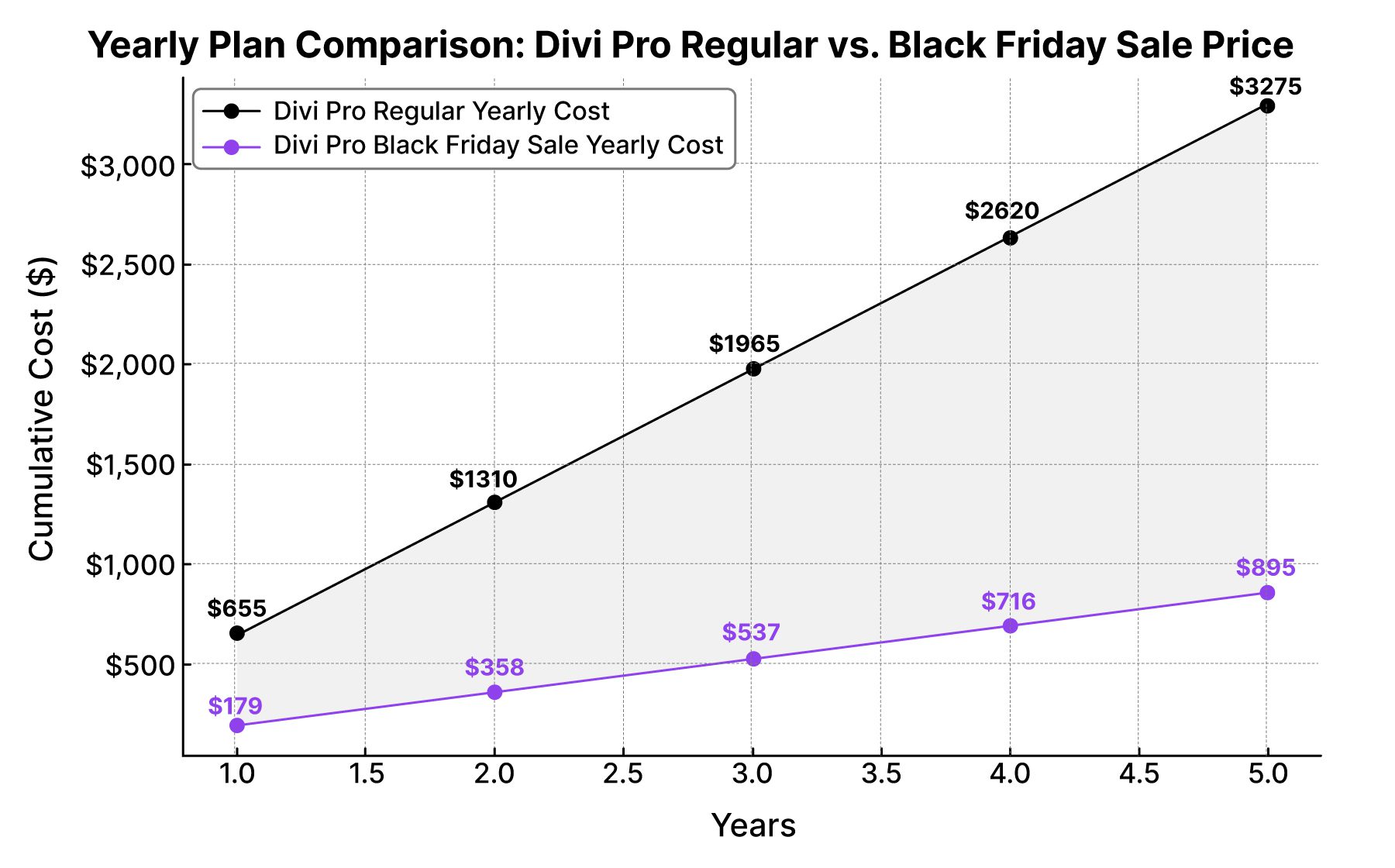
The 73% discount you claim today will be locked in for life, which saves you so much money over the years. It saves you $486 per year every year.
Here’s what you gain by switching to a Divi Pro membership:
- Access to everything in the Divi ecosystem: With Divi Pro, you can create unlimited websites with Divi, generate unlimited text, code, layout, and images with Divi AI, add 4 Divi Teams seats, store layouts in Divi Cloud, get white-glove support with Divi VIP, and manage all your websites in one place with Divi Dash.
- Long-term savings: Say goodbye to expensive annual renewal costs. By upgrading during Cyber Monday, you’ll enjoy massive savings upfront and, in the future, free up your budget for other web design resources. The discount you secure today is locked in for life.
- Continuous access to Divi updates: With a Divi Pro membership, you’ll have access to every Divi update, feature, and enhancement we release — for as long as you’re a member. This means you’re always equipped with the latest tools and functionality that set Divi apart forever.
- Future-ready with Divi 5: Divi 5 is completely reimagining our builder’s speed, flexibility, and scalability. Don’t forget that Divi 5 is included for free for all Divi members.
Using the comparison chart below, you’ll see that you will save an incredible $2380 over the next five years alone.
What You’ll Get With Divi Pro
Upgrading to Divi Pro gives you access to everything in the Divi ecosystem for the unheard-of low price of $173. What does that mean? For starters, you’ll get access to the Divi theme, which allows you to build unlimited websites and keep them up-to-date for as long as you’re an Elegant Themes Member:
- Divi Theme: Access the most versatile WordPress theme on the market. Build websites with over 200 modules, a no-code page builder, and the Divi Theme Builder, which allows you to create dynamic templates for headers, footers, posts, and more.
- Multiple Ways to Create A Website: Divi offers several ways to create the perfect website: from scratch, with a pre-made layout, or using Divi Quick Sites.
- Woo Integration: Divi comes e-commerce-ready with more than 20 Woo-specific modules for building the perfect online store.
- Divi Dash: Update plugins, themes, and WordPress with one click, manage all of your clients, and keep track of important performance metrics from one centralized hub. Divi Dash comes with Divi for free.
Access Every Product In the Divi Ecosystem
In addition to the Divi theme itself, you’ll get access to all of Divi’s companion products, including:
- Divi AI: Generate full websites, layouts, images, text, and code with Divi’s AI-powered design assistant.
- Divi Cloud: Create and save layouts to Divi Cloud, where you can access all of your favorite saved layouts across every Divi website you own. No more exporting JSON files. Log in, save, and import across all your sites quickly.
- Divi VIP: Get white-glove support from expert developers in under 30 minutes – 24/7, 365 days a year.
- Divi Teams: Collaborate with team members, clients, or freelancers in an all-in-one productivity hub. Each team member gets their login, permissions, and access to Divi products to which the account admin subscribes.
You’ll also receive a few perks with your purchase. During the Cyber Monday Sale, you’ll get:
- An Additional 10% Off: As an extra thank you, you’ll receive an additional 10% off to use in the Divi Marketplace during the sale.
- A Free Prize: When you purchase Divi Pro, you’ll get a prize for free, which will help you take your Divi websites to the next level.
- Free Website Packs: Only during this sale will you be able to access two exclusive website packs designed with user experience in mind.
- Exclusive Offers: Once you purchase Divi Pro, new exclusive discounts will appear in your member’s era.
As you can see, Divi Pro provides incredible value, especially considering the substantial savings during the Cyber Monday Sale. Act now to get the best price of the entire year.
How To Upgrade To Divi Pro
Unlocking your discount is easy; follow the steps below.
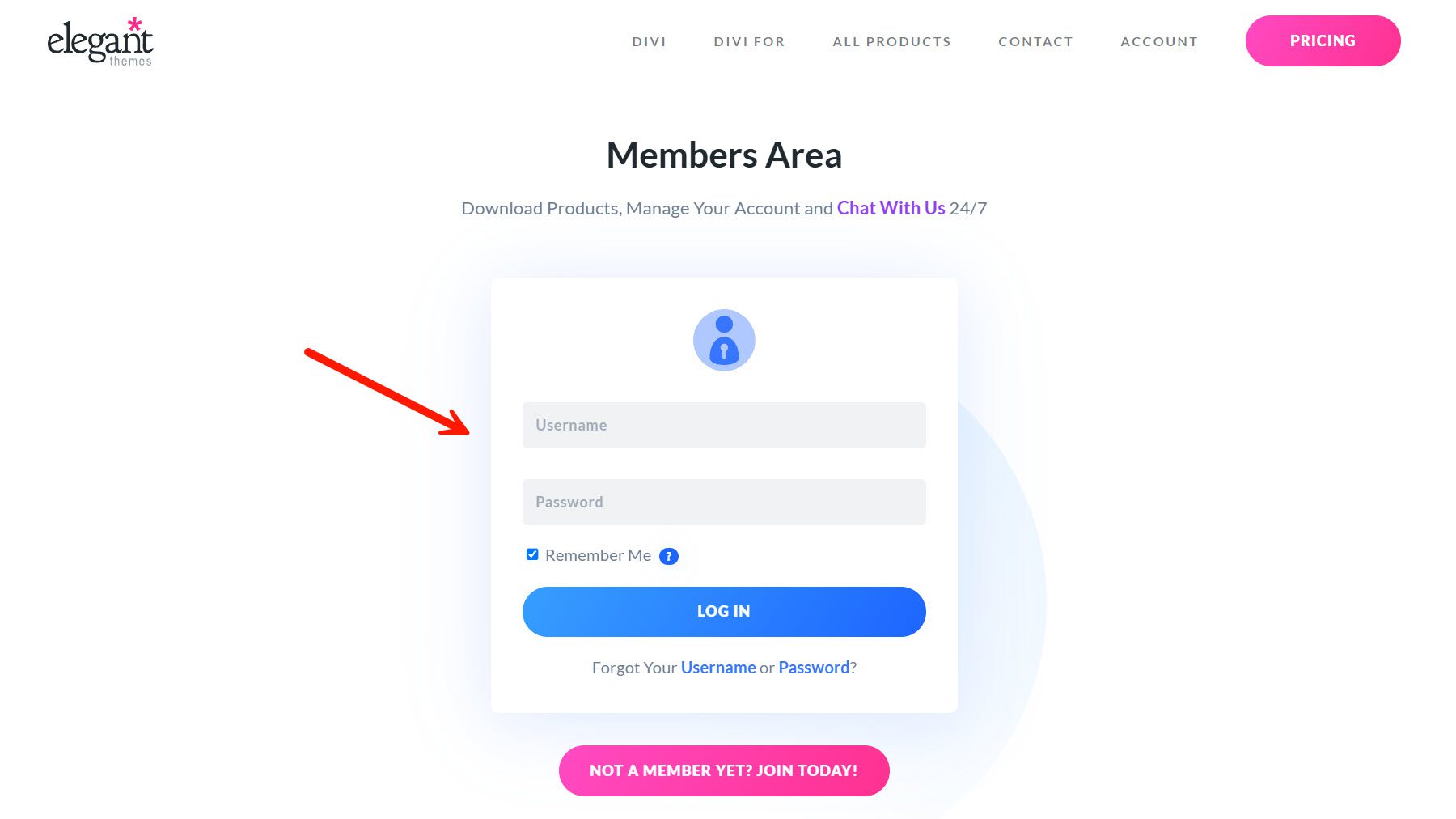
Step 1: Log In
Log into your Divi Members Area to access your account and view available upgrade options.
Step 2: Explore Bundles
Go to the Cyber Monday Offers tab to explore all available bundles, discounts, and exclusive deals tailored to enhance your Divi experience.
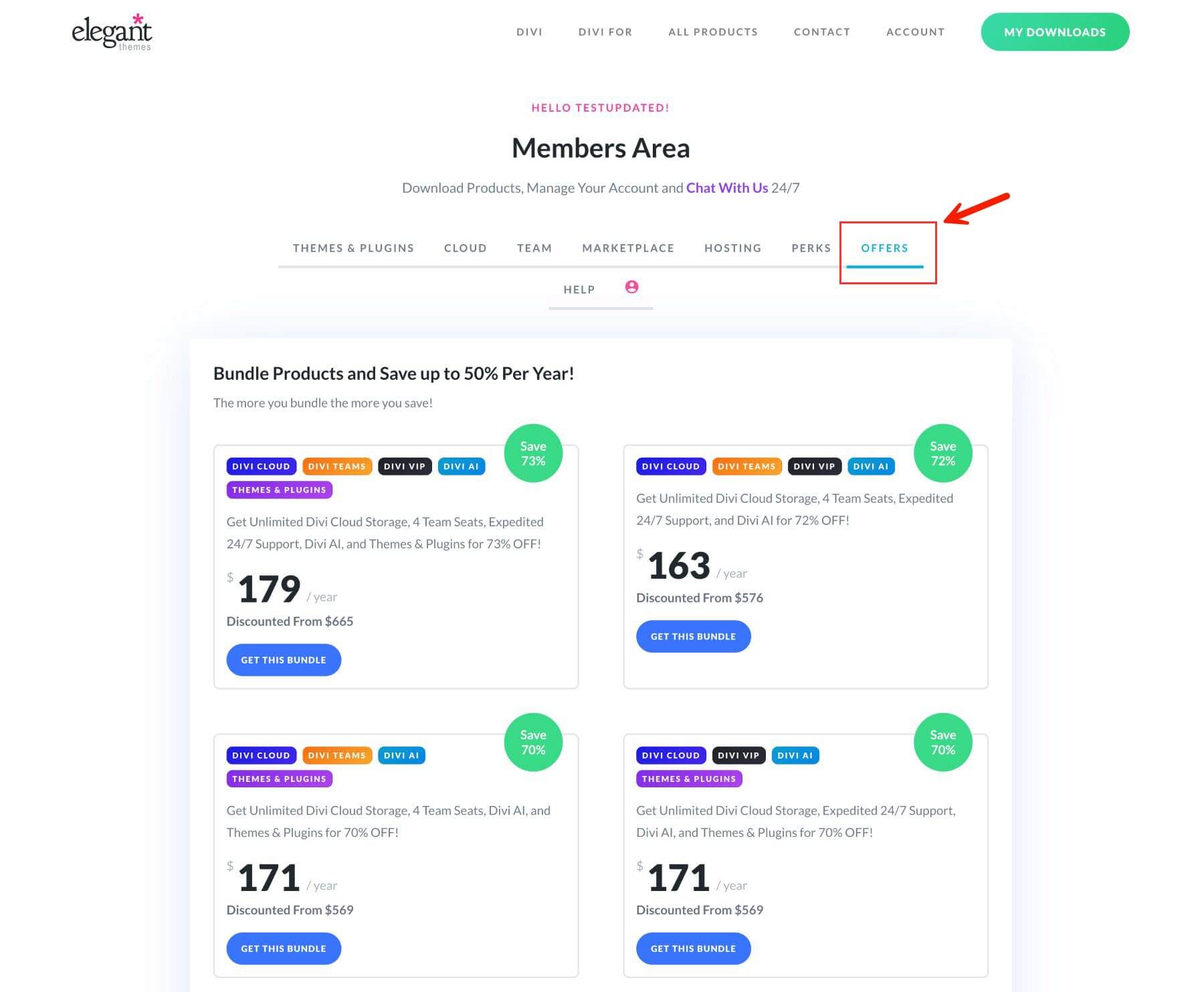
Step 3: Get Your Bundle
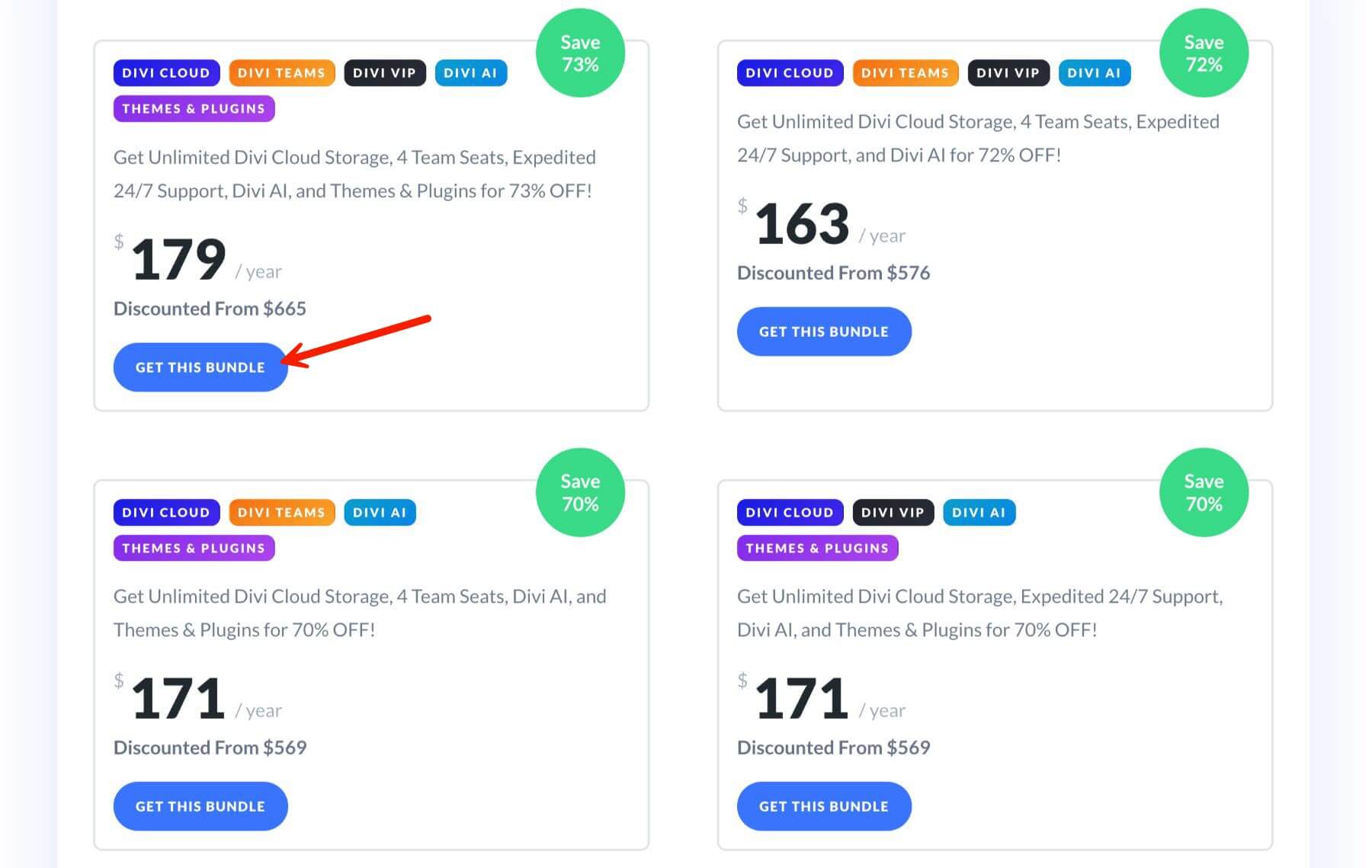
Select the Divi Pro bundle, which includes Themes & Plugins, Divi Cloud, Divi Teams, Divi VIP, and Divi AI. Divi Pro comes at 73% off, and this discount is locked in for life.
Step 4: Claim Your Prize & Cyber Monday Perks
After your bundle purchase, you will unlock all our Cyber Monday freebies. You can claim your free prize, download your free layout packs, and shop for Divi Marketplace products with exclusive discounts.
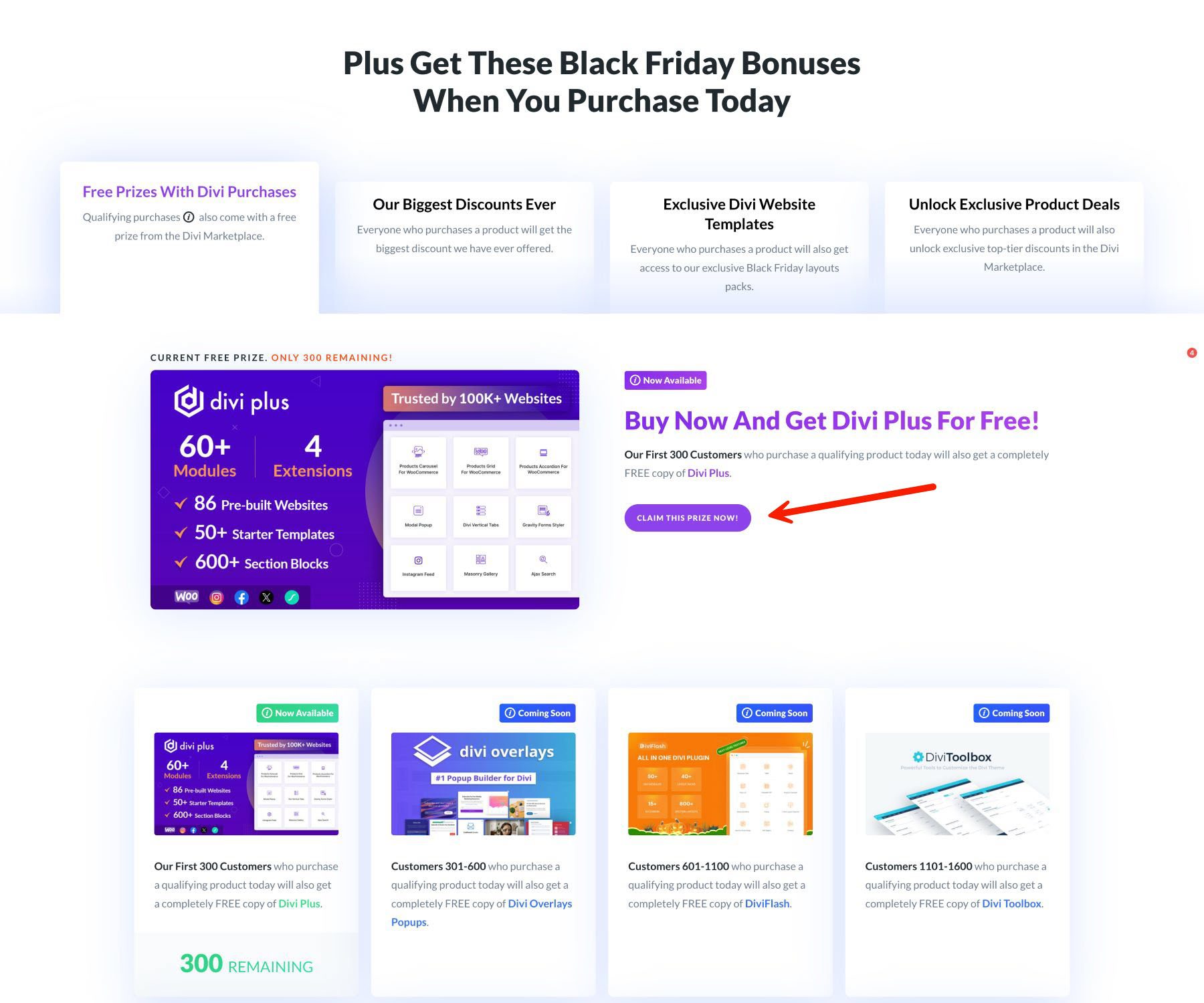
Every purchase during Cyber Monday, including bundles, comes with a free product from the Divi Marketplace. Some of these products are worth up to $169. Considering the value of the free product, you are paying as little as $10 for your Divi Pro bundle.
Lock In Long-Term Divi Pro Savings
The Divi Cyber Monday Sale is your opportunity to secure massive savings while future-proofing your web design toolkit. With discounts of up to 73% off, this limited-time event allows you to upgrade your Divi services, add powerful features, and access Divi’s constantly evolving ecosystem — all at a fraction of the regular cost.
Why Upgrade During the Cyber Monday Sale?
- Upgrade to Divi Pro for Unmatched Value: Get the complete Divi toolkit—including Divi, Divi AI, Divi Cloud, Divi Teams, Divi VIP, Divi Dash, and more — for just $179 per year. This ensures you have every tool you need to create stunning, professional websites.
- Repackage and Save: Maximize your membership by reorganizing your current subscriptions. Lock in the lowest prices now and enjoy long-term savings year after year.
- Unlock Exclusive Cyber Monday Perks: Besides steep discounts, you’ll receive free prizes, bonus layout packs, and extra savings on Divi Marketplace products to supercharge your projects.
Don’t miss out on the biggest deals of the year! Visit the Cyber Monday Sale now to lock in your savings and take your Divi experience to the next level!
The post 🤯 Upgrade To Divi Pro While Lowering Your Subscription Cost! (Seriously) appeared first on Elegant Themes Blog.
# How to Upgrade to Divi Pro and Reduce Your Subscription Costs
Divi, developed by Elegant Themes, is one of the most popular WordPress themes and page builders available today. It offers a powerful visual editor, a plethora of design options, and a user-friendly interface, making it a favorite among web designers and developers. If you’re currently using the free version of Divi or considering upgrading to Divi Pro, this article will guide you through the upgrade process and provide tips on how to reduce your subscription costs.
## Understanding Divi Pro
Divi Pro is a premium version of the Divi theme that unlocks a wide range of features, including:
– **Advanced Design Options**: Access to hundreds of pre-made layouts, custom CSS, and advanced design settings.
– **Visual Builder**: A real-time drag-and-drop editor that allows you to see changes as you make them.
– **Responsive Editing**: Tools to ensure your site looks great on all devices.
– **A/B Testing**: Built-in split testing to optimize your website’s performance.
– **Support and Updates**: Regular updates and access to customer support.
### Why Upgrade to Divi Pro?
Upgrading to Divi Pro can significantly enhance your website’s design and functionality. The premium features can save you time and effort, allowing you to create stunning websites more efficiently. Additionally, if you plan to build multiple websites or work as a freelancer, the investment in Divi Pro can pay off quickly through improved workflow and client satisfaction.
## Steps to Upgrade to Divi Pro
### 1. **Visit the Elegant Themes Website**
To upgrade, go to the [Elegant Themes website](https://www.elegantthemes.com). Here, you can find detailed information about Divi Pro, including its features, pricing, and benefits.
### 2. **Choose Your Subscription Plan**
Elegant Themes offers two subscription plans for Divi Pro:
– **Yearly Access**: This plan costs $89 per year and includes access to all themes and premium support.
– **Lifetime Access**: For a one-time payment of $249, you can access all themes and updates for life, without any recurring fees.
Evaluate your needs and budget to choose the plan that suits you best.
### 3. **Create an Account**
If you don’t already have an account with Elegant Themes, you’ll need to create one. This process is straightforward and requires basic information such as your name, email address, and password.
### 4. **Complete the Purchase**
Once you’ve selected your plan, proceed to checkout. You’ll need to provide payment information. After completing the purchase, you’ll receive an email confirmation and access to your Divi Pro download.
### 5. **Download and Install Divi Pro**
After purchasing, log in to your Elegant Themes account, navigate to the downloads section, and download the Divi theme. To install it on your WordPress site:
– Go to your WordPress dashboard.
– Navigate to **Appearance > Themes**.
– Click **Add New** and then **Upload Theme**.
– Choose the Divi zip file you downloaded and click **Install Now**.
– After installation, activate the theme.
### 6. **Enter Your API Key**
To receive updates and support, you’ll need to enter your API key. You can find this in your Elegant Themes account. Go to **Divi > Theme Options** in your WordPress dashboard, and enter your API key in the appropriate field.
## Tips to Reduce Your Subscription Costs
While upgrading to Divi Pro is a worthwhile investment, there are ways to minimize your costs:
### 1. **Consider the Lifetime Plan**
If you plan to use Divi for multiple years, the Lifetime Access plan can save you money in the long run. It’s a one-time payment that eliminates the need for annual renewals.
### 2. **Utilize Discounts and Promotions**
Keep an eye out for seasonal promotions or discounts offered by Elegant Themes. They occasionally run sales, especially during holidays or special events, which can help you save on your subscription.
### 3. **Refer a Friend**
Elegant Themes has a referral program that allows you to earn rewards for referring new customers. If you have friends or colleagues interested in Divi, sharing your referral link can provide you with discounts or credits.
### 4. **Leverage Free Trials and Demos**
Before committing to a subscription, take advantage of any free trials or demos offered by Elegant Themes. This allows you to explore the features of Divi Pro without financial commitment.
### 5. **Join Community Forums**
Engaging with the Divi community can provide insights into how others are maximizing their use of Divi Pro. You may find tips on using the theme more efficiently, which can save you time and money.
## Conclusion
Upgrading to Divi Pro can significantly enhance your web design capabilities, offering advanced features that streamline your

Recent Comments