
I’m here to give you a sneak peek at a feature coming soon to Divi 5. With Divi 5’s foundation complete, we’re now focused on aggressive feature development, with new features in the works as part of the Divi 5 feature swap.
Every time we finish a feature, we start working on a new one, and every time we start working on a new feature, I’m going to tell you all about it!
Last week, we released Divi AI for Divi 5, and the team involved is already working on their next project: Advanced Units.
Advanced Units will introduce support for various CSS units, value functions, and variables to Divi 5.
Get all the details in this video. 👇
What Are Advanced Units?
With the introduction of Advanced Units, we will replace Divi’s existing unit fields and range sliders with a new multi-functional component. It will come with draggable anchors that mimic range slider functionality, clickable arrows from Divi’s existing unit fields, improved unit validation logic, unit quick selection, and support for CSS value functions and variables. It’s the one field to rule them all!
New Units And Unit Quick Selection
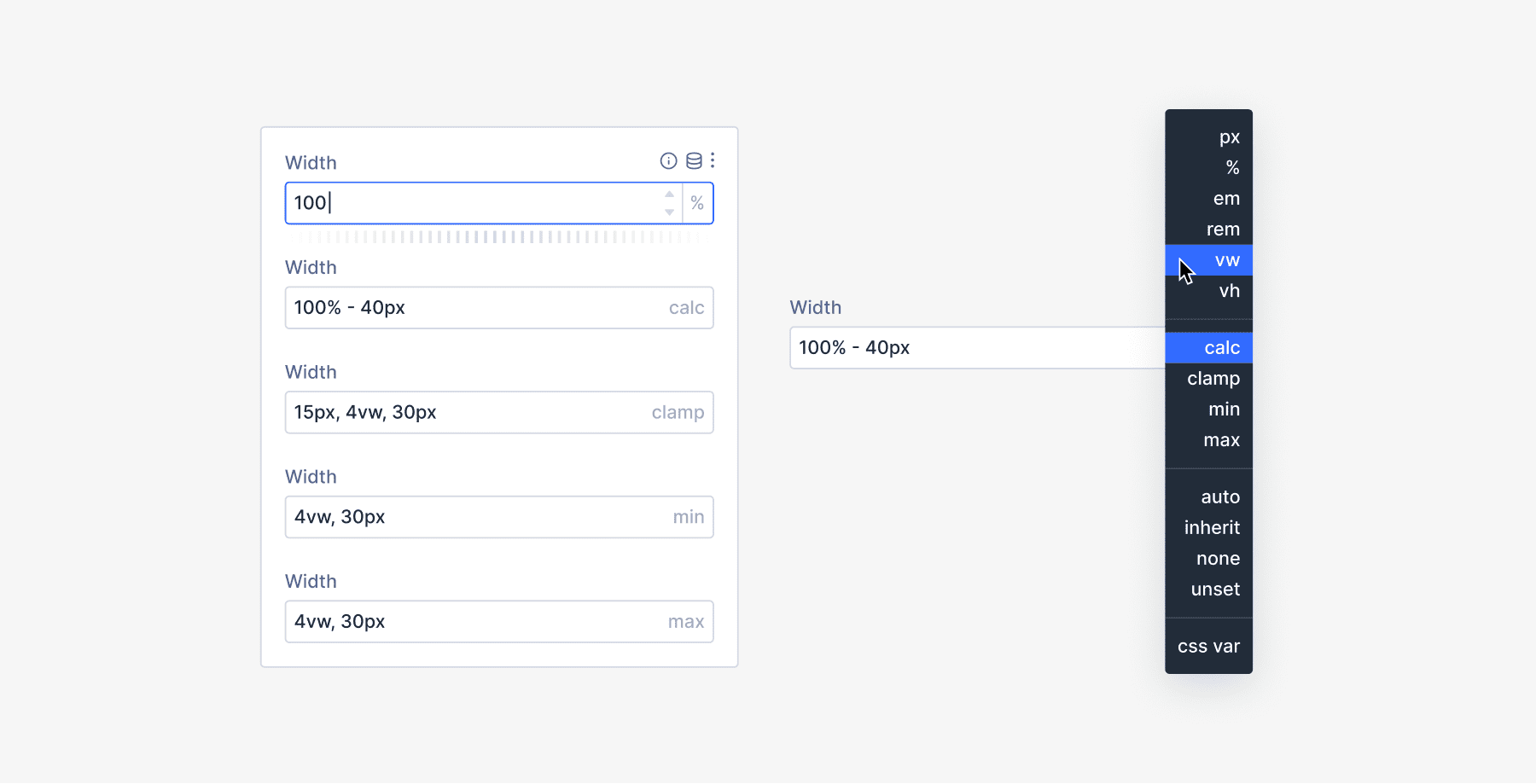
The new Advanced Units field will support a broader range of CSS units, with some of the most commonly used units available for quick selection. You’ll be able to type in any unit you like, and if you want some suggestions, you can check the unit picker.
CSS Function Support
More importantly, this new field will support CSS value functions, such as calc(), clamp(), min(), and max(), which are incredibly useful for designing responsive websites with fluid typography.
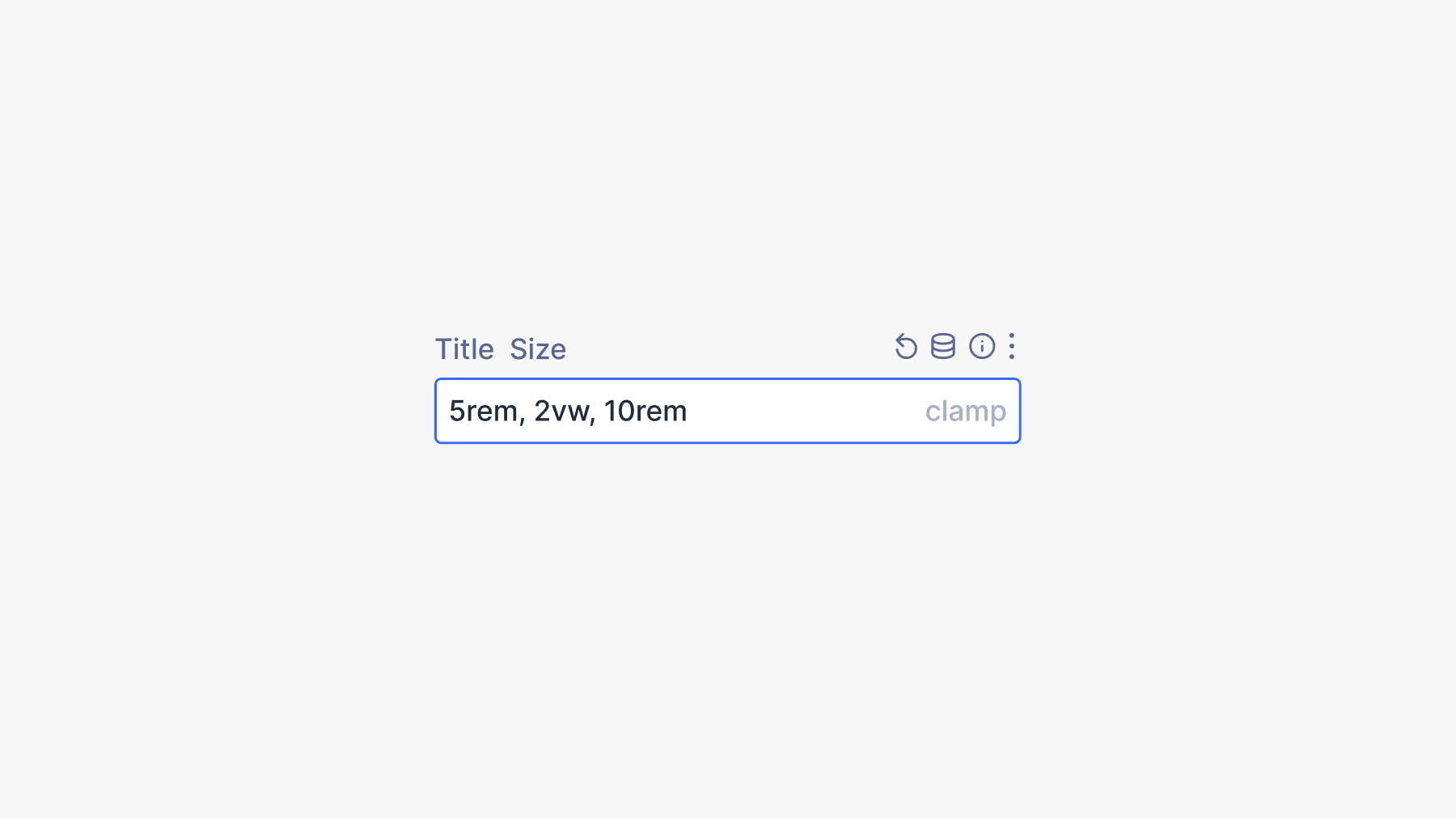
For example, you can use clamp() to scale text based on viewport width while preventing it from becoming too small or too large. clamp(5rem, 2vw, 10rem) ensures a title size of at least 5rem, scales with 2vw as the viewport changes, but does not exceed 10rem. This optimizes the text for readability across all screen sizes without responsive editing. And that’s just one of many applications.
CSS Variables And Dynamic Content
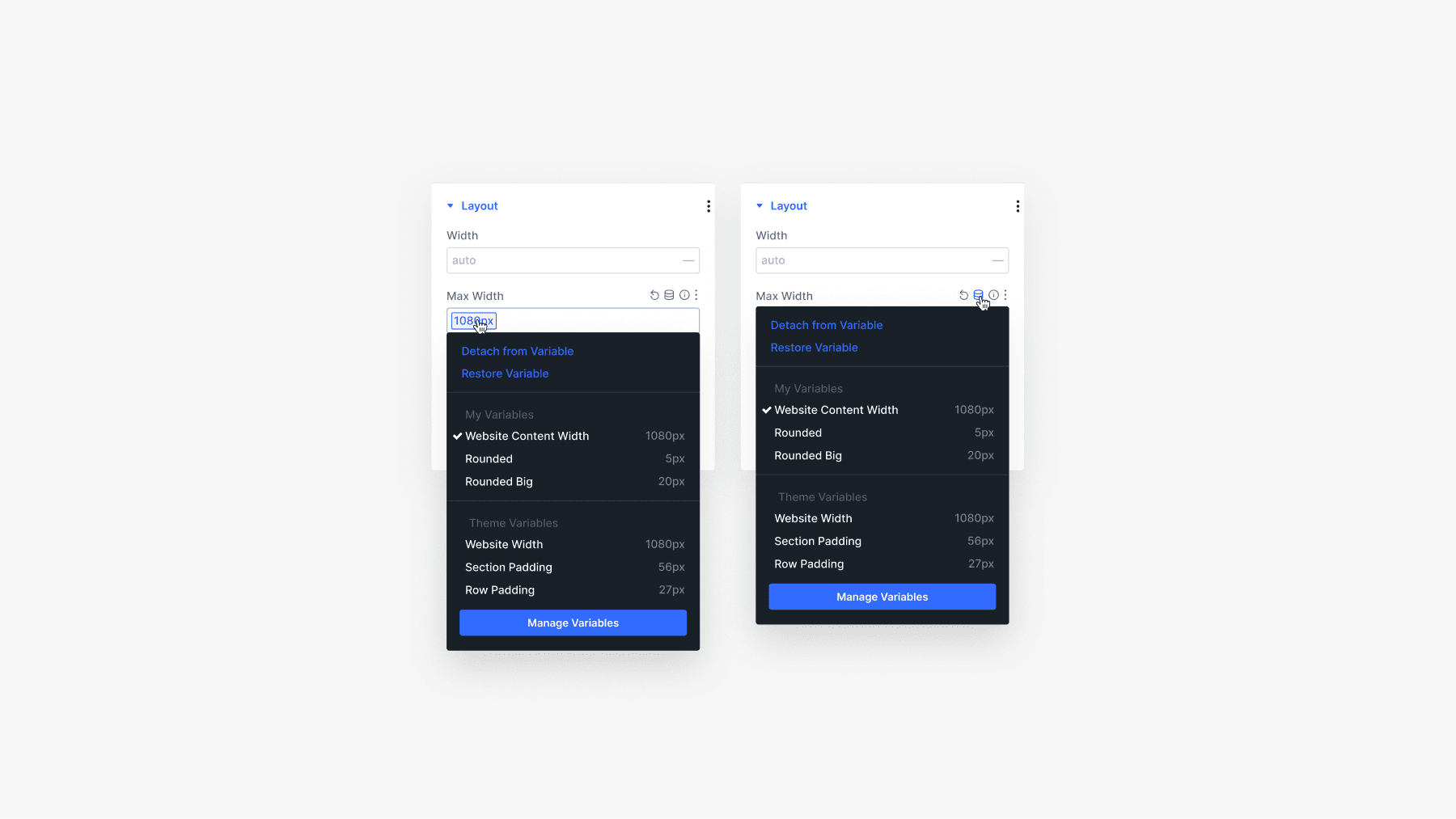
Finally, we will extend the Advanced Units field to support CSS variables, which you can define using Divi’s code fields at the page or website level.
And that’s not all! Soon, unit fields will support a new design variable system built into Divi, but that’s a sneak peek for another day.
Ok, fine, I’ll give you a little sneak peek of that too. 😁
Keep an eye out for this feature, which will launch very soon. We’re updating Divi every two weeks, and we’ll keep that momentum going all year!
Have You Tried Divi AI for Divi 5?
In case you missed it, check out my video from last week announcing the release of Divi AI for Divi 5. Our full suite of AI tools, including website, layout, section, module, text, image, and code generation, has been added to Divi 5.
When mastered, it can significantly improve your efficiency, and it feels like having a helpful designer, copywriter, developer, and photographer at your side.
Get all the details in this video. 👇
Many More Features Coming Soon
Let us know your thoughts in the comments or if you have any questions. Before you go, I have a favor to ask. We are on a mission to leapfrog the competition in 2025 with dozens of new features, and we want you to know about all of them.
That’s why you must subscribe to our YouTube channel, as it’s the primary way we spread the word (in addition to the Divi newsletter). Over 50% of our viewers keep returning to watch these updates but aren’t subscribers. If that’s you, consider clicking the subscribe button and following along as Divi makes its comeback.
All it takes is one little click. 😁
We will fill this year with feature announcements and sneak peeks you don’t want to miss. Stay tuned, and I’ll see you for another sneak peek, which I promise is right around the corner.
The post Divi 5 Sneak Peek! Advanced Units Including CSS Functions appeared first on Elegant Themes Blog.
# Preview of Divi 5: Introduction to Advanced Units and CSS Functions
As web design continues to evolve, so do the tools that empower designers and developers to create stunning, responsive websites. One of the most popular WordPress themes, Divi, is set to release its latest version, Divi 5, which promises to elevate the design experience with a host of new features. Among the most exciting updates are the introduction of advanced units and CSS functions, which will enhance the flexibility and precision of design elements. In this article, we will explore what these features entail and how they can revolutionize the way you build websites.
## Understanding Advanced Units
In web design, units are essential for defining the size, spacing, and layout of elements. Traditionally, designers have relied on a limited set of units, such as pixels (px), percentages (%), and ems. However, Divi 5 introduces advanced units that expand the possibilities for designers, allowing for more precise control over layouts.
### New Units in Divi 5
1. **Viewport Units (vw, vh)**: These units are relative to the size of the viewport, which is the visible area of a web page. For instance, 1vw is equal to 1% of the viewport’s width, while 1vh is equal to 1% of the viewport’s height. This allows for responsive designs that adapt seamlessly to different screen sizes.
2. **CSS Grid Units**: With the rise of CSS Grid, Divi 5 incorporates grid-based units that enable designers to create complex layouts with ease. This feature allows for precise placement of elements within a grid system, making it easier to achieve sophisticated designs without relying on floats or positioning hacks.
3. **Custom Units**: Divi 5 introduces the ability to define custom units, giving designers the freedom to create unique measurements tailored to their specific design needs. This feature is particularly useful for creating intricate designs that require a high level of detail.
### Benefits of Advanced Units
– **Responsive Design**: Advanced units enable designers to create layouts that automatically adjust to different screen sizes, ensuring a consistent user experience across devices.
– **Precision**: With more options at their disposal, designers can achieve greater accuracy in spacing, sizing, and alignment, leading to more polished and professional-looking websites.
– **Flexibility**: The introduction of custom units allows for experimentation and creativity, enabling designers to push the boundaries of traditional web design.
## CSS Functions in Divi 5
In addition to advanced units, Divi 5 also introduces a range of CSS functions that enhance the styling capabilities of the theme. These functions allow designers to manipulate styles dynamically, resulting in more engaging and interactive designs.
### Key CSS Functions
1. **calc()**: This function enables designers to perform calculations when defining CSS properties. For example, you can combine different units to create responsive layouts, such as `width: calc(100% – 20px)`, which allows for dynamic adjustments based on the surrounding elements.
2. **clamp()**: The `clamp()` function allows designers to set a value that adjusts between a defined minimum and maximum. This is particularly useful for responsive typography, where you want text to scale within certain limits based on the viewport size.
3. **var()**: The `var()` function allows for the use of CSS variables, which can be defined once and reused throughout the stylesheet. This promotes consistency and makes it easier to manage styles across a website.
### Advantages of CSS Functions
– **Dynamic Styling**: CSS functions enable designers to create styles that adapt based on user interactions or viewport changes, leading to a more dynamic user experience.
– **Efficiency**: By using CSS variables and functions, designers can reduce redundancy in their stylesheets, making them easier to maintain and update.
– **Enhanced Creativity**: The ability to perform calculations and set dynamic values opens up new creative possibilities, allowing designers to experiment with innovative layouts and styles.
## Conclusion
Divi 5 is poised to redefine the web design landscape with its introduction of advanced units and CSS functions. These features not only enhance the flexibility and precision of design elements but also empower designers to create more responsive, dynamic, and engaging websites. As we await the official release, it’s clear that Divi 5 will be a game-changer for both novice and experienced web designers alike. Whether you’re looking to create a simple blog or a complex e-commerce site, the new capabilities in Divi 5 will provide the tools you need to bring your vision to life. Stay tuned for more updates as we approach the launch!

Recent Comments