


Understanding how Google Analytics 4 (GA4) tracks sessions is key to making sense of your website data. GA4 tracks sessions differently than Universal Analytics, affecting your reports and insights.
Let’s explore how GA4 defines sessions, how traffic sources influence session tracking and what they mean for your analytics.
What are sessions in GA4?
In GA4, how a session is categorized depends on the origin of the visit. The classification is based on the “source” and “medium” details recorded when someone first accesses your site or app in a new session.
Sessions can be found in GA4 in several different reports, including:
- Acquisition overview report.
- User acquisition report.
- Traffic acquisition report.
- Engagement overview report.
- Demographic details report.
Dig deeper: Tools and resources: Getting started with Google Analytics 4
GA4 vs. UA: Key differences in session tracking
In the old days of Universal Analytics, a new session was triggered when a user first landed on the website and the GA tracking code was activated.
By default, a session ended after 30 minutes of inactivity. Any subsequent actions from the user created a new session. If your website contained videos or content that took longer than 30 minutes to consume, you could adjust the session timeout duration.
A new session was also triggered if the same user took an action on the website that created a new source/medium trigger. This could happen if they left the website and returned through a different source/medium or clicked an internal link with a UTM parameter.
The key difference between UA and GA4, however, is that a session in GA4 has been “simplified.” It still has a default session timeout duration of 30 minutes, but now the session only triggers once.
This change improves data accuracy and makes it easier to understand — but when comparing GA4 data to UA, session counts will differ.
Breaking this down, the following user journey would be reported differently:
- 10:00 a.m.: Bob searches on Google for XYZ and clicks on XYZ.com.
- 10:10 a.m.: After 10 minutes of research, Bob goes back to YouTube and sees a pre-roll ad for XYZ.com with a discount, so he clicks on it.
- 10:17 a.m.: Bob registers on the website and receives a welcome email with a discount code for free shipping, so he clicks on it.
- 10:21 a.m.: Bob checks out.
In Universal Analytics, the three site entries — each from a different source/medium — would have triggered three separate sessions. In GA4, since these actions occurred within the defined 30-minute session window, they would be counted as a single session.
Another key difference between UA and GA4 session windows is that a session would automatically expire at midnight in UA. In GA4, however, a session does not expire at midnight and can carry over into the next day.
This means a single session in GA4 can include multiple traffic sources. This change affects session volumes and can also impact attribution.
Sessions are automatically collected events. Automatically collected events are the most basic type of GA4 events. They are recorded as soon as GA4 tracking is set up on your website or app, providing essential data without manual configuration or additional setup.
Dig deeper: 3 ways GA4 is way better than UA
Users vs. sessions in GA4
In GA4, users and sessions are tracked separately, providing different insights into website activity.
- User: A unique person who engages with your site. GA4 counts them as an active user.
- Session: A series of interactions within a set timeframe. A session starts when a user first visits and ends when they leave or become inactive.
This means one user can have multiple sessions. If the same person visits your website twice in one calendar day, GA4 records them as one user but two sessions.
What is the difference between ‘engaged sessions’ and ‘engaged sessions per user’?
This is a common question asked by clients who are used to Universal Analytics reporting metrics and calculations.
An engaged session is defined as a session that meets at least one of the following criteria:
- Lasts a minimum of 10 seconds.
- Includes one or more conversion events.
- Registers two or more pageviews or screenviews.
Engaged sessions per user is the total number of engaged sessions divided by the number of users.
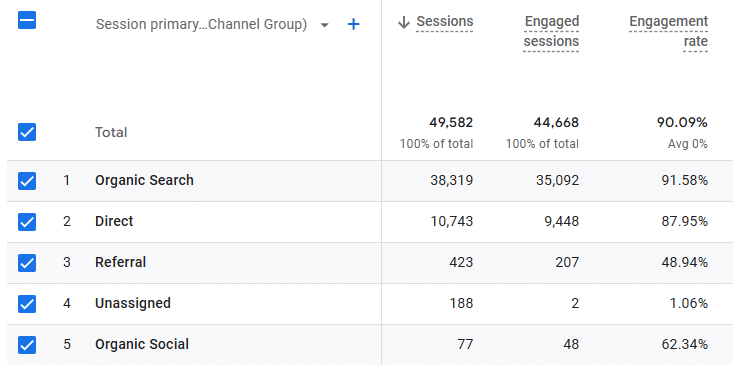
This metric appears in the Traffic Acquisition report alongside average engagement time per session and session engagement rate.
Engagement rate is best used alongside key event tracking and other soft and hard metrics to assess session quality on key pages.
Understanding scopes
Every GA4 dimension and metric has a specific scope. For example, the “first user default channel group” dimension has a user scope, while the “source/medium” dimension has an event scope. Combining dimensions with different scopes can create data mismatches and misleading conclusions.
To avoid errors, pair “first user default channel group” with “first user source/medium,” as both share the same user scope.
- User-scoped dimensions (e.g., first user default channel group, first user source/medium) aggregate data across all sessions for a user, offering a broader view of long-term engagement.
- Session-scoped metrics (e.g., sessions) focus on individual session interactions rather than the user.
For accurate insights:
- Use user-scoped dimensions to analyze long-term user behavior.
- Use session-scoped metrics to assess individual session performance.
Understanding session scope dimensions
Session scope dimensions help businesses track user behavior and measure marketing performance. They distinguish between new and returning visitors and help analyze the effectiveness of marketing strategies.
Standard session scope dimensions include:
- Session default channel grouping: Categorizes traffic by the channel that initiated a session. Helps marketers understand which sources drive the most engagement.
- Session medium: Identifies the marketing channel that started a session, such as organic search, CPC (cost per click), or social media. Helps refine marketing strategies.
- Session source: Indicates the specific website or platform that referred a user to the site. Helps determine which sources drive the most valuable traffic.
- Session campaign: Tracks the marketing campaign that led a user to the site. Helps businesses measure and optimize campaign effectiveness.
Deeper insights
Understanding how GA4 tracks sessions is essential for accurate reporting and analysis. With its simplified session model, GA4 provides a clearer picture of user behavior, though it differs from Universal Analytics.
By using session data effectively, you can gain deeper insights into traffic sources, engagement and attribution — helping you make more informed marketing decisions.
Dig deeper: How to resolve unassigned traffic in GA4
The post How to understand sessions in GA4 appeared first on MarTech.
# Understanding Sessions in Google Analytics 4 (GA4)
Google Analytics 4 (GA4) is the latest version of Google’s web analytics platform, designed to provide businesses with deeper insights into user behavior across websites and apps. One of the fundamental concepts in GA4 is the **session**, which plays a crucial role in tracking user interactions. However, GA4 defines and measures sessions differently from its predecessor, Universal Analytics (UA).
In this article, we’ll explore what a session is in GA4, how it differs from UA, and why understanding sessions is essential for accurate data analysis.
—
## **What is a Session in GA4?**
A **session** in GA4 represents a period of user engagement with your website or app. It begins when a user starts interacting with your site and continues until certain conditions cause the session to end.
Unlike Universal Analytics, which relied on session-based tracking, GA4 uses an **event-driven model**. This means that instead of tracking sessions based on pageviews and time-based rules, GA4 records sessions based on user interactions and events.
### **How Does GA4 Define a Session?**
A session in GA4 starts when:
– A user opens your website or app and triggers the `session_start` event.
– The session remains active as long as the user continues interacting with the site.
A session ends when:
– There is **30 minutes of inactivity** (default timeout setting).
– The user **closes the browser or app** and does not return within 30 minutes.
– The session reaches the **maximum duration of 24 hours**.
Unlike Universal Analytics, **GA4 sessions do not reset at midnight or when a user’s campaign source changes**.
—
## **Key Differences Between GA4 and Universal Analytics Sessions**
GA4 introduces several changes in how sessions are tracked compared to Universal Analytics:
| Feature | Universal Analytics (UA) | Google Analytics 4 (GA4) |
|———|————————–|————————–|
| **Session Definition** | Based on pageviews, hits, and time-based rules | Based on events and user interactions |
| **Session Timeout** | 30 minutes of inactivity (default) | 30 minutes of inactivity (default) |
| **Session Reset at Midnight** | Yes | No |
| **New Session on Campaign Change** | Yes | No |
| **Session ID** | Not explicitly available | Each session has a unique session ID (`ga_session_id`) |
These differences mean that session counts in GA4 may be lower than in UA, as GA4 does not artificially split sessions based on campaign changes or midnight resets.
—
## **Understanding Session Metrics in GA4**
GA4 provides several session-related metrics that help analyze user engagement:
1. **Sessions** – The total number of sessions initiated by users.
2. **Engaged Sessions** – Sessions where a user spends at least 10 seconds, views 2 or more pages/screens, or triggers a conversion event.
3. **Average Engagement Time per Session** – The average time users actively engage with your site or app during a session.
4. **Sessions per User** – The average number of sessions per user.
These metrics help businesses understand how often users return, how long they stay, and how engaged they are during their sessions.
—
## **Why Are Sessions Important in GA4?**
Sessions are a fundamental metric in GA4 because they help businesses measure user engagement and behavior. Here’s why they matter:
– **User Journey Analysis** – Sessions help track how users interact with your website or app over time.
– **Marketing Performance** – Understanding sessions can help evaluate the effectiveness of marketing campaigns.
– **Engagement Insights** – Metrics like engaged sessions and session duration provide insights into user interest and content effectiveness.
– **Conversion Tracking** – Sessions play a role in understanding when and how users complete desired actions (e.g., purchases, sign-ups).
—
## **Best Practices for Analyzing Sessions in GA4**
To make the most of session data in GA4, follow these best practices:
1. **Use Engaged Sessions for Better Insights**
Instead of just looking at total sessions, focus on **engaged sessions** to measure meaningful user interactions.
2. **Analyze Session Sources**
Use the **Traffic Acquisition report** to understand where your sessions originate (organic search, paid ads, social media, etc.).
3. **Monitor Session Duration Trends**
Track **average engagement time per session** to see if users are spending more or less time on your site.
4. **Segment Sessions by User Type**
Compare new vs. returning users to understand how different audiences interact with your site.
5. **Leverage Session IDs for Deeper Analysis**
GA4 assigns a unique `ga_session_id` to each session, which can be useful for advanced analysis in **BigQuery**.
—
## **Conclusion**
Sessions in Google Analytics

Recent Comments