

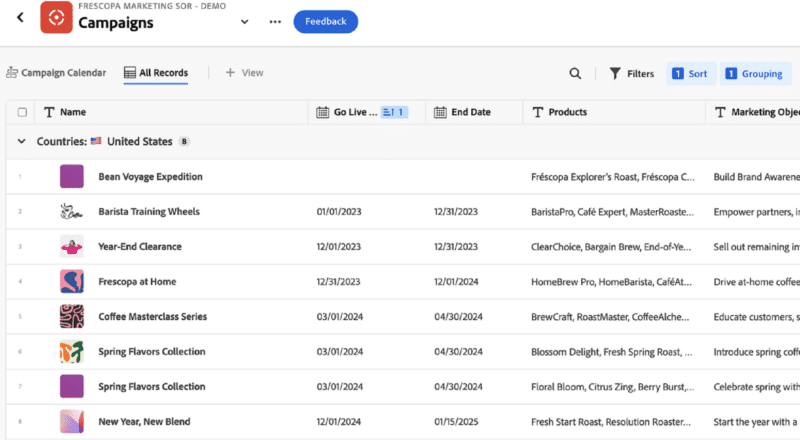
Adobe announced the general availability of Adobe Workfront Planning, a solution that delivers a flexible, unified view of campaign planning and activity leading to fast execution. The aim is to replace manual gathering of disparate information with customizable visualizations in a generative AI-powered interface (think natural language prompts and conversations).
Key to Workfront Planning is connecting the planning of campaigns and the creation of associated records (updated in real time) with the work execution Workfront is known for.

Main capabilities
The main capabilities of Workfront Planning fall under three headings:
1. Curated visualizations
As mentioned above, Workfront Planning will visualize day-to-day marketing operations in different kinds of views. A timeline view displays ongoing campaign-related activity, customizable by team or by stakeholder. There’s also a spreadsheet view.


2. Campaign brief creation
Generative AI capabilities allow the uploading of existing campaign planning materials (such as presentation decks) to create a new marketing brief. The conversational interface allows users to question details across campaigns. The expectation is that brief creation will be considerably faster.
The brief responds to new inputs, like a change in budget — or even ongoing expenditure — in real time. “Turning static documents into dynamic briefs is a huge value proposition,” Richard Whitehead, director of product marketing at Adobe, told us.
3. Record-keeping
The generative AI abilities support the creation of marketing records like target audience and region, tactics, relevant business unit, again through a conversational interface.
Existing users of Workfront Planning include Deloitte, NASCAR and Nordstrom.
Dig deeper: Adobe AI Assistant now generally available
Why see it through a marketing lens?
At a glance, Workfront Planning capabilities would seem to be utilizable by many business teams, not just marketing; and yet it’s clearly aimed at marketing. We asked Whitehead why this was. “The reason we talk about it from a marketing lens is, number one, we’re Adobe. Adobe and marketing are synonymous.” But indeed, Whitehead said, there are customers that use Workfront Planning in the product development cycle. Workfront has long supported agile or waterfall work execution. “Now, with Workfront Planning, you can map that out in the same way. We talk about it in the context of the campaign but it can certainly extend beyond marketing.”
Is the main advantage of this new solution the ability to do things that couldn’t be done before, or is it mainly about speed of execution? “Speed is just about going fast,” said Whitehead, “but velocity is about going fast with direction. What Workfront Planning gives you is velocity. We don’t want you to go so fast that you’re just — doing stuff. It has to have a level of quality. Tying together planning with the execution of work, that connective tissue, is the part that makes us unique.”
The solution can be used to design campaigns for a range of channels, from social media to display, but delivery does not take place within Workfront. “We tie in, of course, to other Adobe applications to execute campaigns. If I was doing a Facebook ad, I would do the planning of it, the banners, the copy, inside of core Workfront, then pass it along to other Adobe applications to push into that channel.”
What Workfront Planning adds to established Workfront capabilities
Workfront, of course, was around for some time before being acquired by Adobe; it’s known as a work planning platform. We wanted to get clear about how Workfront Planning differs from Workfront’s established capabilities.
“Workfront has always had what I call ‘little p’ planning. I could create a project and know the deliverables, those types of things, in the context of work execution,” Whitehead explained. “What we’re adding that is new and noteworthy is the ability to literally create the records associated with the upfront planning. Marketers are using spreadsheets to do that today. This sets up a high-level view and then provides visibility into it across the organization.”
Tying the planning together with the work execution is what Whitehead views as the main advance here.
The post New Adobe Workfront Planning ties campaign development to execution appeared first on MarTech.
# Adobe Workfront Planning Integrates Campaign Development with Execution
In today’s fast-paced digital landscape, the ability to seamlessly integrate campaign development with execution is crucial for marketing teams striving to stay ahead of the competition. Adobe Workfront, a leading work management platform, has emerged as a powerful solution that bridges the gap between planning and execution, enabling organizations to streamline their marketing efforts and deliver impactful campaigns with precision and efficiency.
## The Challenge of Disconnected Campaign Processes
Marketing campaigns are complex undertakings that involve multiple stakeholders, intricate workflows, and a myriad of tasks that need to be coordinated across various teams. Traditionally, campaign development and execution have been treated as separate phases, often leading to disjointed processes, miscommunication, and delays. This disconnect can result in missed opportunities, budget overruns, and a lack of alignment between strategic goals and tactical execution.
In many organizations, campaign planning is done using disparate tools such as spreadsheets, email threads, and project management software that are not designed to work together. This fragmented approach can lead to confusion, duplication of efforts, and a lack of visibility into the overall progress of the campaign. As a result, marketing teams may struggle to keep up with the demands of modern marketing, where agility and speed are paramount.
## Adobe Workfront: A Unified Solution
Adobe Workfront addresses these challenges by providing a unified platform that integrates campaign development with execution, enabling marketing teams to work more collaboratively and efficiently. As part of Adobe’s suite of marketing solutions, Workfront offers a comprehensive set of tools that allow teams to plan, execute, and measure campaigns within a single environment.
### Key Features of Adobe Workfront Planning
1. **Centralized Campaign Planning**: Workfront allows marketing teams to create detailed campaign plans that include timelines, budgets, resources, and objectives. These plans are stored in a centralized location, ensuring that all stakeholders have access to the most up-to-date information. This centralized approach eliminates the need for multiple tools and reduces the risk of miscommunication.
2. **Collaborative Workflows**: Workfront’s collaborative features enable teams to work together in real-time, regardless of their location. Team members can assign tasks, share files, and provide feedback directly within the platform. This level of collaboration ensures that everyone is on the same page and that tasks are completed in a timely manner.
3. **Automated Workflows**: Workfront’s automation capabilities streamline repetitive tasks, such as approvals and notifications, freeing up time for more strategic work. Automated workflows also help ensure that tasks are completed in the correct order and that nothing falls through the cracks.
4. **Resource Management**: Effective resource management is critical to the success of any campaign. Workfront provides tools for allocating resources, tracking availability, and managing workloads. This ensures that teams have the right people working on the right tasks at the right time.
5. **Real-Time Reporting and Analytics**: Workfront’s reporting and analytics features provide real-time insights into campaign performance. Teams can track key metrics, such as task completion rates, budget utilization, and campaign ROI, allowing them to make data-driven decisions and optimize their efforts.
6. **Integration with Adobe Creative Cloud**: For creative teams, the integration between Workfront and Adobe Creative Cloud is a game-changer. Designers and content creators can work directly within their preferred Adobe applications, such as Photoshop and Illustrator, while seamlessly collaborating with the broader marketing team in Workfront. This integration eliminates the need for manual file transfers and ensures that creative assets are always up-to-date.
### Benefits of Integrating Campaign Development with Execution
The integration of campaign development with execution in Adobe Workfront offers several key benefits:
1. **Improved Alignment**: By bringing planning and execution together in a single platform, Workfront ensures that strategic goals are closely aligned with tactical execution. This alignment helps marketing teams stay focused on their objectives and deliver campaigns that drive results.
2. **Increased Efficiency**: Workfront’s automation and collaboration features streamline workflows, reduce manual effort, and eliminate bottlenecks. This increased efficiency allows teams to execute campaigns faster and with greater precision.
3. **Enhanced Visibility**: With all campaign-related information stored in one place, marketing teams have complete visibility into the status of their campaigns. This visibility enables better decision-making and allows teams to quickly identify and address any issues that arise.
4. **Greater Agility**: In today’s dynamic marketing environment, the ability to pivot quickly is essential. Workfront’s real-time reporting and analytics provide the insights needed to make informed decisions and adjust campaigns on the fly.
5. **Scalability**: As organizations grow and their marketing efforts become more complex, Workfront’s scalable platform can accommodate the increased demands. Whether managing a single campaign or a global marketing initiative, Workfront provides the tools needed to succeed.
## Conclusion
Adobe Workfront is revolutionizing the way marketing teams plan and execute campaigns by providing a unified platform that integrates campaign development with execution. By centralizing

Recent Comments