


The January release for Adobe Marketo Engage unveiled a new email designer with the promise to “improve productivity and efficiency.”
Let’s take a look at the feature updates and deprecations for Markeo from January 2025.
New email designer
The new, powerful and enhanced email designer is stealing the show since its release and it’s making no-code email competitors cringe. There is much to talk about here, but here, in a nutshell, is what you need to know:
Old vs. new
- The old and the new design editors will coexist in your instance; there is no plan to deprecate the old email editor at this time.
- Previously built email templates and emails stay untouched, and you are now able to choose between the old email editor and the new designer when creating a new email asset.
- There is no migration possible between old and new email templates at this time. It may be best to move into the new editor as your team creates new content.
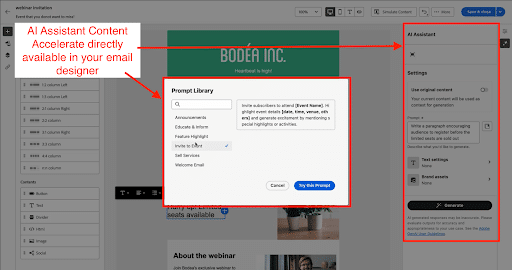
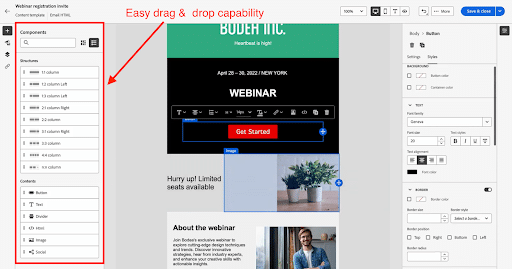
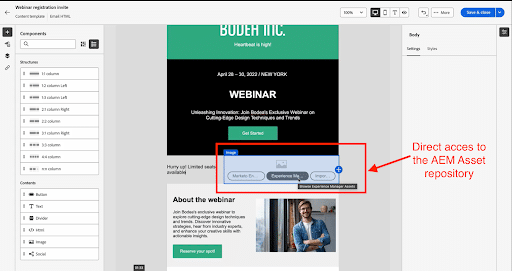
Here’s a comparison between Marketo’s classic email editor and the new email designer:
| Feature | Classic email editor | New email designer |
| Availability | No deprecation date announced; continues to function throughout 2025. | Currently available; requires migration to Adobe Identity Management System (IMS). |
| Accessibility | Design Studio, all programs. | Design Studio, only Email Programs at this time. |
| Design customization | Less customizable; may require external web developers for advanced designs. | More customizable with an enhanced WYSIWYG editor; reduces need for external developers. |
| Template compatibility | Use of Marketo-specific syntax in HTML. Marketo email syntax only works in templates and individual emails.Existing templates cannot be used in the new designer. | Requires creation of new templates; can import HTML from classic templates with adjustments. |
| Branding | Limited control over locking styling elements. Supports custom fonts. Be careful with custom fonts – not all email clients support them (especially Outlook). | Supports locking content sections; future updates to include locking styling, colors, etc.Does not support custom fonts yet. |
| AI-generated content | None. | Generate AI-suggested subject line, email copy, and images with the AI Assistant Content Accelerate feature. Requires approving the terms & conditions – should be vetted by your IT and legal teams before activation. |
| Integration with AEM | No direct integration with the email editor, but AEM assets can be pushed to the Design Studio. | Leverages the AEM Asset repository (images only) directly within the Marketo Engage Email Designer. |
| Dynamic capabilities | Supports dynamic content by segment. | Currently supports dynamic content by attribute; segment support planned for future release. |
| Reusable content | Supports snippets. Snippets are small, reusable blocks of text or HTML that can be inserted into various places. They can only be created and edited in the Design Studio. Snippets can be used with dynamic content. | Supports fragments. Fragments are modular content management. They can be edited straight from the email designer and used across multiple emails for consistency. They can be used with conditional content (coming soon). |
| Velocity tokens | Supports velocity tokens for more advanced customization. | Supports velocity tokens for more advanced customization, though they are not listed in the new token directory. |
Why it’s a win: The user-friendly, WYSIWYG email designer is what Marketo users were waiting for, allowing users to build email templates without technical assistance. The integration of the AI Assistant Content Accelerate feature unlocks the power of AI for content creation (copy, design) further enhancing the email creation process. While the email designer has some limitations, it is expected to be upgraded with additional features throughout 2025, marking a new era for Marketo users.
Now, on to other Marketo updates from the January release.
Unregister registrants from an event in interactive webinars
Remove a registrant from your webinar. The workflow removes the registrant from both the Marketo Event Program as well as Adobe Connect.
Why it matters: Stop unwanted registrants from attending your interactive webinar.
Disable campaigns on archive
This is a long-awaited upgrade: Previously, smart campaigns would continue running even after their associated program was archived, unless they were manually deactivated. Many users would forget to deactivate their smart campaigns, resulting in slower system performance due to possibly hundreds of these campaigns running in the background.
Why it’s a win: Less manual work thanks to the automatic deactivation of programs and campaigns upon archiving . Once this feature is available in your instance, it will be disabled by default. Head to your Admin section > Treasure Chest to enable it.
Social features deprecation
Social features (polls, social button, referral offer, video share, sweepstakes) were deprecated in summer 2024. Social assets ceased to function as of Feb. 1, 2025. As a result, social assets are no longer operational.
Why it matters: It is crucial to audit your existing instance and assets to remove all uses of these social features.
Get Program Members API update
The Get Program Members API supports the ability to retrieve program members’ identifiers. This will help keep track of program members via their unique ID..
Why it matters: This will be helpful to anyone who has implemented a custom program/campaign sync or is tracking program membership in an external platform.
Rest API ‘access_token’ parameter deprecation
The Marketo REST API will no longer support authentication using the access_token query parameter after June 30, 2025.
Why it matters: People using the API should ensure that they’re passing the access token through the ‘Authorization’ header rather than a url parameter.
SOAP API deprecation
Support for the Marketo SOAP API will end on October 31, 2025. Any custom integrations need to be migrated to the REST API by this date.
Why it matters: This change can be a big lift. If you haven’t already started this effort make sure to include all relevant stakeholders such as IT in addition to the MOps team.
The post Marketo unveils new email designer as part of January updates appeared first on MarTech.
# Marketo Introduces New Email Designer in January Update
## Introduction
Marketo, a leading marketing automation platform, has introduced a **new Email Designer** as part of its **January update**. This enhancement aims to simplify email creation, improve design flexibility, and enhance user experience. The new Email Designer is designed to help marketers build responsive and engaging emails more efficiently, without requiring extensive coding knowledge.
In this article, we’ll explore the key features of the new Email Designer, its benefits, and how it improves the email marketing experience for Marketo users.
## Key Features of the New Email Designer
Marketo’s new Email Designer comes with several **enhanced features** that make email creation more intuitive and efficient. Here are some of the most notable improvements:
### 1. **Drag-and-Drop Interface**
The updated Email Designer includes a **drag-and-drop editor**, allowing users to easily add and arrange elements such as text, images, buttons, and dividers. This eliminates the need for manual coding and makes email creation more accessible to marketers of all skill levels.
### 2. **Pre-Built Email Templates**
Marketo now offers a **library of pre-designed email templates**, which can be customized to match a brand’s style and messaging. These templates are optimized for responsiveness, ensuring a seamless experience across different devices.
### 3. **Improved Mobile Responsiveness**
With more users accessing emails on mobile devices, the new Email Designer ensures that emails **automatically adjust** to different screen sizes. This helps marketers create emails that look great on desktops, tablets, and smartphones without additional coding.
### 4. **Real-Time Preview and Testing**
The new update includes a **real-time preview feature**, allowing users to see how their emails will appear on different devices before sending them. Additionally, built-in testing tools help marketers identify and fix potential rendering issues before launching campaigns.
### 5. **Enhanced Personalization and Dynamic Content**
Marketo has improved its **personalization capabilities**, enabling marketers to insert dynamic content based on user behavior, demographics, and preferences. This helps create more targeted and engaging email campaigns.
### 6. **Better Collaboration Tools**
The new Email Designer includes **collaboration features** that allow teams to work together more effectively. Users can leave comments, suggest edits, and track changes, making the email creation process more efficient.
## Benefits of the New Email Designer
The introduction of the new Email Designer brings several advantages to Marketo users:
– **Faster Email Creation** – The drag-and-drop functionality and pre-built templates reduce the time needed to design and launch email campaigns.
– **Improved Email Performance** – Enhanced mobile responsiveness and dynamic content help improve engagement rates and conversions.
– **Greater Design Flexibility** – Marketers can create visually appealing emails without relying on developers or coding expertise.
– **Seamless Collaboration** – Teams can work together more efficiently, reducing errors and improving workflow.
– **Higher Deliverability Rates** – Optimized templates and testing tools help ensure emails render correctly across different email clients.
## How to Get Started with the New Email Designer
If you’re a Marketo user, you can start using the new Email Designer by following these steps:
1. **Log into Marketo** and navigate to the Email Designer section.
2. **Choose a template** from the pre-built options or start from scratch.
3. **Use the drag-and-drop editor** to add and customize content blocks.
4. **Preview and test** your email to ensure it displays correctly on all devices.
5. **Personalize your email** using dynamic content and segmentation.
6. **Save and send** your email campaign to your target audience.
## Conclusion
Marketo’s **new Email Designer** is a game-changer for marketers looking to create professional, responsive, and engaging email campaigns with ease. With its **intuitive drag-and-drop interface, enhanced personalization, and real-time preview features**, this update makes email marketing more efficient and effective.
For businesses using Marketo, adopting the new Email Designer can **streamline workflows, improve engagement, and drive better results** from email marketing campaigns. If you haven’t explored the new features yet, now is the perfect time to try them out and elevate your email marketing strategy.
—
Would you like assistance with implementing the new Email Designer in your Marketo campaigns? Let us know how we can help! 🚀

Recent Comments